
iPad 控件 UIPopoverPresentationController 使用 iPhone可用
- - (void)iPadAndIphonePopOver {
MenuViewController *menuVC = [[MenuViewController alloc] init];
menuVC.modalPresentationStyle = UIModalPresentationPopover;
menuVC.popoverPresentationController.sourceView = self.view;
menuVC.popoverPresentationController.sourceRect = self.testButton.frame;
menuVC.popoverPresentationController.permittedArrowDirections = UIPopoverArrowDirectionUp;
[self presentViewController:menuVC animated:YES completion:nil];
}
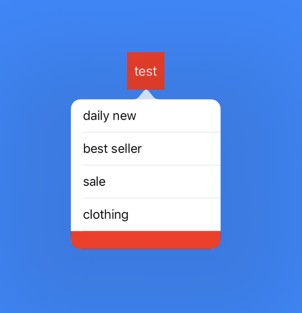
code2:

* - (IBAction)popOver:(id)sender {

    AddressViewController *contentVC = [[AddressViewController alloc] init];

    contentVC.modalPresentationStyle = UIModalPresentationPopover;

    contentVC.popoverPresentationController.sourceView = self.view;

    contentVC.popoverPresentationController.sourceRect = CGRectMake(, , , );

    contentVC.popoverPresentationController.permittedArrowDirections = UIPopoverArrowDirectionUp;

    [self presentViewController:contentVC animated:YES completion:nil];

}

* AddressViewController.m

* #import "AddressViewController.h"

@interface AddressViewController () <UITableViewDelegate, UITableViewDataSource>

@property (weak, nonatomic) IBOutlet UITableView *masterTableView; // 省份tableView

@property (weak, nonatomic) IBOutlet UITableView *detailTableView; // 地区tableView

@property (nonatomic, strong) NSArray *masterDataSource;           // 省份数据源

@property (nonatomic, strong) NSArray *detailDataSource;           // 地区数据源

@property (nonatomic, assign) int masterIndex;                     // 选中的省份

@end

@implementation AddressViewController

- (void)viewDidLoad {

    [super viewDidLoad];

    _masterIndex = ;

    self.preferredContentSize = CGSizeMake(, );

}

- (NSArray *)masterDataSource {

    if (_masterDataSource == nil) {

        _masterDataSource = @[@"河南", @"河北", @"江苏", @"浙江", @"广东"];

    }

    return _masterDataSource;

}

- (NSArray *)detailDataSource {

    if (_detailDataSource == nil) {

        _detailDataSource = @[@[@"郑州", @"洛阳", @"周口", @"开封"],

                              @[@"石家庄", @"石家庄2"],

                              @[@"南京", @"苏州", @"淮安", @"淮北", @"句容"],

                              @[@"杭州", @"温州", @"台州", @"宁波", @"瑞安", @"苍南"],

                              @[@"广州", @"深圳"]

                              ];

    }

    return _detailDataSource;

}

- (NSInteger)tableView:(UITableView *)tableView numberOfRowsInSection:(NSInteger)section {

    if (tableView == self.masterTableView) {

        return self.masterDataSource.count;

    }

    if (tableView == self.detailTableView) {

        return [self.detailDataSource[_masterIndex] count];

    }

    return ;

}

- (UITableViewCell *)tableView:(UITableView *)tableView cellForRowAtIndexPath:(NSIndexPath *)indexPath {

    if (tableView == self.masterTableView) {

        UITableViewCell *cell = [tableView dequeueReusableCellWithIdentifier:@"master"];

        if (cell == nil) {

            cell = [[UITableViewCell alloc] initWithStyle:UITableViewCellStyleDefault reuseIdentifier:@"master"];

        }

        cell.textLabel.text = self.masterDataSource[indexPath.row];

        return cell;

    }

    UITableViewCell *cell = [tableView dequeueReusableCellWithIdentifier:@"detail"];

    if (cell == nil) {

        cell = [[UITableViewCell alloc] initWithStyle:UITableViewCellStyleDefault reuseIdentifier:@"detail"];

    }

    cell.textLabel.text = self.detailDataSource[_masterIndex][indexPath.row];

    return cell;

}

- (void)tableView:(UITableView *)tableView didSelectRowAtIndexPath:(NSIndexPath *)indexPath {

    if (tableView == _masterTableView) {

        _masterIndex = (int)indexPath.row;

        self.preferredContentSize = CGSizeMake(, );

        [_detailTableView reloadData];

    }

    if (tableView == _detailTableView) {

        self.preferredContentSize = CGSizeMake(, );

        [_detailTableView reloadData];

    }

}

@end


- - (void)iPadAndIphonePopOver {
MenuViewController *menuVC = [[MenuViewController alloc] init];
menuVC.modalPresentationStyle = UIModalPresentationPopover;
menuVC.popoverPresentationController.sourceView = self.view;
menuVC.popoverPresentationController.sourceRect = self.test22.frame;
menuVC.popoverPresentationController.permittedArrowDirections = UIPopoverArrowDirectionUp;
menuVC.popoverPresentationController.delegate = self;
[self presentViewController:menuVC animated:YES completion:nil];
}
- - (UIModalPresentationStyle)adaptivePresentationStyleForPresentationController:(UIPresentationController *)controller {
return UIModalPresentationNone;
} - // 是否可以dismiss,返回YES代表可以,返回NO代表不可以
- (BOOL)popoverPresentationControllerShouldDismissPopover:(UIPopoverPresentationController *)popoverPresentationController {
return NO;
}
iPad 控件 UIPopoverPresentationController 使用 iPhone可用的更多相关文章
- iPad 控件UIPopoverController使用
UIPopoverController 是iPad特有控件,(iOS7-9),在iOS9之后别废弃 使用步骤 设置内容控制器 UIPopoverController直接继承NSObject,不具备可视 ...
- js控件设置只读属性和不可用属性
介绍js实现只读的几种方法: 设置控件只读的话,我们要先清楚哪些没有readOlny这个属性 我知道的checkbox和RadioButton没有readOlny这个属性,我上一篇已经介绍了如何设置c ...
- 银联手机支付控件官方使用指南(ios版)
目录 版本信息... 2 目录 3 1 概述... 1 2 支付流程介绍... 1 3 测试帐号... 2 4 iOS客户端... 3 4.1 ...
- 认识基本的mfc控件
几乎可以在每个windows程序中都看到按钮.复选框.文本框以及下拉列表等等,这些都是控件.而且很多常用的控件已经内置到操作系统当中了,在Visual C++中,这些常用控件已经简答到能用“拖放”这种 ...
- 初识Windows窗体(包括各种控件,属性,方法)
什么是Wind ows窗体? 顾名思义,win dows窗体就是将一些所必须的信息通过窗体的形式展示给客户看.例如:我们经常玩的QQ登陆界面,微信登陆界面,等等,都是以窗体的形式将信息展示给我们看的. ...
- ASP.NETserver控件使用之Reportviewer 报表
1. Reportviewer 报表 1.1. Reportviewer控件 注:本教程附2个事例: l 演练:在本地处理模式下将数据库数据源与 ReportViewer W ...
- asp.net textbox控件基础
asp.net有两种控件,一种是html控件,一种是asp控件,在说textbox控件之前,先看看按钮的两个命令oncommand和onclick.每次点击按钮后,都会提交命令,但是程序会首先执行Pa ...
- 百度地图隐藏缩放控件比例尺Logo
对于百度地图最新版V3.7.3,以前的隐藏控件方法失效,可用以下方法隐藏: 1.隐藏缩放控件: mMapView.showZoomControls(false); 2.隐藏比例尺: mMapView. ...
- RichEdit控件 SDK 参考手册
RichEdit控件 SDK 参考手册 摘要: 本文对Rich Edit控件底层消息机制进行了讲解,以期读者对Windows平台下的Rich Edit控件有一个更深入的认识,同时对于使用Win32 S ...
随机推荐
- code forces 382 D Taxes(数论--哥德巴赫猜想)
Taxes time limit per test 2 seconds memory limit per test 256 megabytes input standard input output ...
- pvoid64 pvoid
如果需要某一个结构体,既在kernel space用,又在user space用,如 typedef struct { PVOID data; int size; }binary,pbinary; 上 ...
- Robot Test Framework + Selenium 的几个坑
现有的webtest是基于Robot 和 Selenium 来写的,没出问题的时候还挺好的,出了问题想debug介个麻烦啊(也可能是姿势不对), 特罗列如下,如有不对,求指正,指导. 1. RIDE ...
- C语言字符串处理函数
函数名: strcpy 功 能: 拷贝一个字符串到另一个 用 法: char *stpcpy(char *destin, char *source); 程序例: #include < ...
- Linux-Rsync服务器/客户端搭建实战
一.需求 每晚汇总各机器的操作日志,同步到主服务器进行日志分析. 二.基础知识 rsync 分为服务器端.客户端,服务器端搭建比客户端辛苦一些(也是很简单). rsync 服务器是指以 deamon ...
- Mysql(一)
一.Mysql简介 Mysql是一个关系型数据库管理系统,由瑞典MySQL AB公司开发,目前属于Oracle旗下.特点:其体积小.速度快.开源. 分为社区办和商业版,其社区版性能卓越. 二.Ubun ...
- firefox兼容性问题
//innertext 火狐不同版本不兼容 document.getElementById("user-content").textContent=content; 博主使用的是最 ...
- REPEATABLE-READ下批量更新数据的问题
1. 当前mysql的隔离级别 REPEATABLE-READ 2. 用户读取的时候或者更改的时候(通过事务) 会对 更改的数据加行锁 和 gap锁 , 最终更改完毕后 去掉锁. (行锁表示这条数 ...
- git之.gitignore文件用途
gitignore文件用于忽略无需追踪的文件. 配置文件: $HOME/.config/git/ignore, $GIT_DIR/info/exclude, .gitignore 举例说明: $ gi ...
- 图像分割实验:FCN数据集制作,网络模型定义,网络训练(提供数据集和模型文件,以供参考)
论文:<Fully Convolutional Networks for Semantic Segmentation> 代码:FCN的Caffe 实现 数据集:PascalVOC 一 数据 ...