
iPad 控件 UIPopoverPresentationController 使用 iPhone可用
- - (void)iPadAndIphonePopOver {
MenuViewController *menuVC = [[MenuViewController alloc] init];
menuVC.modalPresentationStyle = UIModalPresentationPopover;
menuVC.popoverPresentationController.sourceView = self.view;
menuVC.popoverPresentationController.sourceRect = self.testButton.frame;
menuVC.popoverPresentationController.permittedArrowDirections = UIPopoverArrowDirectionUp;
[self presentViewController:menuVC animated:YES completion:nil];
}
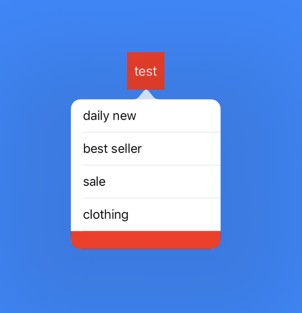
code2:

* - (IBAction)popOver:(id)sender {

    AddressViewController *contentVC = [[AddressViewController alloc] init];

    contentVC.modalPresentationStyle = UIModalPresentationPopover;

    contentVC.popoverPresentationController.sourceView = self.view;

    contentVC.popoverPresentationController.sourceRect = CGRectMake(, , , );

    contentVC.popoverPresentationController.permittedArrowDirections = UIPopoverArrowDirectionUp;

    [self presentViewController:contentVC animated:YES completion:nil];

}

* AddressViewController.m

* #import "AddressViewController.h"

@interface AddressViewController () <UITableViewDelegate, UITableViewDataSource>

@property (weak, nonatomic) IBOutlet UITableView *masterTableView; // 省份tableView

@property (weak, nonatomic) IBOutlet UITableView *detailTableView; // 地区tableView

@property (nonatomic, strong) NSArray *masterDataSource;           // 省份数据源

@property (nonatomic, strong) NSArray *detailDataSource;           // 地区数据源

@property (nonatomic, assign) int masterIndex;                     // 选中的省份

@end

@implementation AddressViewController

- (void)viewDidLoad {

    [super viewDidLoad];

    _masterIndex = ;

    self.preferredContentSize = CGSizeMake(, );

}

- (NSArray *)masterDataSource {

    if (_masterDataSource == nil) {

        _masterDataSource = @[@"河南", @"河北", @"江苏", @"浙江", @"广东"];

    }

    return _masterDataSource;

}

- (NSArray *)detailDataSource {

    if (_detailDataSource == nil) {

        _detailDataSource = @[@[@"郑州", @"洛阳", @"周口", @"开封"],

                              @[@"石家庄", @"石家庄2"],

                              @[@"南京", @"苏州", @"淮安", @"淮北", @"句容"],

                              @[@"杭州", @"温州", @"台州", @"宁波", @"瑞安", @"苍南"],

                              @[@"广州", @"深圳"]

                              ];

    }

    return _detailDataSource;

}

- (NSInteger)tableView:(UITableView *)tableView numberOfRowsInSection:(NSInteger)section {

    if (tableView == self.masterTableView) {

        return self.masterDataSource.count;

    }

    if (tableView == self.detailTableView) {

        return [self.detailDataSource[_masterIndex] count];

    }

    return ;

}

- (UITableViewCell *)tableView:(UITableView *)tableView cellForRowAtIndexPath:(NSIndexPath *)indexPath {

    if (tableView == self.masterTableView) {

        UITableViewCell *cell = [tableView dequeueReusableCellWithIdentifier:@"master"];

        if (cell == nil) {

            cell = [[UITableViewCell alloc] initWithStyle:UITableViewCellStyleDefault reuseIdentifier:@"master"];

        }

        cell.textLabel.text = self.masterDataSource[indexPath.row];

        return cell;

    }

    UITableViewCell *cell = [tableView dequeueReusableCellWithIdentifier:@"detail"];

    if (cell == nil) {

        cell = [[UITableViewCell alloc] initWithStyle:UITableViewCellStyleDefault reuseIdentifier:@"detail"];

    }

    cell.textLabel.text = self.detailDataSource[_masterIndex][indexPath.row];

    return cell;

}

- (void)tableView:(UITableView *)tableView didSelectRowAtIndexPath:(NSIndexPath *)indexPath {

    if (tableView == _masterTableView) {

        _masterIndex = (int)indexPath.row;

        self.preferredContentSize = CGSizeMake(, );

        [_detailTableView reloadData];

    }

    if (tableView == _detailTableView) {

        self.preferredContentSize = CGSizeMake(, );

        [_detailTableView reloadData];

    }

}

@end


- - (void)iPadAndIphonePopOver {
MenuViewController *menuVC = [[MenuViewController alloc] init];
menuVC.modalPresentationStyle = UIModalPresentationPopover;
menuVC.popoverPresentationController.sourceView = self.view;
menuVC.popoverPresentationController.sourceRect = self.test22.frame;
menuVC.popoverPresentationController.permittedArrowDirections = UIPopoverArrowDirectionUp;
menuVC.popoverPresentationController.delegate = self;
[self presentViewController:menuVC animated:YES completion:nil];
}
- - (UIModalPresentationStyle)adaptivePresentationStyleForPresentationController:(UIPresentationController *)controller {
return UIModalPresentationNone;
} - // 是否可以dismiss,返回YES代表可以,返回NO代表不可以
- (BOOL)popoverPresentationControllerShouldDismissPopover:(UIPopoverPresentationController *)popoverPresentationController {
return NO;
}
iPad 控件 UIPopoverPresentationController 使用 iPhone可用的更多相关文章
- iPad 控件UIPopoverController使用
UIPopoverController 是iPad特有控件,(iOS7-9),在iOS9之后别废弃 使用步骤 设置内容控制器 UIPopoverController直接继承NSObject,不具备可视 ...
- js控件设置只读属性和不可用属性
介绍js实现只读的几种方法: 设置控件只读的话,我们要先清楚哪些没有readOlny这个属性 我知道的checkbox和RadioButton没有readOlny这个属性,我上一篇已经介绍了如何设置c ...
- 银联手机支付控件官方使用指南(ios版)
目录 版本信息... 2 目录 3 1 概述... 1 2 支付流程介绍... 1 3 测试帐号... 2 4 iOS客户端... 3 4.1 ...
- 认识基本的mfc控件
几乎可以在每个windows程序中都看到按钮.复选框.文本框以及下拉列表等等,这些都是控件.而且很多常用的控件已经内置到操作系统当中了,在Visual C++中,这些常用控件已经简答到能用“拖放”这种 ...
- 初识Windows窗体(包括各种控件,属性,方法)
什么是Wind ows窗体? 顾名思义,win dows窗体就是将一些所必须的信息通过窗体的形式展示给客户看.例如:我们经常玩的QQ登陆界面,微信登陆界面,等等,都是以窗体的形式将信息展示给我们看的. ...
- ASP.NETserver控件使用之Reportviewer 报表
1. Reportviewer 报表 1.1. Reportviewer控件 注:本教程附2个事例: l 演练:在本地处理模式下将数据库数据源与 ReportViewer W ...
- asp.net textbox控件基础
asp.net有两种控件,一种是html控件,一种是asp控件,在说textbox控件之前,先看看按钮的两个命令oncommand和onclick.每次点击按钮后,都会提交命令,但是程序会首先执行Pa ...
- 百度地图隐藏缩放控件比例尺Logo
对于百度地图最新版V3.7.3,以前的隐藏控件方法失效,可用以下方法隐藏: 1.隐藏缩放控件: mMapView.showZoomControls(false); 2.隐藏比例尺: mMapView. ...
- RichEdit控件 SDK 参考手册
RichEdit控件 SDK 参考手册 摘要: 本文对Rich Edit控件底层消息机制进行了讲解,以期读者对Windows平台下的Rich Edit控件有一个更深入的认识,同时对于使用Win32 S ...
随机推荐
- 关于vue.js的计算属性练习代码
参照官网联系如下: <!DOCTYPE html><html lang="en"><head> <meta charset="U ...
- 【转载】ANSYS完全法与模态叠加法瞬态分析实例
原文地址:http://www.caetecc.com/thread-2172-1-1.html ! 半脉冲载荷 --- 模态叠加法fini/clear,nostart/PREP7ET,1,BEAM4 ...
- Silverlight RadChart :创建十字定位&圈选
//图像加载 void Chart_Loaded(object sender, RoutedEventArgs e) { var plotAreaPanel = this.radChart.Defau ...
- 64位系统里的IIS运行32位ODP.NET的方法
在64位Win7里的IIS里部署使用了ODP.NET的网站,Oracle的版本是11.20.3.20.直接部署会提示错误:在64位环境里使用了32位的程序.自己折腾了两天,最后才从别人的博客里找到解决 ...
- [转]Linux命令的返回值
Linux命令的返回值 对于某些监测脚本和探测命令蛮有用的: 在 Linux 下,不管你是启动一个桌面程序也好,还是在控制台下运行命令,所有的程序在结束时,都会返回一个数字值,这个值叫做返回值,或者称 ...
- React Native For Android 环境搭建
一. 环境搭建 1. JDK更新 http://www.oracle.com/technetwork/java/javase/downloads/index-jsp-138363.html 使用最新的 ...
- KO中对象数组排序时,两个属性的优先顺序不一致时的排序实现
function FromSort(left, right, asc) { if (left.属性1 != "") { if (right.属性1 != &qu ...
- [PHP] - mysql 数据库操作
使用PHP操作数据库有两种方式 使用mysql_XXXX()方法 使用这种方式,需要先把php.ini里的extension=php_mysql.dll去掉注释 使用PDO 使用这种试,需要把php. ...
- 给破坏性的Rake任务加把锁 | Rails
抄自这里 直接贴代码 # lib/tasks/skip_prod.rake desc 'Raises exception if used in production' task skip_prod: ...
- IOCP和WSA异步协同客户端版
有些小伙伴看了之前发的WIN平台下IOCP和WSA异步协同处理SOCKET后有些疑惑,所以就画了个简易流程图+架构图发上来给小伙伴参考 简单说,WSA异步控制CONNECT,IOCP控制WSASend ...