
6、Routing
Routing
- In the previous tutorial we built a simple logging system. We were able to broadcast log messages to many receivers.
- In this tutorial we're going to add a feature to it ,we're going to make it possible to subscribe only to a subset of the messages.For example,we'll be able to direct only critical error messages to the log file,while still being able to print all of the log messages on the console.
Bindings
- In previous examples we were already creating bindings. You may recall code like:
channel.queueBind(queueName,EXCHANGE_NAME,"");
- A binding is a relationship between exchange and queue.This can ba simply read as: the queue is interested in messages from this exchange.
- Bindings can take an extra routingKey parameter.To avoid the confusion with a basic_publish parameter we're going to call it a binding key.This is how we could create a binding with a key:
channel.queueBind(queueName,EXCHANGE_NAME,"black");
- The meaning of a binding key depends on the exchange type.The fanout exchanges,which we used previously,simply ignored its value.
Direct exchange
Our logging system form the previous tutorial broadcast all messages to all consumers.We want to extend that to allow filtering messages based on their severity.For example we may want a programs which write logs messages to the disk to only receive critical errors,and not waste disk space on warning or info log messages.
We were using a fanout exchange ,which doesn't give us much flexibility - it's only capable of mindless broadcasting.
We will use a direct exchage instead.The routing algorithm behind a direct exchange is simple - a message goes to the queues whose binding key exactly matches the routing key of the message.
To illustrate that,consider the following setup:
In this setup, we can see the direct exchange x with two queues bound to it.The first queue is bound with binding key orange, and the second has two bindings, one with binding key black and the other one with green.
In such a setup a message published to the exchange with a routing key orange will be routed to queue Q1.Messages with a routing key of black or green will go to Q2.All other messages will be discarded.

Multiple bindings
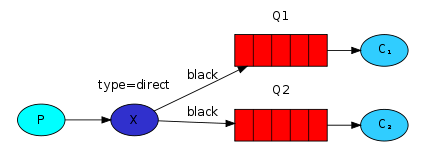
It is perfectly legal to bind multiple queues with the same binding key.In our example we could add a binding between X and Q1 with binding key black.In that case,the direct exchange will behave like fanout and will broadcast the message to all the matching queues.A message with routing key black will be delivered to both Q1 and Q2.
Emitting logs
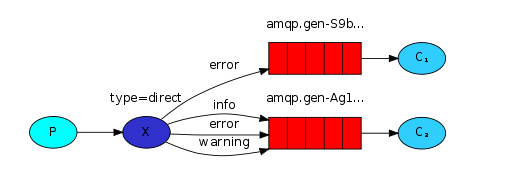
- We'll use this model for our logging system. Instead of fanout we'll send messages to a direct exchange.We will supply the log severity as a routing key.That way the receiving program will be able to select the severity it wants to receive. Let's focus on emitting logs first.
- As always, we need to create an exchange first:
channel.exchangeDeclare(EXCHANGE_NAME, "direct");
- And we're ready to send a message:
channel.basicPublish(EXCHANGE_NAME, severity, null, message.getBytes())
- To simplify things we will assume that 'severity' can be one of 'info', 'warning', 'error'.
Subscribing
- Receiving messages will work just like in the previous tutorial, with one exception - we're going to create a new binding for each severity we're interested in.
  String queueName = channel.queueDeclare().getQueue();

  for(String severity : argv){

  channel.queueBind(queueName, EXCHANGE_NAME, severity);

  }
Code
  public class EmitLogDirect {

      private static Log log = LogFactory.getLog(EmitLogDirect.class);

      private static final String EXCHANGE_NAME="direct_logs";

      public static void main(String[] argv)

      {

          ConnectionFactory connFactory = new ConnectionFactory();

          connFactory.setHost("localhost");

          Connection conn=null;

          Channel channel=null;

          try {

              conn=connFactory.newConnection();

              channel=conn.createChannel();

              channel.exchangeDeclare(EXCHANGE_NAME, BuiltinExchangeType.DIRECT);

              String[] severity={"info","warning","error"};

              String message="hello,world";

              for(String s:severity)

              {

                  channel.basicPublish(EXCHANGE_NAME,s,null,message.getBytes());

                  System.out.println("sent:"+s+" "+message);

              }

          } catch (IOException e) {

              log.error(e);

          } catch (TimeoutException e) {

              log.error(e);

          } finally {

              if (channel!=null)

              {

                  try {

                      channel.close();

                  } catch (IOException e) {

                      log.error(e);

                  } catch (TimeoutException e) {

                      log.error(e);

                  }

              }

              if (conn!=null)

              {

                  try {

                      conn.close();

                  } catch (IOException e) {

                      log.error(e);

                  }

              }

          }

      }

  }

  public class ReceiveLogDirect {

      private static Log log= LogFactory.getLog(ReceiveLogDirect.class);

      private static final String EXCHANGE_NAME="direct_logs";

      public static void main(String[] argv)

      {

          ConnectionFactory connFactory = new ConnectionFactory();

          connFactory.setHost("localhost");

          /*Connection conn=null;

          Channel channel=null;*/

          try {

              final Connection conn=connFactory.newConnection();

              final Channel channel=conn.createChannel();

              channel.exchangeDeclare(EXCHANGE_NAME, BuiltinExchangeType.DIRECT);

              String queueName=channel.queueDeclare().getQueue();

              String[] severity={"info","warning","error"};

              for (String s:severity)

              {

                  channel.queueBind(queueName,EXCHANGE_NAME,s);

              }

              Consumer consumer=new DefaultConsumer(channel){

                  @Override

                  public void handleDelivery(String consumerTag, Envelope envelope, AMQP.BasicProperties properties, byte[] body) throws IOException {

                      String message=new String(body,"UTF-8");

                      System.out.println("receive:"+envelope.getRoutingKey()+" "+message);

                      try {

                          Thread.sleep(1000);

                      } catch (InterruptedException e) {

                          log.error(e);

                      }finally {

                          channel.basicAck(envelope.getDeliveryTag(),false);

                      }

                  }

              };

              channel.basicConsume(queueName,false,consumer);

          } catch (IOException e) {

              log.error(e);

          } catch (TimeoutException e) {

              log.error(e);

          } finally {

          }

      }

  }
- Firstly,run ReceiveLogDirect.java 进行消息监听
- Secondly,run EmitLogDirect.java 发送消息
Summary
- 生产者将消息发送到路由器,然后消费者创建队列绑定到路由器(通过routing key),接着路由器将生产者发送的消息与消费者创建的队列进行匹配(使用binding key也就是routing key),将匹配的消息发送到队列由消费者读取。
6、Routing的更多相关文章
- ASP.NET MVC 入门3、Routing
本系列文章基于Microsoft ASP.NET MVC Beta. 在一个route中,通过在大括号中放一个占位符来定义( { and } ).当解析URL的时候,符号"/"和& ...
- [转]ASP.NET MVC 入门3、Routing
在一个route中,通过在大括号中放一个占位符来定义( { and } ).当解析URL的时候,符号"/"和"."被作为一个定义符来解析,而定义符之间的值则匹配 ...
- ASP.Net MVC开发基础学习笔记:三、Razor视图引擎、控制器与路由机制学习
一.天降神器“剃须刀” — Razor视图引擎 1.1 千呼万唤始出来的MVC3.0 在MVC3.0版本的时候,微软终于引入了第二种模板引擎:Razor.在这之前,我们一直在使用WebForm时代沿留 ...
- ASP.Net MVC开发基础学习笔记(3):Razor视图引擎、控制器与路由机制学习
一.天降神器“剃须刀” — Razor视图引擎 1.1 千呼万唤始出来的MVC3.0 在MVC3.0版本的时候,微软终于引入了第二种模板引擎:Razor.在这之前,我们一直在使用WebForm时代沿留 ...
- 柯南君:看大数据时代下的IT架构(7)消息队列之RabbitMQ--案例(routing 起航)
二.Routing(路由) (using the Java client) 在前面的学习中,构建了一个简单的日志记录系统,能够广播所有的日志给多个接收者,在该部分学习中,将添加一个新的特点,就是可以只 ...
- Spring Cloud Zuul网关 Filter、熔断、重试、高可用的使用方式。
时间过的很快,写springcloud(十):服务网关zuul初级篇还在半年前,现在已经是2018年了,我们继续探讨Zuul更高级的使用方式. 上篇文章主要介绍了Zuul网关使用模式,以及自动转发机制 ...
- Angular基础(七) HTTP & Routing
一.HTTP a)Angular提供了自己的HTTP库来调用外部API,为了能够在等待API响应的过程中继续与界面交互,采用异步HTTP请求的方式. b)Get请求,首先导入Http, Respo ...
- 4.1 Routing -- Introduction
一.Routing 1. 当用户与应用程序交互时,它会经过很多状态.Ember.js为你提供了有用的工具去管理它的状态和扩展你的app. 2. 要理解为什么这是重要的,假设我们正在编写一个Web应用程 ...
- RabbitMQ---3、c#实现
1.EasyNetQ组件的使用 EasyNetQ组件的使用方式比较简单,跟很多组件都类似,例如:建立连接,进行操作做等等,对于EasyNetQ组件也是如此.(mq的升级,用于简化rabbitmq应用代 ...
随机推荐
- .gclient文件
//注意以.开头的文件名在linux下都是隐藏文件,需要使用ll 或者ls -all 才可以查看. .gclient文件必须有,否则会报类似下面的错误: Traceback (most recent ...
- ACM-单向链表的操作
数据表记录包含表索引和数值,请对表索引相同的记录进行合并,即将相同索引的数值进行求和运算,输出按照key值升序进行输出. 输入描述: 先输入键值对的个数然后输入成对的index和value值,以空格隔 ...
- c# 第39节 抽象类、抽象方法
本节内容: 1:抽象类的说明 2:抽象类的实例 1:抽象类的说明 抽象类定义:方法前有abstract就称为抽象类.抽象方法,抽象方法不提供任何实际实现. 注意点1: 抽象方法必须在抽象类中声明: 不 ...
- Spring Boot 自定义Filter
一.Filter功能 它使用户可以改变一个 request和修改一个response. Filter 不是一个servlet,它不能产生一个response,它能够在一个request到达servle ...
- linux shell攻略学习笔记一 基础篇
1.#!/bin/bash shebang 可以自定义 比如 #!/bin/bash +x 就会打印出执行日志 linux中 \ 代表null \n2\n3” 会转义其中的\n,生成3行数据 $! 保 ...
- 杂记(C语言中的不知怎么归类的细小点。)
1.int a; printf("%d",2a); 从数学上讲,没有丝毫问题,但是在计算机上,就无法识别! 纠正:应写成2*a. 2.关于输出结果保留一位小数的:不应 ...
- Java 基础系列:不变性
1.1 定义 不可变类(Immutable Objects):当类的实例一经创建,其内容便不可改变,即无法修改其成员变量. 可变类(Mutable Objects):类的实例创建后,可以修改其内容. ...
- JAVA 运行springboot jar包设置classpath
Java 命令行提供了如何扩展bootStrap 级别class的简单方法. -Xbootclasspath: 完全取代基本核心的Java class 搜索路径.不常用,否则要重新写所有Java 核心 ...
- MyBatis-Generator 用法介绍
”工欲善其事,必先利其器“,古人说的很对,虽然不能做一个单纯的”工具帝“,但是自己有合适的工具集真的很关键.以前认识一个做逆向工程的高手,有自己的”反马套装“,其实不外乎就是 OD . IDA .Sy ...
- Shell基本运算符之算术、关系运算符
Shell 运算符 =============================摘自菜鸟教程================================= Shell和其他编程语言一样,支持多种运算 ...