
iOS Autoresizing Autolayout Size classes
Autoresizing:出现最早,仅仅能够针对父控件做约束(注意:要关闭Autolayout&Size classes才能够看到Autoresizing)
代码对应:
UIView.h中的autoresizingMask属性
@property(nonatomic) UIViewAutoresizing autoresizingMask; // simple resize. default is UIViewAutoresizingNone
typedef NS_OPTIONS(NSUInteger, UIViewAutoresizing) {
UIViewAutoresizingNone = 0,
UIViewAutoresizingFlexibleLeftMargin = 1 << 0,
UIViewAutoresizingFlexibleWidth = 1 << 1,
UIViewAutoresizingFlexibleRightMargin = 1 << 2,
UIViewAutoresizingFlexibleTopMargin = 1 << 3,
UIViewAutoresizingFlexibleHeight = 1 << 4,
UIViewAutoresizingFlexibleBottomMargin = 1 << 5
};
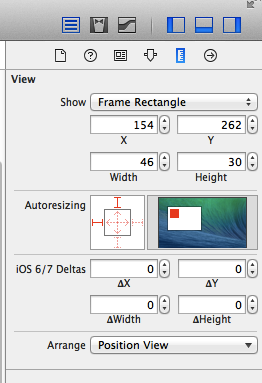
Autolayout:不仅仅能够针对父控件约束,而且可以针对同级进行约束,但对不同设备的横竖屏还是有依赖
Size classes:将所有尺寸分为Regular(标准的)compact(紧凑的) any(任意的)三种情况 进行组合,不再依赖于死的尺寸,这就有效解决了Autolayout的弊端
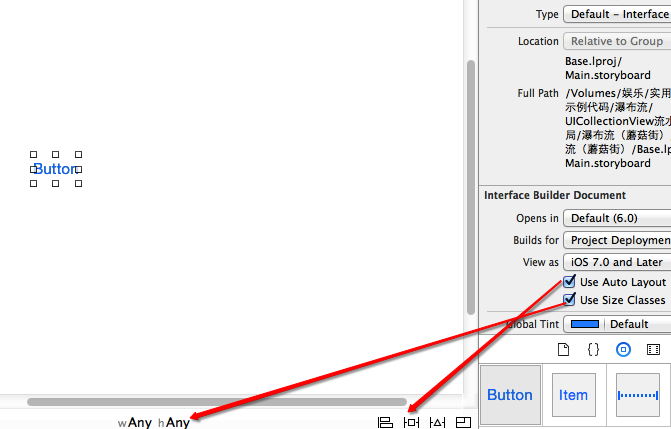
Size classes:
但是我们看到图中的宽度和高度都是Any,Any是什么意思呢?如果weight设为Any,height设置为Regular,那么在该状态下的界面元素在只要height为Regular,无论weight是Regular还是Compact的状态中都会存在。这种关系应该叫做继承关系,具体的四种界面描述与可继承的界面描述如下:
- w:Compact h:Compact 继承 (w:Any h:Compact , w:Compact h:Any , w:Any h:Any)
- w:Regular h:Compact 继承 (w:Any h:Compact , w:Regular h:Any , w:Any h:Any)
- w:Compact h:Regular 继承 (w:Any h:Regular , w:Compact h:Any , w:Any h:Any)
- w:Regular h:Regular 继承 (w:Any h:Regular , w:Regular h:Any , w:Any h:Any)
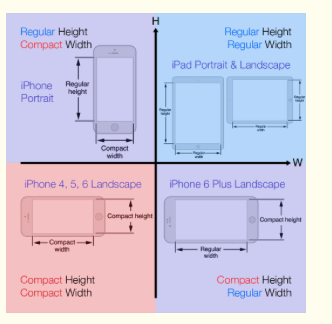
我们知道了iOS 8下面设备界面可以描述为4种,但是这么多设备(iPhone4S,iPhone5/5s,iPhone6,iPhone6 Plus,iPad,Apple Watch)具体对应什么描述呢?经过查看官方文档和具体实践得知具体对应关系如下:
- iPhone4S,iPhone5/5s,iPhone6
- 竖屏:(w:Compact h:Regular)
- 横屏:(w:Compact h:Compact)
- iPhone6 Plus
- 竖屏:(w:Compact h:Regular)
- 横屏:(w:Regular h:Compact)
- iPad
- 竖屏:(w:Regular h:Regular)
- 横屏:(w:Regular h:Regular)
- Apple Watch(猜测)
- 竖屏:(w:Compact h:Compact)
- 横屏:(w:Compact h:Compact)
代码对应:UITraitCollection
UIViewController.h
- (void)willTransitionToTraitCollection:(UITraitCollection *)newCollection withTransitionCoordinator:(id <UIViewControllerTransitionCoordinator>)coordinator NS_AVAILABLE_IOS(8_0);
UITraitCollection.h(普通View)
/*! Trait environments expose a trait collection that describes their environment. */
@protocol UITraitEnvironment <NSObject>
@property (nonatomic, readonly) UITraitCollection *traitCollection;
/*! To be overridden as needed to provide custom behavior when the environment's traits change. */
- (void)traitCollectionDidChange:(UITraitCollection *)previousTraitCollection;
@end
Autolayout:
代码对应:
NSLayoutConstraint
注意:手码自动布局先关闭UIView的以下属性
1.- (BOOL)translatesAutoresizingMaskIntoConstraints NS_AVAILABLE_IOS(6_0); // Default YES
2.1VFL语言
+ (NSArray *)constraintsWithVisualFormat:(NSString *)format options:(NSLayoutFormatOptions)opts metrics:(NSDictionary *)metrics views:(NSDictionary *)views;
2.2纯粹代码
+(instancetype)constraintWithItem:(id)view1 attribute:(NSLayoutAttribute)attr1 relatedBy:(NSLayoutRelation)relation toItem:(id)view2 attribute:(NSLayoutAttribute)attr2 multiplier:(CGFloat)multiplier constant:(CGFloat)c;
详情:http://www.cnblogs.com/zhw511006/p/3998534.html
iOS Autoresizing Autolayout Size classes的更多相关文章
- Xcode 6 AutoLayout Size Classes
1.基本概念 在iPad和iPhone 5出现之前,iOS设备就唯独一种尺寸. 我们在做屏幕适配时须要考虑的唯独设备方向而已. 而非常多应用并不支持转向,这种话就全然没有屏幕适配的工作了. 随着iPa ...
- iOS 8 AutoLayout与Size Class
转自:http://www.cocoachina.com/ios/20141217/10669.html 前言 iOS8 和iPhone6发布已经过去蛮久了,广大的果粉终于迎来了大屏iPhone,再也 ...
- iOS 8 AutoLayout与Size Class自悟(转载)
iOS 8 AutoLayout与Size Class自悟 Size classiOS 8 AutoLayout 前言 iOS8 和iPhone6发布已经过去蛮久了,广大的果粉终于迎来了大屏iPhon ...
- iOS 8 AutoLayout与Size Class自悟
前言 iOS8和iPhone6发布已经过去蛮久了,广大的果粉终于迎来了大屏iPhone,再也不用纠结为大屏买三星舍苹果了…但是对于iOS开发人员来说,迎来了和Android开发开发一样的问题—> ...
- [IOS]译Size Classes with Xcode 6: One Storyboard for all Sizes
Size Classes with Xcode 6: One Storyboard for all Sizes 为所有的尺寸准备一个Storyboard 我最喜欢的Xcode6的特性是新的size c ...
- iOS:Size Classes的使用
iOS 8在应用界面的可视化设计上添加了一个新的特性-Size Classes,对于任何设备来说,界面的宽度和高度都只分为两种描述:正常和紧凑.这样开发者便可以无视设备具体的尺寸,而是对这两类和它们的 ...
- iOS开发——屏幕适配篇&autoResizing autoLayout和sizeClass
autoResizing autoLayout和sizeClass,VFL,Masonry详解 1. autoResizing autoresizing是苹果早期的ui布局适配的解决办法,iOS6之前 ...
- 关于IOS的屏幕适配(iPhone)——Auto Layout和Size Classes
Auto Layout和Size Classes搭配使用极大的方便了开发者,具体如何使用Auto Layout和Size Classes大家可以参考其他文章或者书籍,这里只提一点,在我们设置Size ...
- Xcode iOS布局autolayout和sizeclass的使用
一.关于自动布局(Autolayout) 在Xcode中,自动布局看似是一个很复杂的系统,在真正使用它之前,我也是这么认为的,不过事实并非如此. 我们知道,一款iOS应用,其主要UI组件是由一个个相对 ...
随机推荐
- 机器学习经典分类算法 —— k-近邻算法(附python实现代码及数据集)
目录 工作原理 python实现 算法实战 约会对象好感度预测 故事背景 准备数据:从文本文件中解析数据 分析数据:使用Matplotlib创建散点图 准备数据:归一化数值 测试算法:作为完整程序验证 ...
- thinkphp 插件
1.切换到项目根目录,使用composer require 5ini99/think-addons:dev-master命令安装thinkphp插件 如果是root用户或是管理员执行的话会有提示 等一 ...
- ASP.NET Core on K8S深入学习(1)K8S基础知识与集群搭建
在上一个小系列文章<ASP.NET Core on K8S学习初探>中,通过在Windows上通过Docker for Windows搭建了一个单节点的K8S环境,并初步尝试将ASP.NE ...
- 【Python】Django 的邮件引擎用法详解!!(调用163邮箱为例)
1. send_mall()方法介绍 位置: 在django.core.mail模块提供了send_mail()来发送邮件. 方法参数: send_mail(subject, message, fro ...
- java的jar打包工具的使用
java的jar打包工具的使用 java的jar是一个打包工具,用于将我们编译后的class文件打包起来,这里面主要是举一个例子用来说明这个工具的使用. 在C盘下的temp文件夹下面: ...
- 10个常用的linux的命令
以下就是今天我们要介绍的Linux命令: man touch, cat and less sort and grep cut sed tar find diff uniq chmo ...
- Java匹马行天下之J2EE框架开发——Spring—>Spring框架知多少
————也许我注定成不了一个伟大的人,但是至少我可以做一个很棒的自己.我想我现在应该做的不是瞻前顾后,而是活在当下,正确认知自己,做好自己现在的工作,努力提升自己的能力,踏踏实实地做一个程序员 一.思 ...
- 《SpringCloud docker》读书笔记
yml配置意义 当Ribbon和Eureka配合使用时,会自动将虚拟主机名映射成微服务的网络地址. yml中info可以展示一些信息 server: port: 8000 # 指定端口 spring: ...
- JMS入门简介
一.JMS是什么 1.JMS即Java消息服务(Java Message Service)应用程序接口,是一个Java平台中关于面向消息中间件(MOM)的API,用于在两个应用程序之间,或分布式系统中 ...
- The philosophy of ranking
In the book Decision Quality, one will be trained to have three decision making system; one of them ...