
org.apache.spark.logging类报错
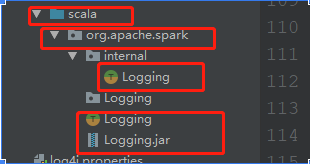
一,1 在使用spark读取kafka数据时,当spark升级到2.0之后,出现如上问题:之前遇到了,当时在工程里面添加了org.apache.spark.Logging类,能够运行。
但是在后期使用过程中,又遇到了相同的问题,为了一劳永逸,今天彻底把问题解决。
在项目下创建org.apache.spark.logging类
将源码考入类中
package org.apache.spark

import org.apache.log4j.{LogManager, PropertyConfigurator}
import org.slf4j.{Logger, LoggerFactory}
import org.slf4j.impl.StaticLoggerBinder

import org.apache.spark.annotation.DeveloperApi
import org.apache.spark.util.Utils
/**
  * Created by Administrator on 2017/8/11.
  */

/**
  * :: DeveloperApi ::
  * Utility trait for classes that want to log data. Creates a SLF4J logger for the class and allows
  * logging messages at different levels using methods that only evaluate parameters lazily if the
  * log level is enabled.
  *
  * NOTE: DO NOT USE this class outside of Spark. It is intended as an internal utility.
  *       This will likely be changed or removed in future releases.
  */
@DeveloperApi
trait Logging {
  // Make the log field transient so that objects with Logging can
  // be serialized and used on another machine
  @transient private var log_ : Logger = null

  // Method to get the logger name for this object
  protected def logName = {
    // Ignore trailing $'s in the class names for Scala objects
    this.getClass.getName.stripSuffix("$")
  }

  // Method to get or create the logger for this object
  protected def log: Logger = {
    if (log_ == null) {
      initializeIfNecessary()
      log_ = LoggerFactory.getLogger(logName)
    }
    log_
  }

  // Log methods that take only a String
  protected def logInfo(msg: => String) {
    if (log.isInfoEnabled) log.info(msg)
  }

  protected def logDebug(msg: => String) {
    if (log.isDebugEnabled) log.debug(msg)
  }

  protected def logTrace(msg: => String) {
    if (log.isTraceEnabled) log.trace(msg)
  }

  protected def logWarning(msg: => String) {
    if (log.isWarnEnabled) log.warn(msg)
  }

  protected def logError(msg: => String) {
    if (log.isErrorEnabled) log.error(msg)
  }

  // Log methods that take Throwables (Exceptions/Errors) too
  protected def logInfo(msg: => String, throwable: Throwable) {
    if (log.isInfoEnabled) log.info(msg, throwable)
  }

  protected def logDebug(msg: => String, throwable: Throwable) {
    if (log.isDebugEnabled) log.debug(msg, throwable)
  }

  protected def logTrace(msg: => String, throwable: Throwable) {
    if (log.isTraceEnabled) log.trace(msg, throwable)
  }

  protected def logWarning(msg: => String, throwable: Throwable) {
    if (log.isWarnEnabled) log.warn(msg, throwable)
  }

  protected def logError(msg: => String, throwable: Throwable) {
    if (log.isErrorEnabled) log.error(msg, throwable)
  }

  protected def isTraceEnabled(): Boolean = {
    log.isTraceEnabled
  }

  private def initializeIfNecessary() {
    if (!Logging.initialized) {
      Logging.initLock.synchronized {
        if (!Logging.initialized) {
          initializeLogging()
        }
      }
    }
  }

  private def initializeLogging() {
    // Don't use a logger in here, as this is itself occurring during initialization of a logger
    // If Log4j 1.2 is being used, but is not initialized, load a default properties file
    val binderClass = StaticLoggerBinder.getSingleton.getLoggerFactoryClassStr
    // This distinguishes the log4j 1.2 binding, currently
    // org.slf4j.impl.Log4jLoggerFactory, from the log4j 2.0 binding, currently
    // org.apache.logging.slf4j.Log4jLoggerFactory
    val usingLog4j12 = "org.slf4j.impl.Log4jLoggerFactory".equals(binderClass)

    lazy val isInInterpreter: Boolean = {
      try {
        val interpClass = classForName("org.apache.spark.repl.Main")
        interpClass.getMethod("interp").invoke(null) != null
      } catch {
        case _: ClassNotFoundException => false
      }
    }
    def classForName(className: String): Class[_] = {
      Class.forName(className, true, getContextOrSparkClassLoader)
      // scalastyle:on classforname
    }
    def getContextOrSparkClassLoader: ClassLoader =
      Option(Thread.currentThread().getContextClassLoader).getOrElse(getSparkClassLoader)
    def getSparkClassLoader: ClassLoader = getClass.getClassLoader

    if (usingLog4j12) {
      val log4j12Initialized = LogManager.getRootLogger.getAllAppenders.hasMoreElements
      if (!log4j12Initialized) {
        // scalastyle:off println
        if (isInInterpreter) {
          val replDefaultLogProps = "org/apache/spark/log4j-defaults-repl.properties"
          Option(Utils.getSparkClassLoader.getResource(replDefaultLogProps)) match {
            case Some(url) =>
              PropertyConfigurator.configure(url)
              System.err.println(s"Using Spark's repl log4j profile: $replDefaultLogProps")
              System.err.println("To adjust logging level use sc.setLogLevel(\"INFO\")")
            case None =>
              System.err.println(s"Spark was unable to load $replDefaultLogProps")
          }
        } else {
          val defaultLogProps = "org/apache/spark/log4j-defaults.properties"
          Option(Utils.getSparkClassLoader.getResource(defaultLogProps)) match {
            case Some(url) =>
              PropertyConfigurator.configure(url)
              System.err.println(s"Using Spark's default log4j profile: $defaultLogProps")
            case None =>
              System.err.println(s"Spark was unable to load $defaultLogProps")
          }
        }
        // scalastyle:on println
      }
    }
    Logging.initialized = true

    // Force a call into slf4j to initialize it. Avoids this happening from multiple threads
    // and triggering this: http://mailman.qos.ch/pipermail/slf4j-dev/2010-April/002956.html
    log
  }
}

private object Logging {
  @volatile private var initialized = false
  val initLock = new Object()
  try {
    // We use reflection here to handle the case where users remove the
    // slf4j-to-jul bridge order to route their logs to JUL.
    val bridgeClass = Utils.classForName("org.slf4j.bridge.SLF4JBridgeHandler")
    bridgeClass.getMethod("removeHandlersForRootLogger").invoke(null)
    val installed = bridgeClass.getMethod("isInstalled").invoke(null).asInstanceOf[Boolean]
    if (!installed) {
      bridgeClass.getMethod("install").invoke(null)
    }
  } catch {
    case e: ClassNotFoundException => // can't log anything yet so just fail silently
  }
}
无需更改源码
2。现在重新运行下项目看适口可以运行
3,如果还是不行,进入cmd中进入项目下刚才建的org.apache.spark下,执行jar -cvf logging.jar 意思是将刚才拷贝进去的源码打成jar包然后引入当前项目依赖中
4,运行即会成功然后将此包在放入你的spark集群中的lib目录下 如果还出现问题
5
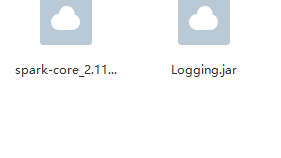
6 这两个包已经是完整的了 在我的百度网盘点击下面下载就好,按照上诉步骤 希望可以帮助到你
链接:https://pan.baidu.com/s/1wOL29M5vQVqmSG6ywxLxNg
提取码:61td
org.apache.spark.logging类报错的更多相关文章
- Spark程序编译报错error: object apache is not a member of package org
Spark程序编译报错: [INFO] Compiling 2 source files to E:\Develop\IDEAWorkspace\spark\target\classes at 156 ...
- 往sde中导入要素类报错000732
sde可以成功连接,可以在Server中注册. 但是向sde中导入要素类报错000732,如图所示. 点击红色圆圈提示 ERROR 000732. 将路径修改为绝对路径即可,如下图所示.
- apache ab压力测试报错(apr_socket_recv: Connection reset by peer (104))
apache ab压力测试报错(apr_socket_recv: Connection reset by peer (104)) 今天用apache 自带的ab工具测试,当并发量达到1000多的时 ...
- maven项目引用时,导入类报错,选择两个项目同时执行Maven update
maven项目引用时,导入类报错,选择两个项目同时执行Maven update springboot引入第三方jar,需要扫描时加@ComponentScan("第三方的包名") ...
- 继承ActionSupper类报错 --Struts2
如下图所示,继承ActionSupper类报错: 原因:缺少Struts2中JAR包,具体是:
- apache ab压力测试报错apr_socket_recv
apache ab压力测试报错(apr_socket_recv: Connection reset by peer (104)) apache 自带的ab工具测试,当并发量达到1000多的时候报错如下 ...
- 启动Tomcat服务时,出现org.apache.catalina.startup.VersionLoggerListener报错
启动Tomcat服务时,出现org.apache.catalina.startup.VersionLoggerListener报错解决办法:打开Tomcat安装后目录,进入conf文件夹,找到配置文件 ...
- php通过JavaBridge调用Java类库和不带包的自定义java类成功 但是调用带包的自定义Java类报错,该怎么解决
php通过JavaBridge调用Java类库和不带包的自定义java类成功 但是调用带包的自定义Java类报错,Class.forName("com.mysql.jdbc.Driver&q ...
- 【IntellJ IDEA】idea启动测试类报错Error running 'Test1.test': Command line is too long. Shorten command line for Test1.test or also for JUnit default configuration.
idea启动测试类报错 Error running 'Test1.test': Command line is too long. Shorten command line for Test1.tes ...
随机推荐
- CPU缓存和内存屏障
CPU性能优化手段 - 缓存 为了提高程序的运行性能, 现代CPU在很多方面对程序进行了优化例如: CPU高速缓存, 尽可能的避免处理器访问主内存的时间开销, 处理器大多会利用缓存以提高性能 多级缓存 ...
- flask模板语言 jinja2 以及render_template 深度用法
是时候开始写个前端了,Flask中默认的模板语言是Jinja2 现在我们来一步一步的学习一下 Jinja2 捎带手把 render_template 中留下的疑问解决一下 首先我们要在后端定义几个字符 ...
- Bzoj 1537: [POI2005]Aut- The Bus 题解 [由暴力到正解]
1537: [POI2005]Aut- The Bus Time Limit: 5 Sec Memory Limit: 64 MBSubmit: 387 Solved: 264[Submit][S ...
- UVA-10608 Friends 【并查集】
There is a town with N citizens. It is known that some pairs of people are friends. According to the ...
- 洛谷 P1039 侦探推理
题目:https://www.luogu.org/problemnew/show/P1039 分析: 这道题是一道有技术含量的模拟,我们主要是不要让计算机向人一样思考,只需要让他穷举变化的星期几和当罪 ...
- Python学习4——条件、循环及其他语句总结
多种语句 打印语句: 导入语句: 赋值语句: 代码块: 条件语句: 断言: 循环: 推导: pass.dal.exec和eval : 学习到的新函数:(以下函数的应用代码均在IDLE测试通过) ch ...
- 架构师小跟班:SSL证书免费申请及部署,解决页面样式错乱问题完整攻略
申请证书 1.登录阿里云控制台,产品与服务,选择SSL证书 2.进入SSL证书页面,点击“购买证书”,选择免费1年的证书类型,点击“立即购买” 3.返回SSL证书页面,可以看到证书列表里多了一条记录 ...
- 《ElasticSearch6.x实战教程》之实战ELK日志分析系统、多数据源同步
第十章-实战:ELK日志分析系统 ElasticSearch.Logstash.Kibana简称ELK系统,主要用于日志的收集与分析. 一个完整的大型分布式系统,会有很多与业务不相关的系统,其中日志系 ...
- 原 docker 安装使用 solr
1.安装solr 7.5 docker solr 官网:https://hub.docker.com/_/solr/ docker pull solr:7.5.0 2.启动solr服务 docker ...
- Java 面向对象面试题
1.Java面向对象的三种特性 封装:封装是把数据和操作数据的方法封装起来,对数据的访问只能通过已定义的接口进行访问. Java的四种访问控制符: - 默认的(default):不使用任何修饰符,在同 ...