
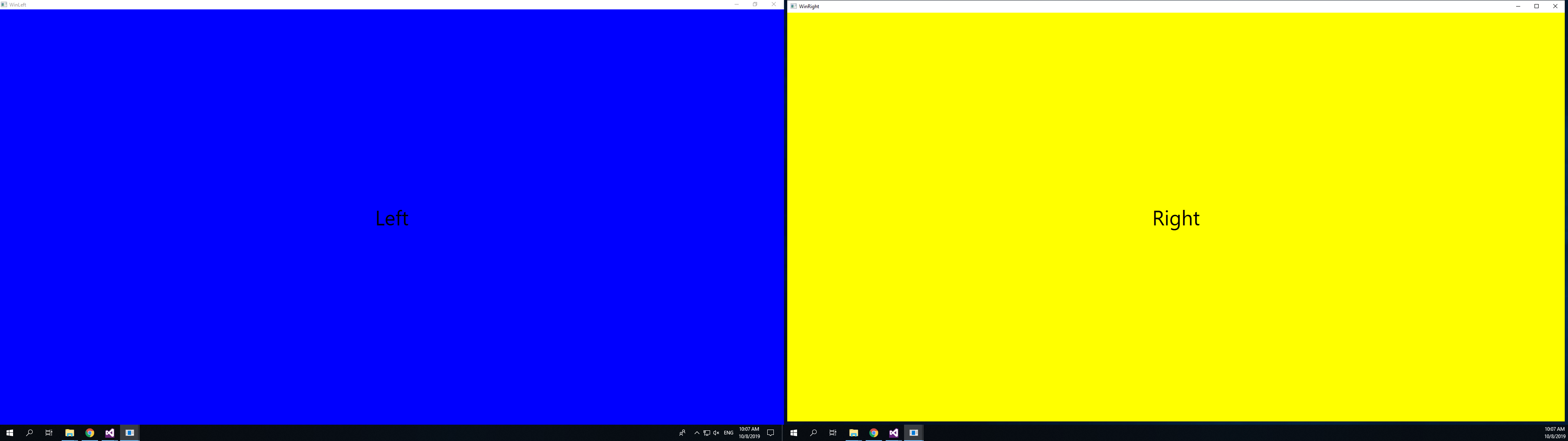
wpf dual monitor
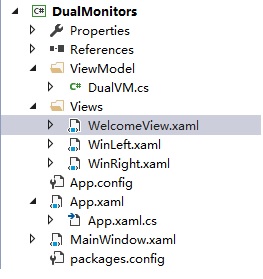
<Window x:Class="DualMonitors.Views.WinLeft"

        xmlns="http://schemas.microsoft.com/winfx/2006/xaml/presentation"

        xmlns:x="http://schemas.microsoft.com/winfx/2006/xaml"

        xmlns:d="http://schemas.microsoft.com/expression/blend/2008"

        xmlns:mc="http://schemas.openxmlformats.org/markup-compatibility/2006"

        xmlns:local="clr-namespace:DualMonitors.Views"

        mc:Ignorable="d" WindowState="Maximized"  WindowStartupLocation="CenterScreen"

        Title="WinLeft" Height="300" Width="300">

    <Grid Background="Blue">

        <Grid>

            <Grid.RowDefinitions>

                <RowDefinition/>

                <RowDefinition/>

            </Grid.RowDefinitions>

            <TextBlock Text="Left" FontSize="50" VerticalAlignment="Center" HorizontalAlignment="Center"/>

            <Button Grid.Row="2" Command="{Binding LeftCmd}" Content="Click Left" FontSize="50"/>

        </Grid>

    </Grid>

</Window>
<Window x:Class="DualMonitors.Views.WinRight"

        xmlns="http://schemas.microsoft.com/winfx/2006/xaml/presentation"

        xmlns:x="http://schemas.microsoft.com/winfx/2006/xaml"

        xmlns:d="http://schemas.microsoft.com/expression/blend/2008"

        xmlns:mc="http://schemas.openxmlformats.org/markup-compatibility/2006"

        xmlns:local="clr-namespace:DualMonitors.Views"

        mc:Ignorable="d" WindowState="Maximized" WindowStartupLocation="CenterScreen"

        Title="WinRight">

    <Grid Background="Yellow">

        <Grid>

            <Grid.RowDefinitions>

                <RowDefinition/>

                <RowDefinition/>

            </Grid.RowDefinitions>

            <TextBlock Text="Right" FontSize="50" VerticalAlignment="Center" HorizontalAlignment="Center"/>

            <Button Grid.Row="2" Command="{Binding RightCmd}" Content="Click Right" FontSize="50"/>

        </Grid>

    </Grid>

</Window>
using DualMonitors.ViewModel;

using System.Windows;

namespace DualMonitors.Views

{

    /// <summary>

    /// Interaction logic for WinRight.xaml

    /// </summary>

    public partial class WinRight : Window

    {

        public WinRight()

        {

            InitializeComponent();

            DualVM BDualVM = DualVM.GetDualVM();

            this.DataContext = BDualVM;

        }

    }

}
using Prism.Commands;

using System.Windows;

namespace DualMonitors.ViewModel

{

    public class DualVM

    {

        private static DualVM DualVMInstance;

        public static DualVM GetDualVM()

        {

            object objLock = new object();

            lock(objLock)

            {

                if(DualVMInstance==null)

                {

                    DualVMInstance = new DualVM();

                }

            }

            return DualVMInstance;

        }

        private DualVM()

        {

            //MessageBox.Show("Dual Monitor");

        }

        private DelegateCommand leftCmdValue;

        public DelegateCommand LeftCmd

        {

            get

            {

                if(leftCmdValue==null)

                {

                    leftCmdValue = new DelegateCommand(LeftCmdExecuted);

                }

                return leftCmdValue;

            }

        }

        private void LeftCmdExecuted()

        {

            MessageBox.Show("Left Monitor");

        }

        private DelegateCommand rightCmdValue;

        public DelegateCommand RightCmd

        {

            get

            {

                if(rightCmdValue==null)

                {

                    rightCmdValue = new DelegateCommand(RightCmdExecuted);

                }

                return rightCmdValue;

            }

        }

        private void RightCmdExecuted()

        {

            MessageBox.Show("Right Monitor");

        }

    }

}
public partial class App : System.Windows.Application

    {

        protected override void OnStartup(StartupEventArgs e)

        {

            base.OnStartup(e);

            SetupWindows();

        }

        private void SetupWindows()

        {

            System.Windows.Forms.Screen mainScreen = Screen.AllScreens[]; ;

            WinLeft leftWin = new WinLeft()

            {

                WindowStartupLocation = WindowStartupLocation.Manual,

                WindowState = System.Windows.WindowState.Normal,

                Left = mainScreen.WorkingArea.Left,

                Top = mainScreen.WorkingArea.Top,

                Width = mainScreen.WorkingArea.Width,

                Height = mainScreen.WorkingArea.Height

            };

            System.Windows.Forms.Screen secondaryScreen = Screen.AllScreens[];

            WinRight rightWin = new WinRight()

            {

                WindowStartupLocation = WindowStartupLocation.Manual,

                WindowState = System.Windows.WindowState.Normal,

                Left = secondaryScreen.WorkingArea.Left,

                Top = secondaryScreen.WorkingArea.Top,

                Width = secondaryScreen.WorkingArea.Width,

                Height = secondaryScreen.WorkingArea.Height

            };

            leftWin.Show();

            leftWin.WindowState = WindowState.Maximized;

            rightWin.Show();

            rightWin.WindowState = WindowState.Maximized;

            rightWin.Owner = leftWin;

        }

    }
wpf dual monitor的更多相关文章
- win7 双屏双任务栏
扩展屏幕下都显示任务栏!!! 第一步:Dual Monitor Taskbar 下载 下载链接:链接: http://pan.baidu.com/s/1pKxYUFL 密码: gu5c 第二步:安装完 ...
- win7系统扩展双屏幕时,如何在两个屏幕下都显示任务栏
扩展屏幕下都显示任务栏!!! win7系统本身无法设置该功能(目前我是不知道) 但可以下载第三方软件来解决该问题. 第一步:Dual Monitor Taskbar 下载软件 下载链接:http:// ...
- Fedora 中多显示器环境下的工作区切换
[Dual monitor workspaces] 默认情况下,fedora中 Gnome 桌面环境在切换工作去的时候,只会在 Primary display 上切换, 其他显示器保持不变.如果要实现 ...
- win7系统扩展双屏幕时,怎样在两个屏幕下都显示任务栏
扩展屏幕下都显示任务栏!!! win7系统本身无法设置该功能(眼下我是不知道) 但能够下载第三方软件来解决该问题. 第一步:Dual Monitor Taskbar 下载软件 下载链接:http:// ...
- win7系统扩展双屏幕时,开启两个屏幕下都显示任务栏,第三方插件
Dual Monitor Taskbar 下载软件 下载地址 https://dual-monitor-taskbar.en.softonic.com/ 安装即可
- WPF MVVM UI分离之《交互与数据分离》 基础才是重中之重~delegate里的Invoke和BeginInvoke 将不确定变为确定系列~目录(“机器最能证明一切”) 爱上MVC3系列~全局异常处理与异常日志 基础才是重中之重~lock和monitor的区别 将不确定变成确定~我想监视我的对象,如果是某个值,就叫另一些方法自动运行 将不确定变成确定~LINQ DBML模型可以对
WPF MVVM UI分离之<交互与数据分离> 在我们使用WPF过程中,不可避免并且超级喜欢使用MVVM框架. 那么,使用MVVM的出发点是视觉与业务逻辑分离,即UI与数据分离 诸如下 ...
- 【基于WPF+OneNote+Oracle的中文图片识别系统阶段总结】之篇三:批量处理后的txt文件入库处理
篇一:WPF常用知识以及本项目设计总结:http://www.cnblogs.com/baiboy/p/wpf.html 篇二:基于OneNote难点突破和批量识别:http://www.cnblog ...
- 11g新特性:Health Monitor Checks
一.什么是Health Monitor ChecksHealth Monitor Checks能够发现文件损坏,物理.逻辑块损坏,undo.redo损坏,数据字典损坏等等.Health Monitor ...
- sql monitor生成不了报告& FFS hint不生效两个问题思考
事情的发生就是这么偶然,一步步的深入才能汲取到更深入的知识~~ -------------------START------------------------------------------- ...
随机推荐
- 《2019年小米春季上海 PHP 实习生招聘面试题》部分答案解析
1 丶 Nginx 怎么实现负载均衡 这个还是比较简单 1.轮询 这种是默认的策略,把每个请求按顺序逐一分配到不同的 server,如果 server 挂掉,能自动剔除. 2.最少连接 把请求分配到连 ...
- BootStrap 关于input与btn的点击focus取消特效相关css
取消btn按钮点击出现的外边框: .btn:focus, /*清除btn按钮点击出现的边框*/.btn:active:focus,.btn.active:focus,.btn.focus,.btn:a ...
- laravel 5.5.39 升级到 5.5.45 出现 cookie 序列化异常问题的解决
把项目里的 laravel 5.5.39 升级到 5.5.45 后,出现如下报错: ErrorExceptionopenssl_encrypt() expects parameter 1 to be ...
- Java入门系列之集合ArrayList源码分析(七)
前言 上一节我们通过排队类实现了类似ArrayList基本功能,当然还有很多欠缺考虑,只是为了我们学习集合而准备来着,本节我们来看看ArrayList源码中对于常用操作方法是如何进行的,请往下看. A ...
- Centos7 下 PHP 添加缺少的组件 sockets 和 openssl
环境是 centos7 + nginx 1.14 + php 7.2.18,由于新增邮件发送功能,使用的是 socket 通讯的方式,需要开启 php 的 sockes 和 openssl 扩展 安装 ...
- 将python项目打包为可运行的windows桌面exe程序
---恢复内容开始--- 步骤大概如下: 1.需要一个python文件/项目.也就是我们想要打包的文件 2.安装pyinstaller,目的是将我们的python文件生成为exe可执行程序. 3.使用 ...
- Android studio将一个项目作为module导入另一个项目
有两个Android项目,一个为pozhudl,一个为app,现在欲将pozhudl项目作为module导入到app中,并调用pozhudl项目中的类 先在pozhudl项目的build.gradle ...
- 树莓派Raspberry pi安装系统/烧录系统
一:下载系统文件 1.树莓派官网系统下载链接:https://www.raspberrypi.org/downloads/raspbian/ (也可在百度云盘下载:https://pan.baidu. ...
- [靶场实战]:SQL注入-显错注入
SQL注入的本质:就是将用户输入的数据当作代码带入执行. 注入条件: 1.用户能控制输入 2.能够将程序原本执行的代码,拼接上用户输入的数据进行执行 首先检查是否存在注入点 Rank1: 构造语句 ? ...
- 第6次作业--static关键字、对象
题目1:编写一个类Computer,类中含有一个求n的阶乘的方法.将该类打包,并在另一包中的Java文件App.java中引入包,在主类中定义Computer类的对象,调用求n的阶乘的方法(n值由参数 ...