
egg-mongoose --- nodejs

项目
egg + mongoose
项目结构
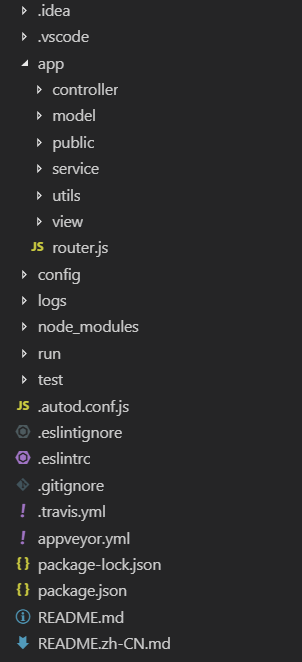
配置
egg 安装模块
npm i egg-mongoose --save
config/pulgin.js
exports.mongoose = {

  enable: true,

  package: 'egg-mongoose',

};
config/config.default.js
exports.mongoose = {

    url: 'mongodb://127.0.0.1/demo',

    //链接到本地的MongoDB,demo是我本地数据库的名字,根据自己数据库名字进行填写即可

    options: {},

};
数据建模
model/user.js
// app/model/user.js

module.exports = app => {

    const mongoose = app.mongoose;

    const Schema = mongoose.Schema;

    const UserSchema = new Schema({

      userName: { type: String  },

      password: { type: String  }

    });

    // 以上定义了表数据的类型

    return mongoose.model('User', UserSchema, 'userInfo');

    // model(参数1,参数2,参数3)参数3是你数据表中需要操作的表的名字,

    // 比如我现在要操作的是名字叫mongoTest里面的叫userInfo的表

}
service
service/user.js
'use strict';

// app/service/user.js

const Service = require('egg').Service;

class UserService extends Service {

  async findUserList() {

    return this.ctx.model.User.find()

  }

}

module.exports = UserService;
controller
controller/user.js
'use strict';

const Controller = require('egg').Controller;

class UserController extends Controller {

  async findUser() {

    // console.log(this.ctx.service.user.findUserList())

    // let ret = await this.ctx.service.user.findUserList()

    // this.ctx.body = ret

    this.ctx.body = await this.ctx.service.user.findUserList()

  }

}

module.exports = UserController;
router.js
'use strict';

/**

 * @param {Egg.Application} app - egg application

 */

module.exports = app => {

  const { router, controller } = app;

  router.get('/findUser', controller.user.findUser);

};
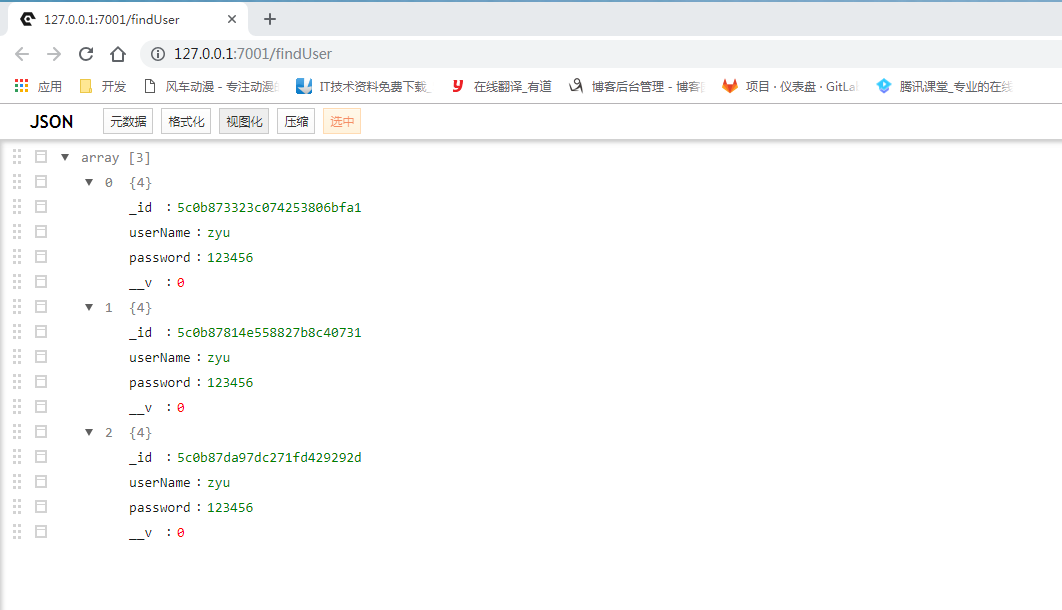
查询结果
egg-mongoose --- nodejs的更多相关文章
- nodejs 初次链接 mongodb 的详细细节
时间 2016-06-2613:05:16 在前端的学习也有一段时间了,学习了html,css,javascript,jqery,ajax,php,mysql,学习了这些,了解了一些皮毛,也没有什么 ...
- Nodejs之MEAN栈开发(三)---- 使用Mongoose创建模型及API
继续开扒我们的MEAN栈开发之路,前面两节我们学习了Express.Jade引擎并创建了几个静态页面,最后通过Heroku部署了应用. Nodejs之MEAN栈开发(一)---- 路由与控制器 Nod ...
- NodeJS实战:Express+Mongoose+ejs
元宵还没到,先向所有朋友拜一个晚年~~~ 文章目录: 1.组件版本号 -- --node -- --express -- --Mongoose 2.初始化项目 firstblood -- --用 ex ...
- nodejs(一) 简单登录验证 使用mongoose 操作MongoDB
---恢复内容开始--- 开发使用webstorm 9 新建nodejs+express 项目 newfarmer 文章目录 配置Mongoose 创建目录及文件 插入数据,POST提交JSON增加 ...
- nodejs 使用mongoose 操作mongodb
nodejs操作mongodb可以使用mongoose: Mongoose is a MongoDB object modeling tool designed to work in an async ...
- nodejs+mongoose操作mongodb副本集实例
继上一篇设置mongodb副本集之后,开始使用nodejs访问mongodb副本集: 1:创建项目 express 项目名称 2:npm install mongoose 安装mongo ...
- nodejs+mongoose+websocket搭建xxx聊天室
简介 本文是由nodejs+mongoose+websocket打造的一个即时聊天系统:本来打算开发一个类似于网页QQ类似功能的聊天系统,但是目前只是开发了一个模块功能 --- 类似群聊的,即一对多的 ...
- 前端笔记之NodeJS(四)MongoDB数据库&Mongoose&自制接口&MVC架构思想|实战
一.MongoDB数据库 1.1 NoSQL简介 随着互联网web2.0网站的兴起,传统的SQL数据库(关系数据库)在应付web2.0网站,特别是超大规模和高并发的SNS(social network ...
- Nodejs mongoose 详解
前言 Mongoose 是在nodejs环境下,对mongodb进行便捷操作的对象模型工具.本文介绍解(翻)密(译)Mongoose插件. Schema 开始我们就要讲到Schema,一个Schema ...
随机推荐
- asp.netcore 自动挡Docker Nginx Redis(滴滴滴,自动挡)
前言 上一章介绍了Docker通过多条命令创建启动运行Docker容器,由此可见这样一个个去创建单独的容器也是相当麻烦的,比如要在某个复杂项目中用DB.缓存.消息等等,这样我们还要去一个个再创建,为此 ...
- Pots POJ 3414
/* *POJ 3414 *简单模板bfs *编程应该为了方便理解,尽量提供接口 */ #include<cstdio> #include<algorithm> #includ ...
- SUSE CaaS Platform 4 - 安装部署
SUSE CaaS Platform 相关文章 (1)SUSE CaaS Platform 4 - 简介 (2)SUSE CaaS Platform 4 - 安装部署 (3)SUSE CaaS Pla ...
- deferred对象和promise对象(一)
个人认为阮一峰老师讲的关于deferred对象是最容易理解的. deferred对象是jquery的回调函数解决方案.解决了如何处理耗时操作的问题,对那些操作提供了更好的控制,以及统一的编程接口. d ...
- 【TencentOS tiny】深度源码分析(2)——调度器
温馨提示:本文不描述与浮点相关的寄存器的内容,如需了解自行查阅(毕竟我自己也不懂) 调度器的基本概念 TencentOS tiny中提供的任务调度器是基于优先级的全抢占式调度,在系统运行过程中,当有比 ...
- 无人机基于Matlab/Simulink的模型开发(连载一)
"一切可以被控制的对象,都需要被数学量化" 这是笔者从事多年研发工作得出的道理,无论是车辆控制,机器人控制,飞机控制,还是无人机控制,所有和机械运动相关的控制,如果不能被很好的数学 ...
- Real Beauty真正的美丽
[1]Beauty is only skin-deep. Physical beauty can only be held fleetingly. Real beauty is much deeper ...
- JVM本地方法栈及native方法
看到虚拟机栈和本地方法栈的区别的时候有点疑惑,因为本地方法栈为虚拟机的Native方法服务.以下转载一篇关于native方法的介绍: http://blog.csdn.net/wike163/arti ...
- RF中的if判断
关键字run keyword if 格式如下: Run Keyword If 判断条件 其他关键字 ... ELSE IF 判断条件 其他关键字 ... ELSE ...
- PowerShell渗透--Empire
0x00 简介 Empire是一款针对Windows平台的,使用PowerShell脚本作为攻击载荷的渗透攻击框架代码具有从stager生成,提权到渗透维持的一系列功能,无需powershell.ex ...