
Android开发之UI更新交互机制与实例解析
android开发过程中,经常需要更新UI的状态和文案等。这是就需要对UI进行 更新。在android中更新UI一般有三种方法,handler机制、RunOnUiThread方法以及AsyncTask异步类方法等
本文下面就这三种方法进行了演示和代码实现.
a.Handler机制通过使用消息机制来实现
b.RunOnUiThread方法是通过运行UI线程来达到更新UI的目的
c.AsyncTask是异步类,通过异步更新来更新UI
效果图如下:
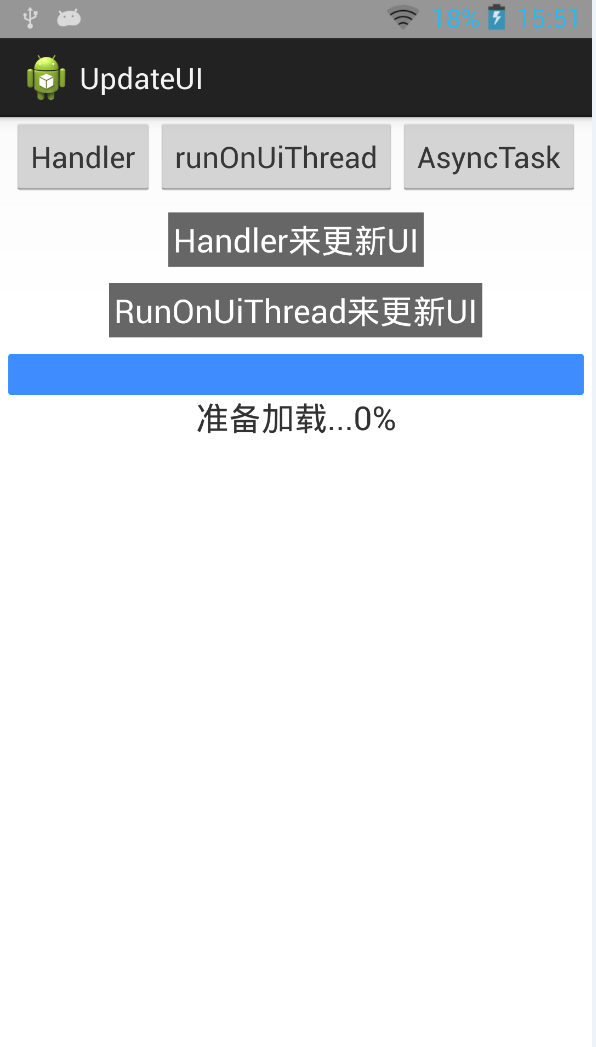
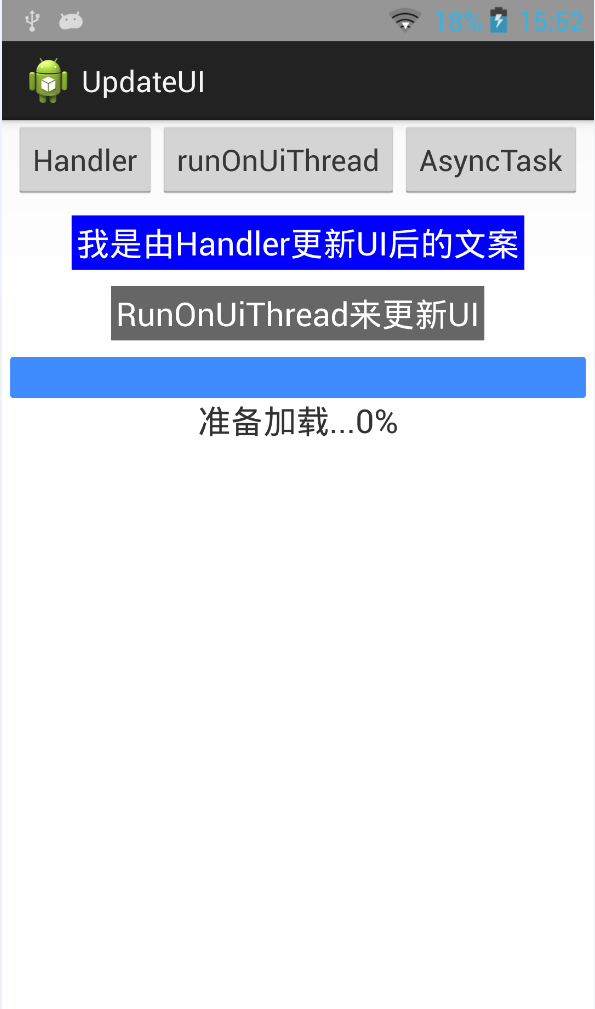
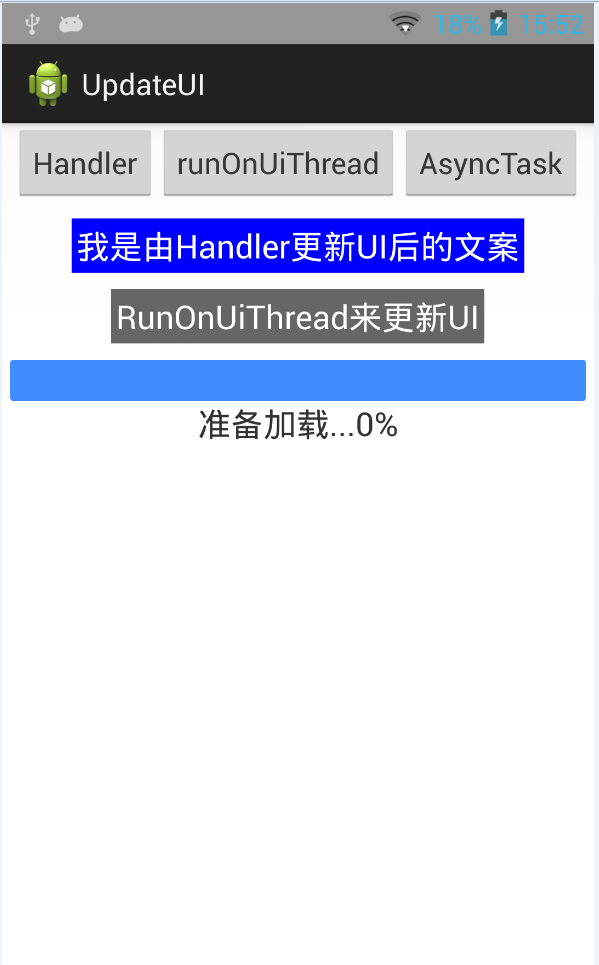
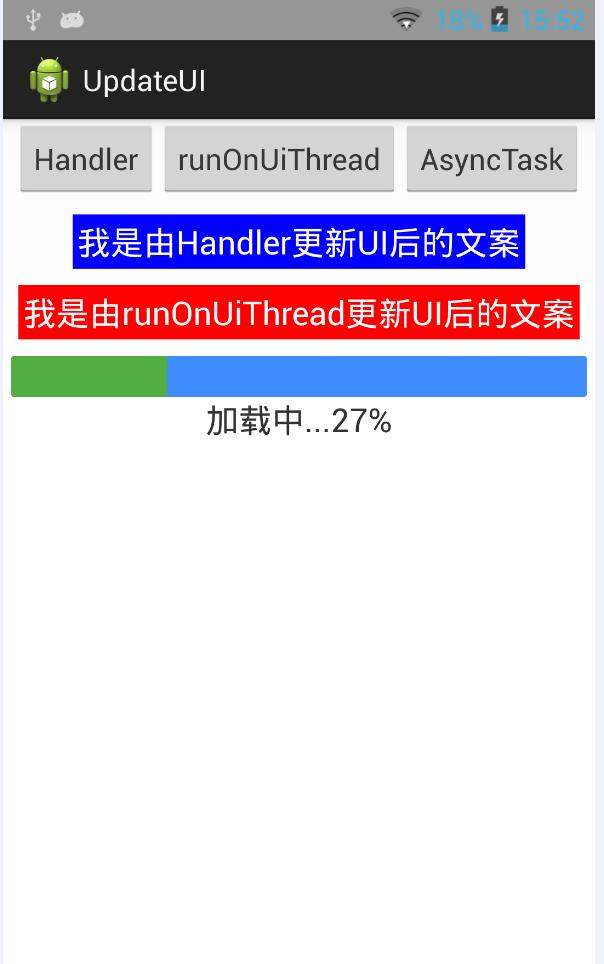
(1)Java功能实现代码如下:
package com.czm.updateui;

import android.os.AsyncTask;

import android.os.Bundle;

import android.os.Handler;

import android.os.Message;

import android.R.integer;

import android.app.Activity;

import android.graphics.Color;

import android.view.View;

import android.view.View.OnClickListener;

import android.widget.Button;

import android.widget.ProgressBar;

import android.widget.TextView;

public class UpdateUIActivity extends Activity {

    private Button btnHandler;

    private Button btnRunOnUiThread;

    private Button btnAsyncTask;

    private TextView tvHandler;

    private TextView tvOnUiThread;

    private TextView tvProgress;

    private Handler uiHandler;

    private ProgressBar progressBar;

    @Override

    protected void onCreate(Bundle savedInstanceState) {

        super.onCreate(savedInstanceState);

        setContentView(R.layout.update_ui);

        initViews();

        setListeners();

    }

    private void initViews(){

        btnHandler = (Button) findViewById(R.id.btnHandler);

        btnRunOnUiThread = (Button) findViewById(R.id.btnRunOnUiThread);

        btnAsyncTask = (Button)findViewById(R.id.btnAsyncTask);

        tvHandler = (TextView) findViewById(R.id.tvText1);

        tvOnUiThread = (TextView)findViewById(R.id.tvText2);

        tvProgress = (TextView)findViewById(R.id.tvText3);

        progressBar = (ProgressBar)findViewById(R.id.progressBar);

    }

    private void setListeners(){

        uiHandler = new Handler(){

            @Override

            public void handleMessage(Message msg) {

                // TODO Auto-generated method stub

                super.handleMessage(msg);

                Bundle bundle = msg.getData();

                String text = bundle.getString("handler_text");

                String color = bundle.getString("handler_color");

                tvHandler.setText(text);

                tvHandler.setBackgroundColor(Color.BLUE);

            }

        };

        //通过Handler机制来更新UI

        btnHandler.setOnClickListener(new OnClickListener() {

            @Override

            public void onClick(View v) {

                // TODO Auto-generated method stub

                new Thread(){

                    @Override

                    public void run() {

                        // TODO Auto-generated method stub

                        Message msg =new Message();

                        Bundle bundle = new Bundle();

                        bundle.putString("handler_text", "我是由Handler更新UI后的文案");

                        bundle.putString("handler_color", "#0000FF");

                        msg.setData(bundle);

                        //uiHandler.sendMessageDelayed(msg, 2000);

                        uiHandler.sendMessage(msg);

                    }

                }.start();

            }

        });

        //通过RunOnUiThread来更新UI

        btnRunOnUiThread.setOnClickListener(new OnClickListener() {

            @Override

            public void onClick(View v) {

                // TODO Auto-generated method stub

                runOnUiThread(new Runnable() {

                    @Override

                    public void run() {

                        // TODO Auto-generated method stub

                        tvOnUiThread.setText("我是由runOnUiThread更新UI后的文案");

                        tvOnUiThread.setBackgroundColor(Color.RED);

                    }

                });

            }

        });

        //通过AsyncTask 异步任务来更新UI

        btnAsyncTask.setOnClickListener(new OnClickListener() {

            @Override

            public void onClick(View v) {

                // TODO Auto-generated method stub

                new MyAsyncTask().execute(0);

            }

        });

    }

    private class MyAsyncTask extends AsyncTask<Integer, Integer, Integer>{

        @Override

        protected void onPostExecute(Integer result) {

            // TODO Auto-generated method stub

            super.onPostExecute(result);

            tvProgress.setText("加载完成...100%");

        }

        @Override

        protected void onProgressUpdate(Integer... values) {

            // TODO Auto-generated method stub

            super.onProgressUpdate(values);

            progressBar.setProgress((int)(values[0]));

            tvProgress.setText("加载中..."+values[0]+"%");

        }

        @Override

        protected Integer doInBackground(Integer... params) {

            // TODO Auto-generated method stub

            Integer timer = 0;

            while(timer <=100){

                try {

                    publishProgress(timer);

                    timer ++;

                    Thread.sleep(40);

                } catch (InterruptedException e) {

                    // TODO Auto-generated catch block

                    e.printStackTrace();

                }

            }

            return null;

        }

    }

}
(2)对应的UI布局xml文件代码:
<LinearLayout xmlns:android="http://schemas.android.com/apk/res/android"

    xmlns:tools="http://schemas.android.com/tools"

    android:layout_width="match_parent"

    android:layout_height="match_parent"

    android:orientation="vertical"

    android:gravity="center_horizontal"

    tools:context=".UpdateUIActivity" >

    <LinearLayout

        android:layout_width="wrap_content"

        android:layout_height="wrap_content"

        android:orientation="horizontal" >"

        <Button

        android:id="@+id/btnHandler"

        android:layout_width="wrap_content"

        android:layout_height="wrap_content"

        android:text="Handler" />

    <Button

        android:id="@+id/btnRunOnUiThread"

        android:layout_width="wrap_content"

        android:layout_height="wrap_content"

        android:text="runOnUiThread" />

    <Button

        android:id="@+id/btnAsyncTask"

        android:layout_width="wrap_content"

        android:layout_height="wrap_content"

        android:text="AsyncTask" />

    </LinearLayout>

    <TextView

        android:id="@+id/tvText1"

        android:layout_width="wrap_content"

        android:layout_height="wrap_content"

        android:layout_marginTop="10dp"

        android:text="Handler来更新UI"

        android:padding="3dp"

        android:textColor="#FFF"

        android:background="#666666"

        android:textSize="20dp" />

    <TextView

        android:id="@+id/tvText2"

        android:layout_width="wrap_content"

        android:layout_height="wrap_content"

        android:layout_marginTop="10dp"

        android:text="RunOnUiThread来更新UI"

        android:padding="3dp"

        android:textColor="#FFF"

        android:background="#666666"

        android:textSize="20dp" />

    <ProgressBar android:id="@+id/progressBar"

        style="?android:attr/progressBarStyleHorizontal"

        android:layout_width="fill_parent"

        android:layout_height="25dp"

        android:progressDrawable="@drawable/progressbar"

        android:max="100"

        android:progress="0"

        android:layout_marginLeft="5dp"

        android:layout_marginRight="5dp"

        android:layout_marginTop="10dp"

         />

    <TextView

        android:id="@+id/tvText3"

        android:layout_width="wrap_content"

        android:layout_height="wrap_content"

        android:text="准备加载...0%"

        android:textSize="20dp" />

</LinearLayout>
Android开发之UI更新交互机制与实例解析的更多相关文章
- Android开发之IPC进程间通信-AIDL介绍及实例解析
一.IPC进程间通信 IPC是进程间通信方法的统称,Linux IPC包括以下方法,Android的进程间通信主要采用是哪些方法呢? 1. 管道(Pipe)及有名管道(named pipe):管道可用 ...
- Android开发之UI的编程方式创建
我们知道,android中一个activity对应一个xml的UI配置文件,除了用xml文件配置的方式创建用户界面外,还可以使用代码编程的方式来创建一个用户界面.如果用户界面需要在运行过程中动态生成的 ...
- Android开发之Touch事件分发机制
原地址http://www.cnblogs.com/linjzong/p/4191891.html Touch事件分发中只有两个主角:ViewGroup和View.Activity的Touch事件事实 ...
- 【Android UI】Android开发之View的几种布局方式及实践
引言 通过前面两篇: Android 开发之旅:又见Hello World! Android 开发之旅:深入分析布局文件&又是“Hello World!” 我们对Android应用程序运行原理 ...
- Android开发之InstanceState详解
Android开发之InstanceState详解 本文介绍Android中关于Activity的两个神秘方法:onSaveInstanceState() 和 onRestoreInstanceS ...
- Android开发之bindService()侦听service内部状态
在Android开发之bindService()通信的基础上,实现bindService()方法侦听service内部状态. 实现侦听service内部状态,使用的是回调机制 1.首先实现一个接口 p ...
- Android开发之InstanceState详解(转)---利用其保存Activity状态
Android开发之InstanceState详解 本文介绍Android中关于Activity的两个神秘方法:onSaveInstanceState() 和 onRestoreInstanceS ...
- Android开发之旅4:应用程序基础及组件
引言 为了后面的例子做准备,本篇及接下来几篇将介绍Android应用程序的原理及术语,这些也是作为一个Android的开发人员必须要了解,且深刻理解的东西.本篇的主题如下: 1.应用程序基础 2.应用 ...
- Android开发之旅: Intents和Intent Filters(理论部分)
引言 大部分移动设备平台上的应用程序都运行在他们自己的沙盒中.他们彼此之间互相隔离,并且严格限制应用程序与硬件和原始组件之间的交互. 我们知道交流是多么的重要,作为一个孤岛没有交流的东西,一定毫无意义 ...
随机推荐
- NAT(NAPT)地址转换过程
整理自NAT地址转换过程 注:本文实质讲的是NAPT(Network Address Port Translation),即网络端口地址转换.NAPT与动态地址NAT不同,它将内部连接映射到外部网络中 ...
- Cloud Insight 客户案例-晨芯时代科技有限公司
在不断迭代的过程中,Cloud Insight 也很重视客户对产品的使用体验,这次我们拜访了晨芯时代,了解到他们在使用 Cloud Insight 过程中对产品的一些想法. 客户背景 晨芯时代是一家开 ...
- Mysql Partition 理论知识总结
简述: 本文内容主要 Giuseppe Maxia 曾在Mysql Conference & Expo 2010发表关于 <Mysql Partition in Mysql 5.1 &a ...
- windows下DOS命令中查看被占用端口的进程
今天在用tomcat 运行项目时报错: java.net.BindException: Address already in use: JVM_Bind这个错误 刚开始有点怀疑是javaw.e ...
- 【UVA 10600】 ACM Contest and Blackout(最小生成树和次小生成树)
[题意] n个点,m条边,求最小生成树的值和次小生成树的值. InputThe Input starts with the number of test cases, T (1 < T < ...
- C# 的 WCF文章 消息契约(Message Contract)在流(Stream )传输大文件中的应用
我也遇到同样问题,所以抄下做MARK http://www.cnblogs.com/lmjq/archive/2011/07/19/2110319.html 刚做完一个binding为netTcpBi ...
- 【CF】135 Div2 Choosing Capital for Treeland
树形结构,挺有意思的题目.不难. /* 219D */ #include <iostream> #include <string> #include <map> # ...
- head frist 设计模式学习之 JVM中的博物馆奇妙夜(观察者模式)
博物馆奇妙夜! 博物馆奇妙夜!博物馆奇妙夜!重说三!!!JVM看了<博物馆奇妙夜>电影之后,决定在自己家里开一个博物馆!毕竟需要什么new一下就好,博物馆很快就开起来了,并且任命你为馆长( ...
- AVL树的左旋右旋理解 (转)
AVL树是最先发明的自平衡二叉查找树.在AVL树中任何节点的两个子树的高度最大差别为一,所以它也被称为高度平衡树.查找.插入和删除在平均和最坏情况下都是O(log n).增加和删除可能需要通过一次或多 ...
- Y2K Accounting Bug
题目: Description Accounting for Computer Machinists (ACM) has sufferred from the Y2K bug and lost som ...