
UIActionViewController 详解 iOS8

- (void)showOkayCancelAlert {

    NSString *title = NSLocalizedString(@"A Short Title Is Best", nil);

    NSString *message = NSLocalizedString(@"A message should be a short, complete sentence.", nil);

    NSString *cancelButtonTitle = NSLocalizedString(@"Cancel", nil);

    NSString *otherButtonTitle = NSLocalizedString(@"OK", nil);

    UIAlertController *alertController = [UIAlertController alertControllerWithTitle:title message:message preferredStyle:UIAlertControllerStyleAlert];

    // Create the actions.

    UIAlertAction *cancelAction = [UIAlertAction actionWithTitle:cancelButtonTitle style:UIAlertActionStyleCancel handler:^(UIAlertAction *action) {

        NSLog(@"The \"Okay/Cancel\" alert's cancel action occured.");

    }];

    UIAlertAction *otherAction = [UIAlertAction actionWithTitle:otherButtonTitle style:UIAlertActionStyleDefault handler:^(UIAlertAction *action) {

        NSLog(@"The \"Okay/Cancel\" alert's other action occured.");

    }];

    // Add the actions.

    [alertController addAction:cancelAction];

    [alertController addAction:otherAction];

    [self presentViewController:alertController animated:YES completion:nil];

}
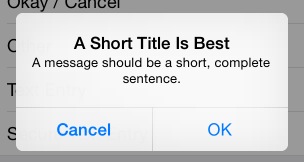
这是最普通的一个alertcontroller,一个取消按钮,一个确定按钮。
新的alertcontroller,其初始化方法也不一样了,按钮响应方法绑定使用了block方式,有利有弊。需要注意的是不要因为block导致了引用循环,记得使用__weak,尤其是使用到self。
上面的界面如下:
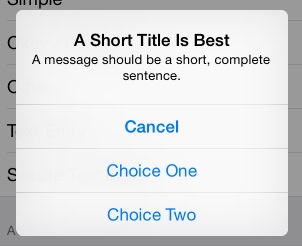
如果UIAlertAction *otherAction这种otherAction多几个的话,它会自动排列成如下:
另外,很多时候,我们需要在alertcontroller中添加一个输入框,例如输入密码:
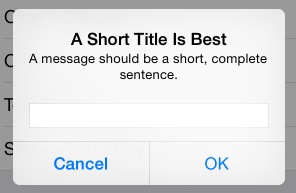
这时候可以添加如下代码:
 [alertController addTextFieldWithConfigurationHandler:^(UITextField *textField) {

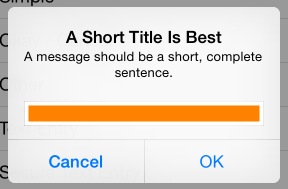
        // 可以在这里对textfield进行定制,例如改变背景色

        textField.backgroundColor = [UIColor orangeColor];

    }];
而改变背景色会这样:
完整的密码输入:
- (void)showSecureTextEntryAlert {

    NSString *title = NSLocalizedString(@"A Short Title Is Best", nil);

    NSString *message = NSLocalizedString(@"A message should be a short, complete sentence.", nil);

    NSString *cancelButtonTitle = NSLocalizedString(@"Cancel", nil);

    NSString *otherButtonTitle = NSLocalizedString(@"OK", nil);

    UIAlertController *alertController = [UIAlertController alertControllerWithTitle:title message:message preferredStyle:UIAlertControllerStyleAlert];

    // Add the text field for the secure text entry.

    [alertController addTextFieldWithConfigurationHandler:^(UITextField *textField) {

        // Listen for changes to the text field's text so that we can toggle the current

        // action's enabled property based on whether the user has entered a sufficiently

        // secure entry.

        [[NSNotificationCenter defaultCenter] addObserver:self selector:@selector(handleTextFieldTextDidChangeNotification:) name:UITextFieldTextDidChangeNotification object:textField];

        textField.secureTextEntry = YES;

    }];

    // Create the actions.

    UIAlertAction *cancelAction = [UIAlertAction actionWithTitle:cancelButtonTitle style:UIAlertActionStyleCancel handler:^(UIAlertAction *action) {

        NSLog(@"The \"Secure Text Entry\" alert's cancel action occured.");

        // Stop listening for text changed notifications.

        [[NSNotificationCenter defaultCenter] removeObserver:self name:UITextFieldTextDidChangeNotification object:alertController.textFields.firstObject];

    }];

    UIAlertAction *otherAction = [UIAlertAction actionWithTitle:otherButtonTitle style:UIAlertActionStyleDefault handler:^(UIAlertAction *action) {

        NSLog(@"The \"Secure Text Entry\" alert's other action occured.");

        // Stop listening for text changed notifications.

        [[NSNotificationCenter defaultCenter] removeObserver:self name:UITextFieldTextDidChangeNotification object:alertController.textFields.firstObject];

    }];

    // The text field initially has no text in the text field, so we'll disable it.

    otherAction.enabled = NO;

    // Hold onto the secure text alert action to toggle the enabled/disabled state when the text changed.

    self.secureTextAlertAction = otherAction;

    // Add the actions.

    [alertController addAction:cancelAction];

    [alertController addAction:otherAction];

    [self presentViewController:alertController animated:YES completion:nil];

}
注意四点:
1.添加通知,监听textfield内容的改变:
// Add the text field for the secure text entry.

    [alertController addTextFieldWithConfigurationHandler:^(UITextField *textField) {

        // Listen for changes to the text field's text so that we can toggle the current

        // action's enabled property based on whether the user has entered a sufficiently

        // secure entry.

        [[NSNotificationCenter defaultCenter] addObserver:self selector:@selector(handleTextFieldTextDidChangeNotification:) name:UITextFieldTextDidChangeNotification object:textField];

        textField.secureTextEntry = YES;

    }];
2.初始化时候,禁用“ok”按钮:
otherAction.enabled = NO;
self.secureTextAlertAction = otherAction;//定义一个全局变量来存储
3.当输入超过5个字符时候,使self.secureTextAlertAction = YES:
- (void)handleTextFieldTextDidChangeNotification:(NSNotification *)notification {

    UITextField *textField = notification.object;

    // Enforce a minimum length of >= 5 characters for secure text alerts.

    self.secureTextAlertAction.enabled = textField.text.length >= 5;

}
4.在“OK”action中去掉通知:
UIAlertAction *otherAction = [UIAlertAction actionWithTitle:otherButtonTitle style:UIAlertActionStyleDefault handler:^(UIAlertAction *action) {

        NSLog(@"The \"Secure Text Entry\" alert's other action occured.");

        // Stop listening for text changed notifications.

        [[NSNotificationCenter defaultCenter] removeObserver:self name:UITextFieldTextDidChangeNotification object:alertController.textFields.firstObject];

    }];
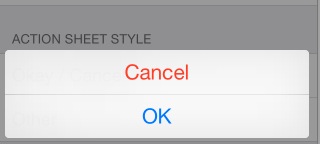
最后是以前经常是alertview与actionsheet结合使用,这里同样也有:
- (void)showOkayCancelActionSheet {

    NSString *cancelButtonTitle = NSLocalizedString(@"Cancel", nil);

    NSString *destructiveButtonTitle = NSLocalizedString(@"OK", nil);

    UIAlertController *alertController = [UIAlertController alertControllerWithTitle:nil message:nil preferredStyle:UIAlertControllerStyleActionSheet];

    // Create the actions.

    UIAlertAction *cancelAction = [UIAlertAction actionWithTitle:cancelButtonTitle style:UIAlertActionStyleCancel handler:^(UIAlertAction *action) {

        NSLog(@"The \"Okay/Cancel\" alert action sheet's cancel action occured.");

    }];

    UIAlertAction *destructiveAction = [UIAlertAction actionWithTitle:destructiveButtonTitle style:UIAlertActionStyleDestructive handler:^(UIAlertAction *action) {

        NSLog(@"The \"Okay/Cancel\" alert action sheet's destructive action occured.");

    }];

    // Add the actions.

    [alertController addAction:cancelAction];

    [alertController addAction:destructiveAction];

    [self presentViewController:alertController animated:YES completion:nil];

}
在底部显示如下:
好了,至此,基本就知道这个新的controller到底是怎样使用了。
UIActionViewController 详解 iOS8的更多相关文章
- UITextField使用详解
转iOS中UITextField使用详解 (1) //初始化textfield并设置位置及大小 UITextField *text = [[UITextField alloc]initWithFr ...
- IOS中表视图(UITableView)使用详解
IOS中UITableView使用总结 一.初始化方法 - (instancetype)initWithFrame:(CGRect)frame style:(UITableViewStyle)styl ...
- iOS开发——屏幕适配篇&Masonry详解
Masonry详解 前言 MagicNumber -> autoresizingMask -> autolayout 以上是纯手写代码所经历的关于页面布局的三个时期 在iphone1-ip ...
- iOS 开发之照片框架详解
转载自:http://kayosite.com/ios-development-and-detail-of-photo-framework.html 一. 概要 在 iOS 设备中,照片和视频是相当重 ...
- 《招一个靠谱的移动开发》iOS面试题及详解(下篇)
iOS面试知识点 现在进入本篇的正题.本篇的面试题是我认为比较好的iOS开发基础知识点,希望大家看过这后在理解的基础上掌握而不是死记硬背.死记硬背很快也会忘记的. 1 iOS基础 1.1 父类实现深拷 ...
- 了解iOS消息推送一文就够:史上最全iOS Push技术详解
本文作者:陈裕发, 腾讯系统测试工程师,由腾讯WeTest整理发表. 1.引言 开发iOS系统中的Push推送,通常有以下3种情况: 1)在线Push:比如QQ.微信等IM界面处于前台时,聊天消息和指 ...
- iOS百度地图简单使用详解
iOS百度地图简单使用详解 百度地图 iOS SDK是一套基于iOS 5.0及以上版本设备的应用程序接口,不仅提供展示地图的基本接口,还提供POI检索.路径规划.地图标注.离线地图.定位.周边雷达等丰 ...
- NSLayoutConstraint.constraintsWithVisualFormat详解,以及AlignAllCenterY
NSLayoutConstraint.constraintsWithVisualFormat详解,以及AlignAllCenterY 转载2015-07-08 18:02:02 鉴于苹果官方文档的解释 ...
- TableView 常用技巧与功能详解
分割线顶格iOS8 UITableview分割线顶格的做法 //iOS8 Cell分割线顶格 if ([_tableView respondsToSelector:@selector(setSepar ...
随机推荐
- Struts标签<s:iterator>遍历访问复杂Map对象
<s:iterator value="resultType" id="geneUi"> //拿到要遍历的Map对象 <s:iterator v ...
- jQuery之动画效果show()......animate()
jQuery之动画效果 1.show()显示效果 语法:show(speed,callback) Number/String,Function speend为动画执行时间,单位为毫秒.也可以为slow ...
- GA遗传算法解析
LinJM @HQU 谈及遗传算法,我首先想到的就是孟德尔的豌豆实验.当然,遗传算法实质上并不能用豌豆实验说明,豌豆实验探讨了分离定律和自由组合定律,而遗传算法所借鉴的并不是这两个定律.遗传算法,简 ...
- CreateEvent的使用方法
CreateEvent的使用方法收藏 新一篇: PreCreateWindow的作用和用法 | 旧一篇: VC中_T()的作用 function StorePage(){d=document;t=d ...
- [D3] 3. Scaling Basics
d3.scale.linear() <!DOCTYPE html> <html> <head lang="en"> <meta chars ...
- oracle2
为什么选择oracle--性能优越 概述:目前主流数据库包括 微软: sql server和access 瑞典MySql: AB公司mysql ibm公司: db2(处理海量) 美国Sybase公司: ...
- 数据结构与算法/leetcode/lintcode题解
http://algorithm.yuanbin.me/zh-hans/index.html
- Linux系统调优1
Linux在进行系统调优的时候,首先要考虑整个操作系统的结构,然后针对各个部分进行优化,下面展示一个Linux系统的各个组成部分: 有上图可以看出,我们可以调整的有应用程序,库文件,内核,驱动,还有硬 ...
- 初步掌握HBase
1.HBase概述 HBase是hadoop生态系统中的重要组成部分,是一个开源的.面向列.适合存储海量非结构化数据或半结构化数据,具备高可靠性.高性能.可灵活扩展伸缩.支持实时数据读写的分布式存储系 ...
- 使用 JSSE 定制 SSL 连接的属性--转载
当数据在网络上传播的时候,通过使用 SSL 对其进行加密和保护,JSSE 为 Java 应用程序提供了安全的通信.在本篇有关该技术的高级研究中,Java 中间件开发人员 Ian Parkinson 深 ...