
UIActionViewController 详解 iOS8

- (void)showOkayCancelAlert {

    NSString *title = NSLocalizedString(@"A Short Title Is Best", nil);

    NSString *message = NSLocalizedString(@"A message should be a short, complete sentence.", nil);

    NSString *cancelButtonTitle = NSLocalizedString(@"Cancel", nil);

    NSString *otherButtonTitle = NSLocalizedString(@"OK", nil);

    UIAlertController *alertController = [UIAlertController alertControllerWithTitle:title message:message preferredStyle:UIAlertControllerStyleAlert];

    // Create the actions.

    UIAlertAction *cancelAction = [UIAlertAction actionWithTitle:cancelButtonTitle style:UIAlertActionStyleCancel handler:^(UIAlertAction *action) {

        NSLog(@"The \"Okay/Cancel\" alert's cancel action occured.");

    }];

    UIAlertAction *otherAction = [UIAlertAction actionWithTitle:otherButtonTitle style:UIAlertActionStyleDefault handler:^(UIAlertAction *action) {

        NSLog(@"The \"Okay/Cancel\" alert's other action occured.");

    }];

    // Add the actions.

    [alertController addAction:cancelAction];

    [alertController addAction:otherAction];

    [self presentViewController:alertController animated:YES completion:nil];

}
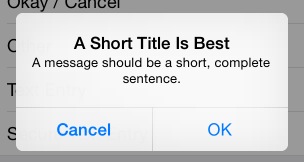
这是最普通的一个alertcontroller,一个取消按钮,一个确定按钮。
新的alertcontroller,其初始化方法也不一样了,按钮响应方法绑定使用了block方式,有利有弊。需要注意的是不要因为block导致了引用循环,记得使用__weak,尤其是使用到self。
上面的界面如下:
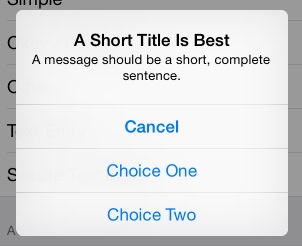
如果UIAlertAction *otherAction这种otherAction多几个的话,它会自动排列成如下:
另外,很多时候,我们需要在alertcontroller中添加一个输入框,例如输入密码:
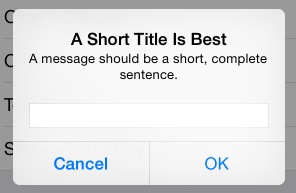
这时候可以添加如下代码:
 [alertController addTextFieldWithConfigurationHandler:^(UITextField *textField) {

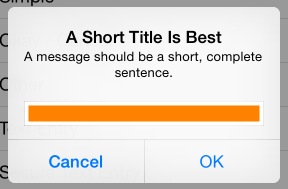
        // 可以在这里对textfield进行定制,例如改变背景色

        textField.backgroundColor = [UIColor orangeColor];

    }];
而改变背景色会这样:
完整的密码输入:
- (void)showSecureTextEntryAlert {

    NSString *title = NSLocalizedString(@"A Short Title Is Best", nil);

    NSString *message = NSLocalizedString(@"A message should be a short, complete sentence.", nil);

    NSString *cancelButtonTitle = NSLocalizedString(@"Cancel", nil);

    NSString *otherButtonTitle = NSLocalizedString(@"OK", nil);

    UIAlertController *alertController = [UIAlertController alertControllerWithTitle:title message:message preferredStyle:UIAlertControllerStyleAlert];

    // Add the text field for the secure text entry.

    [alertController addTextFieldWithConfigurationHandler:^(UITextField *textField) {

        // Listen for changes to the text field's text so that we can toggle the current

        // action's enabled property based on whether the user has entered a sufficiently

        // secure entry.

        [[NSNotificationCenter defaultCenter] addObserver:self selector:@selector(handleTextFieldTextDidChangeNotification:) name:UITextFieldTextDidChangeNotification object:textField];

        textField.secureTextEntry = YES;

    }];

    // Create the actions.

    UIAlertAction *cancelAction = [UIAlertAction actionWithTitle:cancelButtonTitle style:UIAlertActionStyleCancel handler:^(UIAlertAction *action) {

        NSLog(@"The \"Secure Text Entry\" alert's cancel action occured.");

        // Stop listening for text changed notifications.

        [[NSNotificationCenter defaultCenter] removeObserver:self name:UITextFieldTextDidChangeNotification object:alertController.textFields.firstObject];

    }];

    UIAlertAction *otherAction = [UIAlertAction actionWithTitle:otherButtonTitle style:UIAlertActionStyleDefault handler:^(UIAlertAction *action) {

        NSLog(@"The \"Secure Text Entry\" alert's other action occured.");

        // Stop listening for text changed notifications.

        [[NSNotificationCenter defaultCenter] removeObserver:self name:UITextFieldTextDidChangeNotification object:alertController.textFields.firstObject];

    }];

    // The text field initially has no text in the text field, so we'll disable it.

    otherAction.enabled = NO;

    // Hold onto the secure text alert action to toggle the enabled/disabled state when the text changed.

    self.secureTextAlertAction = otherAction;

    // Add the actions.

    [alertController addAction:cancelAction];

    [alertController addAction:otherAction];

    [self presentViewController:alertController animated:YES completion:nil];

}
注意四点:
1.添加通知,监听textfield内容的改变:
// Add the text field for the secure text entry.

    [alertController addTextFieldWithConfigurationHandler:^(UITextField *textField) {

        // Listen for changes to the text field's text so that we can toggle the current

        // action's enabled property based on whether the user has entered a sufficiently

        // secure entry.

        [[NSNotificationCenter defaultCenter] addObserver:self selector:@selector(handleTextFieldTextDidChangeNotification:) name:UITextFieldTextDidChangeNotification object:textField];

        textField.secureTextEntry = YES;

    }];
2.初始化时候,禁用“ok”按钮:
otherAction.enabled = NO;
self.secureTextAlertAction = otherAction;//定义一个全局变量来存储
3.当输入超过5个字符时候,使self.secureTextAlertAction = YES:
- (void)handleTextFieldTextDidChangeNotification:(NSNotification *)notification {

    UITextField *textField = notification.object;

    // Enforce a minimum length of >= 5 characters for secure text alerts.

    self.secureTextAlertAction.enabled = textField.text.length >= 5;

}
4.在“OK”action中去掉通知:
UIAlertAction *otherAction = [UIAlertAction actionWithTitle:otherButtonTitle style:UIAlertActionStyleDefault handler:^(UIAlertAction *action) {

        NSLog(@"The \"Secure Text Entry\" alert's other action occured.");

        // Stop listening for text changed notifications.

        [[NSNotificationCenter defaultCenter] removeObserver:self name:UITextFieldTextDidChangeNotification object:alertController.textFields.firstObject];

    }];
最后是以前经常是alertview与actionsheet结合使用,这里同样也有:
- (void)showOkayCancelActionSheet {

    NSString *cancelButtonTitle = NSLocalizedString(@"Cancel", nil);

    NSString *destructiveButtonTitle = NSLocalizedString(@"OK", nil);

    UIAlertController *alertController = [UIAlertController alertControllerWithTitle:nil message:nil preferredStyle:UIAlertControllerStyleActionSheet];

    // Create the actions.

    UIAlertAction *cancelAction = [UIAlertAction actionWithTitle:cancelButtonTitle style:UIAlertActionStyleCancel handler:^(UIAlertAction *action) {

        NSLog(@"The \"Okay/Cancel\" alert action sheet's cancel action occured.");

    }];

    UIAlertAction *destructiveAction = [UIAlertAction actionWithTitle:destructiveButtonTitle style:UIAlertActionStyleDestructive handler:^(UIAlertAction *action) {

        NSLog(@"The \"Okay/Cancel\" alert action sheet's destructive action occured.");

    }];

    // Add the actions.

    [alertController addAction:cancelAction];

    [alertController addAction:destructiveAction];

    [self presentViewController:alertController animated:YES completion:nil];

}
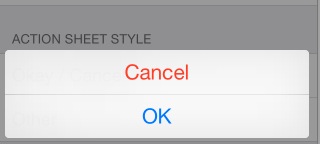
在底部显示如下:
好了,至此,基本就知道这个新的controller到底是怎样使用了。
UIActionViewController 详解 iOS8的更多相关文章
- UITextField使用详解
转iOS中UITextField使用详解 (1) //初始化textfield并设置位置及大小 UITextField *text = [[UITextField alloc]initWithFr ...
- IOS中表视图(UITableView)使用详解
IOS中UITableView使用总结 一.初始化方法 - (instancetype)initWithFrame:(CGRect)frame style:(UITableViewStyle)styl ...
- iOS开发——屏幕适配篇&Masonry详解
Masonry详解 前言 MagicNumber -> autoresizingMask -> autolayout 以上是纯手写代码所经历的关于页面布局的三个时期 在iphone1-ip ...
- iOS 开发之照片框架详解
转载自:http://kayosite.com/ios-development-and-detail-of-photo-framework.html 一. 概要 在 iOS 设备中,照片和视频是相当重 ...
- 《招一个靠谱的移动开发》iOS面试题及详解(下篇)
iOS面试知识点 现在进入本篇的正题.本篇的面试题是我认为比较好的iOS开发基础知识点,希望大家看过这后在理解的基础上掌握而不是死记硬背.死记硬背很快也会忘记的. 1 iOS基础 1.1 父类实现深拷 ...
- 了解iOS消息推送一文就够:史上最全iOS Push技术详解
本文作者:陈裕发, 腾讯系统测试工程师,由腾讯WeTest整理发表. 1.引言 开发iOS系统中的Push推送,通常有以下3种情况: 1)在线Push:比如QQ.微信等IM界面处于前台时,聊天消息和指 ...
- iOS百度地图简单使用详解
iOS百度地图简单使用详解 百度地图 iOS SDK是一套基于iOS 5.0及以上版本设备的应用程序接口,不仅提供展示地图的基本接口,还提供POI检索.路径规划.地图标注.离线地图.定位.周边雷达等丰 ...
- NSLayoutConstraint.constraintsWithVisualFormat详解,以及AlignAllCenterY
NSLayoutConstraint.constraintsWithVisualFormat详解,以及AlignAllCenterY 转载2015-07-08 18:02:02 鉴于苹果官方文档的解释 ...
- TableView 常用技巧与功能详解
分割线顶格iOS8 UITableview分割线顶格的做法 //iOS8 Cell分割线顶格 if ([_tableView respondsToSelector:@selector(setSepar ...
随机推荐
- mdk编译遇见的错误(LX4F120H),望各位指点迷津
程序如下 #define tBoolean int#define GPIO_PORTA_BASE g_pulGPIOBaseAddrs[0]#include "lib/gpio.h" ...
- Sublime_text3怎么运行php代码
开发神奇sublime写代码真的好爽,之前听说是神器,但是没去用,觉得用eclipse写php代码,用dw写html够用了,用了一下sublime,哈哈,爽爆了. 除了写前端代码外,还需要写php代码 ...
- Android 疑难杂症之获取listView Item上面组件的值
事实上思路就是又一次findById一次 获取当中组建的值.比方应用场景是 长按点击事件 获取目录名字 @Override public boolean onItemLongClick(Adapter ...
- 【Java基础】Jar包结构结构分析和操作具体解释
作者:郭嘉 邮箱:allenwells@163.com 博客:http://blog.csdn.net/allenwells github:https://github.com/AllenWell 一 ...
- oracle8
数据库管理 -- 管理表空间和数据文件 表空间是数据库的逻辑组成部分.从物理上讲,数据库数据存放在数据文件中:从逻辑上讲,数据库则是存放在表空间中,数据管理是以表空间管理的,表空间由一个或多个数据文件 ...
- Python初学记录
发音: 拍怂 语系:类C 特点: 1语句控制不用{}和(),而是强制用户空格或tab缩进.空格和tab数量不一定. 2解释性语言,不需要事先声明变量,即写即用. 3.list 列表可存放多种类型数据. ...
- 样式 style="clear:both"
<div style="clear:both"></div>clear:both该属性的值指出了不允许有浮动对象的边.通俗的讲:这段代码的做用是:清除同行元 ...
- Quarzt.NET的Cron表达式理解
网上关于Quarzt.NET的Cron表达式介绍有很多,但都是基本的语法,稍微深入一些的就没有了. 基本语法介绍请参看: http://www.cnblogs.com/lzrabbit/archive ...
- C#DbHelperOra,Oracle数据库帮助类 (转载)
主要功能如下数据访问抽象基础类 主要是访问Oracle数据库主要实现如下功能 .数据访问基础类(基于Oracle),主要是用来访问Oracle数据库的. .得到最大值:是否存在:是否存在(基于Orac ...
- getSharedPreferences()与getSharedPreferences()与getDefaultSharedPreferences()的区别
http://blog.csdn.net/ah200614435/article/details/7869681 一直迷惑于这三个方法的关系,最近忙完项目,好好的分析一下. 如果你熟悉Context那 ...