
ASP.NET MVC- JSON ,Jquery, State management and Asynch controllers
一、JSON MVC And JQuery
In case you are new to JSON please read this before moving ahead with this lab ,What is JSON ?.So in this lab we will expose a simple “Customer” object from MVC in JSON format and consume the same using Jquery. For this lab please ensure that the project is created by using basic project template so that the necessary Jquery libraries are included with the MVC project.

Step 1 :- Create a simple Customer model
So the first step is to create a simple “Customer” class in the MVC project.
    public class Customer

    {

        private string _CustomerCode;

        public string CustomerCode

        {

            get { return _CustomerCode; }

            set { _CustomerCode = value; }

        }

    }
Step 2 :- Expose Customer object as JSON
To expose the customer object in JSON format we need to use “JsonResult” as shown in the below code snippet.
public JsonResult getJson()

{

            Customer obj = new Customer();

            obj.CustomerCode = "c001";

            return Json(obj,JsonRequestBehavior.AllowGet);

}
Please do once run the controller withthe above JSON action to check if the JSON result is displayed properly. If you are using chrome the display comes on the browser , if its internet explorer it spits out a file.

Step 3 :- Consume the JSON controller in jquery
In case you are new to Jquery , please read this What is jquery ?
The next step is to consume the JSON data in Jquery using MVC view. So go ahead and add a view for example my view name is “LearnJquery.aspx”.
First thing add the Jquery library at the top of the ASPX page. In case you do not find jquery library in your project that means you have not created the MVC project using the basic template.
<script src="../../Scripts/jquery-1.8.2.js"></script>
You can then make a call the controller which is exposing in JSON format using “getJson” method as shown below. Its takes three parameters
- The first parameter in “getJson” is the MVC JSON URL with complete controller/action path format.
- The second parameter is the data to be passed. For now its NULL as we are more interesting in getting JSON data rather posting data.
- The last parameter is the call back method (“Display”) which will be invoked once we get the JSON data from the controller. The “Display” function is also available in the below code snippet. I am just putting an alert with the property name. FYI you can see how I have just typed “data.CustomerCode” , no parsing nothing the JSON data is automatically translated to javascript object.
$.getJSON("/Json/getJson", null, Display);

function Display(data)

{

      alert(data.CustomerCode);

}
The complete MVC view HTML looks as shown below. I have created a simple HTML button and on the click event I am calling a “getJson” javascript method which makes a call to the JSON controller and displays the JSON data in a javascript alert.
<script language="javascript">

        function getJson() {

            $.getJSON("/Json/getJson", null, Display);

            return true;

        }

        function Display(data)

        {

            alert(data.CustomerCode);

        }

</script>

<input type="button" value="See Json data" onclick="return getJson();"/>
This view I have invoked by using “DisplayJson” action.
public class JsonController : Controller

{

        public ActionResult DisplayJson()

        {

            return View("LearnJquery");

        }

}
Step 4 :- Run the application and see the data
After you have done all the hardwork its time to hit the “DisplayJson” action to see the beauty running.

二、Session management in MVC (ViewData,ViewBag,TempData and session variables)
The primary goal of MVC is to create web applications and web applications use HTTP protocol. Now HTTP protocol is a stateless by nature. So when you send a request to MVC application it serves the request and forgets about the request. Next time when the same user sends the request MVC treats that as a complete new request.
Now think about the below situation:-
- End user sends request to a MVC site.
- MVC sends a login page.
- User enters proper details and sends data to the MVC application.
- MVC validates the user and sends home page of the site. MVC application now forgets everything about the user as it’s stateless.
- Now user clicks on one of the home page links. This is sent to the MVC application and because MVC application has forgotten everything about the user, he sends a login page again for authentication….User would feel Weird…
In short we need to have some kind of mechanism which will help us to remember states between request and response of MVC.
There are 3 ways of maintaining states in MVC and these ways can be used depending from which layer to which layer you navigate.
Temp data: -Helps to maintain data on redirects for a single request and response. Now the redirects can be from controller to controller or from controller to view.

View data: - Helps to maintain data when you move from controller to view.
View Bag: - It’s a dynamic wrapper around view data. When you use “Viewbag” type casting is not required. It uses the dynamic keyword internally.
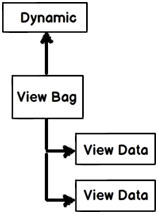
Session variables: - By using session variables we can maintain data until the browser closes.
Let’s demonstrate the above fundamental with a demo.
Step 1:- Create two controllers “DefaultController1” and “DefaultController2”.
Add two controllers “DefaultController1” and “DefaultController2”.
Step 2 :- Set Session , tempdata , viewdata and viewbag
In the “Default1Controller” in “Action1” we set session,tempdata,viewdata and viewbag values as shown in the below code snippet. Once we set the values we do a redirect to the action “SomeOtherAction” which belongs to “Controller2”.
public class Default1Controller : Controller

{

        // GET: /Default1/

        public ActionResult Action1()

        {

            Session["Session1"] = "UntilBrowserCloses";

            TempData["FortheFullRequest"] = "FortheFullRequest";

            ViewData["Myval"] = "ControllertoView";

            ViewBag.MyVal = "ControllertoView";

            return RedirectToAction("SomeOtherAction","Default2");

        }

}
Step 3:- Read Session,tempdata ,viewdata and viewbag values
In “Default2Controller” we will try to read values set in “Default1Controller”. Once the values are read we invoke a view called as “SomeView”.
Please note I am setting “ViewData” and “ViewBag” before redirecting to the view.
public class Default2Controller : Controller

    {

        // GET: /Default2/

        public ActionResult SomeOtherAction()

        {

           string str = Convert.ToString(TempData["FortheFullRequest"]);

           string str2 =  Session["Session1"].ToString();

           string str3 = Convert.ToString(ViewData["Myval"]);

           ViewData["Myval"] = "ControllertoView";

ViewBag.MyVal = "ControllertoViewCollection";

            return View("SomeView");

        }

    }
The “SomeView”view justdisplays the data present in “TempData” ,”ViewData” , “ViewBag” and “Session” .
<%= TempData["FortheFullRequest"] %><br />

<%= ViewData["Myval"] %><br />

<%=  Session["Session1"] %>

<%=  ViewBag.MyVal %>

<a href="/Default1/Action1">Click</a>
So let’s put debug points in both the controller actions and let’s hit Default1 controller and Action1 actionhttp://localhost:1203/Default1/Action1 . So in this action session,tempdata ,viewdata and viewbag are loaded. Below is how the watch window looks with data.

Now from here we are redirecting to controller2 action “SomeOtherAction”.
In controller2 you can see get “TempData” and “Session” variables but not “ViewBag” and “ViewData”( See “str3” and “str4” are set to null). In other words “ViewData” and “ViewBag” do not persist data in redirects while “TempData” and “Session” variables do.
I have set “ViewData” and “ViewBag” with some data again before invoking the view “SomeView”.

When the view gets invoked we can see all the data. In other words “ViewData” and “ViewBag” persist data from controller to view. And also tempdata and session have persisted data.

Now when the view invokes I have kept a click hyper link which invokes “Action1” from “Controller1”. This is to simulate a fresh request.


Below is a summary table which shows different mechanism of persistence.
| Maintains data between | ViewData/ViewBag | TempData ( For single request) | Session |
| Controller to Controller | NO | YES | YES |
| Controller to View | YES | YES | YES |
| View to Controller | NO | NO | YES |
ASP.NET MVC- JSON ,Jquery, State management and Asynch controllers的更多相关文章
- ASP.NET MVC使用jQuery来POST数据至数据库中
学习ASP.NET MVC程序,结合jQuery客户端代码,Post数据至数据库去.Insus.NET今天写一个完整性的例子. 在数据库中,创建一个表[dbo].[TestUser]: 既然是把数据存 ...
- asp.net mvc 接收jquery ajax发送的数组对象
<script type="text/javascript"> $(function () { var obj = { name: "军需品", m ...
- ASP.NET MVC使用jQuery实现Autocomplete
Insus.NET的以前的ASP.NET MVC的练习中,也有实现过Autocomplete的功能.依次是使用jQuery来实现. 首先在数据库准备一些数据: CREATE TABLE [dbo].[ ...
- ASP.NET MVC和jQuery DataTable整合
本文包含代码示例说明如何jQuery插件开发者可以集成到ASP.NET MVC应用程序. 下载源代码- 87.4 KB Introduction The jQuery DataTables plug- ...
- ASP.NET MVC 5 Jquery Validate
ClientValidationEnabled 在asp.net mvc 5中ClientValidationEnabled默认为TRUE,所以也不需要刻意去设置 应用ValidationAttrib ...
- ASP.NET MVC之Session State性能问题(七)
前言 这一节翻译一篇有关Session State性能问题的文章,非一字一句翻译. 话题 不知道我们在真实环境中是否用到了Session State特性,它主要用来当在同一浏览器发出多个请求时来存储数 ...
- Asp.NET MVC JSON序列化问题
最近在做项目的时候遇到一个JSON序列化问题. 环境:ASP.NET MVC 4.0 数据库:SQL 2008 在将获取的数据从后台以json的形式传给前台的easyui treegrid绑定的时候通 ...
- ASP.NET MVC使用jQuery无刷新上传
昨晚网友有下载了一个jQuery无刷新上传的小功能,他尝试搬至ASP.NET MVC应用程序中去,在上传死活无效果.Insus.NET使用Teamviewer远程桌面,操作一下,果真是有问题.网友是说 ...
- ASP.NET MVC中jQuery与angularjs混合应用传参并绑定数据
要求是这样子的,在一个列表页中,用户点击详细铵钮,带记录的主键值至另一页.在另一外页中,获取记录数据,然后显示此记录数据在网页上. 先用动图演示: 昨天有分享为ng-click传递参数 <ang ...
随机推荐
- 一些常用的jQuery插件
1. X-editable 这个插件能够让你在页面上创建可编辑的元素.它能够使用任何引擎(bootstrap.jquery-ui.jquery),并且包含弹出式和内联模式. 2. Garlic.js ...
- 在Python中调用C++,使用SWIG
http://www.coder4.com/archives/2141 SWIG:Simplified Wrapper and Interface Generator,顾名思义,就是将C/C++包装为 ...
- easyui源码翻译1.32--ComboTree(树形下拉框)
前言 扩展自$.fn.combo.defaults和$.fn.tree.defaults.使用$.fn.combotree.defaults重写默认值对象.下载该插件翻译源码 树形下拉框结合选择控件和 ...
- 用Unity3.0+MVC4搭建项目
新年快乐!又是新的一年到来了,我好久没有在园子里面做笔记啦,由于工作上的事,还好年前把该做的都完善了,于是就写了辞职信.由于家庭原因,不得不离职,在春节期间呢,我放松了几天,去这里去那里的,朋友们喜欢 ...
- Java从入门到精通(一)
Java编程可以分为三个方向 ① Java se (j2se) 桌面开发 ② Java ee (j2ee) WEB开发 ③ Java me (j2me) 手机开发 java se 是基础中的基础 Ja ...
- Sublime Text 插件 autoprefixer
Sublime Text 早就有插件(Sublime Prefixr)使用 prefixr 的 API 来自动完成 CSS 前缀,但是 autoprefixer 更牛,这款可使用 Can I Use ...
- 关于JQuery与AJAX验证
AJAX验证,其实就是JS代码,他就是先利用Jquery或JS获取一个值,然后偷偷的把值传送到验证界面,然后在偷偷的把验证后的结果给传回来,利用传回来的结果在进行JS判断,从而不会刷新界面. 用图片解 ...
- .net,sessionState的Session共享问题解决方案
最近项目因为要负载均衡所以就使用了sessionState的Session共享,但是却发现多台服务器中有个别服务器的Session没有共享,于是就有了这篇文章,下面开始说说. 这个基本上就分两种情况: ...
- spring3 mvc使用注解方式时,不能扫描jar包里面的类
使用eclipse export工具时选中Add directory entries可以解决.
- 深入理解OAuth2.0
1. 引言 如果你开车去酒店赴宴,你经常会苦于找不到停车位而耽误很多时间.是否有好办法可以避免这个问题呢?有的,听说有一些豪车的车主就不担心这个问题.豪车一般配备两种钥匙:主钥匙和泊车钥匙.当你到酒店 ...