
java.sql.SQLException: The server time zone value '�й���ʱ��' is unrecognized or represents more than one time zone.
java.sql.SQLException: The server time zone value '�й���ʱ��' is unrecognized or represents more than one time zone. You must configure either the server or JDBC driver (via the serverTimezone configuration property) to use a more specifc time zone value if you want to utilize time zone support.
at com.mysql.cj.jdbc.exceptions.SQLError.createSQLException(SQLError.java:129) ~[mysql-connector-java-8.0.16.jar:8.0.16]
at com.mysql.cj.jdbc.exceptions.SQLError.createSQLException(SQLError.java:97) ~[mysql-connector-java-8.0.16.jar:8.0.16]
at com.mysql.cj.jdbc.exceptions.SQLError.createSQLException(SQLError.java:89) ~[mysql-connector-java-8.0.16.jar:8.0.16]
at com.mysql.cj.jdbc.exceptions.SQLError.createSQLException(SQLError.java:63) ~[mysql-connector-java-8.0.16.jar:8.0.16]
at com.mysql.cj.jdbc.exceptions.SQLError.createSQLException(SQLError.java:73) ~[mysql-connector-java-8.0.16.jar:8.0.16]
at com.mysql.cj.jdbc.exceptions.SQLExceptionsMapping.translateException(SQLExceptionsMapping.java:76) ~[mysql-connector-java-8.0.16.jar:8.0.16]
at com.mysql.cj.jdbc.ConnectionImpl.createNewIO(ConnectionImpl.java:835) ~[mysql-connector-java-8.0.16.jar:8.0.16]
at com.mysql.cj.jdbc.ConnectionImpl.<init>(ConnectionImpl.java:455) ~[mysql-connector-java-8.0.16.jar:8.0.16]
at com.mysql.cj.jdbc.ConnectionImpl.getInstance(ConnectionImpl.java:240) ~[mysql-connector-java-8.0.16.jar:8.0.16]
at com.mysql.cj.jdbc.NonRegisteringDriver.connect(NonRegisteringDriver.java:199) ~[mysql-connector-java-8.0.16.jar:8.0.16]
at com.zaxxer.hikari.util.DriverDataSource.getConnection(DriverDataSource.java:136) ~[HikariCP-3.2.0.jar:na]
at com.zaxxer.hikari.pool.PoolBase.newConnection(PoolBase.java:369) ~[HikariCP-3.2.0.jar:na]
at com.zaxxer.hikari.pool.PoolBase.newPoolEntry(PoolBase.java:198) ~[HikariCP-3.2.0.jar:na]
at com.zaxxer.hikari.pool.HikariPool.createPoolEntry(HikariPool.java:467) [HikariCP-3.2.0.jar:na]
at com.zaxxer.hikari.pool.HikariPool.checkFailFast(HikariPool.java:541) [HikariCP-3.2.0.jar:na]
at com.zaxxer.hikari.pool.HikariPool.<init>(HikariPool.java:115) [HikariCP-3.2.0.jar:na]
at com.zaxxer.hikari.HikariDataSource.getConnection(HikariDataSource.java:112) [HikariCP-3.2.0.jar:na]
at org.springframework.jdbc.datasource.DataSourceUtils.fetchConnection(DataSourceUtils.java:157) [spring-jdbc-5.1.7.RELEASE.jar:5.1.7.RELEASE]
at org.springframework.jdbc.datasource.DataSourceUtils.doGetConnection(DataSourceUtils.java:115) [spring-jdbc-5.1.7.RELEASE.jar:5.1.7.RELEASE]
at org.springframework.jdbc.datasource.DataSourceUtils.getConnection(DataSourceUtils.java:78) [spring-jdbc-5.1.7.RELEASE.jar:5.1.7.RELEASE]
at org.springframework.jdbc.core.JdbcTemplate.execute(JdbcTemplate.java:323) [spring-jdbc-5.1.7.RELEASE.jar:5.1.7.RELEASE]
at org.springframework.boot.jdbc.EmbeddedDatabaseConnection.isEmbedded(EmbeddedDatabaseConnection.java:123) [spring-boot-2.1.5.RELEASE.jar:2.1.5.RELEASE]
at org.springframework.boot.autoconfigure.orm.jpa.DataSourceInitializedPublisher.lambda$isInitializingDatabase$0(DataSourceInitializedPublisher.java:114) [spring-boot-autoconfigure-2.1.5.RELEASE.jar:2.1.5.RELEASE]
at org.springframework.boot.autoconfigure.orm.jpa.HibernateSettings.getDdlAuto(HibernateSettings.java:41) ~[spring-boot-autoconfigure-2.1.5.RELEASE.jar:2.1.5.RELEASE]
at org.springframework.boot.autoconfigure.orm.jpa.HibernateProperties.determineDdlAuto(HibernateProperties.java:130) ~[spring-boot-autoconfigure-2.1.5.RELEASE.jar:2.1.5.RELEASE]
at org.springframework.boot.autoconfigure.orm.jpa.HibernateProperties.getAdditionalProperties(HibernateProperties.java:99) ~[spring-boot-autoconfigure-2.1.5.RELEASE.jar:2.1.5.RELEASE]
at org.springframework.boot.autoconfigure.orm.jpa.HibernateProperties.determineHibernateProperties(HibernateProperties.java:91) ~[spring-boot-autoconfigure-2.1.5.RELEASE.jar:2.1.5.RELEASE]
at org.springframework.boot.autoconfigure.orm.jpa.DataSourceInitializedPublisher.isInitializingDatabase(DataSourceInitializedPublisher.java:116) [spring-boot-autoconfigure-2.1.5.RELEASE.jar:2.1.5.RELEASE]
at org.springframework.boot.autoconfigure.orm.jpa.DataSourceInitializedPublisher.publishEventIfRequired(DataSourceInitializedPublisher.java:96) [spring-boot-autoconfigure-2.1.5.RELEASE.jar:2.1.5.RELEASE]
at org.springframework.boot.autoconfigure.orm.jpa.DataSourceInitializedPublisher.postProcessAfterInitialization(DataSourceInitializedPublisher.java:88) [spring-boot-autoconfigure-2.1.5.RELEASE.jar:2.1.5.RELEASE]
at org.springframework.beans.factory.support.AbstractAutowireCapableBeanFactory.applyBeanPostProcessorsAfterInitialization(AbstractAutowireCapableBeanFactory.java:429) ~[spring-beans-5.1.7.RELEASE.jar:5.1.7.RELEASE]
at org.springframework.beans.factory.support.AbstractAutowireCapableBeanFactory.initializeBean(AbstractAutowireCapableBeanFactory.java:1782) ~[spring-beans-5.1.7.RELEASE.jar:5.1.7.RELEASE]
at org.springframework.beans.factory.support.AbstractAutowireCapableBeanFactory.doCreateBean(AbstractAutowireCapableBeanFactory.java:593) ~[spring-beans-5.1.7.RELEASE.jar:5.1.7.RELEASE]
at org.springframework.beans.factory.support.AbstractAutowireCapableBeanFactory.createBean(AbstractAutowireCapableBeanFactory.java:515) ~[spring-beans-5.1.7.RELEASE.jar:5.1.7.RELEASE]
at org.springframework.beans.factory.support.AbstractBeanFactory.lambda$doGetBean$0(AbstractBeanFactory.java:320) ~[spring-beans-5.1.7.RELEASE.jar:5.1.7.RELEASE]
at org.springframework.beans.factory.support.DefaultSingletonBeanRegistry.getSingleton(DefaultSingletonBeanRegistry.java:222) ~[spring-beans-5.1.7.RELEASE.jar:5.1.7.RELEASE]
at org.springframework.beans.factory.support.AbstractBeanFactory.doGetBean(AbstractBeanFactory.java:318) ~[spring-beans-5.1.7.RELEASE.jar:5.1.7.RELEASE]
at org.springframework.beans.factory.support.AbstractBeanFactory.getBean(AbstractBeanFactory.java:199) ~[spring-beans-5.1.7.RELEASE.jar:5.1.7.RELEASE]
at org.springframework.context.support.AbstractApplicationContext.getBean(AbstractApplicationContext.java:1105) ~[spring-context-5.1.7.RELEASE.jar:5.1.7.RELEASE]
at org.springframework.context.support.AbstractApplicationContext.finishBeanFactoryInitialization(AbstractApplicationContext.java:867) ~[spring-context-5.1.7.RELEASE.jar:5.1.7.RELEASE]
at org.springframework.context.support.AbstractApplicationContext.refresh(AbstractApplicationContext.java:549) ~[spring-context-5.1.7.RELEASE.jar:5.1.7.RELEASE]
at org.springframework.boot.web.servlet.context.ServletWebServerApplicationContext.refresh(ServletWebServerApplicationContext.java:142) ~[spring-boot-2.1.5.RELEASE.jar:2.1.5.RELEASE]
at org.springframework.boot.SpringApplication.refresh(SpringApplication.java:775) ~[spring-boot-2.1.5.RELEASE.jar:2.1.5.RELEASE]
at org.springframework.boot.SpringApplication.refreshContext(SpringApplication.java:397) ~[spring-boot-2.1.5.RELEASE.jar:2.1.5.RELEASE]
at org.springframework.boot.SpringApplication.run(SpringApplication.java:316) ~[spring-boot-2.1.5.RELEASE.jar:2.1.5.RELEASE]
at org.springframework.boot.SpringApplication.run(SpringApplication.java:1260) ~[spring-boot-2.1.5.RELEASE.jar:2.1.5.RELEASE]
at org.springframework.boot.SpringApplication.run(SpringApplication.java:1248) ~[spring-boot-2.1.5.RELEASE.jar:2.1.5.RELEASE]
at crawler.JdCrawlerApplication.main(JdCrawlerApplication.java:10) ~[classes/:na]
Caused by: com.mysql.cj.exceptions.InvalidConnectionAttributeException: The server time zone value '�й���ʱ��' is unrecognized or represents more than one time zone. You must configure either the server or JDBC driver (via the serverTimezone configuration property) to use a more specifc time zone value if you want to utilize time zone support.
at sun.reflect.NativeConstructorAccessorImpl.newInstance0(Native Method) ~[na:1.8.0_162]
at sun.reflect.NativeConstructorAccessorImpl.newInstance(NativeConstructorAccessorImpl.java:62) ~[na:1.8.0_162]
at sun.reflect.DelegatingConstructorAccessorImpl.newInstance(DelegatingConstructorAccessorImpl.java:45) ~[na:1.8.0_162]
at java.lang.reflect.Constructor.newInstance(Constructor.java:423) ~[na:1.8.0_162]
at com.mysql.cj.exceptions.ExceptionFactory.createException(ExceptionFactory.java:61) ~[mysql-connector-java-8.0.16.jar:8.0.16]
at com.mysql.cj.exceptions.ExceptionFactory.createException(ExceptionFactory.java:85) ~[mysql-connector-java-8.0.16.jar:8.0.16]
at com.mysql.cj.util.TimeUtil.getCanonicalTimezone(TimeUtil.java:132) ~[mysql-connector-java-8.0.16.jar:8.0.16]
at com.mysql.cj.protocol.a.NativeProtocol.configureTimezone(NativeProtocol.java:2243) ~[mysql-connector-java-8.0.16.jar:8.0.16]
at com.mysql.cj.protocol.a.NativeProtocol.initServerSession(NativeProtocol.java:2267) ~[mysql-connector-java-8.0.16.jar:8.0.16]
at com.mysql.cj.jdbc.ConnectionImpl.initializePropsFromServer(ConnectionImpl.java:1319) ~[mysql-connector-java-8.0.16.jar:8.0.16]
at com.mysql.cj.jdbc.ConnectionImpl.connectOneTryOnly(ConnectionImpl.java:966) ~[mysql-connector-java-8.0.16.jar:8.0.16]
at com.mysql.cj.jdbc.ConnectionImpl.createNewIO(ConnectionImpl.java:825) ~[mysql-connector-java-8.0.16.jar:8.0.16]
... 41 common frames omitted
在使用爬虫进行爬取数据的时候,因为没有设置好serverTimezone=UTC
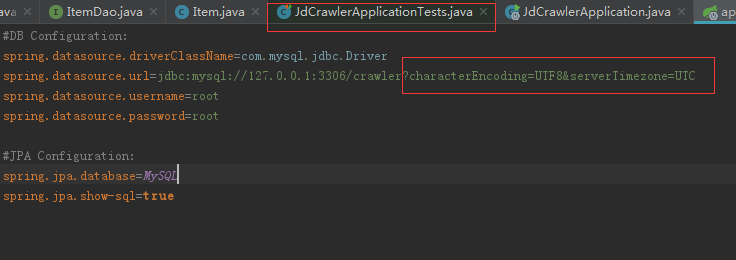
然后就会出现上面的异常
java.sql.SQLException: The server time zone value '�й���ʱ��' is unrecognized or represents more than one time zone.的更多相关文章
- MySQL连接数据库报时区错误:java.sql.SQLException: The server time zone value
连接MySQL数据库时报以下时区错误信息: java.sql.SQLException: The server time zone value '�й���ʱ��' is unrecognized ...
- 连接mysql数据库报错java.sql.SQLException: The server time zone value '�й���ʱ��' is unrecognized...解决方法
今天连接mysql数据库报错如下: java.sql.SQLException: The server time zone value '�й���ʱ��' is unrecognized or r ...
- MySql数据库时区异常,java.sql.SQLException: The server time zone value '?й???׼ʱ?' is unrecognized or represents more than one time zone.
JDBC访问MySql异常 Exception in thread "main" org.apache.ibatis.exceptions.PersistenceException ...
- 【JDBC】java.sql.SQLException: The server time zone value 'Öйú±ê׼ʱ¼ä' is unrecognized or represents more than one time zone.
在使用阿里的druid 时,报了一个异常java.sql.SQLException: The server time zone value 'Öйú±ê׼ʱ¼ä' is unrecognized ...
- 解决java.sql.SQLException: The server time zone value 'Öйú±ê׼ʱ¼ä' is unrecognized or represents more than one time zone
使用spring boot整合MySQL时一直报 java.sql.SQLException: The server time zone value 'Öйú±ê׼ʱ¼ä' is unrecog ...
- java.sql.SQLException: The server time zone value 'Öйú±ê׼ʱ¼ 解决方案
//第一个异常 Loading class `com.mysql.jdbc.Driver'. This is deprecated. The new driver class is `com.mysq ...
- JDBC连接数据库报错:java.sql.SQLException: The server time zone value 'Öйú±ê׼ʱ¼ä' is unrecognized or represents more than one time zone. ......
问题:Java程序使用JDBC连接MySQL数据库时,控制台报错如下: java.sql.SQLException: The server time zone value 'Öйú±ê׼ʱ¼ä' ...
- Exception in thread “main” java.sql.SQLException: The server time zone value ‘�й���ʱ��’ is unrecognized or represents more than one time zone.
Exception in thread “main” java.sql.SQLException: The server time zone value ‘�й���ʱ��’ is unrecogn ...
- java.sql.SQLException: The server time zone value 'Öйú±ê׼ʱ¼ä' is unrecognized
Exception in thread "main" java.sql.SQLException: The server time zone value 'Öйú±ê׼ʱ¼ä ...
- 【MySQL】java.sql.SQLException: The server time zone value
错误:Could not open JDBC Connection for transaction; nested exception is java.sql.SQLException: The se ...
随机推荐
- (CSDN 迁移) JAVA多线程实现-支持定时与周期性任务的线程池(newScheduledThreadPool)
前几篇文章中分别介绍了 单线程化线程池(newSingleThreadExecutor) 可控最大并发数线程池(newFixedThreadPool) 可回收缓存线程池(newCachedThread ...
- Oracle Spatial分区应用研究之八:不同分区粒度在1.5亿要素量级下的查询性能
以土地调查地类图斑层作为测试数据,共计约1.5亿条要素.随机生成90次各比例尺的查询范围,在ORACLE 11gr2数据库中进行空间查询,记录查询耗时.最后计算平均值和第90百分位数,结果如下图所示: ...
- POJ 2386 DFS深搜入门
题目链接 Time Limit: 1000MS Memory Limit: 65536K Description Due to recent rains, water has pooled in va ...
- 基于C++ STL sort函数对c++ string 进行字符串的局部排序
Paypal笔试挂了,因为好久没有在leedcode之类的网上写代码,字符输入调了半天,时间都用光了.... Description: 有一个字符串,现在对其进行多次局部排序,例如str=" ...
- Debian系Linux源码安装Redis5.0.6
一,先在官网下载源码包:https://redis.io/download 二,解压源码包,并cd到解压后的目录: 三,执行make MALLOC=libc: 接着cd src[解压的目录里有这个子目 ...
- Data-Structure-Notes
Data Structure Notes Chapter-1 Sorting Algorithm Selection Sorting: /* * Selection Sort */ template& ...
- TCP/IP详解 IP路由选择
TCP/IP详解 IP路由选择 在本篇文章当中, 将通过例子来说明IP路由选择器过程 如图所示, 主机A与主机B分别是处在两个不同的子网当中, 中间通过一个路由连接. 如果主机A请求与主机B进行通行, ...
- Golang 传递任意类型的切片
肯定有这样的一种场景,写一个函数,该函数可以接收任意类型的切片,完成相应的功能. 就好比这种情况 intSlice := []int{1,2,3,4,5,6,7,8} strSlice := []st ...
- python递归函数和河内塔问题
关于递归函数: 函数内部调用自身的函数. 以n阶乘为例: f(n) = n ! = 1 x 2 x 3 x 4 x...x(n-1)x(n) = n x (n-1) ! def factorial(n ...
- 客开监控(BE/UI/BP)插件停用与启用
1.单据界面右键属性,获取当前客开监控页面URL连接:http://172.16.168.15/U9/erp/display.aspx?lnk=UFSoft.UBF.Cust.CustManager& ...