
编程风格统一配置EditorConfig
EditorConfig 以纯原生无需任何插件支持 EditorConfig 代码风格配置的编辑器:
Visual Studio 2017 开始添加了对 EditorConfig 的原生支持。Visual Studio 一旦检测到 .editorconfig 文件的存在,格式约定就会自动生效。
Visual Studio 中 .NET 相关语言(C# VB)的 EditorConfig 属性,可以参考 .NET coding convention settings For EditorConfig。
设置EditorConfig所需插件: EditorConfig Language Service 和 Visual Studio IntelliCode。
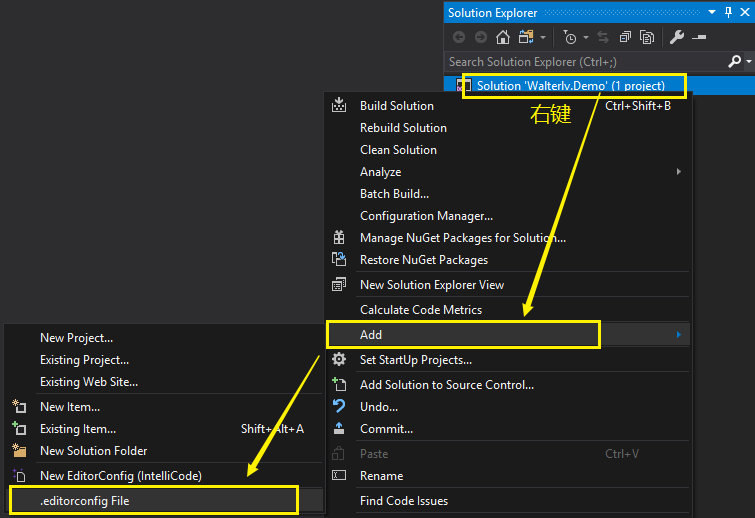
EditorConfig Language Service 生成的 .editorconfig 文件是空的。
IntelliCode 一经添加便提供了丰富的 C# 语言约定的属性设置。不过,IntelliCode 提供的设置多少取决于你目前解决方案中的项目类型。
如果你使用 EditorConfig Language Service 生成了 .editorconfig 文件,则可以继续点击小灯泡生成按照微软约定的编程规范。
C#简单配置:
[*]

end_of_line = crlf

charset = utf-

indent_size =

insert_final_newline = true

trim_trailing_whitespace = true

indent_style = space

[*.cs]

csharp_indent_case_contents = true

csharp_indent_case_contents_when_block = true

csharp_indent_labels = flush_left

csharp_indent_switch_labels = true

csharp_new_line_before_catch = true

csharp_new_line_before_else = true

csharp_new_line_before_finally = true

csharp_new_line_before_members_in_anonymous_types = true

csharp_new_line_before_members_in_object_initializers = true

csharp_new_line_before_open_brace = all

csharp_new_line_between_query_expression_clauses = true

csharp_preferred_modifier_order = public,private,protected,internal,static,extern,new,virtual,abstract,sealed,override,readonly,unsafe,volatile,async:suggestion

csharp_prefer_braces = true:silent

csharp_prefer_simple_default_expression = true:suggestion

csharp_style_deconstructed_variable_declaration = true:suggestion

csharp_preserve_single_line_blocks = true

csharp_preserve_single_line_statements = true

csharp_space_after_cast = false

csharp_space_after_colon_in_inheritance_clause = true

csharp_space_after_keywords_in_control_flow_statements = true

csharp_space_around_binary_operators = before_and_after

csharp_space_before_colon_in_inheritance_clause = true

csharp_space_between_method_call_empty_parameter_list_parentheses = false

csharp_space_between_method_call_name_and_opening_parenthesis = false

csharp_space_between_method_call_parameter_list_parentheses = false

csharp_space_between_method_declaration_empty_parameter_list_parentheses = false

csharp_space_between_method_declaration_parameter_list_parentheses = false

csharp_space_between_parentheses = false

csharp_style_conditional_delegate_call = true:suggestion

csharp_style_expression_bodied_accessors = true:silent

csharp_style_expression_bodied_constructors = false:silent

csharp_style_expression_bodied_indexers = true:silent

csharp_style_expression_bodied_methods = false:silent

csharp_style_expression_bodied_operators = false:silent

csharp_style_expression_bodied_properties = true:silent

csharp_style_inlined_variable_declaration = true:suggestion

csharp_style_pattern_local_over_anonymous_function = true:suggestion

csharp_style_pattern_matching_over_as_with_null_check = true:suggestion

csharp_style_pattern_matching_over_is_with_cast_check = true:suggestion

csharp_style_throw_expression = true:suggestion

csharp_style_var_elsewhere = true:silent

csharp_style_var_for_built_in_types = true:silent

csharp_style_var_when_type_is_apparent = true:silent
编程风格统一配置EditorConfig的更多相关文章
- 浅谈前端JavaScript编程风格
前言 多家公司和组织已经公开了它们的风格规范,详细可參阅jscs.info,以下的内容主要參考了Airbnb的JavaScript风格规范.当然还有google的编程建议等编程风格 本章探讨怎样使用E ...
- 《Essential C++》读书笔记 之 基于对象编程风格
<Essential C++>读书笔记 之 基于对象编程风格 2014-07-13 4.1 如何实现一个class 4.2 什么是Constructors(构造函数)和Destructor ...
- 【Spring】SpringMVC之REST编程风格
REST架构是一个抽象的概念,目前主要是基于HTTP协议实现,其目的是为了提高系统的可伸缩性.降低应用之间的耦合度.便于架构分布式处理程序.当使用多种语言进行开发的时候,每一种语言对URL的处理不同, ...
- [转]ECMAScript 6 入门 -编程风格
本文转自:http://es6.ruanyifeng.com/#docs/style 编程风格 块级作用域 字符串 解构赋值 对象 数组 函数 Map结构 Class 模块 ESLint的使用 本章探 ...
- ES6学习笔记(二十一)编程风格
本章探讨如何将 ES6 的新语法,运用到编码实践之中,与传统的 JavaScript 语法结合在一起,写出合理的.易于阅读和维护的代码. 1.块级作用域 (1)let 取代 var ES6 提出了两个 ...
- 个人c语言编程风格总结
总结一下我个人的编程风格及这样做的原因吧,其实是为了给实验室写一个统一的C语言编程规范才写的.首先声明,我下面提到的编程规范,是自己给自己定的,不是c语言里面规定的. 一件事情,做成和做好中间可能隔了 ...
- Google Java编程风格指南
出处:http://hawstein.com/posts/google-java-style.html 声明:本文采用以下协议进行授权: 自由转载-非商用-非衍生-保持署名|Creative Comm ...
- Google Java编程风格指南中文版
作者:Hawstein出处:http://hawstein.com/posts/google-java-style.html声明:本文采用以下协议进行授权: 自由转载-非商用-非衍生-保持署名|Cre ...
- Java学习笔记(六)——google java编程风格指南(下)
[前面的话] 年后开始正式上班,计划着想做很多事情,但是总会有这样那样的打扰,不知道是自己要求太高还是自我的奋斗意识不够?接下来好好加油.好好学学技术,好好学习英语,好好学习做点自己喜欢的事情,趁着自 ...
随机推荐
- ES开启慢查询日志
默认情况,慢日志是不开启的.要开启它,需要定义具体动作(query,fetch 还是 index),你期望的事件记录等级( WARN.INFO.DEBUG.TRACE 等),以及时间阈值. es有几种 ...
- PV、TPS、QPS是怎么计算出来的?(转载的)
QPS = req/sec = 请求数/秒 [QPS计算PV和机器的方式] QPS统计方式 [一般使用 http_load 进行统计] QPS = 总请求数 / ( 进程总数 * 请求时间 ) QPS ...
- java 欢迎页 主页 设置为servlet的方法
[参考]Java Web 设置默认首页 [参考]设置servlet或action作为欢迎页面 1. 使用HTML<meta>标签跳转至servlet <META HTTP-EQUI ...
- openvswitch2.11.0修改源码后重新编译
一:推文 https://www.jianshu.com/p/923f49c290f5(可以删除运行当中的DataPath内核) https://github.com/ebiken/doc-netwo ...
- IIS6远程代码执行漏洞复现CVE-2017-7269
简述 CVE-2017-7269是IIS 6.0中存在的一个栈溢出漏洞,在IIS6.0处理PROPFIND指令的时候,由于对url的长度没有进行有效的长度控制和检查,导致执行memcpy对虚拟路径进行 ...
- SpringBoot小技巧:Jar包换War包
SpringBoot小技巧:Jar包换War包 情景 我们都知道springBoot中已经内置了tomcat,是不需要我们额外的配置tomcat服务器的,但是有时这也可能是我们的一个瓶颈,因为如果我们 ...
- AIX日志相关的命令
常用的命令有: 1.列出简短的出错信息 errpt | more 2.列出所有硬件出错信息 errpt -d H 3.列出所有软件错误信息 errpt -d S 4.列出详细的出错信息 errpt – ...
- 【ARM-Linux开发】Linux模块机制浅析
Linux模块机制浅析 Linux允许用户通过插入模块,实现干预内核的目的.一直以来,对linux的模块机制都不够清晰,因此本文对内核模块的加载机制进行简单地分析. 模块的Hello World! ...
- HTML、css、javascript、DOM编程
HTML.css.javascript.DOM编程 一.Html 1.1html概述 Html就是超文本标记语言的简写,是最基础的网页语言,其代码都是由标签所组成,是通过标签来定义的语言,代码不需要区 ...
- 局域网-断网&劫持(kali)
1.查看局域网中的主机 fping –asg 192.168.1.0/24 2.断网 arpspoof -i wlan0 -t 192.168.100 192.168.1.1 (arpspoof - ...