
SSH——ssh_exchange_identification: read: Connection reset by peer
前言
ssh远程连接出错
步骤
查看ssh的详细信息
[root@pre-nginx02 ~]# ssh -v 192.168.1.164

OpenSSH_6.6.1, OpenSSL 1.0.1e-fips 11 Feb 2013

debug1: Reading configuration data /etc/ssh/ssh_config

debug1: /etc/ssh/ssh_config line 56: Applying options for *

debug1: Connecting to 192.168.1.164 [192.168.1.164] port 22.

debug1: Connection established.

debug1: permanently_set_uid: 0/0

debug1: identity file /root/.ssh/id_rsa type -1

debug1: identity file /root/.ssh/id_rsa-cert type -1

debug1: identity file /root/.ssh/id_dsa type -1

debug1: identity file /root/.ssh/id_dsa-cert type -1

debug1: identity file /root/.ssh/id_ecdsa type -1

debug1: identity file /root/.ssh/id_ecdsa-cert type -1

debug1: identity file /root/.ssh/id_ed25519 type -1

debug1: identity file /root/.ssh/id_ed25519-cert type -1

debug1: Enabling compatibility mode for protocol 2.0

debug1: Local version string SSH-2.0-OpenSSH_6.6.1

ssh_exchange_identification: read: Connection reset by peer
配置远程服务器
远程服务器即ssh连接的服务器,配置/etc/hosts.allow文件
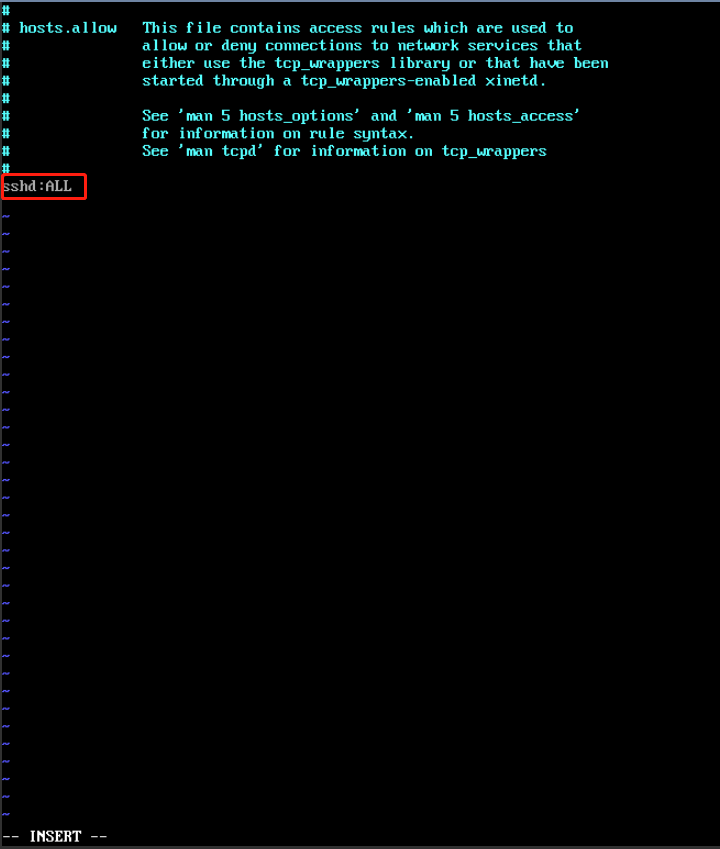
重启sshd服务

SSH——ssh_exchange_identification: read: Connection reset by peer的更多相关文章
- 【SSH错误】ssh_exchange_identification: read: Connection reset by peer
进行远程登录时,ssh root@xxxxxxxxx出现如下错误 ssh_exchange_identification: read: Connection reset by peer 解决方案:登录 ...
- 解决ssh_exchange_identification:read connection reset by peer 原因
服务器改了密码,试过密码多次后出现: ssh_exchange_identification: read: Connection reset by peer 可以通过ssh -v查看连接时详情 Ope ...
- ssh_exchange_identification: read: Connection reset by peer 解决思路
版权声明:本文为博主原创文章,遵循 CC 4.0 BY-SA 版权协议,转载请附上原文出处链接和本声明. 本文链接:https://blog.csdn.net/Jdk_yxs/article/deta ...
- ssh_exchange_identification: read: Connection reset by peer解决办法
使用本地终端连接centos服务器,提示ssh_exchange_identification: read: Connection reset by peer $ssh root@10.xxx.xxx ...
- [未解决]报错:ssh_exchange_identification: read: Connection reset by peer
报错代码: ssh_exchange_identification: read: Connection reset by peer fatal: 无法读取远程仓库. 请确认您有正确的访问权限并且仓库存 ...
- 登录ssh提示:ssh_exchange_identification: read: Connection reset by peer error
vim /etc/hosts.allow 添加 sshd : ALL
- ssh_exchange_identification: read: Connection reset by peer
vim /etc/hosts.deny 删除ip 借鉴:https://www.sunnyos.com/article-show-81.html
- (原)Ubuntu连接远程服务器时connection reset by peer
转载请注明出处: https://www.cnblogs.com/darkknightzh/p/11086935.html 最近使用ubuntu通过ssh连接服务器时,由于密码错误,多次连接失败后,在 ...
- SSH error ( Read from socket failed: Connection reset by peer ) and it's solution
SSH error ( Read from socket failed: Connection reset by peer ) and it's solution ssh cann't connect ...
随机推荐
- eclipse项目有红色感叹号
1.依赖有问题 找到build path 点击configure build path 点击libraries 找到有红叉的包,然后选中移除 2.引用的包有问题 利用maven引用的包出现问题,有的包 ...
- .NET Core 之 Nancy 基本使用
Nancy简介 Nancy是一个轻量级的独立的框架,下面是官网的一些介绍: Nancy 是一个轻量级用于构建基于 HTTP 的 Web 服务,基于 .NET 和 Mono 平台,框架的目标是保持尽可能 ...
- 'cross-env' 不是内部或外部命令,也不是可运行的程序 或批处理文件。 npm ERR! code ELIFECYCLE npm ERR! errno 1
在建立vue项目时报的错误 原因是缺少依赖,在此项目目录下下载依赖即可 cnpm install 发一次建立vue项目的完整顺序吧 //打开要创建的项目路径目录,创建项目 vue init webpa ...
- C++—lambda表达式+优先队列 prority_queue+关键字decltype
合并 k 个排序链表,返回合并后的排序链表.请分析和描述算法的复杂度. 示例: 输入:[ 1->4->5, 1->3->4, 2->6]输出: 1->1-&g ...
- 全栈项目|小书架|微信小程序-登录回调及获取点赞列表功能
效果图 这一节介绍,登录回调 以及 喜欢列表 的实现. 登录回调:这里是指在获取登录完成之后,再进行下一步的操作. 比如效果图中我的页面,默认是未登录状态,积分和喜欢列表的数量都没有获取到. 而登录成 ...
- jquery跨js文件调用函数示例
var common_func; (function() { common_func = { load_hot_data: function(AreaCode) { var hot_html = &q ...
- 2)NET CORE特性与优势
先看看netcore有哪些特性,哪些优点,与.net frameworkd 差异吧: l 跨平台: 可以在 Windows.macOS 和 Linux 操作系统上运行. l 跨体系结构保持一致: ...
- The underlying connection was closed: An unexpected error occurred on a rece
服务器问题,在后台访问外网了,特别是https的网站,容易出这个问题. 修改服务器配置,或修改代码解决.
- 执行kubectl create-f replicaset.yaml后k8s是如何工作的
参考:提高 kubectl 使用生产力[译] 英文原文:https://learnk8s.io/blog/kubectl-productivity/ Kubernetes 架构 Kubernetes ...
- vsftp 安装配置(被动模式)
vi /etc/vsftpd/vsftpd.conf vsftp配置末尾添加 pasv_enable=YES pasv_min_port=10000 pasv_max_port=10030 防火墙端口 ...