
HTML基础五-starrysky页面动起来
Starrysky前端框架
链接:https://pan.baidu.com/s/1P8mPrHZjyRtzw1NWnAx-9w
提取码:cjl5
接口文档:https://www.showdoc.cc/xinghan
Element开发组件
https://element.eleme.cn/#/zh-CN
1、启动前端页面
打开index.html
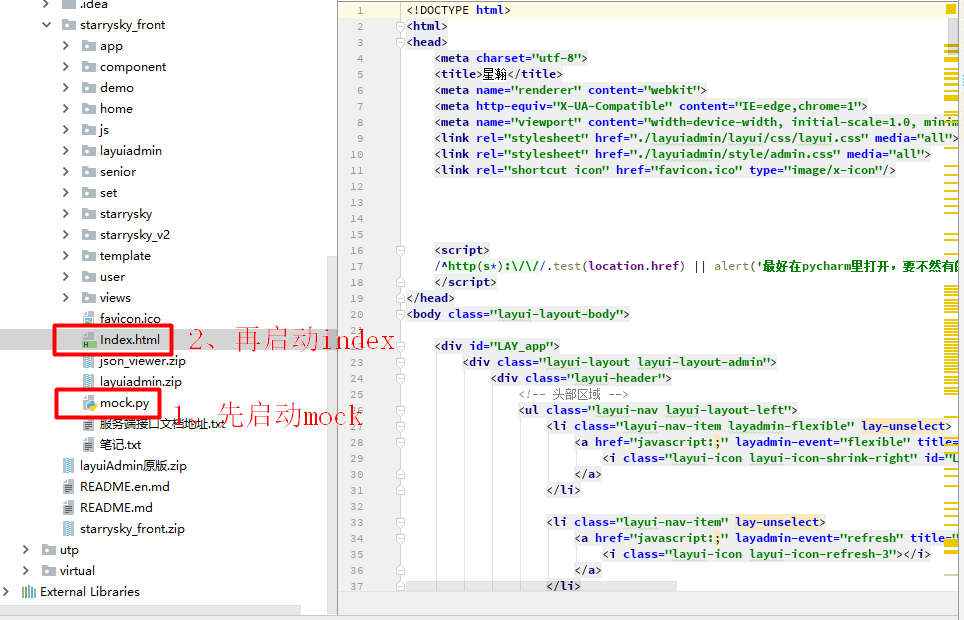
2、在index里创建文件

2.1 创建一个叫mjz的目录
复制一份<dd></dd>标签
                                <dd data-name="console" >
                                    <!--<iframe src="starrysky_v2/test.html">test</iframe>-->
                                    <a lay-href="starrysky_v2/mjz.html">mjz</a>

                                </dd>
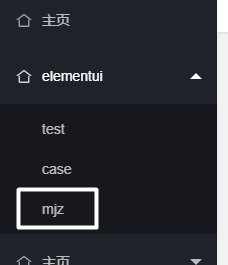
2.2 在starrysky_v2目录下创建一个mjz.html
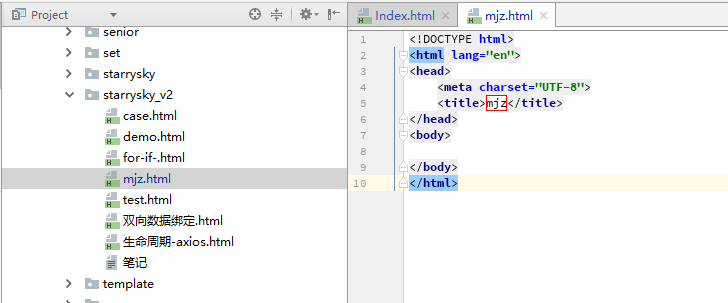
3、开发mjz页面
3.1 把样式和组件库导入到mjz.html里
<!-- 引入样式 -->
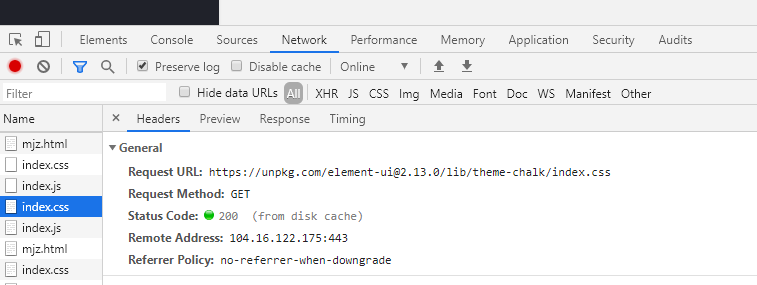
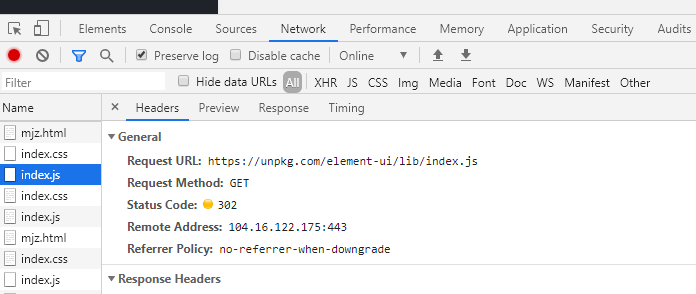
<link rel="stylesheet" href="https://unpkg.com/element-ui/lib/theme-chalk/index.css">
<!-- 引入组件库 -->
<script src="https://unpkg.com/element-ui/lib/index.js"></script>
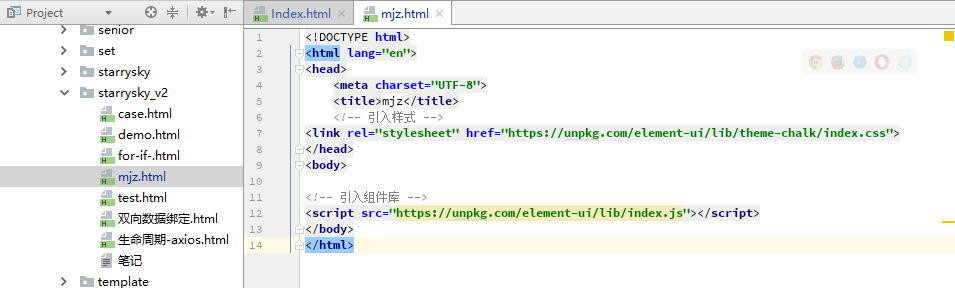
检查
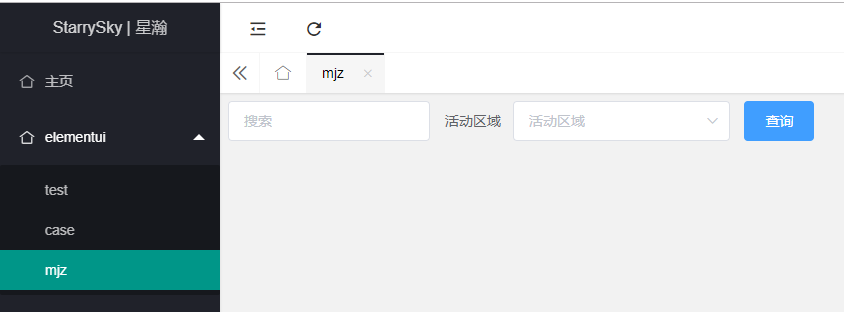
3.2 添加一个搜索输入框、下拉框、搜索按钮
<!DOCTYPE html>
<html lang="en">
<head>
    <meta charset="UTF-8">
    <title>mjz</title>
    <!-- 引入样式 -->
    <link rel="stylesheet" href="https://unpkg.com/element-ui/lib/theme-chalk/index.css">
</head>
<body>
<div id="app">
    <div id="search">
        <el-form :inline="true" :model="query_search" class="demo-form-inline">
            <el-form-item>
                <el-input v-model="query_search.search" placeholder="搜索"></el-input>
            </el-form-item>
            <el-form-item label="活动区域">
                <el-select v-model="query_search.project" placeholder="活动区域">
                    <el-option label="区域一" value="shanghai"></el-option>
                    <el-option label="区域二" value="beijing"></el-option>
                </el-select>
            </el-form-item>
            <el-form-item>
                <el-button type="primary" @click="onSubmit">查询</el-button>
            </el-form-item>
        </el-form>
    </div>
</div>
<!-- import Vue before Element -->
<script src="../js/vue.js"></script>
<!-- 引入组件库 -->
<script src="https://unpkg.com/element-ui/lib/index.js"></script>
<script>
    new Vue({
        el: '#app',
        data: {
            query_search: {
                search: '',
                project: ''
            }
        },
        methods: {
            onSubmit() {
                console.log('submit!');
            }
        }
    })
</script>
</body>
</html>
注意:VUE必须防止Element前
3.3 添加项目下拉选项
<!DOCTYPE html>
<html lang="en">
<head>
    <meta charset="UTF-8">
    <title>mjz</title>
    <!-- 引入样式 -->
    <link rel="stylesheet" href="https://unpkg.com/element-ui/lib/theme-chalk/index.css">
</head>
<body>
<div id="app">
    <div id="search">
        <el-form :inline="true" class="demo-form-inline">
            <el-form-item>
                <el-input v-model="query_search.search" placeholder="搜索"></el-input>
            </el-form-item>
            <el-form-item>
                <el-select v-model="query_search.project">
                    <el-option v-for="item in projects" :key="item.name" :value="item.id" :label="item.name"></el-option>
                </el-select>
            </el-form-item>
            <el-form-item>
                <el-button type="primary" @click="onSubmit">查询</el-button>
            </el-form-item>
            <el-form-item>
                <el-button type="primary" @click="onSubmit">添加</el-button>
            </el-form-item>
            <el-form-item>
                <el-button type="primary" @click="onSubmit">运行</el-button>
            </el-form-item>
        </el-form>
    </div>
</div>
<!-- import Vue before Element -->
<script src="../js/vue.js"></script>
<script src="../js/axios.min.js"></script>
<!-- 引入组件库 -->
<script src="https://unpkg.com/element-ui/lib/index.js"></script>
<script src="../js/config.js"></script>
<script>
    new Vue({
        el: '#app',
        data: {
            query_search: {
                search: '',
                project: ''
            },
            projects:[]
        },
        methods: {
            onSubmit() {
                console.log('submit!');
            },
            get_project_data(){
                axios({
                    method:'get',
                    url:host + '/api/project'
                }).then((response)=>{
                    this.projects = response.data.data;
                })
            }
        },
        created:function () {
            // 请求项目接口,获取项目数据
            this.get_project_data()
        }
    })
</script>
</body>
</html>

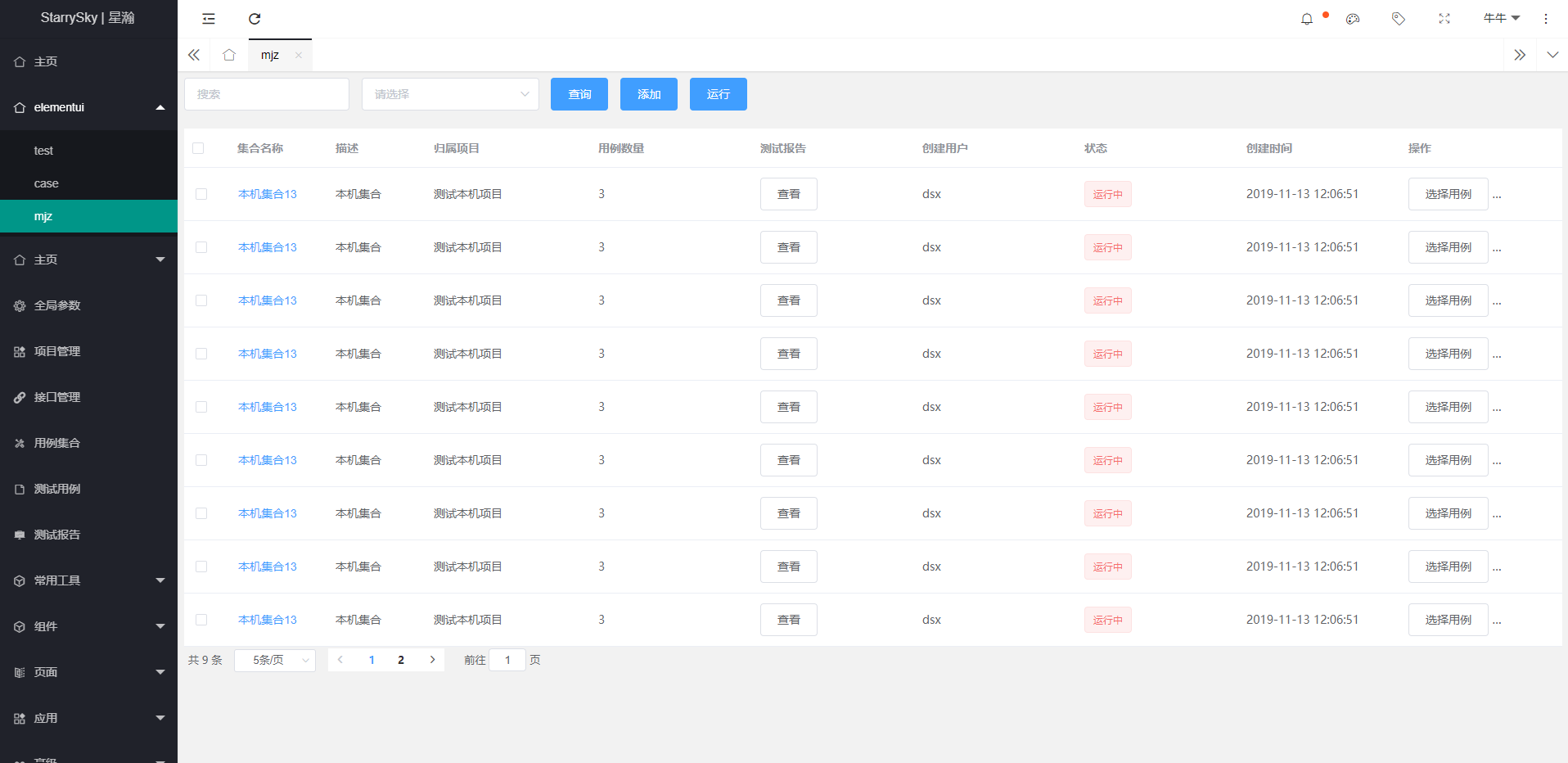
3.4 获取用例集合信息,在前端显示
<!DOCTYPE html>
<html lang="en">
<head>
    <meta charset="UTF-8">
    <title>mjz</title>
    <!-- 引入样式 -->
    <link rel="stylesheet" href="https://unpkg.com/element-ui/lib/theme-chalk/index.css">
</head>
<body>
<div id="app">
    <div id="search">
        <el-form :inline="true" class="demo-form-inline">
            <el-form-item>
                <el-input v-model="query_search.search" placeholder="搜索"></el-input>
            </el-form-item>
            <el-form-item>
                <el-select v-model="query_search.project">
                    <el-option v-for="item in projects" :key="item.id" :value="item.id" :label="item.name"></el-option>
                </el-select>
            </el-form-item>

            <el-form-item>
                <el-button type="primary" @click="search">查询</el-button>
            </el-form-item>
            <el-form-item>
                <el-button type="primary" @click="onSubmit">添加</el-button>
            </el-form-item>
            <el-form-item>
                <el-button type="primary" @click="onSubmit">运行</el-button>
            </el-form-item>
        </el-form>
    </div>
    <div id="table">
        <el-table
                ref="multipleTable"
                :data="case_collection_data"
                tooltip-effect="dark"
                style="width: 100%"
                @selection-change="handleSelectionChange">
            <el-table-column
                    type="selection"
                    width="55">
            </el-table-column>
            <el-table-column
                    label="集合名称"
                    width="120">
                <template slot-scope="scope">
                    <el-button type="text">{{scope.row.name}}</el-button>
                </template>
            </el-table-column>
            <el-table-column
                    prop="desc"
                    label="描述"
                    width="120">
            </el-table-column>
            <el-table-column
                    prop="project_name"
                    label="归属项目"
                    show-overflow-tooltip>
            </el-table-column>
            <el-table-column
                    prop="case_count"
                    label="用例数量"
                    show-overflow-tooltip>
            </el-table-column>
            <el-table-column
                    prop="report_name"
                    label="测试报告"
                    show-overflow-tooltip>
                <el-button>查看</el-button>
            </el-table-column>
            <el-table-column
                    prop="user"
                    label="创建用户"
                    show-overflow-tooltip>
            </el-table-column>
            <el-table-column
                    label="状态"
                    show-overflow-tooltip>
                <template slot-scope="scope">
                    <el-tag type="danger">{{ scope.row.status|replaceStatus }}</el-tag>
                </template>
            </el-table-column>
            <el-table-column
                    prop="create_time"
                    label="创建时间"
                    show-overflow-tooltip>
            </el-table-column>
            <el-table-column
                    prop="address"
                    label="操作"
                    show-overflow-tooltip>
                <el-button>选择用例</el-button>
                <el-button type="danger">删除</el-button>
            </el-table-column>
        </el-table>
    </div>
    <div id="pagination">
        <el-pagination
                @size-change="handleSizeChange"
                @current-change="handleCurrentChange"
                :current-page="query_search.page"
                :page-sizes="[5,10]"
                :page-size="query_search.limit"
                layout="total, sizes, prev, pager, next, jumper"
                :total="count">
        </el-pagination>

    </div>

</div>
<!-- import Vue before Element -->
<script src="../js/vue.js"></script>
<script src="../js/axios.min.js"></script>
<!-- 引入组件库 -->
<script src="https://unpkg.com/element-ui/lib/index.js"></script>
<script src="../js/config.js"></script>
<script>
    new Vue({
        el: '#app',
        data: {
            query_search: {
                search: undefined,
                project: undefined,
                page: 1,
                limit: 5
            },
            projects: [],
            case_collection_data: [],
            multipleSelection: [],
            count: 0,

        },
        methods: {
            search() {
                this.get_page_data()
            },
            handleSizeChange(val) {
                this.query_search.limit = val;
                this.get_page_data()
            },
            handleCurrentChange(val) {
                this.query_search.page = val;
                this.get_page_data()
            },
            handleSelectionChange(val) {
                let ids = [];
                for (var num in val) {
                    ids.push(val[num].id)
                }
                this.multipleSelection = ids;
            },
            onSubmit() {
                console.log('submit!');
            },
            get_project_data() {
                axios({
                    method: 'get',
                    url: host + '/api/project'
                }).then((response) => {

                    this.projects = response.data.data;
                })
            },
            get_page_data() {
                axios({
                    method: 'get',
                    url: host + '/api/case_collection',
                    params: this.query_search
                }).then((response) => {
                    this.case_collection_data = response.data.data;
                    this.count = response.data.count;
                })
            }
        },
        created: function () {
            // 请求项目接口 获取项目数据
            this.get_project_data();
            // 获取页面的数据
            this.get_page_data()
        },
        filters: {
            replaceStatus(status) {
                if (status == 3) {
                    return '运行中'
                }
            }
        }
    })

</script>
</body>
</html>
HTML基础五-starrysky页面动起来的更多相关文章
- 从零开始学习jQuery (七) jQuery动画-让页面动起来!
一.摘要 本系列文章将带您进入jQuery的精彩世界, 其中有很多作者具体的使用经验和解决方案, 即使你会使用jQuery也能在阅读中发现些许秘籍. 开发人员一直痛疼做动画. 但是有了jQuery你 ...
- Bootstrap <基础二十三>页面标题(Page Header)
页面标题(Page Header)是个不错的功能,它会在网页标题四周添加适当的间距.当一个网页中有多个标题且每个标题之间需要添加一定的间距时,页面标题这个功能就显得特别有用.如需使用页面标题(Page ...
- Bootstrap <基础五>表格
Bootstrap 提供了一个清晰的创建表格的布局.下表列出了 Bootstrap 支持的一些表格元素: 标签 描述 <table> 为表格添加基础样式. <thead> 表格 ...
- GSAP JS基础教程--使用缓动函数
今天来了解一下缓动easeing函数. 开始,如果你还没有GSAP的类包,可以到GreenSock的官网去下载最新版本的类包,或者直接点击这里来下载 学习之前,先来准备一下: <!DO ...
- day 70 Django基础五之django模型层(二)多表操作
Django基础五之django模型层(二)多表操作 本节目录 一 创建模型 二 添加表记录 三 基于对象的跨表查询 四 基于双下划线的跨表查询 五 聚合查询.分组查询.F查询和Q查询 六 ORM ...
- day 56 Django基础五之django模型层(二)多表操作
Django基础五之django模型层(二)多表操作 本节目录 一 创建模型 二 添加表记录 三 基于对象的跨表查询 四 基于双下划线的跨表查询 五 聚合查询.分组查询.F查询和Q查询 六 ORM ...
- Django基础五之Ajax
Django基础五之Ajax 目录 Django基础五之Ajax 1. Ajax介绍 2. Ajax前后端传值 2.1 方法一HttpResponse直接返回 2.2 方法二使用Json格式返回 2. ...
- 七天学会ASP.NET MVC (五)——Layout页面使用和用户角色管理
系列文章 七天学会ASP.NET MVC (一)——深入理解ASP.NET MVC 七天学会ASP.NET MVC (二)——ASP.NET MVC 数据传递 七天学会ASP.NET MVC (三)— ...
- 玩转HTML5移动页面(动效篇)(转载)
本文转载自: 玩转HTML5移动页面(动效篇)
随机推荐
- Project Euler Problem 675
ORZ foreverlasting聚聚,QQ上问了他好久才会了这题(所以我们又聊了好久的Gal) 我们先来尝试推导一下\(S\)的性质,我们利用狄利克雷卷积来推: \[2^\omega=I\ast| ...
- 小米笔记本pro 黑苹果系统无法进入系统,频繁重启故障解决记录
问题1:频繁重启,然后clover丢失 表现情况:开机没有选择macos 或windos的界面 解决办法:进入windows使用工具easyefi,直接添加一个clover start boot,选择 ...
- ShellScript值传递参数
Shell传递参数 ######################################摘自菜鸟教程:http://www.runoob.com/linux/linux-shell-passi ...
- vue数据更改视图不更新问题----深入响应式原理
Vue响应式原理之官方解释 当你把一个普通的JavaScript对象传给Vue实例的data选项,Vue将遍历此对象所有的属性,并使用Object.defineProperty把这些属性全部转为get ...
- 正式开放 | 阿里云 10 亿级镜像服务正式支持 Helm Charts,云原生交付再加速!
作者 | 阿里巴巴高级开发工程师 谢于宁(予栖) 2018 年 6 月,Helm 正式加入了 CNCF 孵化项目: 2018 年 8 月,据 CNCF 的调研表明,有百分之六十八的开发者选择了 Hel ...
- NeatUpload .NetFromWork4.0 config配置
NeatUpload使用---config配置(可进行大文件传输) configuration> 下增加: <configSections> <sectionGroup nam ...
- 安装使用 superset
安装 superset 创建虚拟环境: python -m venv msuperset 激活虚拟环境: cd msuperset source bin/activate 安装 superset pi ...
- C# Random
一.简介 在Random类用于创建随机数.(当然是伪随机的.) 二.Random用法 例: Random rnd = new Random(); int month = rnd.Next(1, 13) ...
- 先排序然后union all失效,mysql数据库多个表union all查询并排序的结果为什么错误
mysql数据库多个表union all查询并排序的结果为什么错误? 群主,我想进行一个表的查询,先把表中某个字段的内容查出,然后其他的再排序,我用union all连接两个表的查询结果排序是错的 比 ...
- 【设计模式】Adapter
前言 Adapter设计模式,允许客户端使用接口不兼容的类. 昨天收拾一些以前的东西,发现了藏在柜子里的一条线,这条线叫做OTG.这条线的一端是micro-usb的输出口,另一端是usb的输入口.这条 ...