
Flink Flow
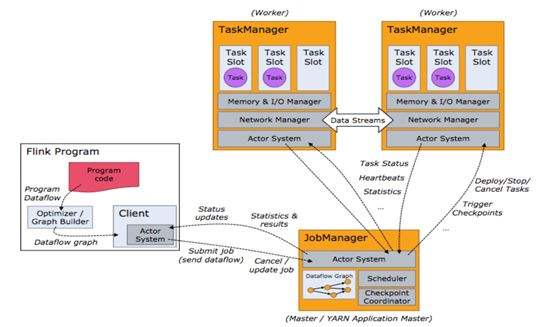

1. Create environment for stream computing
        StreamExecutionEnvironment env = StreamExecutionEnvironment.getExecutionEnvironment();

        env.getConfig().disableSysoutLogging();

        env.getConfig().setRestartStrategy(RestartStrategies.fixedDelayRestart(4, 10000));

        env.enableCheckpointing(5000); // create a checkpoint every 5 seconds

        env.getConfig().setGlobalJobParameters(parameterTool); // make parameters available in the web interface

        env.setStreamTimeCharacteristic(TimeCharacteristic.EventTime);
public static StreamExecutionEnvironment getExecutionEnvironment() {

        if (contextEnvironmentFactory != null) {

            return contextEnvironmentFactory.createExecutionEnvironment();

        }

        // because the streaming project depends on "flink-clients" (and not the other way around)

        // we currently need to intercept the data set environment and create a dependent stream env.

        // this should be fixed once we rework the project dependencies

        ExecutionEnvironment env = ExecutionEnvironment.getExecutionEnvironment();

        if (env instanceof ContextEnvironment) {

            return new StreamContextEnvironment((ContextEnvironment) env);

        } else if (env instanceof OptimizerPlanEnvironment || env instanceof PreviewPlanEnvironment) {

            return new StreamPlanEnvironment(env);

        } else {

            return createLocalEnvironment();

        }

    }
2. Now we need to add the data source for further computing
DataStream<KafkaEvent> input = env

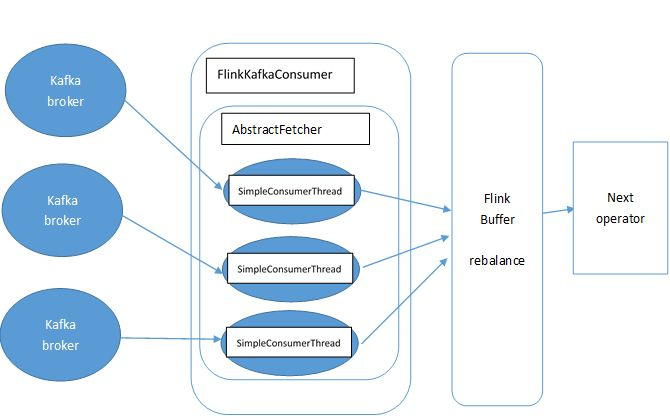
                .addSource( new FlinkKafkaConsumer010<>(

                            parameterTool.getRequired("input-topic"),

                            new KafkaEventSchema(),

                            parameterTool.getProperties()).assignTimestampsAndWatermarks(new CustomWatermarkExtractor()))

                .keyBy("word")

                .map(new RollingAdditionMapper());
public <OUT> DataStreamSource<OUT> addSource(SourceFunction<OUT> function) {

        return addSource(function, "Custom Source");

    }
@SuppressWarnings("unchecked")

    public <OUT> DataStreamSource<OUT> addSource(SourceFunction<OUT> function, String sourceName, TypeInformation<OUT> typeInfo) {

        if (typeInfo == null) {

            if (function instanceof ResultTypeQueryable) {

                typeInfo = ((ResultTypeQueryable<OUT>) function).getProducedType();

            } else {

                try {

                    typeInfo = TypeExtractor.createTypeInfo(

                            SourceFunction.class,

                            function.getClass(), 0, null, null);

                } catch (final InvalidTypesException e) {

                    typeInfo = (TypeInformation<OUT>) new MissingTypeInfo(sourceName, e);

                }

            }

        }

        boolean isParallel = function instanceof ParallelSourceFunction;

        clean(function);

        StreamSource<OUT, ?> sourceOperator;

        if (function instanceof StoppableFunction) {

            sourceOperator = new StoppableStreamSource<>(cast2StoppableSourceFunction(function));

        } else {

            sourceOperator = new StreamSource<>(function);

        }

        return new DataStreamSource<>(this, typeInfo, sourceOperator, isParallel, sourceName);

    }
public <R> SingleOutputStreamOperator<R> map(MapFunction<T, R> mapper) {

        TypeInformation<R> outType = TypeExtractor.getMapReturnTypes(clean(mapper), getType(),

                Utils.getCallLocationName(), true);

        return transform("Map", outType, new StreamMap<>(clean(mapper)));

    }
public <R> SingleOutputStreamOperator<R> transform(String operatorName, TypeInformation<R> outTypeInfo, OneInputStreamOperator<T, R> operator) {

        // read the output type of the input Transform to coax out errors about MissingTypeInfo

        transformation.getOutputType();

        OneInputTransformation<T, R> resultTransform = new OneInputTransformation<>(

                this.transformation,

                operatorName,

                operator,

                outTypeInfo,

                environment.getParallelism());

        @SuppressWarnings({ "unchecked", "rawtypes" })

        SingleOutputStreamOperator<R> returnStream = new SingleOutputStreamOperator(environment, resultTransform);

        getExecutionEnvironment().addOperator(resultTransform);

        return returnStream;

    }
@Internal

    public void addOperator(StreamTransformation<?> transformation) {

        Preconditions.checkNotNull(transformation, "transformation must not be null.");

        this.transformations.add(transformation);

    }
protected final List<StreamTransformation<?>> transformations = new ArrayList<>();
public KeyedStream<T, Tuple> keyBy(String... fields) {

        return keyBy(new Keys.ExpressionKeys<>(fields, getType()));

    }

    private KeyedStream<T, Tuple> keyBy(Keys<T> keys) {

        return new KeyedStream<>(this, clean(KeySelectorUtil.getSelectorForKeys(keys,

                getType(), getExecutionConfig())));

    }
3. The data from data source will be streamed into Flink Distributed Computing Runtime and the computed result will be transfered to data Sink.
input.addSink(          new FlinkKafkaProducer010<>(

                        parameterTool.getRequired("output-topic"),

                        new KafkaEventSchema(),

                        parameterTool.getProperties()));
public DataStreamSink<T> addSink(SinkFunction<T> sinkFunction) {

        // read the output type of the input Transform to coax out errors about MissingTypeInfo

        transformation.getOutputType();

        // configure the type if needed

        if (sinkFunction instanceof InputTypeConfigurable) {

            ((InputTypeConfigurable) sinkFunction).setInputType(getType(), getExecutionConfig());

        }

        StreamSink<T> sinkOperator = new StreamSink<>(clean(sinkFunction));

        DataStreamSink<T> sink = new DataStreamSink<>(this, sinkOperator);

        getExecutionEnvironment().addOperator(sink.getTransformation());

        return sink;

    }
@Internal

    public void addOperator(StreamTransformation<?> transformation) {

        Preconditions.checkNotNull(transformation, "transformation must not be null.");

        this.transformations.add(transformation);

    }
protected final List<StreamTransformation<?>> transformations = new ArrayList<>();
4. The last step is to start executing.
env.execute("Kafka 0.10 Example");
The mapper computing template is defined as blow.
private static class RollingAdditionMapper extends RichMapFunction<KafkaEvent, KafkaEvent> {

        private static final long serialVersionUID = 1180234853172462378L;

        private transient ValueState<Integer> currentTotalCount;

        @Override

        public KafkaEvent map(KafkaEvent event) throws Exception {

            Integer totalCount = currentTotalCount.value();

            if (totalCount == null) {

                totalCount = 0;

            }

            totalCount += event.getFrequency();

            currentTotalCount.update(totalCount);

            return new KafkaEvent(event.getWord(), totalCount, event.getTimestamp());

        }

        @Override

        public void open(Configuration parameters) throws Exception {

            currentTotalCount = getRuntimeContext().getState(new ValueStateDescriptor<>("currentTotalCount", Integer.class));

        }

    }
http://www.debugrun.com/a/LjK8Nni.html
Flink Flow的更多相关文章
- 在 Cloudera Data Flow 上运行你的第一个 Flink 例子
文档编写目的 Cloudera Data Flow(CDF) 作为 Cloudera 一个独立的产品单元,围绕着实时数据采集,实时数据处理和实时数据分析有多个不同的功能模块,如下图所示: 图中 4 个 ...
- Flink Internals
https://cwiki.apache.org/confluence/display/FLINK/Flink+Internals Memory Management (Batch API) In ...
- Peeking into Apache Flink's Engine Room
http://flink.apache.org/news/2015/03/13/peeking-into-Apache-Flinks-Engine-Room.html Join Processin ...
- Flink - Juggling with Bits and Bytes
http://www.36dsj.com/archives/33650 http://flink.apache.org/news/2015/05/11/Juggling-with-Bits-and-B ...
- Flink资料(3)-- Flink一般架构和处理模型
Flink一般架构和处理模型 本文翻译自General Architecture and Process Model ----------------------------------------- ...
- Flink资料(2)-- 数据流容错机制
数据流容错机制 该文档翻译自Data Streaming Fault Tolerance,文档描述flink在流式数据流图上的容错机制. ------------------------------- ...
- Flink架构、原理与部署测试
Apache Flink是一个面向分布式数据流处理和批量数据处理的开源计算平台,它能够基于同一个Flink运行时,提供支持流处理和批处理两种类型应用的功能. 现有的开源计算方案,会把流处理和批处理作为 ...
- [Note] Apache Flink 的数据流编程模型
Apache Flink 的数据流编程模型 抽象层次 Flink 为开发流式应用和批式应用设计了不同的抽象层次 状态化的流 抽象层次的最底层是状态化的流,它通过 ProcessFunction 嵌入到 ...
- Apache Flink 分布式执行
Flink 的分布式执行过程包含两个重要的角色,master 和 worker,参与 Flink 程序执行的有多个进程,包括 Job Manager,Task Manager 以及 Job Clien ...
随机推荐
- 搭建自己的pypi私有源服务器
最简单的方式: pypiserver – minimal pypi server, easy to install & use 1.安装pypiserver:pip install pypis ...
- expect分发脚本
[分发系统]yum -y install expect #!/usr/bin/expect set host "192.168.11.102" " spawn ssh r ...
- Jmeter Grafana Influxdb 环境搭建
1.软件安装 1.Grafana安装 本文仅涉及Centos环境 新建Grafana yum源文件 /etc/yum.repos.d/grafana.repo [grafana] name=grafa ...
- System Verilog基础(一)
学习文本值和基本数据类型的笔记. 1.常量(Literal Value) 1.1.整型常量 例如:8‘b0 32'd0 '0 '1 'x 'z 省略位宽则意味着全位宽都被赋值. 例如: :] sig1 ...
- /data/tomcat8/bin/setenv.sh
--问题 Java HotSpot(TM) 64-Bit Server VM warning: ignoring option MaxPermSize=512m; support was remove ...
- java se系列(十二)集合
1.集合 1.1.什么是集合 存储对象的容器,面向对象语言对事物的体现,都是以对象的形式来体现的,所以为了方便对多个对象的操作,存储对象,集合是存储对象最常用的一种方式.集合的出现就是为了持有对象.集 ...
- lfs
LFS──Linux from Scratch,就是一种从网上直接下载源码,从头编译LINUX的安装方式.它不是发行版,只是一个菜谱,告诉你到哪里去买菜(下载源码),怎么把这些生东西( raw c ...
- Jmeter调试脚本之关联
前言: Jmeter关联和loadrunner关联的区别: 1.在loadrunner中,关联函数是写在要获取变量值的页面的前面,而在就Jmeter中关联函数是要写在获取变量函数值的页面的后面 2.在 ...
- Unity热更方案汇总
http://www.manew.com/thread-114496-1-1.html 谈到目前的代码热更方案:没什么特别的要求 <ignore_js_op> toLua(效 ...
- Java生成二维码和解析二维码URL
二维码依赖jar包,zxing <!-- 二维码依赖 start --><dependency> <groupId>com.google.zxing</gro ...