
Flink Flow
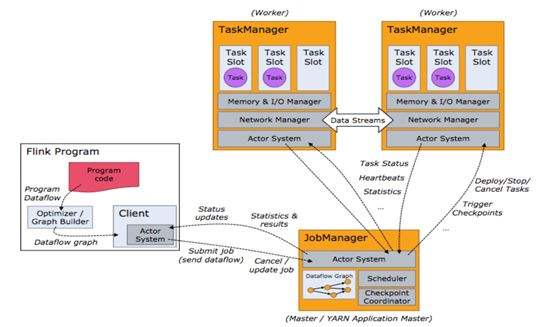

1. Create environment for stream computing
        StreamExecutionEnvironment env = StreamExecutionEnvironment.getExecutionEnvironment();

        env.getConfig().disableSysoutLogging();

        env.getConfig().setRestartStrategy(RestartStrategies.fixedDelayRestart(4, 10000));

        env.enableCheckpointing(5000); // create a checkpoint every 5 seconds

        env.getConfig().setGlobalJobParameters(parameterTool); // make parameters available in the web interface

        env.setStreamTimeCharacteristic(TimeCharacteristic.EventTime);
public static StreamExecutionEnvironment getExecutionEnvironment() {

        if (contextEnvironmentFactory != null) {

            return contextEnvironmentFactory.createExecutionEnvironment();

        }

        // because the streaming project depends on "flink-clients" (and not the other way around)

        // we currently need to intercept the data set environment and create a dependent stream env.

        // this should be fixed once we rework the project dependencies

        ExecutionEnvironment env = ExecutionEnvironment.getExecutionEnvironment();

        if (env instanceof ContextEnvironment) {

            return new StreamContextEnvironment((ContextEnvironment) env);

        } else if (env instanceof OptimizerPlanEnvironment || env instanceof PreviewPlanEnvironment) {

            return new StreamPlanEnvironment(env);

        } else {

            return createLocalEnvironment();

        }

    }
2. Now we need to add the data source for further computing
DataStream<KafkaEvent> input = env

                .addSource( new FlinkKafkaConsumer010<>(

                            parameterTool.getRequired("input-topic"),

                            new KafkaEventSchema(),

                            parameterTool.getProperties()).assignTimestampsAndWatermarks(new CustomWatermarkExtractor()))

                .keyBy("word")

                .map(new RollingAdditionMapper());
public <OUT> DataStreamSource<OUT> addSource(SourceFunction<OUT> function) {

        return addSource(function, "Custom Source");

    }
@SuppressWarnings("unchecked")

    public <OUT> DataStreamSource<OUT> addSource(SourceFunction<OUT> function, String sourceName, TypeInformation<OUT> typeInfo) {

        if (typeInfo == null) {

            if (function instanceof ResultTypeQueryable) {

                typeInfo = ((ResultTypeQueryable<OUT>) function).getProducedType();

            } else {

                try {

                    typeInfo = TypeExtractor.createTypeInfo(

                            SourceFunction.class,

                            function.getClass(), 0, null, null);

                } catch (final InvalidTypesException e) {

                    typeInfo = (TypeInformation<OUT>) new MissingTypeInfo(sourceName, e);

                }

            }

        }

        boolean isParallel = function instanceof ParallelSourceFunction;

        clean(function);

        StreamSource<OUT, ?> sourceOperator;

        if (function instanceof StoppableFunction) {

            sourceOperator = new StoppableStreamSource<>(cast2StoppableSourceFunction(function));

        } else {

            sourceOperator = new StreamSource<>(function);

        }

        return new DataStreamSource<>(this, typeInfo, sourceOperator, isParallel, sourceName);

    }
public <R> SingleOutputStreamOperator<R> map(MapFunction<T, R> mapper) {

        TypeInformation<R> outType = TypeExtractor.getMapReturnTypes(clean(mapper), getType(),

                Utils.getCallLocationName(), true);

        return transform("Map", outType, new StreamMap<>(clean(mapper)));

    }
public <R> SingleOutputStreamOperator<R> transform(String operatorName, TypeInformation<R> outTypeInfo, OneInputStreamOperator<T, R> operator) {

        // read the output type of the input Transform to coax out errors about MissingTypeInfo

        transformation.getOutputType();

        OneInputTransformation<T, R> resultTransform = new OneInputTransformation<>(

                this.transformation,

                operatorName,

                operator,

                outTypeInfo,

                environment.getParallelism());

        @SuppressWarnings({ "unchecked", "rawtypes" })

        SingleOutputStreamOperator<R> returnStream = new SingleOutputStreamOperator(environment, resultTransform);

        getExecutionEnvironment().addOperator(resultTransform);

        return returnStream;

    }
@Internal

    public void addOperator(StreamTransformation<?> transformation) {

        Preconditions.checkNotNull(transformation, "transformation must not be null.");

        this.transformations.add(transformation);

    }
protected final List<StreamTransformation<?>> transformations = new ArrayList<>();
public KeyedStream<T, Tuple> keyBy(String... fields) {

        return keyBy(new Keys.ExpressionKeys<>(fields, getType()));

    }

    private KeyedStream<T, Tuple> keyBy(Keys<T> keys) {

        return new KeyedStream<>(this, clean(KeySelectorUtil.getSelectorForKeys(keys,

                getType(), getExecutionConfig())));

    }
3. The data from data source will be streamed into Flink Distributed Computing Runtime and the computed result will be transfered to data Sink.
input.addSink(          new FlinkKafkaProducer010<>(

                        parameterTool.getRequired("output-topic"),

                        new KafkaEventSchema(),

                        parameterTool.getProperties()));
public DataStreamSink<T> addSink(SinkFunction<T> sinkFunction) {

        // read the output type of the input Transform to coax out errors about MissingTypeInfo

        transformation.getOutputType();

        // configure the type if needed

        if (sinkFunction instanceof InputTypeConfigurable) {

            ((InputTypeConfigurable) sinkFunction).setInputType(getType(), getExecutionConfig());

        }

        StreamSink<T> sinkOperator = new StreamSink<>(clean(sinkFunction));

        DataStreamSink<T> sink = new DataStreamSink<>(this, sinkOperator);

        getExecutionEnvironment().addOperator(sink.getTransformation());

        return sink;

    }
@Internal

    public void addOperator(StreamTransformation<?> transformation) {

        Preconditions.checkNotNull(transformation, "transformation must not be null.");

        this.transformations.add(transformation);

    }
protected final List<StreamTransformation<?>> transformations = new ArrayList<>();
4. The last step is to start executing.
env.execute("Kafka 0.10 Example");
The mapper computing template is defined as blow.
private static class RollingAdditionMapper extends RichMapFunction<KafkaEvent, KafkaEvent> {

        private static final long serialVersionUID = 1180234853172462378L;

        private transient ValueState<Integer> currentTotalCount;

        @Override

        public KafkaEvent map(KafkaEvent event) throws Exception {

            Integer totalCount = currentTotalCount.value();

            if (totalCount == null) {

                totalCount = 0;

            }

            totalCount += event.getFrequency();

            currentTotalCount.update(totalCount);

            return new KafkaEvent(event.getWord(), totalCount, event.getTimestamp());

        }

        @Override

        public void open(Configuration parameters) throws Exception {

            currentTotalCount = getRuntimeContext().getState(new ValueStateDescriptor<>("currentTotalCount", Integer.class));

        }

    }
http://www.debugrun.com/a/LjK8Nni.html
Flink Flow的更多相关文章
- 在 Cloudera Data Flow 上运行你的第一个 Flink 例子
文档编写目的 Cloudera Data Flow(CDF) 作为 Cloudera 一个独立的产品单元,围绕着实时数据采集,实时数据处理和实时数据分析有多个不同的功能模块,如下图所示: 图中 4 个 ...
- Flink Internals
https://cwiki.apache.org/confluence/display/FLINK/Flink+Internals Memory Management (Batch API) In ...
- Peeking into Apache Flink's Engine Room
http://flink.apache.org/news/2015/03/13/peeking-into-Apache-Flinks-Engine-Room.html Join Processin ...
- Flink - Juggling with Bits and Bytes
http://www.36dsj.com/archives/33650 http://flink.apache.org/news/2015/05/11/Juggling-with-Bits-and-B ...
- Flink资料(3)-- Flink一般架构和处理模型
Flink一般架构和处理模型 本文翻译自General Architecture and Process Model ----------------------------------------- ...
- Flink资料(2)-- 数据流容错机制
数据流容错机制 该文档翻译自Data Streaming Fault Tolerance,文档描述flink在流式数据流图上的容错机制. ------------------------------- ...
- Flink架构、原理与部署测试
Apache Flink是一个面向分布式数据流处理和批量数据处理的开源计算平台,它能够基于同一个Flink运行时,提供支持流处理和批处理两种类型应用的功能. 现有的开源计算方案,会把流处理和批处理作为 ...
- [Note] Apache Flink 的数据流编程模型
Apache Flink 的数据流编程模型 抽象层次 Flink 为开发流式应用和批式应用设计了不同的抽象层次 状态化的流 抽象层次的最底层是状态化的流,它通过 ProcessFunction 嵌入到 ...
- Apache Flink 分布式执行
Flink 的分布式执行过程包含两个重要的角色,master 和 worker,参与 Flink 程序执行的有多个进程,包括 Job Manager,Task Manager 以及 Job Clien ...
随机推荐
- SAP生产订单各种日期的计算说明
生产订单各种日期的计算说明 基本日期.已计划的.确认的日期,介绍一下这些日期的作用和计算方法: 首先我们来介绍一下基本日期: 基本开始日期:表示订单的开始日期 基本完成日期:表示订单的完成日期 我们在 ...
- JAVA数据结构--快速排序
快排概念 快速排序(英语:Quicksort),又称划分交换排序(partition-exchange sort),一种排序算法,最早由东尼·霍尔提出.在平均状况下,排序个项目要(大O符号)次比较.在 ...
- Go语言字符串
Go语言的字符串是一个用UTF-8编码的变宽字符序列,它的每一个字符都用一个或多个字节表示 . 在Go语言中,没有字符类型,字符类型是rune类型,rune是int32的别称.可使用 []byte() ...
- Jedis timeout
处理Jedis timeout 异常 Jedis rClient = new Jedis("localhost"); 解决步骤 关闭linux防火墙 systemctl stop ...
- Vue学习笔记 template methods,filters,ChromeDriver,安装sass
ChromeDriver installation failed Error with http(s) request: Error: connect ETIMEDOUT 172.217.160.80 ...
- Oracle 行列转换函数pivot、unpivot的使用(二)
一.行转列pivot 关键函数pivot,其用法如下 pivot(聚合函数 for 列名 in(类型)) select * from table_name pivot(max(column_name) ...
- 人机交互print
python两种输出类型: 1· 表达式语句,python理解的 # repr() 2· print() 结果是给用户看的 # str() >>> "Hell ...
- mysql语句插入前判断数据是否重复
在mysql中插入数据有时需要判断数据插入是否重复 语句编写:insert into 表(相应字段) select 相应字段 from dual where not exists (select 相应 ...
- 性能调优之vmstat命令(转)
vmstat是Virtual Meomory Statistics(虚拟内存统计)的缩写,可对操作系统的虚拟内存.进程.IO读写.CPU活动等进行监视.它是对系统的整体情况进行统计,不足之处是无法对某 ...
- 通过overflow: scroll;来实现部分区域的滚动
在移动端中,我们希望元素的滚动,可以通过一些插件的使用来实现滚动,当然也可以自己来实现. 比如:对于某一个区域,我们可以限制好高度之后,设定:overflow-y: scroll; 这样,就可以实现滚 ...