
spark相关脚本解析
spark-shell/spark-submit/pyspark等关系如下:

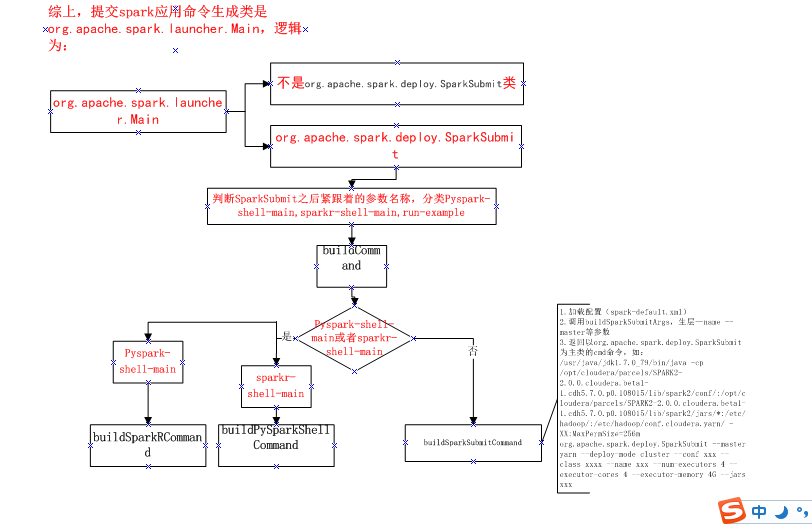
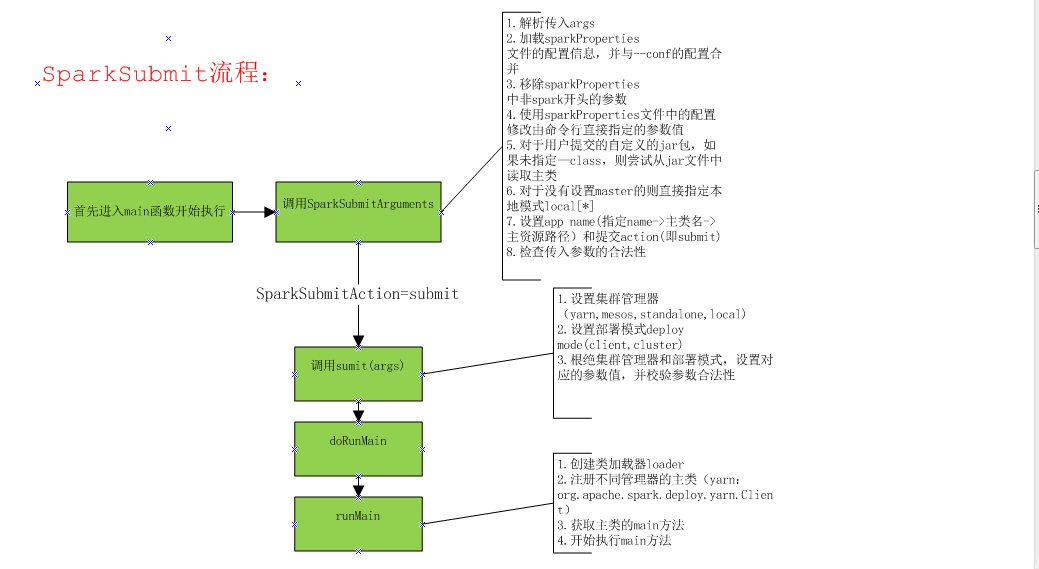
#spark-submit 逻辑:

################################################

#从spark-shell调用之后,传进来--class org.apache.spark.repl.Main --name "Spark shell" --master spark://ip:7077

#先检测spark_home,然后去调用spark_home/bin/spark-class 会将org.apache.spark.deploy.SparkSubmit作为第一个参数,

#----- 会执行脚本spark-class org.apache.spark.deploy.SparkSubmit --class org.apache.spark.repl.Main --name"Spark shell" --master spark://ip:7077

#####################################

#!/usr/bin/env bash

if [-z "${SPARK_HOME}" ]; then

  export SPARK_HOME="$(cd "`dirname"$0"`"/..; pwd)"

fi

#disable randomized hash for string in Python 3.3+

exportPYTHONHASHSEED=

#exec 执行完面的命令,exec 命令,是创建一个新的进程,只不过这个进程与前一个进程的ID是一样的。

#这样,原来的脚本剩余的部分代码就不能执行了,因为相当于换了一个进程。

exec "${SPARK_HOME}"/bin/spark-class org.apache.spark.deploy.SparkSubmit " $@"
#以下是spark-class逻辑:

###########################################################################

#--如果是spark-shell从spark-submit脚本传进来如下参数:

org.apache.spark.deploy.SparkSubmit --classorg.apache.spark.repl.Main --name "Spark shell" --master spark://ip:7077

#如果自己的application则直接执行spark-submit 脚本传入自己的--class等参数信息就可以

###########################################################################

#还是判断了一下SPARK_HOME环境变量是否存在

if [ -z "${SPARK_HOME}" ]; then

  export SPARK_HOME="$(cd "`dirname "$0"`"/..; pwd)"

fi

#配置一些环境变量,它会将conf/spark-env.sh中的环境变量加载进来:

. "${SPARK_HOME}"/bin/load-spark-env.sh

# Find the java binary

#如果有java_home环境变量会将java_home/bin/java给RUNNER

#if [ -n str ] 表示当串的长度大于0时为真

if [ -n "${JAVA_HOME}" ]; then

  RUNNER="${JAVA_HOME}/bin/java"

else

  if [ `command -v java` ]; then

    RUNNER="java"

  else

    echo "JAVA_HOME is not set" >&

    exit

  fi

fi

# Find Spark jars.

#会先找spark_home/RELESE文本是否存在,如果存在将spark_home/lib目录给变量ASSEMBLY_DIR

#spark2目录是${SPARK_HOME}/jars,spark1.x目录是${SPARK_HOME}/lib

if [ -f "${SPARK_HOME}/RELEASE" ]; then

  SPARK_JARS_DIR="${SPARK_HOME}/jars"

else

  SPARK_JARS_DIR="${SPARK_HOME}/assembly/target/scala-$SPARK_SCALA_VERSION/jars"

fi

#---ls -1与ls -l的区别在于ls -1只会返回文件名,没有文件类型,大小,日期等信息。num_jars返回spark-assembly的jar有多少个

#GREP_OPTIONS= num_jars="$(ls-1 "$ASSEMBLY_DIR" | grep "^spark-assembly.*hadoop.*\.jar$"| wc -l)"

#---如果$num_jars为0,会报错并退出

# if ["$num_jars" -eq "0" -a -z "$SPARK_ASSEMBLY_JAR"-a "$SPARK_PREPEND_CLASSES" != "1" ]; then

#  echo "Failed to find Spark assembly in$ASSEMBLY_DIR." 1>&2

#  echo "You need to build Spark beforerunning this program." 1>&2

#  exit 1

#fi

if [ ! -d "$SPARK_JARS_DIR" ] && [ -z "$SPARK_TESTING$SPARK_SQL_TESTING" ]; then

  echo "Failed to find Spark jars directory ($SPARK_JARS_DIR)." >&

  echo "You need to build Spark with the target \"package\" before running this program." >&

  exit

else

  LAUNCH_CLASSPATH="$SPARK_JARS_DIR/*"

fi

# Add the launcher build dir to the classpath if requested.

if [ -n "$SPARK_PREPEND_CLASSES" ]; then

  LAUNCH_CLASSPATH="${SPARK_HOME}/launcher/target/scala-$SPARK_SCALA_VERSION/classes:$LAUNCH_CLASSPATH"

fi

# For tests

if [[ -n "$SPARK_TESTING" ]]; then

  unset YARN_CONF_DIR

  unset HADOOP_CONF_DIR

fi

# The launcher library will print arguments separated by a NULL character, to allow arguments with

# characters that would be otherwise interpreted by the shell. Read that in a while loop, populating

# an array that will be used to exec the final command.

#

# The exit code of the launcher is appended to the output, so the parent shell removes it from the

# command array and checks the value to see if the launcher succeeded.

build_command() {

  "$RUNNER" -Xmx128m -cp "$LAUNCH_CLASSPATH" org.apache.spark.launcher.Main "$@"

  printf "%d\0" $?

}

CMD=()

while IFS= read -d '' -r ARG; do

  CMD+=("$ARG")

done < <(build_command "$@") ##调用org.apache.spark.launcher.Main拼接提交命令

COUNT=${#CMD[@]}

LAST=$((COUNT - ))

LAUNCHER_EXIT_CODE=${CMD[$LAST]}

# Certain JVM failures result in errors being printed to stdout (instead of stderr), which causes

# the code that parses the output of the launcher to get confused. In those cases, check if the

# exit code is an integer, and if it's not, handle it as a special error case.

if ! [[ $LAUNCHER_EXIT_CODE =~ ^[-]+$ ]]; then

  echo "${CMD[@]}" | head -n- >&

  exit

fi

if [ $LAUNCHER_EXIT_CODE !=  ]; then

  exit $LAUNCHER_EXIT_CODE

fi

CMD=("${CMD[@]:0:$LAST}")

exec "${CMD[@]}"   ##shell拉起命令

##CMD形如:

#/usr/java/jdk1.7.0_79/bin/java -cp /opt/cloudera/parcels/SPARK2-2.0.0.cloudera.beta1-1.cdh5.7.0.p0.108015/lib/spark2/conf/:/opt/cloudera/parcels/SPARK2-2.0.0.cloudera.beta1-1.cdh5.7.0.p0.108015/lib/spark2/jars/*:/etc/hadoop/:/etc/hadoop/conf.cloudera.yarn/ -XX:MaxPermSize=256m org.apache.spark.deploy.SparkSubmit --master yarn --deploy-mode cluster --conf spark.driver.extraClassPath=/opt/cloudera/parcels/CDH/lib/hbase/lib/* --conf spark.scheduler.mode=FAIR --conf spark.executorEnv.JAVA_HOME=/usr/java/jdk1.8 --conf spark.yarn.appMasterEnv.JAVA_HOME=/usr/java/jdk1.8 --conf spark.yarn.maxAppAttempts=1 --class opHbase.opHbase.TopHbase --name Hbase --verbose --files /etc/hadoop/conf/log4j.properties,/etc/hive/conf/hive-site.xml --jars hdfs://10.8.18.74:8020/ada/spark/share/tech_component/tc.plat.spark.jar,hdfs://10.8.18.74:8020/ada/spark/share/tech_component/bigdata4i-1.0.jar,hdfs://10.8.18.74:8020/ada/spark/share/tech_component/bigdata-sparklog-1.0.jar,hdfs://108474.server.bigdata.com.cn:8020/user/lyy/App/tc.app.test.opHbase-1.0.jar,hdfs://10.8.18.74:8020/ada/spark/share/tech_component/mysql-connector-java-5.1.24-bin.jar hdfs://108474.server.bigdata.com.cn:8020/user/lyy/App/opHbase.opHbase.jar loglevel=ALL path=hdfs://108474.server.bigdata.com.cn:8020/user/lyy/data/hfile hbtab=hbase_test

#假如是spark-shell提交的,形如:

#env LD_LIBRARY_PATH=:/opt/cloudera/parcels/CDH-5.8.2-1.cdh5.8.2.p0.3/lib/hadoop/lib/native:/opt/cloudera/parcels/CDH-5.8.2-1.cdh5.8.2.p0.3/lib/hadoop/lib/native /usr/java/jdk1.7.0_79/bin/java -cp /opt/cloudera/parcels/SPARK2-2.0.0.cloudera.beta1-1.cdh5.7.0.p0.108015/lib/spark2/conf/:/opt/cloudera/parcels/SPARK2-2.0.0.cloudera.beta1-1.cdh5.7.0.p0.108015/lib/spark2/jars/*:/opt/cloudera/parcels/SPARK2-2.0.0.cloudera.beta1-1.cdh5.7.0.p0.108015/lib/spark2/conf/yarn-conf/ -Dscala.usejavacp=true -Xmx1g -XX:MaxPermSize=256m org.apache.spark.deploy.SparkSubmit --class org.apache.spark.repl.Main --name Spark shell spark-shell
| spark-config.sh | 初始化环境变量 SPARK_CONF_DIR, PYTHONPATH |
| bin/load-spark-env.sh |
初始化环境变量SPARK_SCALA_VERSION,
调用%SPARK_HOME%/conf/spark-env.sh加载用户自定义环境变量
|
| conf/spark-env.sh | 用户自定义配置 |
| start-all.sh | 同时启动master和slave |
#start-daemon.sh:

#主要完成进程相关基本信息初始化,然后调用bin/spark-class进行守护进程启动,该脚本是创建端点的通用脚本,
#三端各自脚本都会调用spark-daemon.sh脚本启动各自进程

#!/usr/bin/env bash

.....................

##调用spark-config.sh

. "${SPARK_HOME}/sbin/spark-config.sh"

.....................

##调用load-spark-env.sh加载spark环境变量

. "${SPARK_HOME}/bin/load-spark-env.sh"

.....................

# some variables

log="$SPARK_LOG_DIR/spark-$SPARK_IDENT_STRING-$command-$instance-$HOSTNAME.out"  ##日志目录

pid="$SPARK_PID_DIR/spark-$SPARK_IDENT_STRING-$command-$instance.pid"  ##pid目录

.....................

run_command() {

  mode="$1"

  shift

 .............

  case "$mode" in

    (class)

        ##直接调用spark-class,该命令用于启动master或者slave

      execute_command nice -n "$SPARK_NICENESS" "${SPARK_HOME}"/bin/spark-class "$command" "$@"

      ;;

    (submit)

      execute_command nice -n "$SPARK_NICENESS" bash "${SPARK_HOME}"/bin/spark-submit --class "$command" "$@" 调用spark-submit

      ;;

    (*)

      echo "unknown mode: $mode"

      exit

      ;;

  esac

}

case $option in

  (submit)## 用于提交任务

    run_command submit "$@"

    ;;

  (start) ##用于启动

    run_command class "$@"

    ;;

.....................

esac
##start-master.sh:

#!/usr/bin/env bash

.............................

CLASS="org.apache.spark.deploy.master.Master"  #设置主类名称Master

###加载相应脚本,获取spark环境变量及配置

. "${SPARK_HOME}/sbin/spark-config.sh"

. "${SPARK_HOME}/bin/load-spark-env.sh"

if [ "$SPARK_MASTER_PORT" = "" ]; then

  SPARK_MASTER_PORT=  ##设置进程端口

fi

if [ "$SPARK_MASTER_HOST" = "" ]; then

  case `uname` in

      (SunOS)

      SPARK_MASTER_HOST="`/usr/sbin/check-hostname | awk '{print $NF}'`"

      ;;

      (*)

      SPARK_MASTER_HOST="`hostname -f`"  ##获取master启动所在的主机名称

      ;;

  esac

fi

if [ "$SPARK_MASTER_WEBUI_PORT" = "" ]; then

  SPARK_MASTER_WEBUI_PORT=  ##webui端口

fi

##调用spark-daemon.sh启动

##"${SPARK_HOME}/sbin"/spark-daemon.sh start org.apache.spark.deploy.master.Master 1 --host $SPARK_MASTER_HOST --port  \
# $SPARK_MASTER_PORT --webui-port $SPARK_MASTER_WEBUI_PORT  $ORIGINAL_ARGS
##最后转换成:
##bin/spark-class --class org.apache.spark.deploy.master.Master --host $SPARK_MASTER_HOST --port $SPARK_MASTER_PORT \
#--webui-port $SPARK_MASTER_WEBUI_PORT $ORIGINAL_ARGS

"${SPARK_HOME}/sbin"/spark-daemon.sh start $CLASS  \

  --host $SPARK_MASTER_HOST --port $SPARK_MASTER_PORT --webui-port $SPARK_MASTER_WEBUI_PORT \

  $ORIGINAL_ARGS
##stat-slaves.sh:

#!/usr/bin/env bash

.......................

##调用脚本初始化环境

. "${SPARK_HOME}/sbin/spark-config.sh"

. "${SPARK_HOME}/bin/load-spark-env.sh"

# Find the port number for the master

if [ "$SPARK_MASTER_PORT" = "" ]; then

  SPARK_MASTER_PORT=  ##master的端口

fi

if [ "$SPARK_MASTER_HOST" = "" ]; then

  case `uname` in

      (SunOS)

      SPARK_MASTER_HOST="`/usr/sbin/check-hostname | awk '{print $NF}'`"

      ;;

      (*)

      SPARK_MASTER_HOST="`hostname -f`" ##master的主机名

      ;;

  esac

fi

# Launch the slaves

"${SPARK_HOME}/sbin/slaves.sh" cd "${SPARK_HOME}" \; "${SPARK_HOME}/sbin/start-slave.sh" "spark://$SPARK_MASTER_HOST:$SPARK_MASTER_PORT"

##${SPARK_HOME}/sbin/slaves.sh:

#!/usr/bin/env bash

........................

. "${SPARK_HOME}/sbin/spark-config.sh"

. "${SPARK_HOME}/bin/load-spark-env.sh"

###获取slaves列表

if [ "$HOSTLIST" = "" ]; then

  if [ "$SPARK_SLAVES" = "" ]; then

    if [ -f "${SPARK_CONF_DIR}/slaves" ]; then

      HOSTLIST=`cat "${SPARK_CONF_DIR}/slaves"`

    else

      HOSTLIST=localhost

    fi

  else

    HOSTLIST=`cat "${SPARK_SLAVES}"`

  fi

fi

........................

if [ "$SPARK_SSH_OPTS" = "" ]; then

  SPARK_SSH_OPTS="-o StrictHostKeyChecking=no"

fi

##读取conf/slaves文件并遍历,通过ssh连接到对应slave节点,启动 ${SPARK_HOME}/sbin/start-slave.sh spark://$SPARK_MASTER_HOST:$SPARK_MASTER_PORT

for slave in `echo "$HOSTLIST"|sed  "s/#.*$//;/^$/d"`; do

  if [ -n "${SPARK_SSH_FOREGROUND}" ]; then

    ssh $SPARK_SSH_OPTS "$slave" $"${@// /\\ }" \

      >& | sed "s/^/$slave: /"

  else

    ssh $SPARK_SSH_OPTS "$slave" $"${@// /\\ }" \

      >& | sed "s/^/$slave: /" &

  fi

  if [ "$SPARK_SLAVE_SLEEP" != "" ]; then

    sleep $SPARK_SLAVE_SLEEP

  fi

done

wait

###"${SPARK_HOME}/sbin/start-slave.sh":

#!/usr/bin/env bash

# Starts a slave on the machine this script is executed on.

#

# Environment Variables

#

#   SPARK_WORKER_INSTANCES  The number of worker instances to run on this

#                           slave.  Default is 1.

#   SPARK_WORKER_PORT       The base port number for the first worker. If set,

#                           subsequent workers will increment this number.  If

#                           unset, Spark will find a valid port number, but

#                           with no guarantee of a predictable pattern.

#   SPARK_WORKER_WEBUI_PORT The base port for the web interface of the first

#                           worker.  Subsequent workers will increment this

#                           number.  Default is 8081.

# NOTE: This exact class name is matched downstream by SparkSubmit.

# Any changes need to be reflected there.

CLASS="org.apache.spark.deploy.worker.Worker"

. "${SPARK_HOME}/sbin/spark-config.sh"

. "${SPARK_HOME}/bin/load-spark-env.sh"

.......................

MASTER=$ #获取master参数

shift

# Determine desired worker port

if [ "$SPARK_WORKER_WEBUI_PORT" = "" ]; then

  SPARK_WORKER_WEBUI_PORT=  #work的webui端口

fi

# Start up the appropriate number of workers on this machine.

# quick local function to start a worker

function start_instance {

  WORKER_NUM=$ ##通过SPARK_WORKER_INSTANCES得到 WORKER_NUM

  shift

  if [ "$SPARK_WORKER_PORT" = "" ]; then

    PORT_FLAG=

    PORT_NUM=

  else

    PORT_FLAG="--port"

    PORT_NUM=$(( $SPARK_WORKER_PORT + $WORKER_NUM -  )) ##端口依次递增

  fi

  WEBUI_PORT=$(( $SPARK_WORKER_WEBUI_PORT + $WORKER_NUM -  ))

  ##${SPARK_HOME}/sbin /spark-daemon.sh start org.apache.spark.deploy.worker.Worker $WORKER_NUM  \
  ##--webui-port "$WEBUI_PORT" $PORT_FLAG $PORT_NUM $MASTER "$@"

  "${SPARK_HOME}/sbin"/spark-daemon.sh start $CLASS $WORKER_NUM \

     --webui-port "$WEBUI_PORT" $PORT_FLAG $PORT_NUM $MASTER "$@"

}

if [ "$SPARK_WORKER_INSTANCES" = "" ]; then

  start_instance  "$@"

else

  for ((i=; i<$SPARK_WORKER_INSTANCES; i++)); do

    start_instance $((  + $i )) "$@"

  done

fi
spark相关脚本解析的更多相关文章
- Spark 个人实战系列(2)--Spark 服务脚本分析
前言: spark最近非常的火热, 本文不讲spark原理, 而是研究spark集群搭建和服务的脚本是如何编写的, 管中窥豹, 希望从运行脚本的角度去理解spark集群. 研究的spark为1.0.1 ...
- spark源码解析总结
========== Spark 通信架构 ========== 1.spark 一开始使用 akka 作为网络通信框架,spark 2.X 版本以后完全抛弃 akka,而使用 netty 作为新的网 ...
- spark源码解析大全
第1章 Spark 整体概述 1.1 整体概念 Apache Spark 是一个开源的通用集群计算系统,它提供了 High-level 编程 API,支持 Scala.Java 和 Pytho ...
- Apollo 启动脚本解析
Apollo 启动脚本解析 sudo service docker start -- 是在ubuntu14.04中打开 在dev_start.sh脚本中会调用restart_map_volume.sh ...
- Spark RDD深度解析-RDD计算流程
Spark RDD深度解析-RDD计算流程 摘要 RDD(Resilient Distributed Datasets)是Spark的核心数据结构,所有数据计算操作均基于该结构进行,包括Spark ...
- shell基础、变量、相关脚本
目录 一.shell基础 书写规范 引号 配置文件 read交互 脚本调式 小节总结 二.变量 变量类型 位置变量 状态变量 替换和删除 变量补充 变量运算 小节总结 三.相关脚本面试题 统计hist ...
- Spark之SQL解析(源码阅读十)
如何能更好的运用与监控sparkSQL?或许我们改更深层次的了解它深层次的原理是什么.之前总结的已经写了传统数据库与Spark的sql解析之间的差别.那么我们下来直切主题~ 如今的Spark已经支持多 ...
- awr相关指标解析
awr相关指标解析 2016年11月11日 15:09
- MAC 相关操作解析
MAC 相关操作解析 OS 显示桌面 f11 F1~F12 fn + F1~F12 撤销重做 command + z command + shift + z 图片预览 选择图片 空格 上下左右 svn ...
随机推荐
- 使用Storyboard拖线容易出错的地方
使用Storyboard拖线容易出错的地方: 在Storyboard中,选中某个控件,按住ctrl键进行拖线,建立Outlet和Action后,不能手动再去修改自动生成的代码,然后再次进行连线,这样会 ...
- Office365完整离线安装包下载及自定义安装教程
Office 365是微软打造的一款适用于教育机构使用的office办公软件,这里为大家提供了一个Office 365离线安装包下载工具,让office 365离线包下载到本地再安装,而不是联网下载安 ...
- js 变速动画函数
//获取任意一个元素的任意一个属性的当前的值---当前属性的位置值 function getStyle(element, attr) { return window.getComputedStyle ...
- Magazine Ad CodeForces - 803D(二分 + 贪心,第一次写博客)
Magazine Ad The main city magazine offers its readers an opportunity to publish their ads. The forma ...
- redhat系统升级openssh到7.5
注意,注意,注意重要的事情说三遍,关于ssh的升级不能完全按照别人的教程进行升级,因为每台生产机器都是不一样的,有可能别人能升级成功但是另外一个就可能会失败,因为每台机器上面跑的应用是不一样的,涉及到 ...
- SQL注入的浅尝辄止
简单的说,SQL注入就是通过在前端页面输入SQL语句,导致系统暴露异常信息在前端页面显示,非法者通过这些异常信息获取数据库的相干信息,为攻击系统做准备.
- react之styled-components(基础篇)
介绍 它是react的一个库,可以用来美化组件 它的写法依赖于es6,依赖于webpack 安装 -yarn add styled-components 基本使用的一些方法 -as -Adapting ...
- A1092
可输入内容为0-9,a-z,A-Z. 输入: 第一行输入任意字符串: 第二行输入期望字符串. 输出: 如果第一行包含了所有期望字符串,输出yes和多余字符个数: 如果第一行不能完全包含期望字符串,输出 ...
- MCUXpresso release build 时提示GFLIB等函数未引用的问题
MCUXpresso release build 时提示 GFLIB 等函数未引用的问题 最近在使用 MCUXpresso 编译工程时选择 Debug(Debug build) 能顺利编译,但是选择 ...
- Scala学习笔记(五)—— 元组和集合
1. 映射 映射Java中的Map,即Key/Value的数据形式 映射的创建,有以下两种方法 scala> val map =Map("Lisa" -> 90 , & ...