
Consul初体验
| Hostname | IP | Port | OS Version | MySQL Version | MySQL Role | Consul Version | Consul Role |
| zlm1 | 192.168.56.100 | 3306 | CentOS 7.0 | 5.7.21 | master | Consul v1.2.2 | server |
| zlm2 | 192.168.56.101 | 3306 | CentOS 7.0 | 5.7.21 | slave | Consul v1.2.2 | client |
 [root@zlm1 :: /vagrant]

 #wget https://releases.hashicorp.com/consul/1.2.2/consul_1.2.2_linux_amd64.zip

 ---- ::--  https://releases.hashicorp.com/consul/1.2.2/consul_1.2.2_linux_amd64.zip

 Resolving releases.hashicorp.com (releases.hashicorp.com)... 151.101.229.183, 2a04:4e42:::

 Connecting to releases.hashicorp.com (releases.hashicorp.com)|151.101.229.183|:... connected.

 HTTP request sent, awaiting response...  OK

 Length:  (18M) [application/zip]

 Saving to: ‘consul_1..2_linux_amd64.zip’

 %[===========================================================================================================>] ,,  .8KB/s   in 6m 12s

 -- :: (48.3 KB/s) - ‘consul_1..2_linux_amd64.zip’ saved [/]

 [root@zlm1 :: /vagrant/consul_1..2_linux_amd64]

 #ls -l

 total

 -rwxrwxrwx  vagrant vagrant  Jul  : consul //There's only a binary command in the unziped directory of zip file.

 [root@zlm1 :: /vagrant/consul_1..2_linux_amd64]

 #mkdir /etc/consul.d

 [root@zlm1 :: /vagrant/consul_1..2_linux_amd64]

 #mkdir /data/consul

 [root@zlm1 :: /vagrant/consul_1..2_linux_amd64]

 #cp consul ~

 [root@zlm1 :: ~]

 #cd /usr/local/bin

 [root@zlm1 :: /usr/local/bin]

 #ls -l|grep consul

 lrwxrwxrwx  root root       Aug  : consul -> /root/consul

 [root@zlm1 :: /usr/local/bin]

 #consul --help

 Usage: consul [--version] [--help] <command> [<args>]

 Available commands are:

     agent          Runs a Consul agent

     catalog        Interact with the catalog

     connect        Interact with Consul Connect

     event          Fire a new event

     exec           Executes a command on Consul nodes

     force-leave    Forces a member of the cluster to enter the "left" state

     info           Provides debugging information for operators.

     intention      Interact with Connect service intentions

     join           Tell Consul agent to join cluster

     keygen         Generates a new encryption key

     keyring        Manages gossip layer encryption keys

     kv             Interact with the key-value store

     leave          Gracefully leaves the Consul cluster and shuts down

     lock           Execute a command holding a lock

     maint          Controls node or service maintenance mode

     members        Lists the members of a Consul cluster

     monitor        Stream logs from a Consul agent

     operator       Provides cluster-level tools for Consul operators

     reload         Triggers the agent to reload configuration files

     rtt            Estimates network round trip time between nodes

     snapshot       Saves, restores and inspects snapshots of Consul server state

     validate       Validate config files/directories

     version        Prints the Consul version

     watch          Watch for changes in Consul
 [root@zlm1 :: /usr/local/bin]

 #consul agent -dev

 ==> Starting Consul agent...

 ==> Consul agent running!

            Version: 'v1.2.2'

            Node ID: '7c839914-8a47-ab36-8920-1a9da54fc6c3'

          Node name: 'zlm1'

         Datacenter: 'dc1' (Segment: '<all>')

             Server: true (Bootstrap: false)

        Client Addr: [127.0.0.1] (HTTP: , HTTPS: -, DNS: )

       Cluster Addr: 127.0.0.1 (LAN: , WAN: )

            Encrypt: Gossip: false, TLS-Outgoing: false, TLS-Incoming: false

 ==> Log data will now stream in as it occurs:

     // :: [DEBUG] agent: Using random ID "7c839914-8a47-ab36-8920-1a9da54fc6c3" as node ID

     // :: [INFO] raft: Initial configuration (index=): [{Suffrage:Voter ID:7c839914-8a47-ab36--1a9da54fc6c3 Address:127.0.0.1:}]

     // :: [INFO] serf: EventMemberJoin: zlm1.dc1 127.0.0.1

     // :: [INFO] serf: EventMemberJoin: zlm1 127.0.0.1

     // :: [INFO] raft: Node at 127.0.0.1: [Follower] entering Follower state (Leader: "")

     // :: [INFO] consul: Adding LAN server zlm1 (Addr: tcp/127.0.0.1:) (DC: dc1)

     // :: [INFO] consul: Handled member-join event for server "zlm1.dc1" in area "wan"

     // :: [DEBUG] agent/proxy: managed Connect proxy manager started

     // :: [WARN] agent/proxy: running as root, will not start managed proxies

     // :: [INFO] agent: Started DNS server 127.0.0.1: (tcp)

     // :: [INFO] agent: Started DNS server 127.0.0.1: (udp)

     // :: [INFO] agent: Started HTTP server on 127.0.0.1: (tcp)

     // :: [INFO] agent: started state syncer

     // :: [WARN] raft: Heartbeat timeout from "" reached, starting election

     // :: [INFO] raft: Node at 127.0.0.1: [Candidate] entering Candidate state in term

     // :: [DEBUG] raft: Votes needed:

     // :: [DEBUG] raft: Vote granted from 7c839914-8a47-ab36--1a9da54fc6c3 in term . Tally:

     // :: [INFO] raft: Election won. Tally:

     // :: [INFO] raft: Node at 127.0.0.1: [Leader] entering Leader state

     // :: [INFO] consul: cluster leadership acquired

     // :: [INFO] consul: New leader elected: zlm1

     // :: [INFO] connect: initialized CA with provider "consul"

     // :: [DEBUG] consul: Skipping self join check for "zlm1" since the cluster is too small

     // :: [INFO] consul: member 'zlm1' joined, marking health alive

     // :: [DEBUG] agent: Skipping remote check "serfHealth" since it is managed automatically

     // :: [INFO] agent: Synced node info

     // :: [DEBUG] agent: Skipping remote check "serfHealth" since it is managed automatically

     // :: [DEBUG] agent: Node info in sync

     // :: [DEBUG] agent: Node info in sync

     // :: [DEBUG] consul: Skipping self join check for "zlm1" since the cluster is too small

     // :: [DEBUG] agent: Skipping remote check "serfHealth" since it is managed automatically

     // :: [DEBUG] agent: Node info in sync

     // :: [DEBUG] manager: Rebalanced  servers, next active server is zlm1.dc1 (Addr: tcp/127.0.0.1:) (DC: dc1)

     // :: [DEBUG] consul: Skipping self join check for "zlm1" since the cluster is too small

     // :: [DEBUG] consul: Skipping self join check for "zlm1" since the cluster is too small

     // :: [DEBUG] agent: Skipping remote check "serfHealth" since it is managed automatically

     // :: [DEBUG] agent: Node info in sync

 //Now the consul cluser has only one node "zlm1".

 [root@zlm1 :: ~]

 #consul members

 Node  Address         Status  Type    Build  Protocol  DC   Segment

 zlm1  127.0.0.1:  alive   server  1.2.           dc1  <all>

 //Type "Ctrl+C" can exit consul gracefully.

 ^C    // :: [INFO] agent: Caught signal:  interrupt

     // :: [INFO] agent: Graceful shutdown disabled. Exiting

     // :: [INFO] agent: Requesting shutdown

     // :: [WARN] agent: dev mode disabled persistence, killing all proxies since we can't recover them

     // :: [DEBUG] agent/proxy: Stopping managed Connect proxy manager

     // :: [INFO] consul: shutting down server

     // :: [WARN] serf: Shutdown without a Leave

     // :: [WARN] serf: Shutdown without a Leave

     // :: [INFO] manager: shutting down

     // :: [INFO] agent: consul server down

     // :: [INFO] agent: shutdown complete

     // :: [INFO] agent: Stopping DNS server 127.0.0.1: (tcp)

     // :: [INFO] agent: Stopping DNS server 127.0.0.1: (udp)

     // :: [INFO] agent: Stopping HTTP server 127.0.0.1: (tcp)

     // :: [INFO] agent: Waiting for endpoints to shut down

     // :: [INFO] agent: Endpoints down

     // :: [INFO] agent: Exit code:

 [root@zlm1 :: /usr/local/bin]

 #ps aux|grep consul

 root        0.0  0.0     pts/    R+   :   : grep --color=auto consul

 [root@zlm1 :: /usr/local/bin]

 #consul members

 Error retrieving members: Get http://127.0.0.1:8500/v1/agent/members?segment=_all: dial tcp 127.0.0.1:8500: connect: connection refused
 [root@zlm1 :: /etc/consul.d]

 #cat server.json

 {

     "data_dir":"/data/consul",

     "datacenter":"dc1",

     "log_level":"INFO",

     "server":true,

     "bootstrap_expect":,

     "bind_addr":"192.168.56.100",

     "client_addr":"192.168.56.100",

     "ports":{

     },

     "ui":true,

     "retry_join":[],

     "retry_interval":"3s",

     "raft_protocol":,

     "rejoin_after_leave":true

 }

 [root@zlm1 :: /etc/consul.d]

 #consul agent --config-dir=/etc/consul.d/ > /data/consul/consul.log >& &

 []

 [root@zlm1 :: /etc/consul.d]

 #ps aux|grep consul

 root        1.3  2.0    pts/    Sl   :   : consul agent --config-dir=/etc/consul.d/

 root        0.0  0.0     pts/    R+   :   : grep --color=auto consul

 [root@zlm1 :: /etc/consul.d]

 #tail -f /data/consul/consul.log

     // :: [INFO] agent: Started HTTP server on 192.168.56.100: (tcp)

     // :: [INFO] agent: started state syncer

     // :: [WARN] raft: Heartbeat timeout from "" reached, starting election

     // :: [INFO] raft: Node at 192.168.56.100: [Candidate] entering Candidate state in term

     // :: [INFO] raft: Election won. Tally:

     // :: [INFO] raft: Node at 192.168.56.100: [Leader] entering Leader state

     // :: [INFO] consul: cluster leadership acquired

     // :: [INFO] consul: New leader elected: zlm1

     // :: [INFO] consul: member 'zlm1' joined, marking health alive

     // :: [INFO] agent: Synced node info

 [root@zlm1 :: ~]

 #consul members

 Error retrieving members: Get http://127.0.0.1:8500/v1/agent/members?segment=_all: dial tcp 127.0.0.1:8500: connect: connection refused

 [root@zlm1 :: ~]

 #consul members --http-addr=192.168.56.100:

 Node  Address              Status  Type    Build  Protocol  DC   Segment

 zlm1  192.168.56.100:  alive   server  1.2.           dc1  <all>
 [root@zlm1 :: /etc/consul.d]

 #scp /root/consul zlm2:~

 consul                                                                                                             %   80MB  .3MB/s   :

 [root@zlm2 :: ~]

 #mkdir /etc/consul.d

 [root@zlm2 :: ~]

 #mkdir /data/consul

 [root@zlm2 :: ~]

 #cd /etc/consul.d/

 [root@zlm2 :: /etc/consul.d]

 #ls -l

 total

 -rw-r--r--  root root  Aug  : client.json

 [root@zlm2 :: /etc/consul.d]

 #cat client.json

 {

     "data_dir": "/data/consul",

     "enable_script_checks": true,

     "bind_addr": "192.168.56.101",

     "retry_join": ["192.168.56.100"],

     "retry_interval": "30s",

     "rejoin_after_leave": true,

     "start_join": ["192.168.56.100"]

 }

 [root@zlm2 :: /etc/consul.d]

 #consul agent -client 192.168.56.101 -bind 192.168.56.101 --config-dir=/etc/consul.d

 ==> Starting Consul agent...

 ==> Joining cluster...

     Join completed. Synced with  initial agents

 ==> Consul agent running!

            Version: 'v1.2.2'

            Node ID: 'a69eae21-4e31-7edf-1f1a-3ec285a8fb3b'

          Node name: 'zlm2'

         Datacenter: 'dc1' (Segment: '')

             Server: false (Bootstrap: false)

        Client Addr: [192.168.56.101] (HTTP: , HTTPS: -, DNS: )

       Cluster Addr: 192.168.56.101 (LAN: , WAN: )

            Encrypt: Gossip: false, TLS-Outgoing: false, TLS-Incoming: false

 ==> Log data will now stream in as it occurs:

     // :: [INFO] serf: EventMemberJoin: zlm2 192.168.56.101

     // :: [INFO] agent: Started DNS server 192.168.56.101: (udp)

     // :: [WARN] agent/proxy: running as root, will not start managed proxies

     // :: [INFO] agent: Started DNS server 192.168.56.101: (tcp)

     // :: [INFO] agent: Started HTTP server on 192.168.56.101: (tcp)

     // :: [INFO] agent: (LAN) joining: [192.168.56.100]

     // :: [INFO] agent: Retry join LAN is supported for: aliyun aws azure digitalocean gce os packet scaleway softlayer triton vsphere

     // :: [INFO] agent: Joining LAN cluster...

     // :: [INFO] agent: (LAN) joining: [192.168.56.100]

     // :: [INFO] serf: EventMemberJoin: zlm1 192.168.56.100

     // :: [INFO] agent: (LAN) joined:  Err: <nil>

     // :: [INFO] agent: started state syncer

     // :: [INFO] consul: adding server zlm1 (Addr: tcp/192.168.56.100:) (DC: dc1)

     // :: [INFO] agent: (LAN) joined:  Err: <nil>

     // :: [INFO] agent: Join LAN completed. Synced with  initial agents

     // :: [INFO] agent: Synced node info

 [root@zlm2 :: /etc/consul.d]

 #consul members --http-addr=192.168.56.100:

 Node  Address              Status  Type    Build  Protocol  DC   Segment

 zlm1  192.168.56.100:  alive   server  1.2.           dc1  <all>

 zlm2  192.168.56.101:  alive   client  1.2.           dc1  <default>
 [root@zlm2 :: /etc/consul.d]

 #cat service_master_check.json

 {

     "service":

        {

             "name": "w_db3306",

             "tags":  [

                           "Master Satus Check"

                         ],

             "address": "192.168.56.100",

             "port": ,

             "check":

                             {

                                 "args": [

                                              "/data/consul/script/CheckMaster.py",

                                              ""

                                             ],

                                 "interval": "15s"

                             }

         }

 }

 [root@zlm2 :: /etc/consul.d]

 #cat service_slave_check.json

 {

     "service":

         {

             "name": "r_db3306",

             "tags": [

                          "Slave Satus Check"

                         ],

             "address": "192.168.56.101",

             "port": ,

             "check":

                             {

                                 "args": [

                                              "/data/consul/script/CheckSlave.py",

                                              ""

                                             ],

                                 "interval": "15s"

                             }

         }

 }

 [root@zlm2 :: /etc/consul.d]

 #ls -l

 total

 -rw-r--r--  root root  Aug  : client.json

 -rw-r--r--  root root  Aug  : service_master_check.json

 -rw-r--r--  root root  Aug  : servi_slave_check.json
 [root@zlm2 :: /data/consul/script]

 #cat CheckMaster.py

 #!/usr/bin/python

 import sys

 import os

 import pymysql

 port = int(sys.argv[])

 var={}

 conn = pymysql.connect(host='192.168.56.100',port=port,user='zlm',passwd='zlmzlm')

 #cur = conn.cursor(pymysql.cursor.DictCursor)

 cur = conn.cursor()

 cur.execute("show global variables like \"%read_only%\"")

 rows = cur.fetchall()

 for r in rows:

     var[r[]]=r[]

 if var['read_only']=='OFF' and var['super_read_only']=='OFF':

         print "MySQL %d master instance." % port

 else:

         print "This is read only instance."

         sys.exit()

 sys.exit()

 cur.close()

 conn.close()
 [root@zlm2 :: /data/consul/script]

 #cat CheckSlave.py

 #!/usr/bin/python

 import sys

 import os

 import pymysql

 port = int(sys.argv[])

 var={}

 conn = pymysql.connect(host='192.168.56.101',port=port,user='zlm',passwd='zlmzlm')

 cur = conn.cursor

 cur.execute("show global variables like \"%read_only%\"")

 rows = cur.fetchall()

 for r in rows:

     var[r[]]=r[]

 if var['read_only']=='OFF' and var['super_read_only']=='OFF':

         print "MySQL %d master instance." % port

         sys.exit()

 else:

         print "MySQL %d is read only instance." % port

 cur = conn.cursor(pymysql.cursors.DictCursor)

 cur.execute("show slave status")

 slave_status = cur.fetchone()

 if len(slave_status)<:

         print "Slave replication setup error.";

         sys.exit()

 if slave_status['Slave_IO_Running'] !='Yes' or slave_status['Slave_SQL_Running'] !='Yes':

         print "Replication error: replication from host=%s, port=%s, io_thread=%s, sql_thread=%s, error info %s %s" % (slave_status['Master_Host'],slave_status['Master_Port'],slave_status['Slave_IO_Running'],slave_status['Slave_SQL_Running'],slave_status['Last_IO_Error'],slave_status['Last_SQL_Error'])

         sys.exit()

 print slave_status

 sys.exit()

 cur.close()

 conn.close()
 [root@zlm2 :: /etc/consul.d]

 #consul members --http-addr=192.168.56.100:

 Node  Address              Status  Type    Build  Protocol  DC   Segment

 zlm1  192.168.56.100:  alive   server  1.2.           dc1  <all>

 zlm2  192.168.56.101:  alive   client  1.2.           dc1  <default>

 [root@zlm2 :: /etc/consul.d]

 #consul leave --http-addr=192.168.56.101:

 Graceful leave complete

 [root@zlm2 :: /etc/consul.d]

 #consul members --http-addr=192.168.56.100:

 Node  Address              Status  Type    Build  Protocol  DC   Segment

 zlm1  192.168.56.100:  alive   server  1.2.           dc1  <all>

 zlm2  192.168.56.101:  left    client  1.2.           dc1  <default>

 [root@zlm2 :: /etc/consul.d]

 #consul agent --config-dir=/etc/consul.d/ -client 192.168.56.101 > /data/consul/consul.log >& &

 []

 [root@zlm2 :: /etc/consul.d]

 #!ps

 ps aux|grep consul

 root        2.3  2.0    pts/    Sl   :   : consul agent --config-dir=/etc/consul.d/ -client 192.168.56.101

 root        0.0  0.0     pts/    R+   :   : grep --color=auto consul

 [root@zlm2 :: /etc/consul.d]

 #consul reload -http-addr=192.168.56.101:

 Configuration reload triggered
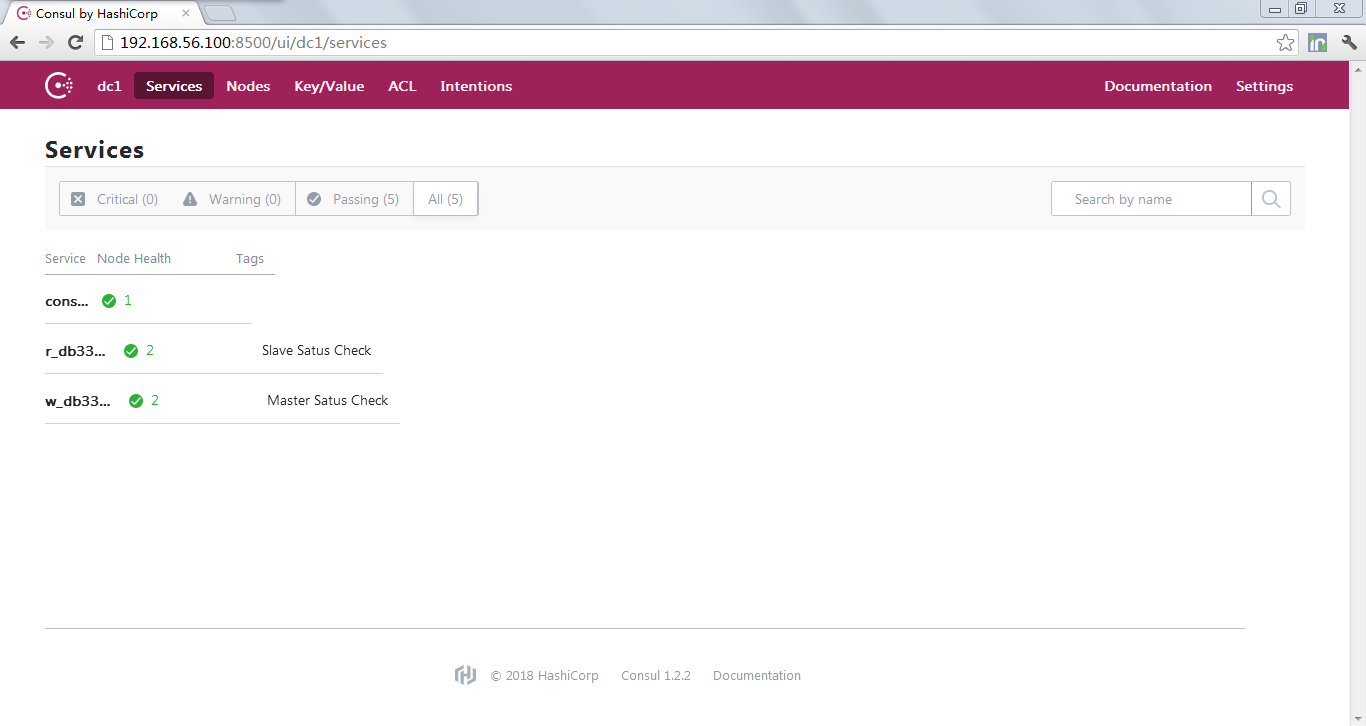
5UCMCU%7BTK48ED1)OBL.png)


Consul初体验的更多相关文章
- consul 初体验
consul server: 192.168.48.134: #!/bin/bash cd /data/server/consuls nohup /data/server/consuls/consul ...
- Consul在.Net Core中初体验
Consul在.Net Core中初体验 简介 在阅读本文前我想您应该对微服务架构有一个基本的或者模糊的了解 Consul是一个服务管理软件,它其实有很多组件,包括服务发现配置共享键值对存储等 本文主 ...
- .NET平台开源项目速览(15)文档数据库RavenDB-介绍与初体验
不知不觉,“.NET平台开源项目速览“系列文章已经15篇了,每一篇都非常受欢迎,可能技术水平不高,但足够入门了.虽然工作很忙,但还是会抽空把自己知道的,已经平时遇到的好的开源项目分享出来.今天就给大家 ...
- Xamarin+Prism开发详解四:简单Mac OS 虚拟机安装方法与Visual Studio for Mac 初体验
Mac OS 虚拟机安装方法 最近把自己的电脑升级了一下SSD固态硬盘,总算是有容量安装Mac 虚拟机了!经过心碎的安装探索,尝试了国内外的各种安装方法,最后在youtube上找到了一个好方法. 简单 ...
- Spring之初体验
Spring之初体验 Spring是一个轻量级的Java Web开发框架,以IoC(Inverse of Control 控制反转)和 ...
- Xamarin.iOS开发初体验
aaarticlea/png;base64,iVBORw0KGgoAAAANSUhEUgAAAKwAAAA+CAIAAAA5/WfHAAAJrklEQVR4nO2c/VdTRxrH+wfdU84pW0
- 【腾讯Bugly干货分享】基于 Webpack & Vue & Vue-Router 的 SPA 初体验
本文来自于腾讯bugly开发者社区,非经作者同意,请勿转载,原文地址:http://dev.qq.com/topic/57d13a57132ff21c38110186 导语 最近这几年的前端圈子,由于 ...
- 【Knockout.js 学习体验之旅】(1)ko初体验
前言 什么,你现在还在看knockout.js?这货都已经落后主流一千年了!赶紧去学Angular.React啊,再不赶紧的话,他们也要变out了哦.身旁的90后小伙伴,嘴里还塞着山东的狗不理大蒜包, ...
- 在同一个硬盘上安装多个 Linux 发行版及 Fedora 21 、Fedora 22 初体验
在同一个硬盘上安装多个 Linux 发行版 以前对多个 Linux 发行版的折腾主要是在虚拟机上完成.我的桌面电脑性能比较强大,玩玩虚拟机没啥问题,但是笔记本电脑就不行了.要在我的笔记本电脑上折腾多个 ...
随机推荐
- 虚拟机Centos安装docker小记
本书记录是参考 <Spring Cloud 与 Docker 微服务架构实战(第二版)>这本书实现的. 记录简单几个命令,安装顺序如下: 1. 安装docker所需的包 sudo yum ...
- 几句代码简单实现IoC容器
前言 最近在调试EasyNetQ代码的时候发现里面有一段代码,就是IoC容器的简单实现,跟着他的代码敲了一遍,发现了奇妙之处.当然也是因为我才疏学浅导致孤陋寡闻了.他的思路就是通过动态调用构造函数生成 ...
- if not
if not x 在python中的意思是如果x为空 a = [] if not a: print 1 此代码会打印出1 a = [1,2,3] if not a: print 1 此代码不会打印出1 ...
- 创建blob地址
aa="121" "121" b=new Blob([aa]) Blob(3) {size: 3, type: ""} window.URL ...
- Cesium.js点击事件
创建viewer var viewer = new Cesium.Viewer('cesiumContainer'); 鼠标事件 var handler = new Cesium.ScreenSpac ...
- java字符串类型和时间类型的转换
类型转换 //reqeust.getParameter获取字符串直接赋值 1 public static Date date(String date_str) { try { Calendar zca ...
- 锐捷交换机实验案例:vlan间互访的配置与验证
组网需求: 1.如下图所示,某用户内网被划分为VLAN 10.VLAN 20.VLAN 30,以实现相互间的2 层隔离: 2.3 个VLAN 对应的IP 子网分别为192.168.10.0/24 .1 ...
- 团体队列 UVA540 Team Queue
题目描述 有t个团队的人正在排一个长队.每次新来一个人时,如果他有队友在排队,那么新人会插队到最后一个队友的身后.如果没有任何一个队友排队,则他会被排到长队的队尾. 输入每个团队中所有队员的编号,要求 ...
- Qt 项目主进程接收Alarm 后在GUI上显示,并且可以有选择性输出文件
项目主进程接收报警后,将alarm msg 发送给代理, 并将其分发: else if (msg.name == "MesLCUalarmRep") { QString error ...
- 10.安装使用jenkins及其插件
持续集成 1.安装jenkins 安装依赖 [root@git ~]# yum install java-1.8.0-openjdk java-1.8.0-openjdk-devel rpm包下载: ...