
Consul初体验
| Hostname | IP | Port | OS Version | MySQL Version | MySQL Role | Consul Version | Consul Role |
| zlm1 | 192.168.56.100 | 3306 | CentOS 7.0 | 5.7.21 | master | Consul v1.2.2 | server |
| zlm2 | 192.168.56.101 | 3306 | CentOS 7.0 | 5.7.21 | slave | Consul v1.2.2 | client |
 [root@zlm1 :: /vagrant]

 #wget https://releases.hashicorp.com/consul/1.2.2/consul_1.2.2_linux_amd64.zip

 ---- ::--  https://releases.hashicorp.com/consul/1.2.2/consul_1.2.2_linux_amd64.zip

 Resolving releases.hashicorp.com (releases.hashicorp.com)... 151.101.229.183, 2a04:4e42:::

 Connecting to releases.hashicorp.com (releases.hashicorp.com)|151.101.229.183|:... connected.

 HTTP request sent, awaiting response...  OK

 Length:  (18M) [application/zip]

 Saving to: ‘consul_1..2_linux_amd64.zip’

 %[===========================================================================================================>] ,,  .8KB/s   in 6m 12s

 -- :: (48.3 KB/s) - ‘consul_1..2_linux_amd64.zip’ saved [/]

 [root@zlm1 :: /vagrant/consul_1..2_linux_amd64]

 #ls -l

 total

 -rwxrwxrwx  vagrant vagrant  Jul  : consul //There's only a binary command in the unziped directory of zip file.

 [root@zlm1 :: /vagrant/consul_1..2_linux_amd64]

 #mkdir /etc/consul.d

 [root@zlm1 :: /vagrant/consul_1..2_linux_amd64]

 #mkdir /data/consul

 [root@zlm1 :: /vagrant/consul_1..2_linux_amd64]

 #cp consul ~

 [root@zlm1 :: ~]

 #cd /usr/local/bin

 [root@zlm1 :: /usr/local/bin]

 #ls -l|grep consul

 lrwxrwxrwx  root root       Aug  : consul -> /root/consul

 [root@zlm1 :: /usr/local/bin]

 #consul --help

 Usage: consul [--version] [--help] <command> [<args>]

 Available commands are:

     agent          Runs a Consul agent

     catalog        Interact with the catalog

     connect        Interact with Consul Connect

     event          Fire a new event

     exec           Executes a command on Consul nodes

     force-leave    Forces a member of the cluster to enter the "left" state

     info           Provides debugging information for operators.

     intention      Interact with Connect service intentions

     join           Tell Consul agent to join cluster

     keygen         Generates a new encryption key

     keyring        Manages gossip layer encryption keys

     kv             Interact with the key-value store

     leave          Gracefully leaves the Consul cluster and shuts down

     lock           Execute a command holding a lock

     maint          Controls node or service maintenance mode

     members        Lists the members of a Consul cluster

     monitor        Stream logs from a Consul agent

     operator       Provides cluster-level tools for Consul operators

     reload         Triggers the agent to reload configuration files

     rtt            Estimates network round trip time between nodes

     snapshot       Saves, restores and inspects snapshots of Consul server state

     validate       Validate config files/directories

     version        Prints the Consul version

     watch          Watch for changes in Consul
 [root@zlm1 :: /usr/local/bin]

 #consul agent -dev

 ==> Starting Consul agent...

 ==> Consul agent running!

            Version: 'v1.2.2'

            Node ID: '7c839914-8a47-ab36-8920-1a9da54fc6c3'

          Node name: 'zlm1'

         Datacenter: 'dc1' (Segment: '<all>')

             Server: true (Bootstrap: false)

        Client Addr: [127.0.0.1] (HTTP: , HTTPS: -, DNS: )

       Cluster Addr: 127.0.0.1 (LAN: , WAN: )

            Encrypt: Gossip: false, TLS-Outgoing: false, TLS-Incoming: false

 ==> Log data will now stream in as it occurs:

     // :: [DEBUG] agent: Using random ID "7c839914-8a47-ab36-8920-1a9da54fc6c3" as node ID

     // :: [INFO] raft: Initial configuration (index=): [{Suffrage:Voter ID:7c839914-8a47-ab36--1a9da54fc6c3 Address:127.0.0.1:}]

     // :: [INFO] serf: EventMemberJoin: zlm1.dc1 127.0.0.1

     // :: [INFO] serf: EventMemberJoin: zlm1 127.0.0.1

     // :: [INFO] raft: Node at 127.0.0.1: [Follower] entering Follower state (Leader: "")

     // :: [INFO] consul: Adding LAN server zlm1 (Addr: tcp/127.0.0.1:) (DC: dc1)

     // :: [INFO] consul: Handled member-join event for server "zlm1.dc1" in area "wan"

     // :: [DEBUG] agent/proxy: managed Connect proxy manager started

     // :: [WARN] agent/proxy: running as root, will not start managed proxies

     // :: [INFO] agent: Started DNS server 127.0.0.1: (tcp)

     // :: [INFO] agent: Started DNS server 127.0.0.1: (udp)

     // :: [INFO] agent: Started HTTP server on 127.0.0.1: (tcp)

     // :: [INFO] agent: started state syncer

     // :: [WARN] raft: Heartbeat timeout from "" reached, starting election

     // :: [INFO] raft: Node at 127.0.0.1: [Candidate] entering Candidate state in term

     // :: [DEBUG] raft: Votes needed:

     // :: [DEBUG] raft: Vote granted from 7c839914-8a47-ab36--1a9da54fc6c3 in term . Tally:

     // :: [INFO] raft: Election won. Tally:

     // :: [INFO] raft: Node at 127.0.0.1: [Leader] entering Leader state

     // :: [INFO] consul: cluster leadership acquired

     // :: [INFO] consul: New leader elected: zlm1

     // :: [INFO] connect: initialized CA with provider "consul"

     // :: [DEBUG] consul: Skipping self join check for "zlm1" since the cluster is too small

     // :: [INFO] consul: member 'zlm1' joined, marking health alive

     // :: [DEBUG] agent: Skipping remote check "serfHealth" since it is managed automatically

     // :: [INFO] agent: Synced node info

     // :: [DEBUG] agent: Skipping remote check "serfHealth" since it is managed automatically

     // :: [DEBUG] agent: Node info in sync

     // :: [DEBUG] agent: Node info in sync

     // :: [DEBUG] consul: Skipping self join check for "zlm1" since the cluster is too small

     // :: [DEBUG] agent: Skipping remote check "serfHealth" since it is managed automatically

     // :: [DEBUG] agent: Node info in sync

     // :: [DEBUG] manager: Rebalanced  servers, next active server is zlm1.dc1 (Addr: tcp/127.0.0.1:) (DC: dc1)

     // :: [DEBUG] consul: Skipping self join check for "zlm1" since the cluster is too small

     // :: [DEBUG] consul: Skipping self join check for "zlm1" since the cluster is too small

     // :: [DEBUG] agent: Skipping remote check "serfHealth" since it is managed automatically

     // :: [DEBUG] agent: Node info in sync

 //Now the consul cluser has only one node "zlm1".

 [root@zlm1 :: ~]

 #consul members

 Node  Address         Status  Type    Build  Protocol  DC   Segment

 zlm1  127.0.0.1:  alive   server  1.2.           dc1  <all>

 //Type "Ctrl+C" can exit consul gracefully.

 ^C    // :: [INFO] agent: Caught signal:  interrupt

     // :: [INFO] agent: Graceful shutdown disabled. Exiting

     // :: [INFO] agent: Requesting shutdown

     // :: [WARN] agent: dev mode disabled persistence, killing all proxies since we can't recover them

     // :: [DEBUG] agent/proxy: Stopping managed Connect proxy manager

     // :: [INFO] consul: shutting down server

     // :: [WARN] serf: Shutdown without a Leave

     // :: [WARN] serf: Shutdown without a Leave

     // :: [INFO] manager: shutting down

     // :: [INFO] agent: consul server down

     // :: [INFO] agent: shutdown complete

     // :: [INFO] agent: Stopping DNS server 127.0.0.1: (tcp)

     // :: [INFO] agent: Stopping DNS server 127.0.0.1: (udp)

     // :: [INFO] agent: Stopping HTTP server 127.0.0.1: (tcp)

     // :: [INFO] agent: Waiting for endpoints to shut down

     // :: [INFO] agent: Endpoints down

     // :: [INFO] agent: Exit code:

 [root@zlm1 :: /usr/local/bin]

 #ps aux|grep consul

 root        0.0  0.0     pts/    R+   :   : grep --color=auto consul

 [root@zlm1 :: /usr/local/bin]

 #consul members

 Error retrieving members: Get http://127.0.0.1:8500/v1/agent/members?segment=_all: dial tcp 127.0.0.1:8500: connect: connection refused
 [root@zlm1 :: /etc/consul.d]

 #cat server.json

 {

     "data_dir":"/data/consul",

     "datacenter":"dc1",

     "log_level":"INFO",

     "server":true,

     "bootstrap_expect":,

     "bind_addr":"192.168.56.100",

     "client_addr":"192.168.56.100",

     "ports":{

     },

     "ui":true,

     "retry_join":[],

     "retry_interval":"3s",

     "raft_protocol":,

     "rejoin_after_leave":true

 }

 [root@zlm1 :: /etc/consul.d]

 #consul agent --config-dir=/etc/consul.d/ > /data/consul/consul.log >& &

 []

 [root@zlm1 :: /etc/consul.d]

 #ps aux|grep consul

 root        1.3  2.0    pts/    Sl   :   : consul agent --config-dir=/etc/consul.d/

 root        0.0  0.0     pts/    R+   :   : grep --color=auto consul

 [root@zlm1 :: /etc/consul.d]

 #tail -f /data/consul/consul.log

     // :: [INFO] agent: Started HTTP server on 192.168.56.100: (tcp)

     // :: [INFO] agent: started state syncer

     // :: [WARN] raft: Heartbeat timeout from "" reached, starting election

     // :: [INFO] raft: Node at 192.168.56.100: [Candidate] entering Candidate state in term

     // :: [INFO] raft: Election won. Tally:

     // :: [INFO] raft: Node at 192.168.56.100: [Leader] entering Leader state

     // :: [INFO] consul: cluster leadership acquired

     // :: [INFO] consul: New leader elected: zlm1

     // :: [INFO] consul: member 'zlm1' joined, marking health alive

     // :: [INFO] agent: Synced node info

 [root@zlm1 :: ~]

 #consul members

 Error retrieving members: Get http://127.0.0.1:8500/v1/agent/members?segment=_all: dial tcp 127.0.0.1:8500: connect: connection refused

 [root@zlm1 :: ~]

 #consul members --http-addr=192.168.56.100:

 Node  Address              Status  Type    Build  Protocol  DC   Segment

 zlm1  192.168.56.100:  alive   server  1.2.           dc1  <all>
 [root@zlm1 :: /etc/consul.d]

 #scp /root/consul zlm2:~

 consul                                                                                                             %   80MB  .3MB/s   :

 [root@zlm2 :: ~]

 #mkdir /etc/consul.d

 [root@zlm2 :: ~]

 #mkdir /data/consul

 [root@zlm2 :: ~]

 #cd /etc/consul.d/

 [root@zlm2 :: /etc/consul.d]

 #ls -l

 total

 -rw-r--r--  root root  Aug  : client.json

 [root@zlm2 :: /etc/consul.d]

 #cat client.json

 {

     "data_dir": "/data/consul",

     "enable_script_checks": true,

     "bind_addr": "192.168.56.101",

     "retry_join": ["192.168.56.100"],

     "retry_interval": "30s",

     "rejoin_after_leave": true,

     "start_join": ["192.168.56.100"]

 }

 [root@zlm2 :: /etc/consul.d]

 #consul agent -client 192.168.56.101 -bind 192.168.56.101 --config-dir=/etc/consul.d

 ==> Starting Consul agent...

 ==> Joining cluster...

     Join completed. Synced with  initial agents

 ==> Consul agent running!

            Version: 'v1.2.2'

            Node ID: 'a69eae21-4e31-7edf-1f1a-3ec285a8fb3b'

          Node name: 'zlm2'

         Datacenter: 'dc1' (Segment: '')

             Server: false (Bootstrap: false)

        Client Addr: [192.168.56.101] (HTTP: , HTTPS: -, DNS: )

       Cluster Addr: 192.168.56.101 (LAN: , WAN: )

            Encrypt: Gossip: false, TLS-Outgoing: false, TLS-Incoming: false

 ==> Log data will now stream in as it occurs:

     // :: [INFO] serf: EventMemberJoin: zlm2 192.168.56.101

     // :: [INFO] agent: Started DNS server 192.168.56.101: (udp)

     // :: [WARN] agent/proxy: running as root, will not start managed proxies

     // :: [INFO] agent: Started DNS server 192.168.56.101: (tcp)

     // :: [INFO] agent: Started HTTP server on 192.168.56.101: (tcp)

     // :: [INFO] agent: (LAN) joining: [192.168.56.100]

     // :: [INFO] agent: Retry join LAN is supported for: aliyun aws azure digitalocean gce os packet scaleway softlayer triton vsphere

     // :: [INFO] agent: Joining LAN cluster...

     // :: [INFO] agent: (LAN) joining: [192.168.56.100]

     // :: [INFO] serf: EventMemberJoin: zlm1 192.168.56.100

     // :: [INFO] agent: (LAN) joined:  Err: <nil>

     // :: [INFO] agent: started state syncer

     // :: [INFO] consul: adding server zlm1 (Addr: tcp/192.168.56.100:) (DC: dc1)

     // :: [INFO] agent: (LAN) joined:  Err: <nil>

     // :: [INFO] agent: Join LAN completed. Synced with  initial agents

     // :: [INFO] agent: Synced node info

 [root@zlm2 :: /etc/consul.d]

 #consul members --http-addr=192.168.56.100:

 Node  Address              Status  Type    Build  Protocol  DC   Segment

 zlm1  192.168.56.100:  alive   server  1.2.           dc1  <all>

 zlm2  192.168.56.101:  alive   client  1.2.           dc1  <default>
 [root@zlm2 :: /etc/consul.d]

 #cat service_master_check.json

 {

     "service":

        {

             "name": "w_db3306",

             "tags":  [

                           "Master Satus Check"

                         ],

             "address": "192.168.56.100",

             "port": ,

             "check":

                             {

                                 "args": [

                                              "/data/consul/script/CheckMaster.py",

                                              ""

                                             ],

                                 "interval": "15s"

                             }

         }

 }

 [root@zlm2 :: /etc/consul.d]

 #cat service_slave_check.json

 {

     "service":

         {

             "name": "r_db3306",

             "tags": [

                          "Slave Satus Check"

                         ],

             "address": "192.168.56.101",

             "port": ,

             "check":

                             {

                                 "args": [

                                              "/data/consul/script/CheckSlave.py",

                                              ""

                                             ],

                                 "interval": "15s"

                             }

         }

 }

 [root@zlm2 :: /etc/consul.d]

 #ls -l

 total

 -rw-r--r--  root root  Aug  : client.json

 -rw-r--r--  root root  Aug  : service_master_check.json

 -rw-r--r--  root root  Aug  : servi_slave_check.json
 [root@zlm2 :: /data/consul/script]

 #cat CheckMaster.py

 #!/usr/bin/python

 import sys

 import os

 import pymysql

 port = int(sys.argv[])

 var={}

 conn = pymysql.connect(host='192.168.56.100',port=port,user='zlm',passwd='zlmzlm')

 #cur = conn.cursor(pymysql.cursor.DictCursor)

 cur = conn.cursor()

 cur.execute("show global variables like \"%read_only%\"")

 rows = cur.fetchall()

 for r in rows:

     var[r[]]=r[]

 if var['read_only']=='OFF' and var['super_read_only']=='OFF':

         print "MySQL %d master instance." % port

 else:

         print "This is read only instance."

         sys.exit()

 sys.exit()

 cur.close()

 conn.close()
 [root@zlm2 :: /data/consul/script]

 #cat CheckSlave.py

 #!/usr/bin/python

 import sys

 import os

 import pymysql

 port = int(sys.argv[])

 var={}

 conn = pymysql.connect(host='192.168.56.101',port=port,user='zlm',passwd='zlmzlm')

 cur = conn.cursor

 cur.execute("show global variables like \"%read_only%\"")

 rows = cur.fetchall()

 for r in rows:

     var[r[]]=r[]

 if var['read_only']=='OFF' and var['super_read_only']=='OFF':

         print "MySQL %d master instance." % port

         sys.exit()

 else:

         print "MySQL %d is read only instance." % port

 cur = conn.cursor(pymysql.cursors.DictCursor)

 cur.execute("show slave status")

 slave_status = cur.fetchone()

 if len(slave_status)<:

         print "Slave replication setup error.";

         sys.exit()

 if slave_status['Slave_IO_Running'] !='Yes' or slave_status['Slave_SQL_Running'] !='Yes':

         print "Replication error: replication from host=%s, port=%s, io_thread=%s, sql_thread=%s, error info %s %s" % (slave_status['Master_Host'],slave_status['Master_Port'],slave_status['Slave_IO_Running'],slave_status['Slave_SQL_Running'],slave_status['Last_IO_Error'],slave_status['Last_SQL_Error'])

         sys.exit()

 print slave_status

 sys.exit()

 cur.close()

 conn.close()
 [root@zlm2 :: /etc/consul.d]

 #consul members --http-addr=192.168.56.100:

 Node  Address              Status  Type    Build  Protocol  DC   Segment

 zlm1  192.168.56.100:  alive   server  1.2.           dc1  <all>

 zlm2  192.168.56.101:  alive   client  1.2.           dc1  <default>

 [root@zlm2 :: /etc/consul.d]

 #consul leave --http-addr=192.168.56.101:

 Graceful leave complete

 [root@zlm2 :: /etc/consul.d]

 #consul members --http-addr=192.168.56.100:

 Node  Address              Status  Type    Build  Protocol  DC   Segment

 zlm1  192.168.56.100:  alive   server  1.2.           dc1  <all>

 zlm2  192.168.56.101:  left    client  1.2.           dc1  <default>

 [root@zlm2 :: /etc/consul.d]

 #consul agent --config-dir=/etc/consul.d/ -client 192.168.56.101 > /data/consul/consul.log >& &

 []

 [root@zlm2 :: /etc/consul.d]

 #!ps

 ps aux|grep consul

 root        2.3  2.0    pts/    Sl   :   : consul agent --config-dir=/etc/consul.d/ -client 192.168.56.101

 root        0.0  0.0     pts/    R+   :   : grep --color=auto consul

 [root@zlm2 :: /etc/consul.d]

 #consul reload -http-addr=192.168.56.101:

 Configuration reload triggered
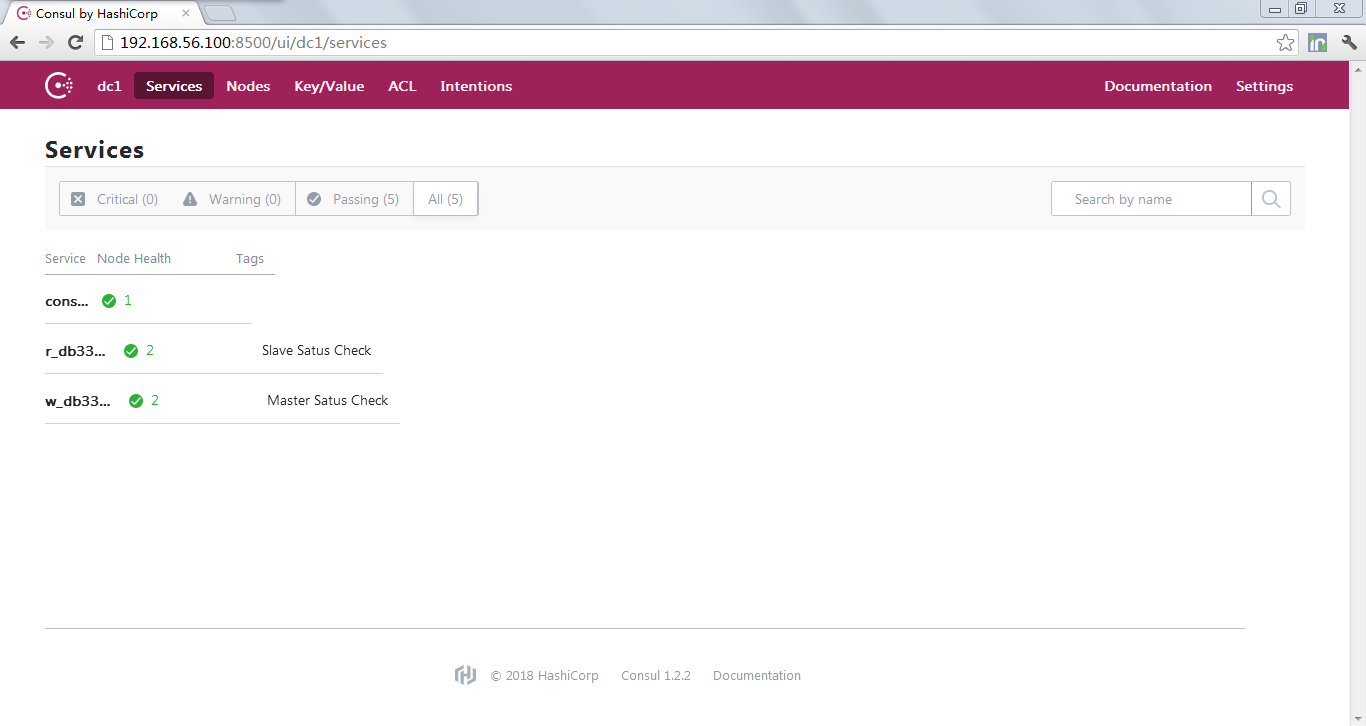
5UCMCU%7BTK48ED1)OBL.png)


Consul初体验的更多相关文章
- consul 初体验
consul server: 192.168.48.134: #!/bin/bash cd /data/server/consuls nohup /data/server/consuls/consul ...
- Consul在.Net Core中初体验
Consul在.Net Core中初体验 简介 在阅读本文前我想您应该对微服务架构有一个基本的或者模糊的了解 Consul是一个服务管理软件,它其实有很多组件,包括服务发现配置共享键值对存储等 本文主 ...
- .NET平台开源项目速览(15)文档数据库RavenDB-介绍与初体验
不知不觉,“.NET平台开源项目速览“系列文章已经15篇了,每一篇都非常受欢迎,可能技术水平不高,但足够入门了.虽然工作很忙,但还是会抽空把自己知道的,已经平时遇到的好的开源项目分享出来.今天就给大家 ...
- Xamarin+Prism开发详解四:简单Mac OS 虚拟机安装方法与Visual Studio for Mac 初体验
Mac OS 虚拟机安装方法 最近把自己的电脑升级了一下SSD固态硬盘,总算是有容量安装Mac 虚拟机了!经过心碎的安装探索,尝试了国内外的各种安装方法,最后在youtube上找到了一个好方法. 简单 ...
- Spring之初体验
Spring之初体验 Spring是一个轻量级的Java Web开发框架,以IoC(Inverse of Control 控制反转)和 ...
- Xamarin.iOS开发初体验
aaarticlea/png;base64,iVBORw0KGgoAAAANSUhEUgAAAKwAAAA+CAIAAAA5/WfHAAAJrklEQVR4nO2c/VdTRxrH+wfdU84pW0
- 【腾讯Bugly干货分享】基于 Webpack & Vue & Vue-Router 的 SPA 初体验
本文来自于腾讯bugly开发者社区,非经作者同意,请勿转载,原文地址:http://dev.qq.com/topic/57d13a57132ff21c38110186 导语 最近这几年的前端圈子,由于 ...
- 【Knockout.js 学习体验之旅】(1)ko初体验
前言 什么,你现在还在看knockout.js?这货都已经落后主流一千年了!赶紧去学Angular.React啊,再不赶紧的话,他们也要变out了哦.身旁的90后小伙伴,嘴里还塞着山东的狗不理大蒜包, ...
- 在同一个硬盘上安装多个 Linux 发行版及 Fedora 21 、Fedora 22 初体验
在同一个硬盘上安装多个 Linux 发行版 以前对多个 Linux 发行版的折腾主要是在虚拟机上完成.我的桌面电脑性能比较强大,玩玩虚拟机没啥问题,但是笔记本电脑就不行了.要在我的笔记本电脑上折腾多个 ...
随机推荐
- PHP------Jquery的用法
Jquery Jquery实际上相当于一个升级版的JS,Jquery里面封装了很多的东西,Jquery的功能要比JS强大,用起来比JS方便.Jquery和JS都属于JS,只不过Jquery是封装了一个 ...
- 4springboot:日志(上)
1.主流的日志框架 2.SLF4J使用 如何在系统中使用SLF4j https://www.slf4j.org 以后开发的时候,日志记录方法的调用,不应该来直接调用日志的实现类,而是调用日志抽象层里面 ...
- image_pyradid和自己的一些训练经验总结
这是训练的路锥.警示柱的数据,也就是小物体的.小物体有两个定义,一个是本身像素少,另一个是物体相对于整张图片的比例小 这是把图片缩小到600 proposal_target_layer选取用来训练的p ...
- Java获取虚拟机内存和操作系统内存及其线程
为什么要获取虚拟机内存和操作系统内存呢? 虚拟机内存,这里主要指JVM.为了防止有的时候因为JVM内存问题导致服务器宕机,所以有必要监控JVM的内存.当达到一定值时,通过邮件及时通知,防止线上宕机造成 ...
- Sonar安装和常见问题解决
Sonar是一款代码质量分析工具,有助于帮助代码质量提高. Sonar的官网地址为:https://www.sonarqube.org/downloads/ 点击 Show All Versions ...
- JavaScript读取本地json文件
JavaScript读取本地json文件 今天调试了一上午,通过jQuery读取本地json文件总是失败,始终找不出原因,各种方法都试了 开始总以为是不是json格式的问题.高了半天不行 后来读了一个 ...
- cmd进入指定的文件夹
怎么利用cmd进入指定的文件夹呢? 1:win+r ——cmd 2:进入要到达的盘符 (比如我要进入d盘) 3:然后通过 cd d:\project 进入指定的文件夹
- 【luogu P2195 HXY造公园】 题解
题目链接:https://www.luogu.org/problemnew/show/P2195 fir.吐槽题目(省略1w字 sec.考虑对一个森林的维护,每棵树用并查集维护. 操作1:输出当前查询 ...
- 如何遍历Map操作总结
Map<Integer, String> map = new HashMap<Integer, String>(); map.put(1, "123"); ...
- HDU 2082 找单词 (普通型 数量有限 母函数)
传送门: http://acm.hdu.edu.cn/showproblem.php?pid=2082 找单词 Time Limit: 1000/1000 MS (Java/Others) Me ...