
matplotlib之legend
在《matplotlib极坐标系应用之雷达图》 中,我们提出了这个问题“图例中每种成员的颜色是怎样和极坐标相应的成员的颜色相对应的呢”,那么接下来我们说说legend的一般使用和设置。
调用legend()一般有三种方式:
方式1. 自动检测,直接调用legend();
在plot()时就指定图例labels,再直接调用legend()就好了,或者在plot中指定plot elements,然后通过set_label函数指定图例labels
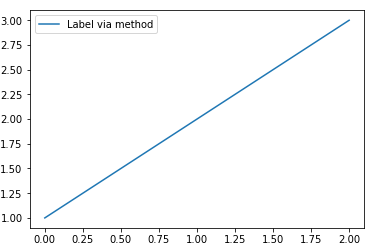
 plt.plot([1, 2, 3], label='Inline label')

 plt.legend()

 line, = plt.plot([1, 2, 3])#此处的逗号非常重要,如果没有的话line是一个list对象;加上的话line是一个matplotlib.lines.Line2D对象,才能调用set_label()函数

 line.set_label('Label via method')

 plt.legend()

方式2. 显示指定labels,调用legend(labels);
但是,这种方式会使plot elements 和 labels的对应关系不明显,所以并不建议使用这种方式。
Note: This way of using is discouraged, because the relation between plot elements and labels is only implicit by their order and can easily be mixed up.
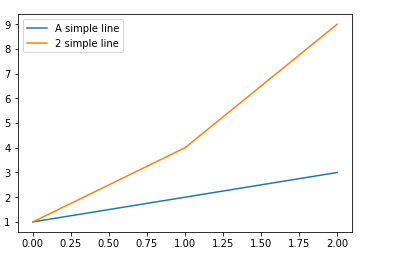
 plt.plot([1, 2, 3])

 plt.plot([1, 4, 9])

 plt.legend(['A simple line','2 simple line'])
方式3. 显示指定plot elements 和 labels,调用legend(handles, labels)
handles : sequence of Artist/lines/patches
A list of Artists (lines, patches) to be added to the legend. Use this together with labels, if you need full control on what is shown in the legend and the automatic mechanism described above is not sufficient.
The length of handles and labels should be the same in this case. If they are not, they are truncated to the smaller length.
labels : sequence of strings, optional
A list of labels to show next to the artists. Use this together with handles, if you need full control on what is shown in the legend and the automatic mechanism described above is not sufficient.
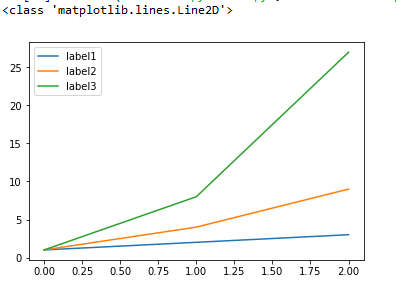
 line1, = plt.plot([1,2,3])

 print(type(line1))

 line2, = plt.plot([1,4,9])

 line3, = plt.plot([1,8,27])

 handles = (line1, line2, line3)

 labels = ('label1', 'label2', 'label3')

 plt.legend(handles, labels)
legend()的返回值:class:`matplotlib.legend.Legend` instance
其他参数说明:
loc : int or string or pair of floats, default: ‘upper right’
| Location String | Location Code |
| ‘best’ | 0 |
| ‘upper right’ | 1 |
| ‘upper left’ | 2 |
| ‘lower left’ | 3 |
| ‘lower right’ | 4 |
| ‘right’ | 5 |
| ‘center left’ | 6 |
| ‘center right’ | 7 |
| ‘lower center’ | 8 |
| ‘upper center’ | 9 |
| ‘center’ | 10 |
ncol : integer(设置图例显示列数)
The number of columns that the legend has. Default is 1.
prop : None or matplotlib.font_manager.FontProperties or dict(设置图例字体)
The font properties of the legend. If None (default), the current matplotlib.rcParams will be used.
references:
https://matplotlib.org/api/_as_gen/matplotlib.pyplot.legend.html?highlight=legend#matplotlib.pyplot.legend
https://matplotlib.org/tutorials/intermediate/legend_guide.html#sphx-glr-tutorials-intermediate-legend-guide-py
matplotlib之legend的更多相关文章
- matplotlib笔记——legend用法
rates = [0.01, 0.001, 0.0001] models = {} costs = np.array([[0.7, 0.9, 0.4, 0.6, 0.4, 0.3, 0.2, 0.1] ...
- 【Python学习笔记】调整matplotlib的图例legend的位置
有时默认的图例位置不符合我们的需要,那么我们可以使用下面的代码对legend位置进行调整. plt.legend(loc='String or Number', bbox_to_anchor=(num ...
- matplotlib.legend()函数用法
用的较多,作为记录 legend语法参数如下: matplotlib.pyplot.legend(*args, **kwargs) 几个暂时主要用的参数: (1)设置图例位置 使用loc参数 plt. ...
- matplotlib 进阶之Legend guide
目录 matplotlib.pyplot.legend 方法1自动检测 方法2为现有的Artist添加 方3显示添加图例 控制图例的输入 为一类Artist设置图例 Legend 的位置 loc, b ...
- matplotlib 入门之Sample plots in Matplotlib
文章目录 Line Plot One figure, a set of subplots Image 展示图片 展示二元正态分布 A sample image Interpolating images ...
- 基于matplotlib的数据可视化 - 笔记
1 基本绘图 在plot()函数中只有x,y两个量时. import numpy as np import matplotlib.pyplot as plt # 生成曲线上各个点的x,y坐标,然后用一 ...
- matplotlib使用总结
一.简介 Matplotlib 是一个 Python 的 2D绘图库,它以各种硬拷贝格式和跨平台的交互式环境生成出版质量级别的图形.通过 Matplotlib,开发者可以仅需要几行代码,便可以生成绘图 ...
- python 2: 解决python中的plot函数的图例legend不能显示中文问题
问题: 图像标题.横纵坐标轴的标签都能显示中文名字,但是图例就是不能显示中文,怎么解决呢? 解决: plt.figure() plt.title(u'训练性能', fontproperties=f ...
- Python之matplotlib库学习:实现数据可视化
1. 安装和文档 pip install matplotlib 官方文档 为了方便显示图像,还使用了ipython qtconsole方便显示.具体怎么弄网上搜一下就很多教程了. pyplot模块是提 ...
随机推荐
- EASYUI DATAGRID加合计
想达到的效果(计算当前展示的20条的合计数量(一言难尽)): 参考http://www.jb51.net/article/85645.htm(万分感谢该文的作者) 相关代码: function onL ...
- 项目中集成Easyui-Tree,可拖拽更新节点
由于公司架构较旧,使用的jdk版本为1.4,页面上也没有el表达式. Html <ul class="easyui-tree" id="data"> ...
- Android疑难杂症之KillProcess 和System.exit 无效
以下所讲,浓缩在 https://github.com/wytings/CrashDemo 首先就这个名字来说,kill了process 或者 system.exit确实已经把APP杀掉了,特别是当你 ...
- 实现同时提交多个form(基础方法) 收集
实现同时提交多个form(基础方法) 收集 分类: 1.2-JSP 1.3-J2EE 1.1J2se 1.0-Java相关2011-12-01 20:59 1644人阅读 评论(0) 收藏 举报 bu ...
- [ToDo]Thrift学习
这里有较详细的Java项目配置过程: http://bglmmz.iteye.com/blog/2058785 下面有Java项目的示例介绍: http://www.tuicool.com/artic ...
- 阅读ARm芯片手册 阅读方法
一 overview 1 table of contents -*** 2 product overview -*** 芯片概述 3 feature *** 每一个功能的特点 4 block ...
- 使用rsync进行多服务器同步
使用rsync进行多服务器同步 @(Others) 当集群数量很大时,修改配置文件和节点之间的文件同步是一件很麻烦且浪费时间的事情. rsync是linux上实现不同机器之间文件同步.备份的工具,ce ...
- [OpenCV]实验1.1:图像加载、显示
实验要求:利用图像库的功能,实现从文件加载图像,并在窗口中进行显示的功能:利用常见的图像文件格式(.jpg;.png;.bmp; .gif)进行测试 实验原理:图片读取到程序中是以Mat结构存储的,在 ...
- Set 遍历的三种方法
1.迭代遍历:Set<String> set = new HashSet<String>();Iterator<String> it = set.iterator( ...
- poj 2253 (dis最短路径)
Frogger Time Limit: 1000MS Memory Limit: 65536K Total Submissions: 24979 Accepted: 8114 Descript ...