
Django视图之ORM连表操作一
1 项目路径结构树
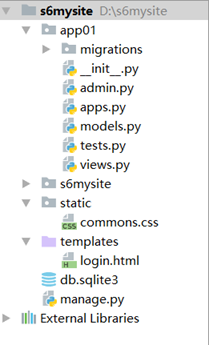
2 models创建类
from django.db import models

class UserType(models.Model):

    '''

    用户类型

    '''

    title = models.CharField(max_length=12)

class UserInfo(models.Model):

    '''

    用户表

    '''

    name = models.CharField(max_length=16)

    age = models.IntegerField()

 ut = models.ForeignKey('UserType')
CharField :char类型
IntegerField: int类型
ForeignKey: 关联表
3 检测app是否注册项目
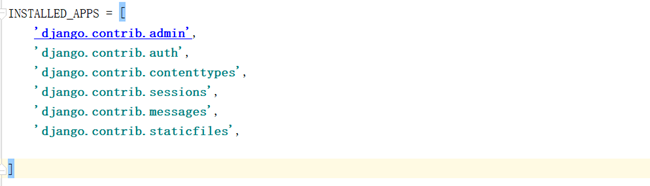
添加app01

4 初始化数据库
初始化db.sqlite3数据库
1.创建表结构
>>python manage.py makemigrations

Migrations for 'app01':

  app01\migrations\0001_initial.py

    - Create model UserInfo

    - Create model UserType

- Add field ut to userinfo
2. 初始化数据库
>> python manage.py migrate

Operations to perform:

  Apply all migrations: admin, app01, auth, contenttypes, sessions

Running migrations:

  Applying contenttypes.0001_initial... OK

  Applying auth.0001_initial... OK

  Applying admin.0001_initial... OK

  Applying admin.0002_logentry_remove_auto_add... OK

  Applying app01.0001_initial... OK

  Applying contenttypes.0002_remove_content_type_name... OK

  Applying auth.0002_alter_permission_name_max_length... OK

  Applying auth.0003_alter_user_email_max_length... OK

  Applying auth.0004_alter_user_username_opts... OK

  Applying auth.0005_alter_user_last_login_null... OK

  Applying auth.0006_require_contenttypes_0002... OK

  Applying auth.0007_alter_validators_add_error_messages... OK

  Applying auth.0008_alter_user_username_max_length... OK

  Applying sessions.0001_initial... OK
5 创建表数据
1) urls映射关系
urlpatterns = [

    url(r'^create_data/', views.create_data),

]
2) 创建视图函数
from django.shortcuts import render,redirect,HttpResponse

from app01 import models

# Create your views here.

def create_data(request):

    '''创建书籍'''

    #models.UserType.objects.create(title='普通用户')

    #models.UserType.objects.create(title='白金用户')

    #models.UserType.objects.create(title='砖石用户')

'''创建用户'''

  #models.UserInfo.objects.create(name='alex',age=32,ut_id=1)

   #models.UserInfo.objects.create(name='egon',age=42,ut_id=2)

   #models.UserInfo.objects.create(name='yuan',age=32,ut_id=3)

   #models.UserInfo.objects.create(name='naza',age=32,ut_id=1)

'''获取数据'''

    result = models.UserInfo.objects.all()

    for obj in result:

    print(obj.name,obj.age)
return HttpResponse('...')
'''

   alex 32

   egon 42

   yuan 32

   naza 32

'''
跨表操作获取数据
result = models.UserInfo.objects.all()

    for obj in result:

        print(obj.name,obj.age,obj.ut.title)

alex 32 普通用户

egon 42 白金用户

yuan 32 砖石用户

naza 32 普通用户
6 访问初始化数据
http://127.0.0.1:8000/create_data/
Django视图之ORM连表操作一的更多相关文章
- Django框架06 /orm多表操作
Django框架06 /orm多表操作 目录 Django框架06 /orm多表操作 1. admin相关操作 2. 创建模型 3. 增加 4. 删除 5. 修改 6. 基于对象的跨表查询 7. 基于 ...
- Django框架05 /orm单表操作
Django框架05 /orm单表操作 目录 Django框架05 /orm单表操作 1. orm使用流程 2. orm字段 3. orm参数 4. orm单表简单增/删/改 5. orm单表查询 5 ...
- Django之模型---ORM 多表操作
多表操作 创建表模型 from django.db import models # Create your models here. class Author(models.Model): nid = ...
- django框架基础-ORM单表操作-长期维护
############### 单表操作-添加数据 ################ import os if __name__ == '__main__': os.environ.set ...
- Django之模型---ORM 单表操作
以上一随笔中创建的book表为例讲解单表操作 添加表记录 方式一 # create方法的返回值book_obj就是插入book表中的python葵花宝典这本书籍纪录对象 book_obj=Book.o ...
- python django基础五 ORM多表操作
首先在创建表的时候看下分析一下 1.作者表和作者详细地址表 一对一关系 理论上谁都能当主表 把Author设置成主表 au=models.OneToOneField(to='AuthorDetail ...
- Django 学习 之ORM多表操作
一.创建模型 1.模型关系整理 创建一对一的关系:OneToOne("要绑定关系的表名") 创建一对多的关系:ForeignKey("要绑定关系的表名") 创建 ...
- django框架基础-ORM跨表操作-长期维护
############### 一对一跨表查询 ################ import os if __name__ == '__main__': os.environ.setde ...
- Django视图之ORM数据库查询操作API
查询表记录 查询相关API 操作:models.表名.objects.方法() all(): 查询所有结果 filter(**kwargs): 它包含了与所给筛选条件相匹配的对象 get(**kwar ...
随机推荐
- React Patterns
Contents Stateless function JSX spread attributes Destructuring arguments Conditional rendering Chil ...
- Poco::File
基于入门的环境及makefile. #include<iostream> #include<Poco/File.h> using namespace std; using na ...
- Codeforces Round #530 (Div. 2):D. Sum in the tree (题解)
D. Sum in the tree 题目链接:https://codeforces.com/contest/1099/problem/D 题意: 给出一棵树,以及每个点的si,这里的si代表从i号结 ...
- HDU2444 :The Accomodation of Students(二分图染色+二分图匹配)
The Accomodation of Students Time Limit: 5000/1000 MS (Java/Others) Memory Limit: 32768/32768 K ( ...
- Transformation 线段树好题 好题 (独立写出来对线段树不容易)
Transformation Time Limit: 15000/8000 MS (Java/Others) Memory Limit: 65535/65536 K (Java/Others)T ...
- java重写equals和hashCode方法
一.重写equals方法 如果不重写equals,那么比较的将是对象的引用是否指向同一块内存地址,重写之后目的是为了比较两个对象的value值是否相等. 利用equals比较八大包装对象(如int,f ...
- .net 跨域 问题解决
参考地址:http://www.cnblogs.com/moretry/p/4154479.html 在项目上面使用 Nuget 搜索 microsoft.aspnet.webapi.cors 直接下 ...
- LightOJ 1340 - Story of Tomisu Ghost 阶乘分解素因子
http://www.lightoj.com/volume_showproblem.php?problem=1340 题意:问n!在b进制下至少有t个后缀零,求最大的b. 思路:很容易想到一个数通过分 ...
- jsp05 指令与动作
JSP7个动作指令如下 : jsp:forward: 执行页面转向,将请求的处理转发到下一个页面. jsp:param: 用于传递参数,必须与其他支持参数曲标签一起使用. jsp:include: 用 ...
- leaflet一个前端gis框架,比openlayer更简单
leaflet一个前端gis框架,比openlayer更简单 作者github:https://github.com/mourner?tab=overview&from=2009-12-01& ...