
Redis 入门到分布式 (八)Redis Sentinel
个人博客网:https://wushaopei.github.io/ (你想要这里多有)
sentinel-目录
        主从复制高可用

        安装配置

        实现原理

        架构说明

        客户端连接

        常见开发运维问题
一、主从复制高可用
1、主从复制的作用?
为主提供一个备份,当主服务器挂掉后,可以为客户端提供主服务器中完整的数据;
为主服务器进行分流,将读操作放到从节点上。
2、主从复制高可用存在的问题?
手动故障转移
写能力和存储能力受限
3、手动故障转移:
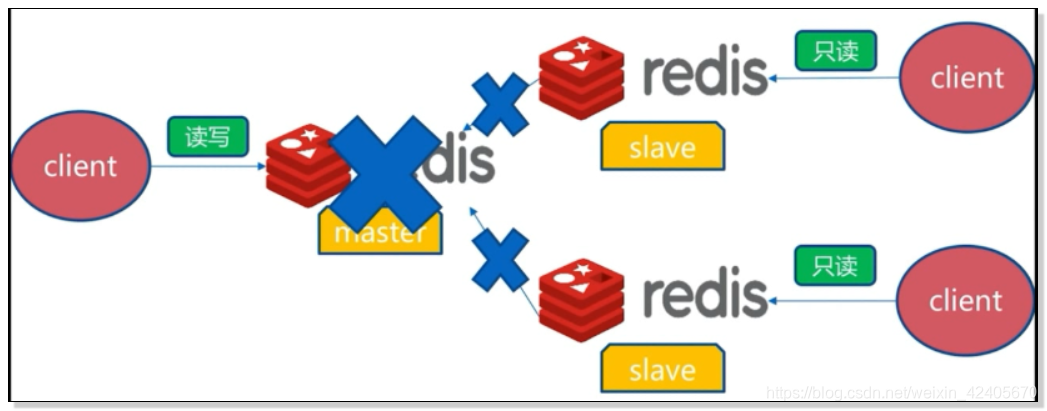
如图,假如这时候master挂掉了, master向slave的复制也被断掉了,这对于我们连接master的客户端肯定会连接或者读写失败的。这对于连接或读写分离的策略,这里的读是正常的,但是数据的更新却是无法保证的。
解决方案:
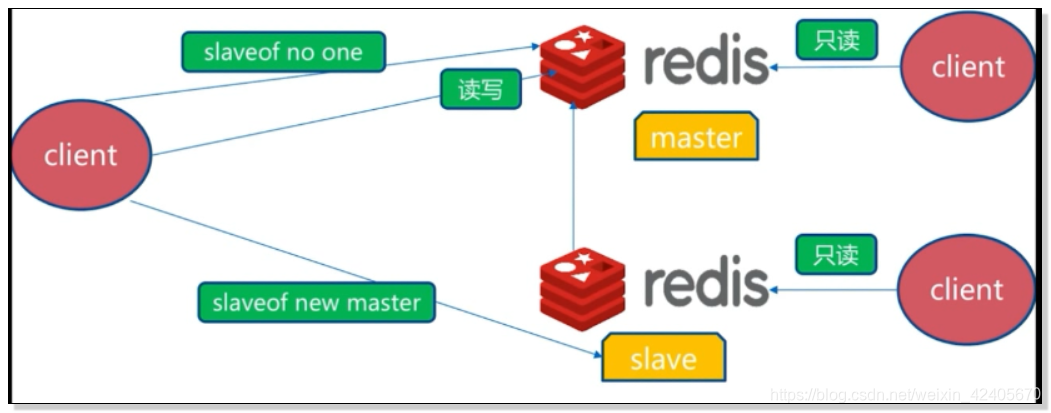
发生以上问题后,要进行故障转移。首先,要选中一个客户端slave,让它执行slaveof no one,让它成为master;然后对于其余的slave让它们执行slaveof new master 从而向新的master进行数据同步,这样就完成了生成一个新的master和向它复制的过程。
同时,我们的客户端slave也会去读取新的master。
二、 redis sentinel
1、 Redis Sentinel架构:

首先,Redis Sentinel包含多个redis节点,其中包括一主一从或者一主多从等多个节点;同样包含有多个sentinel节点。
sentinel节点主要用于对redis节点的状态进行故障判断,对redis进行故障转移的处理以及对客户端进行通知的处理。
对于一个节点的失败是可以达到公平性,还可以保证高可用,因为当前某个sentinel节点挂了,还可以保证整个Senetinel结构是完美的。
2、Redis Sentinel故障转移:

- 多个Sentinel发现并确认master有问题
- 选举出一个sentinel作为领导
- 选出一个slave作为master
- 通知其余slave成为新的master的slave
- 通知客户端主从变化
- 等待老的master复活成为新master的slave
整个过程其实就是从手动故障配置转移改成由sentinel进行故障发现、故障处理转移、故障通知的机制。

Redis Sentinel可以进行多套master~slave的机制的监控;每套master~slave会使用一个master-name进行标识。
三、redis sentinel 安装
1、安装与配置
1)配置开启主从节点
2) 配置开启sentinel监控主节点。(sentinel是特殊的redis)
3)实际应该多机器
4)详细配置节点
2、案例:

有个master:master-7000,两个slave: slave-7001,slave-7002:
1)Redis主节点:
启动:
redis-server redis-7000.conf
配置:
port 7000
daemonnize yes
pidfile /var/run/redis-7000.pid
logfile "7000.log"
2) Redis从节点
启动 :
redis-server redis-7001.conf
redis-server redis-7002.conf
配置:
slave-1:
port 7001
daemonnize yes
pidfile /var/run/redis-7001.pid
logfile "7001.log"
dir "/opt/soft/redis/data/"
slaveof 127.0.0.1 7000
slave-2:
port 7002
daemonnize yes
pidfile /var/run/redis-7002.pid
logfile "7002.log"
dir "/opt/soft/redis/data/"
slaveof 127.0.0.1 7000
3、sentinel主要配置
port ${port}
dir "/opt/soft/redis/data/"
logfile "${port}.log"
sentinel monitor mymaster 127.0.0.1 7000 2
sentinel down-after-milliseconds mymaster 30000
sentinel parallel-syncs mymaster 1
sentinel failover-timeout mymaster 180000
四、redis sentine安装演示1
1、配置主节点配置文件: redis-7000.conf
[root@VM_0_14_centos conf]# ll
total 0
[root@VM_0_14_centos conf]# vim redis-7000.conf
1)配置参数:
port 7000
daemonize yes
pidfile /var/run/redis-7000.pid
logfile "7000.log"
dir "/usr/local/redis/data/"
2)将redis-7000复制为从节点rediss-7001、redis-7002
[root@VM_0_14_centos conf]# sed "s/7000/7001/g" redis-7000.conf > redis-7001.conf
[root@VM_0_14_centos conf]# sed "s/7000/7002/g" redis-7000.conf > redis-7002.conf
[root@VM_0_14_centos conf]# ll
total 12
-rw-r--r-- 1 root root 106 Nov 11 14:53 redis-7000.conf
-rw-r--r-- 1 root root 106 Nov 11 14:54 redis-7001.conf
-rw-r--r-- 1 root root 106 Nov 11 14:54 redis-7002.conf
3)让redis-7001、redis-7002指向redis-7000主节点:
[root@VM_0_14_centos conf]# echo "slaveof 127.0.0.1 7000" >> redis-7001.conf
[root@VM_0_14_centos conf]#
[root@VM_0_14_centos conf]# echo "slaveof 127.0.0.1 7000" >> redis-7002.conf
[root@VM_0_14_centos conf]# ll
total 12
-rw-r--r-- 1 root root 106 Nov 11 14:53 redis-7000.conf
-rw-r--r-- 1 root root 129 Nov 11 14:55 redis-7001.conf
-rw-r--r-- 1 root root 129 Nov 11 14:55 redis-7002.conf
[root@VM_0_14_centos conf]# cat redis-7000.conf
port 7000
daemonize yes
pidfile /var/run/redis-7000.pid
logfile "7000.log"
dir "/usr/local/redis/data/"
[root@VM_0_14_centos conf]# cat redis-7001.conf
port 7001
daemonize yes
pidfile /var/run/redis-7001.pid
logfile "7001.log"
dir "/usr/local/redis/data/"
slaveof 127.0.0.1 7000
[root@VM_0_14_centos conf]# cat redis-7002.conf
port 7002
daemonize yes
pidfile /var/run/redis-7002.pid
logfile "7002.log"
dir "/usr/local/redis/data/"
slaveof 127.0.0.1 7000
2、启动主、从节点:
[root@VM_0_14_centos conf]# redis-server redis-7000.conf
[root@VM_0_14_centos conf]# redis-cli -p 7000 ping
PONG
[root@VM_0_14_centos conf]# redis-server redis-7001.conf
[root@VM_0_14_centos conf]# redis-cli -p 7001 ping
PONG
[root@VM_0_14_centos conf]# redis-server redis-7002.conf
[root@VM_0_14_centos conf]# redis-cli -p 7002 ping
PONG
3、查看主从节点端口及相关配置信息:

五、 redis sentinel 安装2
安装配置redis-sentinel:
1、创建sentinel.conf文件:
port 26379
dir /tmp
sentinel monitor mymaster 192.168.1.108 6379 2
sentinel auth-pass mymaster MySUPER--secret-0123passw0rd
sentinel down-after-milliseconds mymaster 30000
sentinel parallel-syncs mymaster 1
sentinel failover-timeout mymaster 180000
2、复制创建 redis-sentinel-26379.conf文件:
cat sentinel.conf | grep -v "#" | grep -v "^$" > redis-sentinel-26379.conf
3、主节点参数配置:
port 26379
daemonize yes
dir /usr/local/redis/data/
logfile "26379.log"
sentinel monitor mymaster 127.0.0.1 7000 2
sentinel down-after-milliseconds mymaster 30000
sentinel parallel-syncs mymaster 1
sentinel failover-timeout mymaster 180000
4、启动redis-sentinel-26379主节点:
[root@VM_0_14_centos conf]# /usr/bin/redis-sentinel redis-sentinel-26379.conf
5、查看主节点状态:
[root@VM_0_14_centos conf]# ps -ef | grep redis-sentinel
root 31610 1 0 15:31 ? 00:00:00 /usr/bin/redis-sentinel *:26379 [sentinel]
root 31699 25301 0 15:32 pts/0 00:00:00 grep --color=auto redis-sentinel
6、从sentinel端口26379启动:
[root@VM_0_14_centos conf]# redis-cli -p 26379
127.0.0.1:26379>
7、为两个从节点配置sentinel:
[root@VM_0_14_centos conf]# sed "s/26379/26380/g" redis-sentinel-26379.conf > redis-sentinel-26380.conf
[root@VM_0_14_centos conf]# sed "s/26379/26381/g" redis-sentinel-26379.conf > redis-sentinel-26381.conf
8、启动从节点的sentinel:
[root@VM_0_14_centos conf]# /usr/bin/redis-sentinel redis-sentinel-26380.conf
[root@VM_0_14_centos conf]# /usr/bin/redis-sentinel redis-sentinel-26381.conf
9、状态查看;
[root@VM_0_14_centos conf]# ps -ef | grep redis-sentinel
root 31610 1 0 15:31 ? 00:00:00 /usr/bin/redis-sentinel *:26379 [sentinel]
root 32545 1 0 15:38 ? 00:00:00 /usr/bin/redis-sentinel *:26380 [sentinel]
root 32556 1 0 15:38 ? 00:00:00 /usr/bin/redis-sentinel *:26381 [sentinel]
root 32582 25301 0 15:38 pts/0 00:00:00 grep --color=auto redis-sentinel
[root@VM_0_14_centos conf]# redis-cli -p 26381127.0.0.1:26381> info# Server
redis_version:3.0.7
redis_git_sha1:00000000
redis_git_dirty:0
redis_build_id:d709ac81eddea5b3
redis_mode:sentinel
os:Linux 4.9.87-linuxkit-aufs x86_64
arch_bits:64
multiplexing_api:epoll
gcc_version:4.8.5
process_id:202
run_id:0120cece7bbd3c8c6ae3f7c8530e7608efda863e
tcp_port:26381
uptime_in_seconds:62
uptime_in_days:0
hz:16
lru_clock:14510388
config_file:/opt/soft/redis-3.0.7/config/redis-sentinel-26381.conf
# Sentinel
sentinel_masters:1
sentinel_tilt:0
sentinel_running_scripts:0
sentinel_scripts_queue_length:0
master0:name=mymaster,status=ok,address=127.0.0.1:7000,slaves=2,sentinels=3
[root@VM_0_14_centos conf]# redis-cli -p 26380 info sentinel# Sentinel
sentinel_masters:1
sentinel_tilt:0
sentinel_running_scripts:0
sentinel_scripts_queue_length:0
master0:name=mymaster,status=ok,address=127.0.0.1:7000,slaves=2,sentinels=3
六、 java 客服端
- 请求响应流程
- Jedis
- Redis-py
- 直连?
1.服务高可用?
2.客户端高可用?
1、客户端实现基本原理-step1
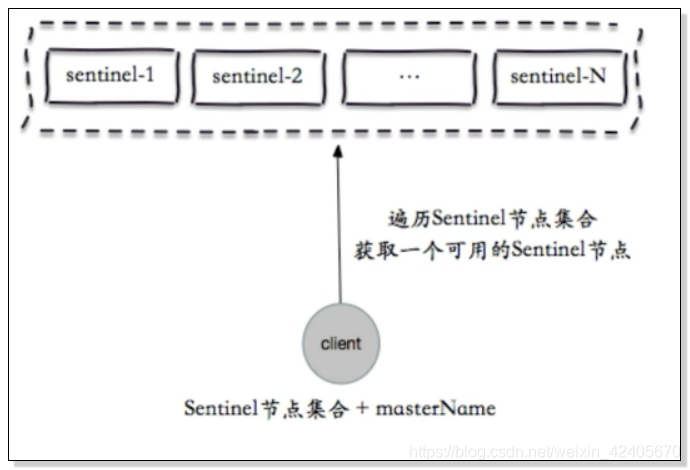
首先,我们要获取所有的sentinel节点,因为我们不知道哪个sentinel节点是活的,哪个sentnel节点已经宕机,所以我们要获取所有的sentinel节点的集合。同时,我要获取所以的master,就需要获取所有的master-name。
然后去遍历sentinel集合,找到可用的sentinel节点,也就是可以被ping通的节点。
2、客户端实现基本原理-step2

通过sentinel节点的集合和masterName去sentine-k中去查询并返回可用master节点的真正可用信息。
3、客户端实现基本原理-step3

当我们的客户端获取到master节点的时候,它会执行一次role或rol replication进行一次验证,从而验证该节点是否是真的master节点

如果master节点发生了变化,那么,sentinel是感知的。因为谁是真正的master,是由他来决定的。
Sentinel和客户端进行通知的机制:它们内部采用的是发布订阅的方式实现的。

4、客户端接入流程:
1) Sentinel 地址集合
2)masterName
3)不是代理模式
5、Jedis的使用:
JedisSentinelPool senntinelPool = new JedisSentinelPool(masterName,sentinelSet,poolConfig,timeout);

Jedis jedis = null;

try {

    jedis = redisSentinelPool.getResource();

    //jedis command

}catch(Exception e){

    logger.error(e.getMessage(),e);

}finally(

    if(jedis != null)

        jedis.close():

}
Redis 入门到分布式 (八)Redis Sentinel的更多相关文章
- redis入门(15)redis的数据备份和恢复
redis入门(15)redis的数据备份和恢复
- redis入门(14)redis集群下的数据分区存储
redis入门(10)redis集群下的数据分区存储
- Redis 入门到分布式 (二)API的理解和使用
个人博客网:https://wushaopei.github.io/ (你想要这里多有) 内容: 通用命令 单线程架构 数据结构和内部编码 一.常用的通用命令: keys 计算所有的 ...
- <Redis> 入门X 分布式锁
分布式其实就是多进程的程序,当多个进程访问一个资源,会造成问题: 1.资源共享的竞争问题 2.数据的安全性 分布式锁的解决方案: 1.怎么去获取锁 数据库 zookeeper redis 2.怎么释放 ...
- Redis 入门到分布式 (一)Redis初识
个人博客网:https://wushaopei.github.io/ (你想要这里多有) 一.Redis特性目录 Redis的特性: 速度快 持久化 多种数据结构 支持多种编辑语言 功能丰富 简 ...
- Redis 入门到分布式 (五) Redis持久化的取舍和选择
个人博客网:https://wushaopei.github.io/ (你想要这里多有) Redis持久化的取舍和选择 持久化的作用 RDB AOF RDB和AOF的选择 一.持久化的作用 ...
- Redis 入门到分布式 (三) Redis客户端的使用
个人博客网:https://wushaopei.github.io/ (你想要这里多有) 一.Java客服端:jedis 获取Jedis Jedis基本使用 Jedis连接池使用 1.Jedis ...
- SpringBoot开发二十-Redis入门以及Spring整合Redis
安装 Redis,熟悉 Redis 的命令以及整合Redis,在Spring 中使用Redis. 代码实现 Redis 内置了 16 个库,索引是 0-15 ,默认选择第 0 个 Redis 的常用命 ...
- Redis入门到放弃系列-redis安装
Redis是什么? Redis is an open source (BSD licensed), in-memory data structure store, used as a database ...
- SpringBoot开发二十四-Redis入门以及Spring整合Redis
需求介绍 安装 Redis,熟悉 Redis 的命令以及整合Redis,在Spring 中使用Redis. 代码实现 Redis 内置了 16 个库,索引是 0-15 ,默认选择第 0 个 Redis ...
随机推荐
- uniapp滚动监听元素
鸽了这么久,一晃2个月过去了.自考+上班没时间记录. 前不久看到移动官网上的时间轴效果,看起来不错,我也来试着做一下. 需要元素滚动到视野内加载动画. 插件地址 https://ext.dcloud. ...
- 郭天祥TX-1C+DS12C887实现电子日历和闹钟
经过几天时间,看着DS12C887的DataSheet把这个带闹钟的电子日历遍了出来. 发现了几个问题,在此记录一下: DS12C887虽然说带闰年.星期等等的自动计算,可是在手工设置时间时,居然可以 ...
- Appium+Python-项目实践一
一.前言 前面讲了环境搭建和常用的元素定位,后续会持续以项目实践的方式去慢慢学习以及整理各方面的知识点,具体不会详细阐述,但会贴上完整代码,想要了 ...
- Linux设备模型之kobject
阿辉原创,转载请注明出处 参考文档:LDD3-ch14.内核文档Documentation/kobject.txt,本文中使用到的代码均摘自Linux-3.4.75 ----------------- ...
- Properties集合与IO流
package com.itheima.demo07.Prop; import java.io.FileOutputStream; import java.io.FileReader; import ...
- BIO、NIO、AIO的形象比喻
BIO (Blocking I/O):同步阻塞I/O模式. NIO (New I/O):同步非阻塞模式. AIO (Asynchronous I/O):异步非阻塞I/O模型. 先看阻塞和非阻塞的区别, ...
- 51单片机实战UcosII操作系统
中断定义为CPU对系统内外发生的异步事件的响应.异步事件是指没有一定时序关系的.随机发生的事件. 与前后台系统中的中断服务子程序不同,uC/OS-Ⅱ要知道当前内核是否正在处理中断.是否脱离中断. OS ...
- RMQ问题总结,标准RMQ算法的实现
RMQ问题:对于长度为N的序列,询问区间[L,R]中的最值 RMQ问题的几种解法: 普通遍历查询,O(1)-O(N) 线段树,O(N)-O(logN) DP,O(NlogN)-O(1) RMQ标准算法 ...
- HDU 2011 (水)
题目链接:http://acm.hdu.edu.cn/showproblem.php?pid=2011 题目大意:给你 m 个数,对于每个数,求前 n 项和,数列:1 - 1/2 + 1/3 - 1/ ...
- HBase 安装snappy压缩软件以及相关编码配置
HBase 安装snappy压缩软件以及相关编码配置 前言 在使用HBase过程中因为数据存储冗余.备份数等相关问题占用过多的磁盘空间,以及在入库过程中为了增加吞吐量所以会采用相关的压缩算法来压缩 ...