
【HBase】HBase与MapReduce的集成案例
HBase与MapReducer集成官方帮助文档:http://archive.cloudera.com/cdh5/cdh/5/hbase-1.2.0-cdh5.14.0/book.html
需求
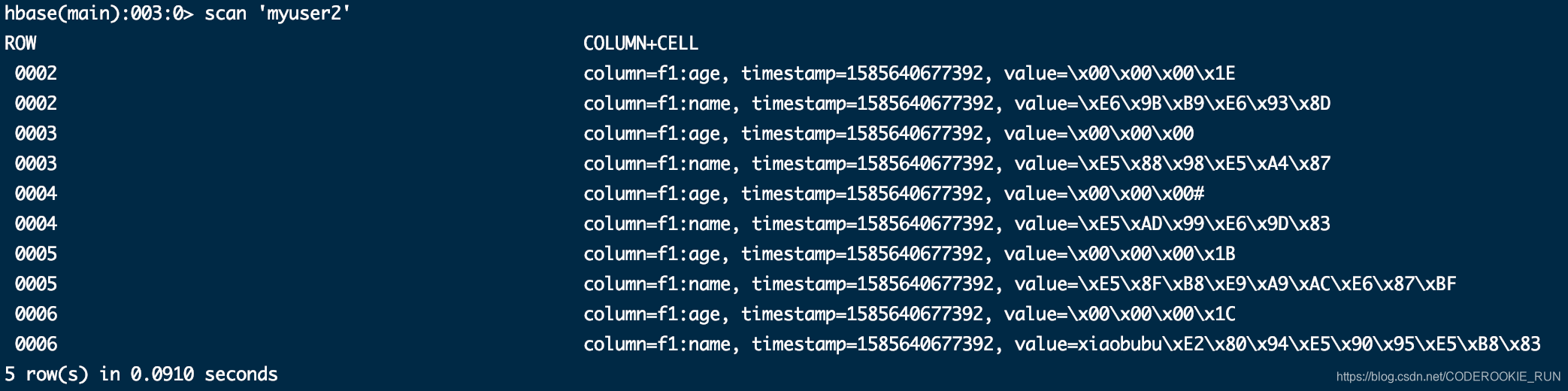
在HBase先创建一张表myuser2 —— create 'myuser2','f1',然后读取myuser表中的数据,将myuser表中f1列族下name列和age列的数据写入到表myuser2中
步骤
一、创建maven工程,导入jar包
<repositories>

        <repository>

            <id>cloudera</id>

            <url>https://repository.cloudera.com/artifactory/cloudera-repos/</url>

        </repository>

    </repositories>

    <dependencies>

        <dependency>

            <groupId>org.apache.hadoop</groupId>

            <artifactId>hadoop-client</artifactId>

            <version>2.6.0-mr1-cdh5.14.0</version>

        </dependency>

        <dependency>

            <groupId>org.apache.hbase</groupId>

            <artifactId>hbase-client</artifactId>

            <version>1.2.0-cdh5.14.0</version>

        </dependency>

        <dependency>

            <groupId>org.apache.hbase</groupId>

            <artifactId>hbase-server</artifactId>

            <version>1.2.0-cdh5.14.0</version>

        </dependency>

        <dependency>

            <groupId>junit</groupId>

            <artifactId>junit</artifactId>

            <version>4.12</version>

            <scope>test</scope>

        </dependency>

        <dependency>

            <groupId>org.testng</groupId>

            <artifactId>testng</artifactId>

            <version>6.14.3</version>

            <scope>test</scope>

        </dependency>

    </dependencies>

    <build>

        <plugins>

            <plugin>

                <groupId>org.apache.maven.plugins</groupId>

                <artifactId>maven-compiler-plugin</artifactId>

                <version>3.0</version>

                <configuration>

                    <source>1.8</source>

                    <target>1.8</target>

                    <encoding>UTF-8</encoding>

                    <!--    <verbal>true</verbal>-->

                </configuration>

            </plugin>

            <plugin>

                <groupId>org.apache.maven.plugins</groupId>

                <artifactId>maven-shade-plugin</artifactId>

                <version>2.2</version>

                <executions>

                    <execution>

                        <phase>package</phase>

                        <goals>

                            <goal>shade</goal>

                        </goals>

                        <configuration>

                            <filters>

                                <filter>

                                    <artifact>*:*</artifact>

                                    <excludes>

                                        <exclude>META-INF/*.SF</exclude>

                                        <exclude>META-INF/*.DSA</exclude>

                                        <exclude>META-INF/*/RSA</exclude>

                                    </excludes>

                                </filter>

                            </filters>

                        </configuration>

                    </execution>

                </executions>

            </plugin>

        </plugins>

    </build>
二、开发MapReduce程序
定义一个main类——HbaseReadWrite
package cn.itcast.mr.demo1;

import org.apache.hadoop.conf.Configuration;

import org.apache.hadoop.conf.Configured;

import org.apache.hadoop.hbase.HBaseConfiguration;

import org.apache.hadoop.hbase.client.Put;

import org.apache.hadoop.hbase.client.Scan;

import org.apache.hadoop.hbase.mapreduce.TableMapReduceUtil;

import org.apache.hadoop.io.Text;

import org.apache.hadoop.mapreduce.Job;

import org.apache.hadoop.util.Tool;

import org.apache.hadoop.util.ToolRunner;

public class HbaseReadWrite extends Configured implements Tool {

    @Override

    public int run(String[] args) throws Exception {

        //创建Job对象

        Job job = Job.getInstance(super.getConf(), "HbaseMapReduce");

        //创建Scan对象,这里如果不设置过滤器,就是全表查询,因为在Mapper类中已经设置了判断条件,所以这里不需要设置过滤器

        Scan scan = new Scan();

        /**

         *  这是自定义Map逻辑的工具类

         *  这里需要五个参数:

         *  tablename 就是 要读取数据的表名

         *  scan 就是 HBASE 在java代码 实现增删改查时用来设置过滤器,获取数据等的

         *  接着就是自己定义的Mapper类,k2和v2的输出类型

         *  最后是Job对象

         */

        TableMapReduceUtil.initTableMapperJob("myuser",scan,HbaseReadMapper.class, Text.class, Put.class,job);

        /**

         * 这是自定义Reduce逻辑的工具类

         * 这里只需要三个参数即可

         * tablename 就是要写入数据的表名

         * 然后一个自定义的reduce类和job对象

         */

        TableMapReduceUtil.initTableReducerJob("myuser2",HbaseWriteReducer.class,job);

        //提交任务

        boolean b = job.waitForCompletion(true);

        return b?0:1;

    }

    /**

     * main方法,负责run的退出

     * @param args

     * @throws Exception

     */

    public static void main(String[] args) throws Exception {

        Configuration configuration = HBaseConfiguration.create();

        //一定记得要在configuration中设置zookeeper的地址,否则无法连接

        configuration.set("hbase.zookeeper.quorum","node01:2181,node02:2181,node03:2181");

        int run = ToolRunner.run(configuration, new HbaseReadWrite(), args);

        System.exit(run);

    }

}
自定义Mapper逻辑,定义一个Mapper类——HbaseReadMapper
package cn.itcast.mr.demo1;

import org.apache.hadoop.hbase.Cell;

import org.apache.hadoop.hbase.client.Put;

import org.apache.hadoop.hbase.client.Result;

import org.apache.hadoop.hbase.io.ImmutableBytesWritable;

import org.apache.hadoop.hbase.mapreduce.TableMapper;

import org.apache.hadoop.hbase.util.Bytes;

import org.apache.hadoop.io.Text;

import java.io.IOException;

import java.util.List;

public class HbaseReadMapper extends TableMapper<Text, Put> {

    /**

     *

     * @param key   ke2输出类型为Text,因为是rowKey

     * @param result     v2输出类型为Put,因为Hbase插入数据都是Put对象

     * @param context

     * @throws IOException

     * @throws InterruptedException

     */

    @Override

    protected void map(ImmutableBytesWritable key, Result result, Context context) throws IOException, InterruptedException {

        //获取Hbase表中rowKey的字节

        byte[] rowKeyBytes = key.get();

        //将rowKey字节转换为字符串,因为k2输出类型为Text

        String rowKey = Bytes.toString(rowKeyBytes);

        //新建Put对象

        Put put = new Put(rowKeyBytes);

        //获取Hbase所有数据

        List<Cell> cells = result.listCells();

        //循环遍历到每一条数据

        for (Cell cell : cells) {

            //获取cell的列族

            byte[] family = cell.getFamily();

            //获取cell的列

            byte[] qualifier = cell.getQualifier();

            //判断cell的列族和列值,拿到需要的数据

            if ("f1".equals(Bytes.toString(family))){

                if ("name".equals(Bytes.toString(qualifier)) || "age".equals(Bytes.toString(qualifier))){

                    put.add(cell);

                }

            }

        }

        //判断Put是否为空

        if (!put.isEmpty()){

            context.write(new Text(rowKey),put);

        }

    }

}
自定义Reducer逻辑,定义一个Reducer类——HbaseWriterReduce
package cn.itcast.mr.demo1;

import org.apache.hadoop.hbase.client.Put;

import org.apache.hadoop.hbase.io.ImmutableBytesWritable;

import org.apache.hadoop.hbase.mapreduce.TableReducer;

import org.apache.hadoop.io.Text;

import java.io.IOException;

public class HbaseWriteReducer extends TableReducer<Text, Put, ImmutableBytesWritable> {

    /**

     *

     * @param key   输入值,k2为Text,也就是rowKey

     * @param values    输入值,v2为Put

     * @param context

     * @throws IOException

     * @throws InterruptedException

     */

    @Override

    protected void reduce(Text key, Iterable<Put> values, Context context) throws IOException, InterruptedException {

        // ImmutableBytesWritable是用来封装rowKey的

        ImmutableBytesWritable immutableBytesWritable = new ImmutableBytesWritable();

        // key就是rowKey

        immutableBytesWritable.set(key.getBytes());

        // 循环遍历拿到每一个put对象,输出即可

        for (Put put : values) {

            context.write(immutableBytesWritable,put);

        }

    }

}
三、运行结果
【HBase】HBase与MapReduce的集成案例的更多相关文章
- HBase与Sqoop集成案例
HBase与Sqoop集成 案例:将RDBMS中的数据抽取到HBase中 Step1.配置sqoop-env.sh如下: Step2.在Mysql中创建一张数据库library,一张表book CRE ...
- MapReduce 单词统计案例编程
MapReduce 单词统计案例编程 一.在Linux环境安装Eclipse软件 1. 解压tar包 下载安装包eclipse-jee-kepler-SR1-linux-gtk-x86_64.ta ...
- hadoop笔记之MapReduce的应用案例(利用MapReduce进行排序)
MapReduce的应用案例(利用MapReduce进行排序) MapReduce的应用案例(利用MapReduce进行排序) 思路: Reduce之后直接进行结果合并 具体样例: 程序名:Sort. ...
- hadoop笔记之MapReduce的应用案例(WordCount单词计数)
MapReduce的应用案例(WordCount单词计数) MapReduce的应用案例(WordCount单词计数) 1. WordCount单词计数 作用: 计算文件中出现每个单词的频数 输入结果 ...
- Apache的HBase与cdh的sqoop集成(不建议不同版本之间的集成)
1.修改sqoop的配资文件 2.从mysql导入到hbase(import) bin/sqoop import \ --connect jdbc:mysql://linux-hadoop3.ibei ...
- 基于Hbase数据的Mapreduce程序环境开发
一.实验目标 编写Mapreduce程序,以Hbase表数据为Map输入源,计算结果输出到HDFS或者Hbase表中. 在非CDH5的Hadoop集群环境中,将编写好的Mapreduce程序整个工程打 ...
- hbase自带mapreduce计数表行数功能
$HBASE_HOME/bin/hbase org.apache.hadoop.hbase.mapreduce.RowCounter ‘tablename’ mapreduce来计数,很快的!!!
- Hbase理论&&hbase shell&&python操作hbase&&python通过mapreduce操作hbase
一.Hbase搭建: 二.理论知识介绍: 1Hbase介绍: Hbase是分布式.面向列的开源数据库(其实准确的说是面向列族).HDFS为Hbase提供可靠的底层数据存储服务,MapReduce为Hb ...
- 076 Apache的HBase与cdh的sqoop集成(不建议不同版本之间的集成)
1.修改sqoop的配资文件 2.从mysql导入到hbase(import) bin/sqoop import \ --connect jdbc:mysql://linux-hadoop3.ibei ...
随机推荐
- Map使用foreach遍历方式,Map获取第一个键值
List<Map<String, Object>> mapList = new ArrayList<>(); for (Map.Entry<String,O ...
- 从零开始学习docker之在docker中运行springboot项目
一.docker环境配置 首先需要一个安装了docker的服务器(本地或者云服务器),如果没有请看上文,传送门---https://www.cnblogs.com/wdfordream/p/12737 ...
- ES[7.6.x]学习笔记(三)新建索引
与ES的交互方式 与es的交互方式采用http的请求方式,请求的格式如下: curl -X<VERB> '<PROTOCOL>://<HOST>:<PORT& ...
- 用long类型让我出了次生产事故,写代码还是要小心点
昨天发现线上试跑期的一个程序挂了,平时都跑的好好的,查了下日志是因为昨天运营跑了一家美妆top级淘品牌店,会员量近千万,一下子就把128G的内存给爆了,当时并行跑了二个任务,没辙先速写一段代码限流,后 ...
- Spring Boot中只能有一个WebMvcConfigurationSupport配置类
首先将结论写文章的最前面,一个项目中只能有一个继承WebMvcConfigurationSupport的@Configuration类(使用@EnableMvc效果相同),如果存在多个这样的类,只有一 ...
- Spring Boot的exit code
文章目录 Spring Boot的exit code 自定义Exit Codes ExitCodeGenerator ExitCodeExceptionMapper ExitCodeEvent Spr ...
- Vue集成tinymce富文本编辑器并实现本地化指南(2019.11.21最新)
tinymce是一款综合口碑特别好.功能异常强大的富文本编辑器,在某些网站,甚至享有"宇宙最强富文本编辑器"的称号.那么,在Vue项目中如何集成呢?这并不困难,只需要参照官方教程 ...
- vuex vue-devtools 安装
vue-devtools是一款基于chrome游览器的插件,用于调试vue应用,这可以极大地提高我们的调试效率.接下来我们就介绍一下vue-devtools的安装 chrome商店直接安装 谷歌访问助 ...
- 《Microduino实战》——2.3 Microduino STM32核心系列
本节书摘来自华章出版社<Microduino实战>一 书中的第2章,第2.3节,作者:姚琪 杨立斌,更多章节内容可以访问云栖社区"华章计算机"公众号查看. 2.3 Mi ...
- 前端存储 (5) - service worker 离线存储
service worker 离线存储 简介: 一般的网站 在我们无法访问的 时候 一般 回出现 如下 该网页无法访问 service worker 构建的网站不会出现这个错误,因为所有的 请求都是先 ...