
python3的subprocess的各个方法的区别(-)
subprocess(python3.7)
subprocess 主要是为了替换一下的模块函数,允许你执行一些命令,并获取返回的状态码和 输入,输出和错误信息。
os.system
os.spawn*
subprocess 有好多方法,本文主要在总结下之间的区别是什么,最后官方推荐使用哪个。
subprocess的主要方法:
subprocess.run(),subprocess.Popen(),subprocess.call #这些模块都是基于Popen的
Python 3.5 之前
subprocess.call //call 系列 都是等待命令执行完, Wait for command to complete
subprocess.call(args, *, stdin=None, stdout=None, stderr=None, shell=False, cwd=None, timeout=None)
只返回执行结果的code 等同于subprocess.run(args).returncode
Note Do not use stdout=PIPE or stderr=PIPE with this function. The child process will block if it generates enough output to a pipe to fill up the OS pipe buffer as the pipes are not being read from.
############例子###
ret=subprocess.call(['ls', '-l']) # ret 程序执行结果返回值,正确执行都是0
----------------------------捕获输出结果到一个文件里Redirecting STDOUT to a File--- with open('joe.txt', 'w') as f: # 执行后joe.txt 文件内容为 Wed May 15 17:07:59 CST 2019
subprocess.call(['date'], stdout=f)
-------捕获输出结果到字符串,Redirecting STDOUT to strings---
ret=subprocess.check_output() #ret 为output内容(命令输出的内容) 等同于run(..., check=True, stdout=PIPE).stdout
-------------------
subprocess.check_call() #和 subprocess.call 一样,只是返回值不是0就引起异常,raise CalledProcessError ,等同于 subprocess.run(…, check=True) -----输入stdin ---------- with open('joe.txt', 'r') as fr
subprocess.call(['cat'], stdin=f)
------- ######################################################
subprocess.Popen() #最基本的subprocess模块
class subprocess.Popen(args, bufsize=-1, executable=None, stdin=None, stdout=None, stderr=None, preexec_fn=None, close_fds=True, shell=False, cwd=None, env=None, universal_newlines=None, startupinfo=None, creationflags=0, restore_signals=True, start_new_session=False, pass_fds=(), *, encoding=None, errors=None, text=None)
p = subprocess.Popen(['ls', '-l']) #返回的p是Popen 对象
p(Popen对象) 有一下方法
p.poll() 检查子进程(cmd) 是否结束 ,如果没有结束会返回None,结束就返回return returncode
p.returncode 程序之后后的返回码,一般正常结束会返回0,否则会返回其他值
p.wait() 等待子进程结束,然后返回returncode值
If the process does not terminate after timeout seconds, raise a TimeoutExpired exception. It is safe to catch this exception and retry the wait.
Note This will deadlock when using stdout=PIPE or stderr=PIPE and the child process generates enough output to a pipe such that it blocks waiting for the OS pipe buffer to accept more data. Use Popen.communicate() when using pipes to avoid that.
Note The function is implemented using a busy loop (non-blocking call and short sleeps). Use the asyncio module for an asynchronous wait: see asyncio.create_subprocess_exec.
p.communicate() 和子进程交互,返回一个元祖,returns a tuple (stdout_data, stderr_data)
p.terminate() 终止子进程,相当于发送SIGTERM 信号,相当于kill (后面不加参数)
p.kill() 终止子进程,相当于发送SIGKILL 信号,相当于kill -9
p.stdin,p.stdout,p.stderr 分别是输入,输出,错误输出,在python3中都是byte类型需要decode转化
p.returncode() 程序的返回状态 ,程序没有结束的话会返回None
p.pid 返回程序的 pid
p.send_signal(signal) 发送一个信号给子进程
subprocess.Popen(args, bufsize=-1, executable=None, stdin=None, stdout=None, stderr=None, preexec_fn=None, close_fds=True, shell=False, cwd=None, env=None, universal_newlines=None, startupinfo=None, creationflags=0, restore_signals=True, start_new_session=False, pass_fds=(), *, encoding=None, errors=None, text=None) Popen 参数:
------
args, a sequence of program arguments or else a single string(参数是一个序列如,列表,元祖等。或者参数是一个字符串),默认情况下,如果args是序列,则要执行的程序是args中的第一项。如果args是一个字符串,需要设置shell=True,即开启一个shell 执行一个字符串的命令,或者序列的第一项
-----
bufsize 参数,stdin,stdout,stderr的缓存参数
executable 参数
@@@@@@@@@@@@@@@@@@@@@@@@@@@@ ,shell=True时 executable=, 用于替换系统默认的shell(一般是bash),
p = subprocess.Popen('echo $0',shell=True,stdout=subprocess.PIPE,stderr=subprocess.PIPE,executable='/bin/zsh') out,_=p.communicate() print(out.decode())
输出>>>/bin/zsh
@@@@@@@@@@@@@@@@@@@@@@@@@ shell=False时 executable=xxx,xxx会替换序列的第一项,一下'ls' 替换了'cat' 最终执行了 ls 'a.py','a.txt','b.txt'
p = subprocess.Popen(['cat','a.py','a.txt','b.txt'],stdout=subprocess.PIPE,stderr=subprocess.PIPE,executable='ls') out,_=p.communicate() print(out.decode())
输出>>>a.py a.txt b.txt
-----
stdin=None, stdout=None, stderr=None 和输入,输出,错误输出有关,
想要捕捉这些信息可以设置为 将值设置为subprocess.PIPE,stdin=subprocess.PIPE,stdout=subprocess.PIPE,stderr=subprocess.PIPE 如果想要达到2>&1 可以设置为stdout=subprocess.PIPE,stderr=subprocess.STDOUT 这些内容 stdin 如输入("haha") 可以通过p.stdin.write(b"hahha");p.stdin.close() 或者 out,_=p.communicate(b'haha') stdout,stderr 可以通过p.stdout.readline(),p.stderr.readline() [就是文件描述符的一些参数如read(),readline等]
------
close_fds=True 子进程是否继承文件描述符,如果false 将关闭除了0,1,2之外的所有文件描述符。 print( p.stdin.fileno()) #查看自身对应的(stdin/stdout)的文件描述符 参考一下遇到的问题close_fds(python2.x遇到的问题???!!!) https://stackoverflow.com/questions/19950185/python-close-fds-not-clear http://drmingdrmer.github.io/tech/programming/2017/11/20/python-concurrent-popen.html
-------
shell=True 是否在shell中执行,参考args 说明
--------
cwd 当前的工作目录,如果有值,就会进入cd 到这个目录执行args命令
-----
text=True,和universal_newlines=True一样,universal_newlines只是为了向后兼容 都是让stdxxx以文本模式输出,而不是默认的二进制模式
If encoding or errors are specified, or text is true, the file objects stdin, stdout and stderr are opened in text mode with the specified encoding and errors, as described above in Frequently Used Arguments. The universal_newlines argument is equivalent to text and is provided for backwards compatibility. By default, file objects are opened in binary mode.
-----
python3.5 以后官方推荐使用run
p=subprocess.run(args, ***, stdin=None, input=None, stdout=None, stderr=None, capture_output=False, shell=False, cwd=None, timeout=None, check=False, encoding=None, errors=None, text=None, env=None, universal_newlines=None)
run 也是需要等进程结束后才返回结果,所以没有结束p.stdout等就不会输出结果
run的参数,和Popen 一样
capture_output =true 相当于stdout=PIPE and stderr=PIPE
timeout 设置子进程超时时间,超时引起 TimeoutExpired异常
The timeout argument is passed to Popen.communicate(). If the timeout expires, the child process will be killed and waited for. The TimeoutExpired exception will be re-raised after the child process has terminated
input=xxx 相当于 Popen.communicate(xxx)和自动创建 stdin=PIPE
The input argument is passed to Popen.communicate() and thus to the subprocess’s stdin. If used it must be a byte sequence, or a string if encoding or errors is specified or text is true. When used, the internal Popen object is automatically created with stdin=PIPE, and the stdin argument may not be used as well.
check check=True 如果程序返回状态码不是0 就引起异常CalledProcessError
If check is true, and the process exits with a non-zero exit code, a CalledProcessErrorexception will be raised. Attributes of that exception hold the arguments, the exit code, and stdout and stderr if they were captured.
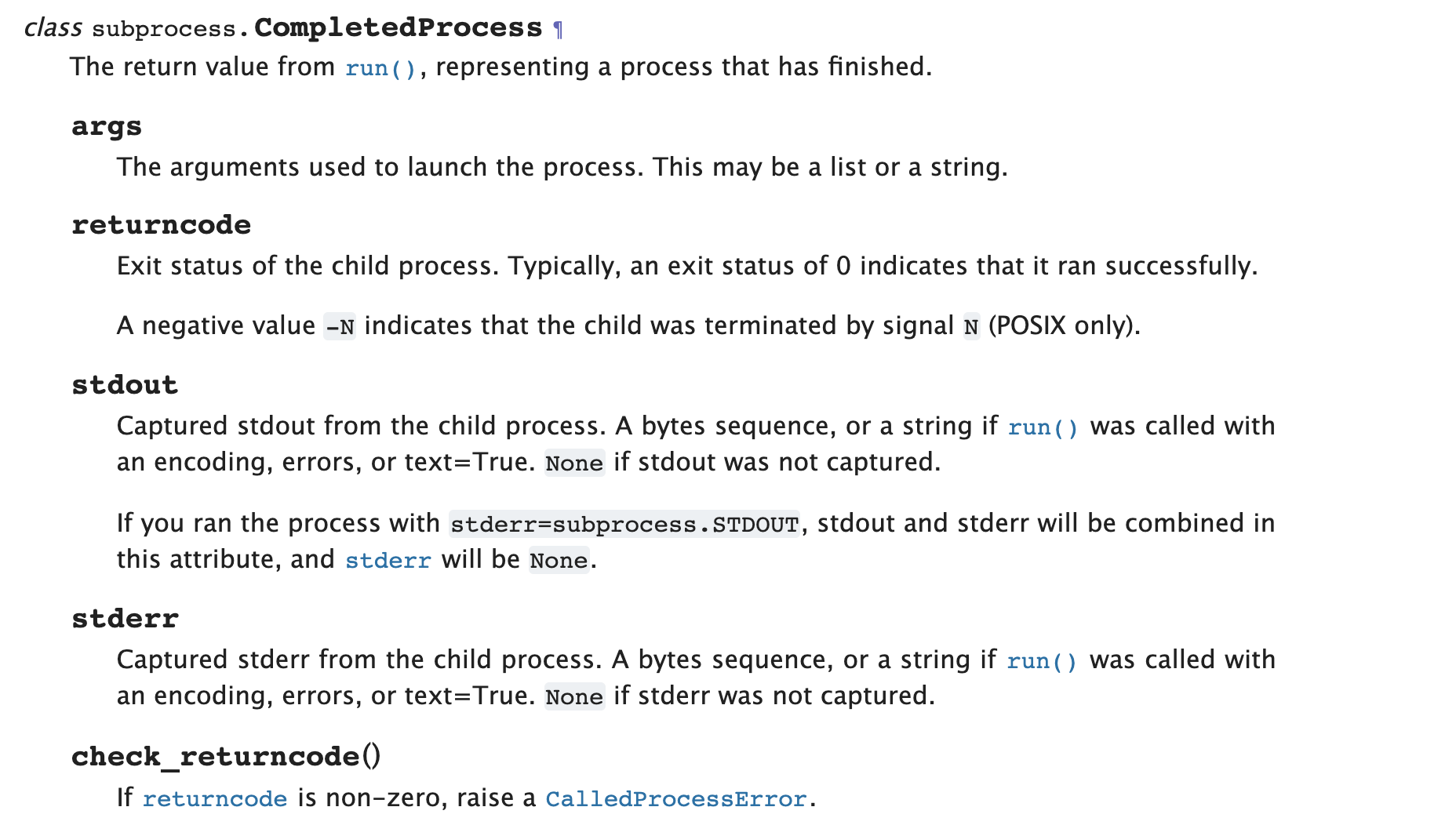
p=subprocess.run(), 执行run后会返回 CompletedProcess类型 实例 P
实例P 有如下方法
p.args
p.returncode
p.stdout
p.stderr
p.check_returncode
python3的subprocess的各个方法的区别(-)的更多相关文章
- python3的subprocess的各个方法的区别(二)
subprocess如何避免死锁 如果交互是双工的,即涉及读取和写入,则尤其如此.这种交互可能导致死锁,因为两个进程都可能最终等待另一个进程的输出 您希望从子进程标准输出管道读取,但标准错误管道的缓冲 ...
- python3之subprocess常见方法使用
一.常见subprocess方法 1.subprocess.getstatusoutput(cmd) 官方解释: Return (exitcode, output) of executing cmd ...
- python3 os.path.realpath(__file__) 和 os.path.cwd() 方法的区别
python3 os.path.realpath(__file__) 和 os.path.cwd() 方法的区别 os.path.realpath 获取当前执行脚本的绝对路径. os.path.rea ...
- 【转载】python3.0与2.x之间的区别
python3.0与2.x之间的区别: 1.性能 Py3.0运行pystone benchmark的速度比Py2.5慢30%.Guido认为Py3.0有极大的优化空间,在字符串和整形操作上可以取得很好 ...
- python3.0与2.x之间的区别
python3.0与2.x之间的区别: 1.性能 Py3.0运行pystone benchmark的速度比Py2.5慢30%.Guido认为Py3.0有极大的优化空间,在字符串和整形操作上可以取得很好 ...
- ThinkPHP的D方法和M方法的区别
M方法和D方法的区别 ThinkPHP 中M方法和D方法都用于实例化一个模型类,M方法 用于高效实例化一个基础模型类,而 D方法 用于实例化一个用户定义模型类. 使用M方法 如果是如下情况,请考虑使用 ...
- 正则表达式中的exec和match方法的区别
正则表达式中的exec和match方法的区别 字符串的正则方法有:match().replace().search().split() 正则对象的方法有:exec().test() 1.match m ...
- Hibernate框架之get和load方法的区别
我们在学习Hibernate框架时,经常会进行修改,删除操作,对于这些操作,我们都应该先加载对象,然后在执行或删除的操作,那么这里Hibernate提供了两种方法按照主键加载对象,也就是我要说的get ...
- [BS-27] 创建NSURL的几个方法的区别
创建NSURL的几个方法的区别 URL的基本格式 = 协议://主机地址/路径 URL和Path的区别 * URL:统一资源定位符,格式 “协议+主机名称+路径” 例如:[NSURL UR ...
随机推荐
- 《Linux环境进程间通信》系列文章链接
深刻理解 Linux 进程间通信(IPC) http://www.ibm.com/developerworks/cn/linux/l-ipc/index.html Linux 环境进程间通信(一): ...
- rpc框架dubbo学习入门及环境搭建(spring boot+Kotlin)
学习之前,确保有以下知识基础: Java网络编程 Socket传输数据 IO流 rpc简介及实现 rpc是remote procedure call的简写,意思为远程过程调用. rpc应用较多的情景是 ...
- [vue ]滚动视图解决ElementUI NavMenu 导航菜单过长显示的问题
记录一下工作 需求 导航菜单过长的时候会溢出,需要一个像 Tabs 标签页一样的滚动视图容器,可以左右滚动内部视图. 解决方法 由于时间问题,所以直接将 Tabs 源码抽取出来使用. 这里要做一些特殊 ...
- C#中无边框窗体拖动
//定义一个bool变量标识是否拖动窗体 private bool isMove = false; //记录鼠标的位置 private Point point; 定义的变量 /// <summa ...
- 靓仔,整合SpringBoot还在百度搜配置吗?老司机教你一招!!!
导读 最近陈某公司有些忙,为了保证文章的高质量可能要两天一更了,在这里陈某先说声不好意思了!!! 昨天有朋友问我SpringBoot如何整合Redis,他说百度谷歌搜索了一遍感觉不太靠谱.我顿时惊呆了 ...
- Journal of Proteome Research | iHPDM: In Silico Human Proteome Digestion Map with Proteolytic Peptide Analysis and Graphical Visualizations(iHPDM: 人类蛋白质组理论酶解图谱的水解肽段分析和可视化展示)| (解读人:邓亚美)
文献名:iHPDM: In Silico Human Proteome Digestion Map with Proteolytic Peptide Analysis and Graphical Vi ...
- ComplexBrowser: a tool for identification and quantification of protein complexes in large-scale proteomics datasets(大规模蛋白组学数据集中鉴定和定量蛋白复合物)
文献名:ComplexBrowser: a tool for identification and quantification of protein complexes in large-scale ...
- mvc5+ET6入门第一章
这一篇主要讲的是MVC也就是Model--View--Controller的缩写,没有讲ET.其中 Model(模型)表示应用程序核心(比如数据库记录列表).通常模型对象在数据库中存取数据. View ...
- Spring Cloud 系列之 Netflix Hystrix 服务监控
Actuator Hystrix 除了可以实现服务容错之外,还提供了近乎实时的监控功能,将服务执行结果和运行指标,请求数量成功数量等等这些状态通过 Actuator 进行收集,然后访问 /actuat ...
- STL篇--list容器
list容器: 1.list 容器 的本质就是双向环形链表,最后一个节点刻意做成空节点,符合容器的左闭右开的原则2.list 的迭代器 是一个智能指针,其实就是一个类,通过操作符重载模拟各种操作(++ ...