
python3的subprocess的各个方法的区别(-)
subprocess(python3.7)
subprocess 主要是为了替换一下的模块函数,允许你执行一些命令,并获取返回的状态码和 输入,输出和错误信息。
os.system
os.spawn*
subprocess 有好多方法,本文主要在总结下之间的区别是什么,最后官方推荐使用哪个。
subprocess的主要方法:
subprocess.run(),subprocess.Popen(),subprocess.call #这些模块都是基于Popen的
Python 3.5 之前
subprocess.call //call 系列 都是等待命令执行完, Wait for command to complete
subprocess.call(args, *, stdin=None, stdout=None, stderr=None, shell=False, cwd=None, timeout=None)
只返回执行结果的code 等同于subprocess.run(args).returncode
Note Do not use stdout=PIPE or stderr=PIPE with this function. The child process will block if it generates enough output to a pipe to fill up the OS pipe buffer as the pipes are not being read from.
############例子###
ret=subprocess.call(['ls', '-l']) # ret 程序执行结果返回值,正确执行都是0
----------------------------捕获输出结果到一个文件里Redirecting STDOUT to a File--- with open('joe.txt', 'w') as f: # 执行后joe.txt 文件内容为 Wed May 15 17:07:59 CST 2019
subprocess.call(['date'], stdout=f)
-------捕获输出结果到字符串,Redirecting STDOUT to strings---
ret=subprocess.check_output() #ret 为output内容(命令输出的内容) 等同于run(..., check=True, stdout=PIPE).stdout
-------------------
subprocess.check_call() #和 subprocess.call 一样,只是返回值不是0就引起异常,raise CalledProcessError ,等同于 subprocess.run(…, check=True) -----输入stdin ---------- with open('joe.txt', 'r') as fr
subprocess.call(['cat'], stdin=f)
------- ######################################################
subprocess.Popen() #最基本的subprocess模块
class subprocess.Popen(args, bufsize=-1, executable=None, stdin=None, stdout=None, stderr=None, preexec_fn=None, close_fds=True, shell=False, cwd=None, env=None, universal_newlines=None, startupinfo=None, creationflags=0, restore_signals=True, start_new_session=False, pass_fds=(), *, encoding=None, errors=None, text=None)
p = subprocess.Popen(['ls', '-l']) #返回的p是Popen 对象
p(Popen对象) 有一下方法
p.poll() 检查子进程(cmd) 是否结束 ,如果没有结束会返回None,结束就返回return returncode
p.returncode 程序之后后的返回码,一般正常结束会返回0,否则会返回其他值
p.wait() 等待子进程结束,然后返回returncode值
If the process does not terminate after timeout seconds, raise a TimeoutExpired exception. It is safe to catch this exception and retry the wait.
Note This will deadlock when using stdout=PIPE or stderr=PIPE and the child process generates enough output to a pipe such that it blocks waiting for the OS pipe buffer to accept more data. Use Popen.communicate() when using pipes to avoid that.
Note The function is implemented using a busy loop (non-blocking call and short sleeps). Use the asyncio module for an asynchronous wait: see asyncio.create_subprocess_exec.
p.communicate() 和子进程交互,返回一个元祖,returns a tuple (stdout_data, stderr_data)
p.terminate() 终止子进程,相当于发送SIGTERM 信号,相当于kill (后面不加参数)
p.kill() 终止子进程,相当于发送SIGKILL 信号,相当于kill -9
p.stdin,p.stdout,p.stderr 分别是输入,输出,错误输出,在python3中都是byte类型需要decode转化
p.returncode() 程序的返回状态 ,程序没有结束的话会返回None
p.pid 返回程序的 pid
p.send_signal(signal) 发送一个信号给子进程
subprocess.Popen(args, bufsize=-1, executable=None, stdin=None, stdout=None, stderr=None, preexec_fn=None, close_fds=True, shell=False, cwd=None, env=None, universal_newlines=None, startupinfo=None, creationflags=0, restore_signals=True, start_new_session=False, pass_fds=(), *, encoding=None, errors=None, text=None) Popen 参数:
------
args, a sequence of program arguments or else a single string(参数是一个序列如,列表,元祖等。或者参数是一个字符串),默认情况下,如果args是序列,则要执行的程序是args中的第一项。如果args是一个字符串,需要设置shell=True,即开启一个shell 执行一个字符串的命令,或者序列的第一项
-----
bufsize 参数,stdin,stdout,stderr的缓存参数
executable 参数
@@@@@@@@@@@@@@@@@@@@@@@@@@@@ ,shell=True时 executable=, 用于替换系统默认的shell(一般是bash),
p = subprocess.Popen('echo $0',shell=True,stdout=subprocess.PIPE,stderr=subprocess.PIPE,executable='/bin/zsh') out,_=p.communicate() print(out.decode())
输出>>>/bin/zsh
@@@@@@@@@@@@@@@@@@@@@@@@@ shell=False时 executable=xxx,xxx会替换序列的第一项,一下'ls' 替换了'cat' 最终执行了 ls 'a.py','a.txt','b.txt'
p = subprocess.Popen(['cat','a.py','a.txt','b.txt'],stdout=subprocess.PIPE,stderr=subprocess.PIPE,executable='ls') out,_=p.communicate() print(out.decode())
输出>>>a.py a.txt b.txt
-----
stdin=None, stdout=None, stderr=None 和输入,输出,错误输出有关,
想要捕捉这些信息可以设置为 将值设置为subprocess.PIPE,stdin=subprocess.PIPE,stdout=subprocess.PIPE,stderr=subprocess.PIPE 如果想要达到2>&1 可以设置为stdout=subprocess.PIPE,stderr=subprocess.STDOUT 这些内容 stdin 如输入("haha") 可以通过p.stdin.write(b"hahha");p.stdin.close() 或者 out,_=p.communicate(b'haha') stdout,stderr 可以通过p.stdout.readline(),p.stderr.readline() [就是文件描述符的一些参数如read(),readline等]
------
close_fds=True 子进程是否继承文件描述符,如果false 将关闭除了0,1,2之外的所有文件描述符。 print( p.stdin.fileno()) #查看自身对应的(stdin/stdout)的文件描述符 参考一下遇到的问题close_fds(python2.x遇到的问题???!!!) https://stackoverflow.com/questions/19950185/python-close-fds-not-clear http://drmingdrmer.github.io/tech/programming/2017/11/20/python-concurrent-popen.html
-------
shell=True 是否在shell中执行,参考args 说明
--------
cwd 当前的工作目录,如果有值,就会进入cd 到这个目录执行args命令
-----
text=True,和universal_newlines=True一样,universal_newlines只是为了向后兼容 都是让stdxxx以文本模式输出,而不是默认的二进制模式
If encoding or errors are specified, or text is true, the file objects stdin, stdout and stderr are opened in text mode with the specified encoding and errors, as described above in Frequently Used Arguments. The universal_newlines argument is equivalent to text and is provided for backwards compatibility. By default, file objects are opened in binary mode.
-----
python3.5 以后官方推荐使用run
p=subprocess.run(args, ***, stdin=None, input=None, stdout=None, stderr=None, capture_output=False, shell=False, cwd=None, timeout=None, check=False, encoding=None, errors=None, text=None, env=None, universal_newlines=None)
run 也是需要等进程结束后才返回结果,所以没有结束p.stdout等就不会输出结果
run的参数,和Popen 一样
capture_output =true 相当于stdout=PIPE and stderr=PIPE
timeout 设置子进程超时时间,超时引起 TimeoutExpired异常
The timeout argument is passed to Popen.communicate(). If the timeout expires, the child process will be killed and waited for. The TimeoutExpired exception will be re-raised after the child process has terminated
input=xxx 相当于 Popen.communicate(xxx)和自动创建 stdin=PIPE
The input argument is passed to Popen.communicate() and thus to the subprocess’s stdin. If used it must be a byte sequence, or a string if encoding or errors is specified or text is true. When used, the internal Popen object is automatically created with stdin=PIPE, and the stdin argument may not be used as well.
check check=True 如果程序返回状态码不是0 就引起异常CalledProcessError
If check is true, and the process exits with a non-zero exit code, a CalledProcessErrorexception will be raised. Attributes of that exception hold the arguments, the exit code, and stdout and stderr if they were captured.
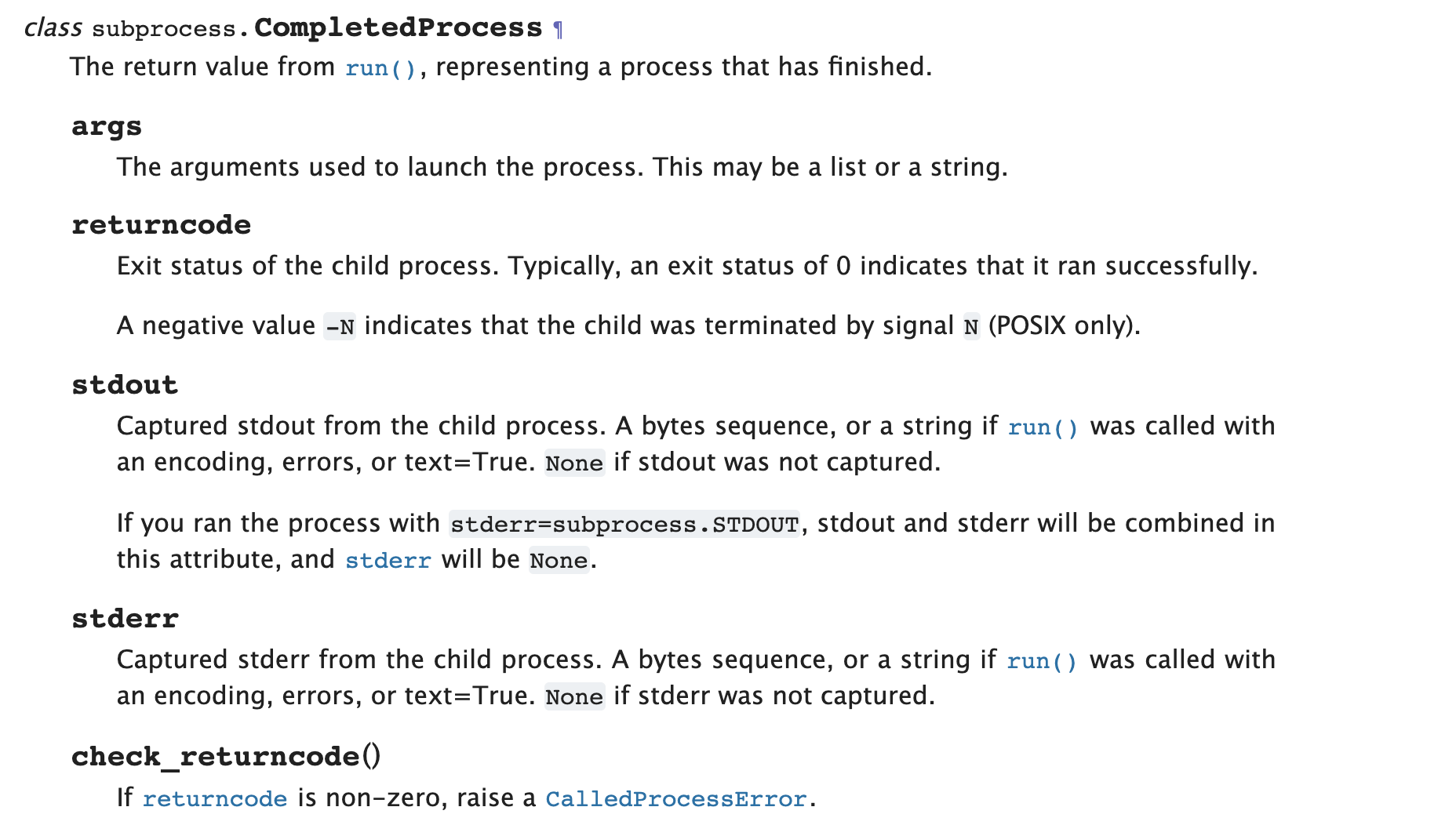
p=subprocess.run(), 执行run后会返回 CompletedProcess类型 实例 P
实例P 有如下方法
p.args
p.returncode
p.stdout
p.stderr
p.check_returncode
python3的subprocess的各个方法的区别(-)的更多相关文章
- python3的subprocess的各个方法的区别(二)
subprocess如何避免死锁 如果交互是双工的,即涉及读取和写入,则尤其如此.这种交互可能导致死锁,因为两个进程都可能最终等待另一个进程的输出 您希望从子进程标准输出管道读取,但标准错误管道的缓冲 ...
- python3之subprocess常见方法使用
一.常见subprocess方法 1.subprocess.getstatusoutput(cmd) 官方解释: Return (exitcode, output) of executing cmd ...
- python3 os.path.realpath(__file__) 和 os.path.cwd() 方法的区别
python3 os.path.realpath(__file__) 和 os.path.cwd() 方法的区别 os.path.realpath 获取当前执行脚本的绝对路径. os.path.rea ...
- 【转载】python3.0与2.x之间的区别
python3.0与2.x之间的区别: 1.性能 Py3.0运行pystone benchmark的速度比Py2.5慢30%.Guido认为Py3.0有极大的优化空间,在字符串和整形操作上可以取得很好 ...
- python3.0与2.x之间的区别
python3.0与2.x之间的区别: 1.性能 Py3.0运行pystone benchmark的速度比Py2.5慢30%.Guido认为Py3.0有极大的优化空间,在字符串和整形操作上可以取得很好 ...
- ThinkPHP的D方法和M方法的区别
M方法和D方法的区别 ThinkPHP 中M方法和D方法都用于实例化一个模型类,M方法 用于高效实例化一个基础模型类,而 D方法 用于实例化一个用户定义模型类. 使用M方法 如果是如下情况,请考虑使用 ...
- 正则表达式中的exec和match方法的区别
正则表达式中的exec和match方法的区别 字符串的正则方法有:match().replace().search().split() 正则对象的方法有:exec().test() 1.match m ...
- Hibernate框架之get和load方法的区别
我们在学习Hibernate框架时,经常会进行修改,删除操作,对于这些操作,我们都应该先加载对象,然后在执行或删除的操作,那么这里Hibernate提供了两种方法按照主键加载对象,也就是我要说的get ...
- [BS-27] 创建NSURL的几个方法的区别
创建NSURL的几个方法的区别 URL的基本格式 = 协议://主机地址/路径 URL和Path的区别 * URL:统一资源定位符,格式 “协议+主机名称+路径” 例如:[NSURL UR ...
随机推荐
- Python - 常用内置变量
直接上代码 #!/usr/bin/env python # -*- coding: utf-8 -*- """ 这是注释__doc__会打印这部分内容 "&qu ...
- Microsoft Visual Studio 修改语言包
需求内容: 更改 Microsoft Visual Studio 界面的语言包(将中文改为英文) 解决方案: https://docs.microsoft.com/zh-cn/visualstudio ...
- JavaScript中的内存释放
C.C++语言需要手动管理内存的分配与释放(常用方法:malloc(), calloc(), realloc()和free()等).而JavaScript与Java.C#相似,内置了垃圾回收器,能自动 ...
- mybatis探究之延迟加载和缓存
mybatis探究之延迟加载和缓存 一.什么是延迟加载 1.延迟加载的概念 在mybatis进行多表查询时,并非所有的查询都需要立即进行.例如在查询带有账户信息的用户信息时,我们们并不需要总是在加载用 ...
- 对时间进行操作 加减 XXX天
date:要操作的时间目标 days: 要加减的天数时间 addDate: function(date, days) { if (date == '') { return '' }; if (days ...
- 使用PageHelper插件分页时,如何对对象进行转换以及添加属性
一.插件介绍 PageHelper是针对Mybaits的分页插件,支持任何复杂的单表.多表分页. 二.基本用法 以springboot为例,有两种方式配置,一种是传统的,引入依赖,编写配置类:一种是使 ...
- 项目中 关于localstorage、cookie的坑?明明设置了本地存储为什么没生效
1.简单的介绍一下localStorage,sessionStorage,cookie localStorage:仅在客户端存储不参与服务器通信,存储大小一般为5M,如果不是人为清除,那么即使是关闭浏 ...
- java-Properties集合。
查看手册: 关键字: store() 储存. setProperty("",""); 添加. FileWriter("D:\\ja.propertie ...
- HTML每日学习笔记(0)
2019.7.14 1.属性为 HTML 元素提供附加信息,总是在 HTML 元素的开始标签中规定. 例子:<h1 align="center"> 对齐方式 <b ...
- Development of a High Coverage Pseudotargeted Lipidomics Method Based on Ultra-High Performance Liquid Chromatography−Mass Spectrometry(基于超高效液相色谱-质谱法的高覆盖拟靶向脂质组学方法的开发)
文献名:Development of a High Coverage Pseudotargeted Lipidomics Method Based on Ultra-High Performance ...