
mapreduce导出MSSQL的数据到HDFS
今天想通过一些数据,来测试一下我的《基于信息熵的无字典分词算法》这篇文章的正确性。就写了一下MapReduce程序从MSSQL SERVER2008数据库里取数据分析。程序发布到hadoop机器上运行报SQLEXCEPTION错误
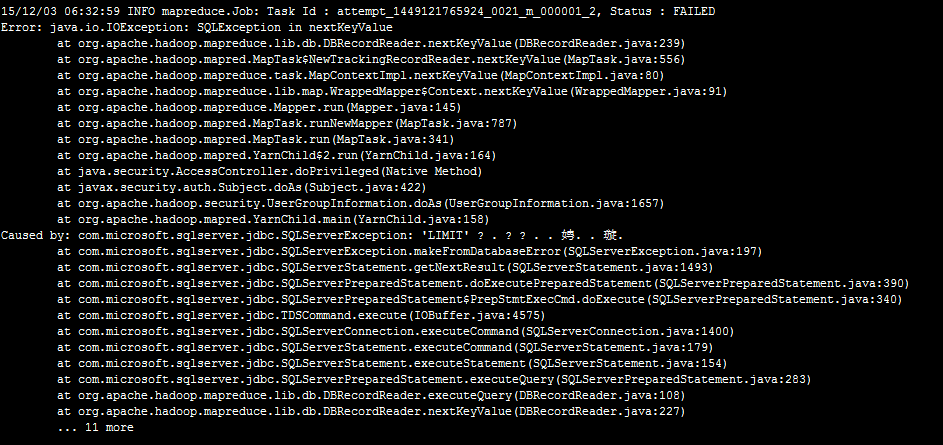
奇怪了,我的SQL语句中没有LIMIT,这LIMIT哪来的。我翻看了DBInputFormat类的源码,
 protected RecordReader<LongWritable, T> createDBRecordReader(DBInputSplit split,

       Configuration conf) throws IOException {

     @SuppressWarnings("unchecked")

     Class<T> inputClass = (Class<T>) (dbConf.getInputClass());

     try {

       // use database product name to determine appropriate record reader.

       if (dbProductName.startsWith("ORACLE")) {

         // use Oracle-specific db reader.

         return new OracleDBRecordReader<T>(split, inputClass,

             conf, createConnection(), getDBConf(), conditions, fieldNames,

             tableName);

       } else if (dbProductName.startsWith("MYSQL")) {

         // use MySQL-specific db reader.

         return new MySQLDBRecordReader<T>(split, inputClass,

             conf, createConnection(), getDBConf(), conditions, fieldNames,

             tableName);

       } else {

         // Generic reader.

         return new DBRecordReader<T>(split, inputClass,

             conf, createConnection(), getDBConf(), conditions, fieldNames,

             tableName);

       }

     } catch (SQLException ex) {

       throw new IOException(ex.getMessage());

     }

   }
DBRecordReader的源码
 protected String getSelectQuery() {

     StringBuilder query = new StringBuilder();

     // Default codepath for MySQL, HSQLDB, etc. Relies on LIMIT/OFFSET for splits.

     if(dbConf.getInputQuery() == null) {

       query.append("SELECT ");

       for (int i = 0; i < fieldNames.length; i++) {

         query.append(fieldNames[i]);

         if (i != fieldNames.length -1) {

           query.append(", ");

         }

       }

       query.append(" FROM ").append(tableName);

       query.append(" AS ").append(tableName); //in hsqldb this is necessary

       if (conditions != null && conditions.length() > 0) {

         query.append(" WHERE (").append(conditions).append(")");

       }

       String orderBy = dbConf.getInputOrderBy();

       if (orderBy != null && orderBy.length() > 0) {

         query.append(" ORDER BY ").append(orderBy);

       }

     } else {

       //PREBUILT QUERY

       query.append(dbConf.getInputQuery());

     }

     try {

       query.append(" LIMIT ").append(split.getLength()); //问题所在

       query.append(" OFFSET ").append(split.getStart());

     } catch (IOException ex) {

       // Ignore, will not throw.

     }

     return query.toString();

   }
终于找到原因了。
原来,hadoop只实现了Mysql的DBRecordReader(MySQLDBRecordReader)和ORACLE的DBRecordReader(OracleDBRecordReader)。
原因找到了,我参考着OracleDBRecordReader实现了MSSQL SERVER的DBRecordReader代码如下:
MSSQLDBInputFormat的代码:
 /**

  *

  */

 package org.apache.hadoop.mapreduce.lib.db;

 import java.io.IOException;

 import java.sql.SQLException;

 import org.apache.hadoop.conf.Configuration;

 import org.apache.hadoop.io.LongWritable;

 import org.apache.hadoop.mapreduce.Job;

 import org.apache.hadoop.mapreduce.RecordReader;

 /**

  * @author summer

  *  MICROSOFT SQL SERVER

  */

 public class MSSQLDBInputFormat<T extends DBWritable> extends DBInputFormat<T> {

     public static void setInput(Job job,

               Class<? extends DBWritable> inputClass,

               String inputQuery, String inputCountQuery,String rowId) {

             job.setInputFormatClass(MSSQLDBInputFormat.class);

             DBConfiguration dbConf = new DBConfiguration(job.getConfiguration());

             dbConf.setInputClass(inputClass);

             dbConf.setInputQuery(inputQuery);

             dbConf.setInputCountQuery(inputCountQuery);

             dbConf.setInputFieldNames(new String[]{rowId});

           }

     @Override

     protected RecordReader<LongWritable, T> createDBRecordReader(

             org.apache.hadoop.mapreduce.lib.db.DBInputFormat.DBInputSplit split,

             Configuration conf) throws IOException {

          @SuppressWarnings("unchecked")

             Class<T> inputClass = (Class<T>) (dbConf.getInputClass());

             try {

                 return new MSSQLDBRecordReader<T>(split, inputClass,

                     conf, createConnection(), getDBConf(), conditions, fieldNames,

                     tableName);

             } catch (SQLException ex) {

               throw new IOException(ex.getMessage());

             }

     }

 }
MSSQLDBRecordReader的代码:
 /**

  *

  */

 package org.apache.hadoop.mapreduce.lib.db;

 import java.io.IOException;

 import java.sql.Connection;

 import java.sql.SQLException;

 import org.apache.hadoop.conf.Configuration;

 /**

  * @author summer

  *

  */

 public class MSSQLDBRecordReader <T extends DBWritable> extends DBRecordReader<T>{

     public MSSQLDBRecordReader(DBInputFormat.DBInputSplit split,

               Class<T> inputClass, Configuration conf, Connection conn, DBConfiguration dbConfig,

               String cond, String [] fields, String table) throws SQLException {

         super(split, inputClass, conf, conn, dbConfig, cond, fields, table);

     }

     @Override

     protected String getSelectQuery() {

          StringBuilder query = new StringBuilder();

             DBConfiguration dbConf = getDBConf();

             String conditions = getConditions();

             String tableName = getTableName();

             String [] fieldNames = getFieldNames();

             // Oracle-specific codepath to use rownum instead of LIMIT/OFFSET.

             if(dbConf.getInputQuery() == null) {

               query.append("SELECT ");

               for (int i = 0; i < fieldNames.length; i++) {

                 query.append(fieldNames[i]);

                 if (i != fieldNames.length -1) {

                   query.append(", ");

                 }

               }

               query.append(" FROM ").append(tableName);

               if (conditions != null && conditions.length() > 0)

                 query.append(" WHERE ").append(conditions);

               String orderBy = dbConf.getInputOrderBy();

               if (orderBy != null && orderBy.length() > 0) {

                 query.append(" ORDER BY ").append(orderBy);

               }

             } else {

               //PREBUILT QUERY

               query.append(dbConf.getInputQuery());

             }

             try {

               DBInputFormat.DBInputSplit split = getSplit();

               if (split.getLength() > 0){

                 String querystring = query.toString();

                 String id = fieldNames[0];

                 query = new StringBuilder();

                 query.append("SELECT TOP "+split.getLength()+"* FROM ( ");

                 query.append(querystring);

                 query.append(" ) a WHERE " + id +" NOT IN (SELECT TOP ").append(split.getEnd());

                 query.append(" "+id +" FROM (");

                 query.append(querystring);

                 query.append(" ) b");

                 query.append(" )");

                 System.out.println("----------------------MICROSOFT SQL SERVER QUERY STRING---------------------------");

                 System.out.println(query.toString());

                 System.out.println("----------------------MICROSOFT SQL SERVER QUERY STRING---------------------------");

               }

             } catch (IOException ex) {

               // ignore, will not throw.

             }

             return query.toString();

     }

 }
mapreduce的代码
 /**

  *

  */

 package com.nltk.sns.mapreduce;

 import java.io.IOException;

 import java.util.List;

 import org.apache.hadoop.conf.Configuration;

 import org.apache.hadoop.fs.FileSystem;

 import org.apache.hadoop.fs.Path;

 import org.apache.hadoop.io.LongWritable;

 import org.apache.hadoop.io.Text;

 import org.apache.hadoop.mapreduce.Job;

 import org.apache.hadoop.mapreduce.MRJobConfig;

 import org.apache.hadoop.mapreduce.Mapper;

 import org.apache.hadoop.mapreduce.lib.db.DBConfiguration;

 import org.apache.hadoop.mapreduce.lib.db.MSSQLDBInputFormat;

 import org.apache.hadoop.mapreduce.lib.output.FileOutputFormat;

 import com.nltk.utils.ETLUtils;

 /**

  * @author summer

  *

  */

 public class LawDataEtl {

     public static class CaseETLMapper extends

         Mapper<LongWritable, LawCaseRecord, LongWritable, Text>{

         static final int step = 6;

         LongWritable key = new LongWritable(1);

         Text value = new Text();

         @Override

         protected void map(

                 LongWritable key,

                 LawCaseRecord lawCaseRecord,

                 Mapper<LongWritable, LawCaseRecord, LongWritable, Text>.Context context)

                 throws IOException, InterruptedException {

             System.out.println("-----------------------------"+lawCaseRecord+"------------------------------");

             key.set(lawCaseRecord.id);

             String source = ETLUtils.format(lawCaseRecord.source);

             List<LawCaseWord> words = ETLUtils.split(lawCaseRecord.id,source, step);

             for(LawCaseWord w:words){

                 value.set(w.toString());

                 context.write(key, value);

             }

         }

     }

     static final String driverClass = "com.microsoft.sqlserver.jdbc.SQLServerDriver";

     static final String dbUrl = "jdbc:sqlserver://192.168.0.1:1433;DatabaseName=XXX";

     static final String uid = "XXX";

     static final String pwd = "XXX";

     static final String inputQuery = "select id,source from tablename where id<1000";

     static final String inputCountQuery = "select count(1) from LawDB.dbo.case_source where id<1000";

     static final String jarClassPath = "/user/lib/sqljdbc4.jar";

     static final String outputPath = "hdfs://ubuntu:9000/user/test";

     static final String rowId = "id";

     public static Job configureJob(Configuration conf) throws Exception{

         String jobName = "etlcase";

         Job job =  Job.getInstance(conf, jobName);

         job.addFileToClassPath(new Path(jarClassPath));

         MSSQLDBInputFormat.setInput(job, LawCaseRecord.class, inputQuery, inputCountQuery,rowId);

         job.setJarByClass(LawDataEtl.class);

         FileOutputFormat.setOutputPath(job, new Path(outputPath));

         job.setMapOutputKeyClass(LongWritable.class);

         job.setMapOutputValueClass(Text.class);

         job.setOutputKeyClass(LongWritable.class);

         job.setOutputValueClass(Text.class);

         job.setMapperClass(CaseETLMapper.class);

         return job;

     }

     public static void main(String[] args) throws Exception{

         Configuration conf = new Configuration();

         FileSystem fs = FileSystem.get(conf);

         fs.delete(new Path(outputPath), true);

         DBConfiguration.configureDB(conf, driverClass, dbUrl, uid, pwd);

         conf.set(MRJobConfig.NUM_MAPS, String.valueOf(10));

         Job job = configureJob(conf);

         System.out.println("------------------------------------------------");

         System.out.println(conf.get(DBConfiguration.DRIVER_CLASS_PROPERTY));

         System.out.println(conf.get(DBConfiguration.URL_PROPERTY));

         System.out.println(conf.get(DBConfiguration.USERNAME_PROPERTY));

         System.out.println(conf.get(DBConfiguration.PASSWORD_PROPERTY));

         System.out.println("------------------------------------------------");

         System.exit(job.waitForCompletion(true) ? 0 : 1);

     }

 }
辅助类的代码:
 /**

  *

  */

 package com.nltk.sns;

 import java.util.ArrayList;

 import java.util.List;

 import org.apache.commons.lang.StringUtils;

 /**

  * @author summer

  *

  */

 public class ETLUtils {

     public final static String NULL_CHAR = "";

     public final static String PUNCTUATION_REGEX = "[(\\pP)&&[^\\|\\{\\}\\#]]+";

     public final static String WHITESPACE_REGEX = "[\\p{Space}]+";

     public static String format(String s){

         return s.replaceAll(PUNCTUATION_REGEX, NULL_CHAR).replaceAll(WHITESPACE_REGEX, NULL_CHAR);

     }

     public static List<String> split(String s,int stepN){

         List<String> splits = new ArrayList<String>();

         if(StringUtils.isEmpty(s) || stepN<1)

             return splits;

         int len = s.length();

         if(len<=stepN)

             splits.add(s);

         else{

             for(int j=1;j<=stepN;j++)

                 for(int i=0;i<=len-j;i++){

                     String key = StringUtils.mid(s, i,j);

                     if(StringUtils.isEmpty(key))

                         continue;

                     splits.add(key);

                 }

         }

         return splits;

     }

     public static void main(String[] args){

         String s="谢婷婷等与姜波等";

         int stepN = 2;

         List<String> splits = split(s,stepN);

         System.out.println(splits);

     }

 }
运行成功了

代码初略的实现,主要是为了满足我的需求,大家可以根据自己的需要进行修改。
实际上DBRecordReader作者实现的并不好,我们来看DBRecordReader、MySQLDBRecordReader和OracleDBRecordReader源码,DBRecordReader和MySQLDBRecordReader耦合度太高。一般而言,就是对于没有具体实现的数据库DBRecordReader也应该做到运行不报异常,无非就是采用单一的SPLIT和单一的MAP。
mapreduce导出MSSQL的数据到HDFS的更多相关文章
- 使用C#导出MSSQL表数据Insert语句,支持所有MSSQL列属性
在正文开始之前,我们先看一下MSSQL的两张系统表sys.objects . syscolumnsMSDN中 sys.objects表的定义:在数据库中创建的每个用户定义的架构作用域内的对象在该表中均 ...
- MapReduce(十六): 写数据到HDFS的源代码分析
1) LineRecordWriter负责把Key,Value的形式把数据写入到DFSOutputStream watermark/2/text/aHR0cDovL2Jsb2cuY3Nkbi5uZ ...
- 使用MapReduce将mysql数据导入HDFS
package com.zhen.mysqlToHDFS; import java.io.DataInput; import java.io.DataOutput; import java.io.IO ...
- 1.6-1.10 使用Sqoop导入数据到HDFS及一些设置
一.导数据 1.import和export Sqoop可以在HDFS/Hive和关系型数据库之间进行数据的导入导出,其中主要使用了import和export这两个工具.这两个工具非常强大, 提供了很多 ...
- BCP导入导出MsSql
BCP导入导出MsSql 1.导出数据 (1).在Sql Server Management Studio中: --导出数据到tset1.txt,并指定本地数据库的用户名和密码 --这里需要指定数据库 ...
- sqoop将oracle数据导入hdfs集群
使用sqoop将oracle数据导入hdfs集群 集群环境: hadoop1.0.0 hbase0.92.1 zookeeper3.4.3 hive0.8.1 sqoop-1.4.1-incubati ...
- 大数据(1)---大数据及HDFS简述
一.大数据简述 在互联技术飞速发展过程中,越来越多的人融入互联网.也就意味着各个平台的用户所产生的数据也越来越多,可以说是爆炸式的增长,以前传统的数据处理的技术已经无法胜任了.比如淘宝,每天的活跃用户 ...
- 第3节 sqoop:4、sqoop的数据导入之导入数据到hdfs和导入数据到hive表
注意: (1)\001 是hive当中默认使用的分隔符,这个玩意儿是一个asc 码值,键盘上面打不出来 (2)linux中一行写不下,可以末尾加上 一些空格和 “ \ ”,换行继续写余下的命令: bi ...
- 关于Java导出100万行数据到Excel的优化方案
1>场景 项目中需要从数据库中导出100万行数据,以excel形式下载并且只要一张sheet(打开这么大文件有多慢另说,呵呵). ps:xlsx最大容纳1048576行 ,csv最大容纳1048 ...
随机推荐
- StructureMap.dll 中的 GetInstance 重载 + 如何利用 反射动态创建泛型类
public static T GetInstance<T>(ExplicitArguments args); // // Summary: // Creates a new instan ...
- 2.羽翼sqlmap学习笔记之MySQL注入
1.判断一个url是否存在注入点: .sqlmap.py -u "http://abcd****efg.asp?id=7" -dbs 假设找到数据库:student ------- ...
- Android之使用个推实现三方应用的推送功能
PS:用了一下个推.感觉实现第三方应用的推送功能还是比较简单的.官方文档写的也非常的明确. 学习内容: 1.使用个推实现第三方应用的推送. 所有的配置我最后会给一个源代码,内部有相关的配置和 ...
- VS2013预览版安装 体验截图
支持与msdn帐号链接: 不一样的团队管理: 新建项目:
- 我的angularjs源码学习之旅3——脏检测与数据双向绑定
前言 为了后面描述方便,我们将保存模块的对象modules叫做模块缓存.我们跟踪的例子如下 <div ng-app="myApp" ng-controller='myCtrl ...
- SQL Server 存储(1/8):理解数据页结构
我们都很清楚SQL Server用8KB 的页来存储数据,并且在SQL Server里磁盘 I/O 操作在页级执行.也就是说,SQL Server 读取或写入所有数据页.页有不同的类型,像数据页,GA ...
- 深入剖析tomcat之一个简单的servlet容器
上一篇,我们讲解了如果开发一个简单的Http服务器,这一篇,我们扩展一下,让我们的服务器具备servlet的解析功能. 简单介绍下Servlet接口 如果我们想要自定义一个Servlet,那么我们必须 ...
- 在 C# 中执行 msi 安装
有时候我们需要在程序中执行另一个程序的安装,这就需要我们去自定义 msi 安装包的执行过程. 需求 比如我要做一个安装管理程序,可以根据用户的选择安装不同的子产品.当用户选择了三个产品时,如果分别显示 ...
- 获取documents、tmp、app、Library的路径的方法
phone沙箱模型的有四个文件夹: documents,tmp,app,Library 1.Documents 您应该将所有的应用程序数据文件写入到这个目录下.这个目录用于存储用户数据或其它 ...
- 可控制导航下拉方向的jQuery下拉菜单代码
效果:http://hovertree.com/texiao/nav/1/ 代码如下: <!DOCTYPE html> <html> <head> <meta ...