
xamarin.forms+prism 实现DialogService(对话框服务)
Getting Started with IDialogAware
Creating dialogs with the DialogService requires a ViewModel that is IDialogAware. This special interface is what allows the DialogService to work with your ViewModel. Note that the navigation interfaces such as INavigationAware, IConfirmNavigation, IInitialize, IDestructible are not supported or used by the DialogService. By implementing IDialogAware you have methods that will allow you to do anything that you may be used to doing throught the ViewModel's lifecycle.
使用DialogService创建对话框需要一个IDialogAware的ViewModel。这个特殊的接口允许DialogService与ViewModel一起工作。注意,像INavigationAware, IConfirmNavigation, IInitialize, IDestructible这样的导航接口是不被DialogService支持或使用的。通过实现IDialogAware,你有了一些方法,这些方法将允许你在ViewModel的生命周期中做任何你可能习惯做的事情。
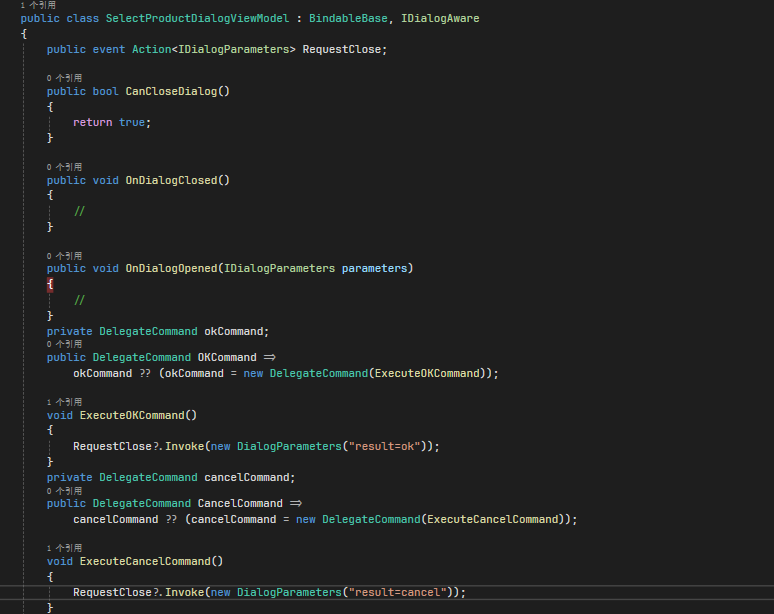
You can provide any specific logic you may want to prevent your dialog from closing. If RequestClose is invoked and CanCloseDialog returns false the Dialog Service will not close the Dialog.
您可以提供任何您想要阻止对话框关闭的特定逻辑。如果RequestClose被调用并且CanCloseDialog返回false,对话服务将不会关闭对话。
Sample Dialog View
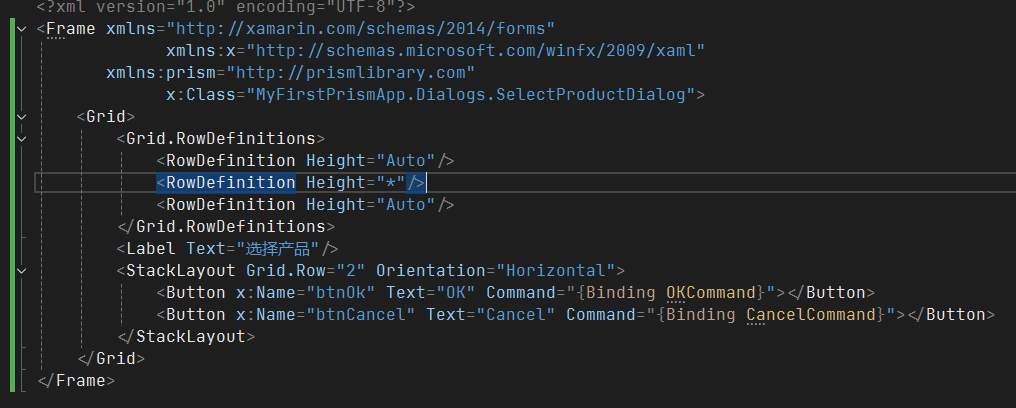
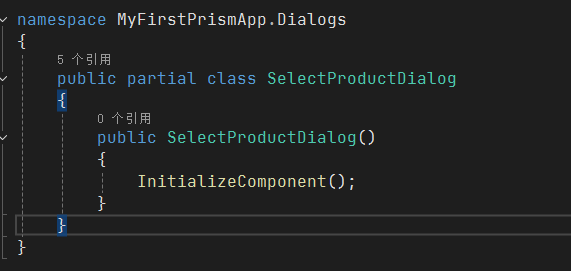
Dialog's are built entirely from any Xamarin.Forms Layout or View. These all use normal bindings and might look something like the following:
对话框完全由Xamarin构建。窗体布局或视图。这些都使用普通绑定,可能看起来像下面这样
Registering the Dialog
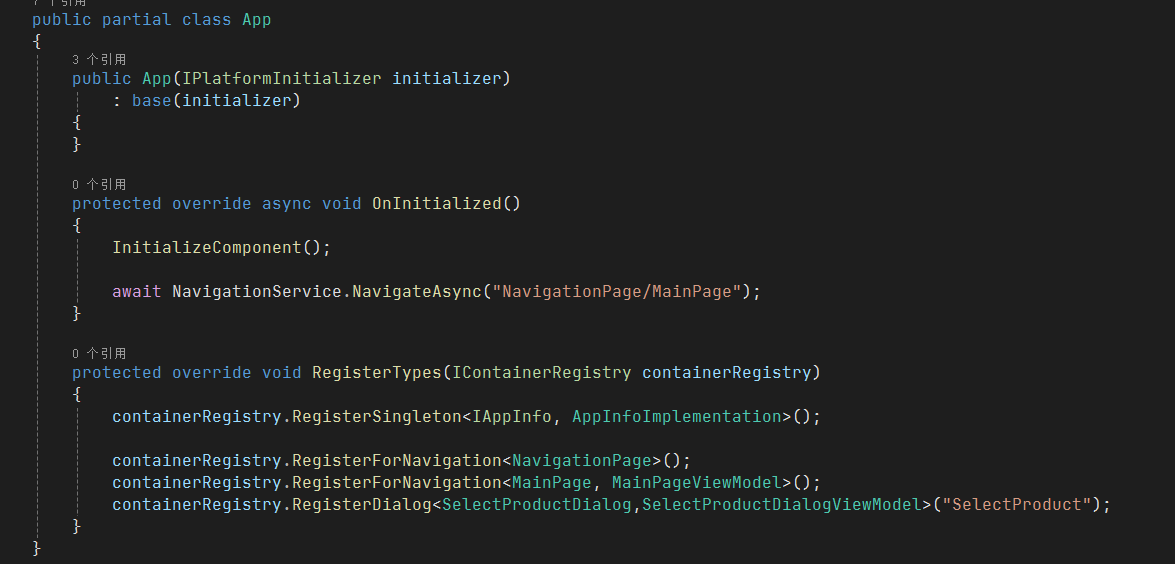
Similar to registering a Page for Navigation, there is an extension on IContainerRegistry to register your Dialogs. You do not need to specify the ViewModel, as the ViewModelLocator will automatically attempt to resolve the ViewModel as long as both the Dialog and the ViewModel match Prism's naming/namespace conventions. Using the fully qualified registration method in which you specify both the Dialog View and the ViewModel is considered a better practice as this bypasses and Reflection cost that would be incurred by the ViewModelLocator.
类似于注册导航页面,在IContainerRegistry上有一个扩展来注册您的对话框。您不需要指定ViewModel,因为只要Dialog和ViewModel都符合Prism的命名/命名空间约定,ViewModelLocator就会自动尝试解析ViewModel。使用指定对话框视图和ViewModel的完全限定注册方法被认为是一种更好的实践,因为这绕过了ViewModelLocator可能产生的反射成本。
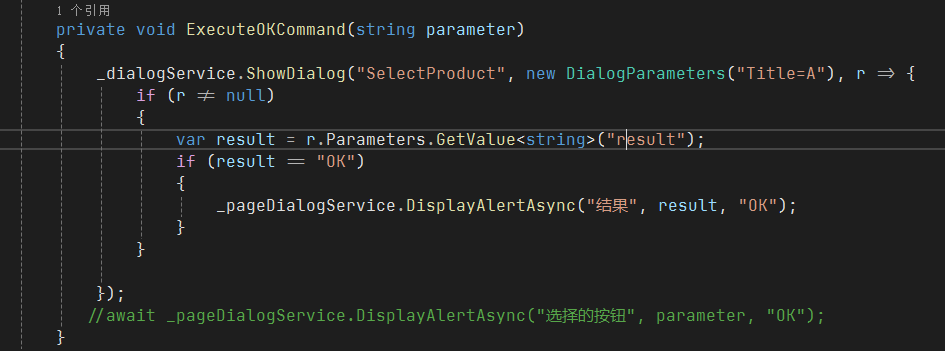
Using the Dialog Service
The Dialog Service is a very simplistic service which has a few overrides to make using it easier.
Dialog Service是一个非常简单的服务,它有一些覆盖,使它更容易使用
xamarin.forms+prism 实现DialogService(对话框服务)的更多相关文章
- .NET Core 3 WPF MVVM框架 Prism系列之对话框服务
本文将介绍如何在.NET Core3环境下使用MVVM框架Prism的对话框服务,这也是prism系列的最后一篇完结文章,下面是Prism系列文章的索引: .NET Core 3 WPF MVVM框 ...
- Xamarin.Forms+Prism(1)—— 开发准备
本次随笔连载,主要用于记录本人在项目中,用Xamarin.Forms开发APP中所使用的第三方技术或一些技巧. 准备: 1.VS2017(推荐)或VS2015: 2.JDK 1.8以上: 3.Xama ...
- Xamarin.Forms+Prism(3)—— 简单提示UI的使用
这次给大家介绍两个比较好用的提示插件,如成功.等待.错误提示. 准备: 1.新建一个Prism Xamarin.Forms项目: 2.右击解决方案,添加NuGet包: 1)Acr.UserDialog ...
- LINKs: Xamarin.Forms + Prism
LINK 1 - How to use Prism with Xamarin.Forms http://brianlagunas.com/first-look-at-the-prism-for-xam ...
- Xamarin.Forms+Prism(2)—— 基本使用 NavigationService 相对路径和绝对路径
本文主要对Prism框架下的导航服务NavigationService进行一次介绍和使用. 1.打开VS,可以看到左侧的已安装模版里面有: 2.创建完成后,从PCL项目中,看到App.xaml.cs中 ...
- Xamarin.Forms + Prism,整理页面导航跳转流程
3个Page,Page1 -> Page2 -> Page3 -> Page2 -> Page1. PageViewModel实现接口:INavigatingAware, IN ...
- Xamarin.Forms 开发资源集合(复制)
复制:https://www.cnblogs.com/mschen/p/10199997.html 收集整理了下 Xamarin.Forms 的学习参考资料,分享给大家,稍后会不断补充: UI样式 S ...
- Xamarin.Forms 开发资源集合
收集整理了下 Xamarin.Forms 的学习参考资料,分享给大家,稍后会不断补充: UI样式 Snppts: Xamarin Forms UI Snippets. Prebuilt Templat ...
- Xamarin.Forms开发APP
Xamarin.Forms+Prism(1)—— 开发准备 准备: 1.VS2017(推荐)或VS2015: 2.JDK 1.8以上: 3.Xamarin.Forms 最新版: 4.Prism 扩展, ...
- Xamarin.Forms客户端第一版
Xamarin.Forms客户端第一版 作为TerminalMACS的一个子进程模块,目前完成第一版:读取展示手机基本信息.联系人信息.应用程序本地化. 功能简介 详细功能说明 关于TerminalM ...
随机推荐
- 自动安装zabbix-agentd脚本 自己写的
zabbix_agent_install.sh #!/bin/bash #auther by wangxp ZABBIX_AGENT_DIR="/usr/local/zabbix" ...
- Qt数据库驱动编译(MySQL)
Qt数据库驱动编译(MySQL) 哈喽!我是 Pro_er,一名热爱编程的小伙伴.在这里我会分享一些实用的开发技巧和经验心得.如果你也对编程充满热情,欢迎关注并一起交流学习! 第一步:安装所需文件 / ...
- .NET最佳实践:业务逻辑减少使用异常
在 .NET 开发中,异常处理是保证应用健壮性的重要手段,但不应被滥用. 异常的引发和捕获相较于普通的代码逻辑性能较差,因此在热路径(频繁执行的代码路径)中,避免依赖异常来控制程序流是提升性能的关键之 ...
- mac环境下配置jdk
1.如果你是第一次配置环境变量,可以使用"touch .bash_profile" 创建一个.bash_profile的隐藏配置文件(如果你是为编辑已存在的配置文件,则使用&quo ...
- npcap实战抓包教程
npcap 是一个用于 Windows 系统的网络抓包库,基于 WinPcap 的改进版本,支持最新的 Windows 特性和协议(如 IPv6).它通常与 Wireshark 或 Nmap 等工具一 ...
- log4net 配置数据库连接
http://logging.apache.org/log4net/release/config-examples.html MS SQL Server The database table defi ...
- maven - [02] settings.xml配置
maven处理配置的优先级顺序 (1)全局settings.xml(优先级★☆☆☆☆) 位于Maven安装目录的conf/settings.xml,提供系统级的默认配置,比如本地仓库位置.远程仓库列表 ...
- 基于Openframeworks调取摄像头方式的定时抓拍保存图像方法小结
这次是采用Openframeworks来调取摄像头画面并抓图保存. 开始 借向导自动生成代码,因为要调取摄像头设备,因此增添ofVideoGrabber对象声明,又因为保存需求,所以还需添加ofPix ...
- C# 多线程编程及其几种方式
引言: 进程(process):应用程序的实例要使用的资源的集合.每个进程被赋予了一个虚拟地址空间,确保在一个进程中使用的代码和数据无法由另一个进程访问. 线程(thread):程序中的一个执行流,每 ...
- 【Matlab】求解复合材料层合板刚度矩阵及柔度矩阵
1. matlab文件结构 2. main.m代码 clc clear; warning off; %% %铺层角度数组 angles=[0 90 0]; % ° %单层厚度 ply_thicknes ...