
Python PEP8 代码规范常见问题及解决方法
之前一直用 Python IDLE 写代码,最近换成 PyCharm 写代码总是会出现波浪号,这才了解到 Python 的 PEP8 代码规范,所以将常见的 PEP8 代码规范问题和解决方法记录一下,学习一下,遇到了再持续更新,养成良好的习惯,编写规范的代码!
PEP的全称是Python Enhancement Proposals,其中Enhancement是增强改进的意思,Proposals则可译为提案或建议书,所以合起来,比较常见的翻译是Python增强提案或Python改进建议书。
PEP 8: no newline at end of file
解决方法:代码末尾需要另起一行,光标移到最后回车即可PEP 8: indentation is not a multiple of four
解决方法:缩进不是4的倍数,检查缩进PEP 8: over-indented
解决方法:过度缩进,检查缩进PEP 8: missing whitespace after’,’
解决方法:逗号后面少了空格,添加空格即可,类似还有分号或者冒号后面少了空格PEP 8: multiple imports on one line
解决方法:不要在一句 import 中引用多个库,举例:import socket, urllib.error最好写成:import socketimport urllib.errorPEP 8: blank line at end of line
解决方法:代码末尾行多了空格,删除空格即可PEP 8: at least two spaces before inline comment
解决方法:代码与注释之间至少要有两个空格PEP 8: block comment should start with ‘#’
解决方法:注释要以#加一个空格开始PEP 8: inline comment should start with ‘#’
解决方法:注释要以#加一个空格开始PEP 8: module level import not at top of file
解决方法:import不在文件的最上面,可能之前还有其它代码PEP 8: expected 2 blank lines,found 0
解决方法:需要两条空白行,添加两个空白行即可PEP 8: function name should be lowercase
解决方法:函数名改成小写即可PEP 8: missing whitespace around operator
解决方法:操作符(’=’、’>’、’<'等)前后缺少空格,加上即可PEP 8: unexpected spaces around keyword / parameter equals
解决方法:关键字/参数等号周围出现意外空格,去掉空格即可PEP 8: multiple statements on one line (colon)
解决方法:多行语句写到一行了,比如:if x == 2: print('OK')要分成两行写PEP 8: line too long (82 > 79 characters)
解决方法:超过了每行的最大长度限制79PEP 8: Simplify chained comparison
可简化连锁比较(例如:if a >= 0 and a <= 9:可以简写为:if 0 <= a <= 9:)
如果想要选择性忽略PEP8代码风格的警告信息可以使用以下方法:(养成良好的习惯,编写规范的代码!不推荐忽略!)
①将鼠标移到出现警告信息的地方,按 alt+Enter,选择忽略(Ignore)这个错误即可: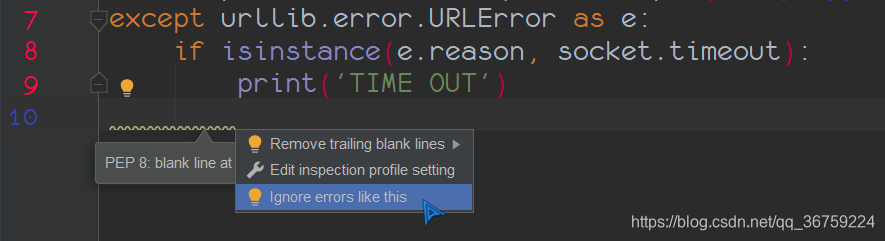
②依次选择 File - Settings - Editor - Inspections,在 Python下找到 PEP8 coding style violation 选项,在右下角的 Ignore errors 里点击加号可以添加需要忽略的警告信息ID(ID信息见后面附录),例如想要忽略indentation contains mixed spaces and tabs这个警告,只需要添加其ID:E101 即可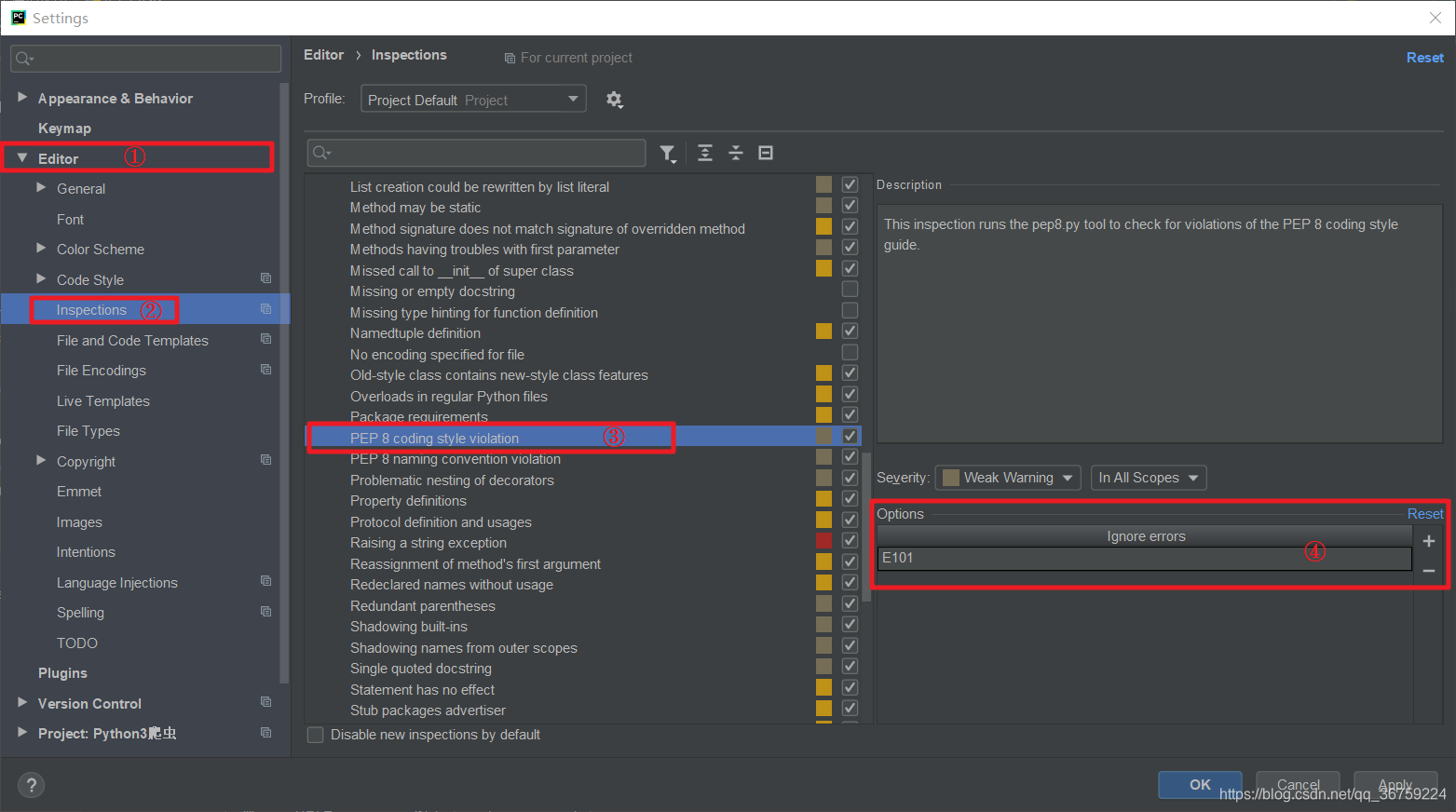
附录:全部警告信息以及对应的ID,官方地址:https://pep8.readthedocs.io/en/latest/intro.html#error-codes
| code | sample message |
|---|---|
| E1 | Indentation |
| E101 | indentation contains mixed spaces and tabs |
| E111 | indentation is not a multiple of four |
| E112 | expected an indented block |
| E113 | unexpected indentation |
| E114 | indentation is not a multiple of four (comment) |
| E115 | expected an indented block (comment) |
| E116 | unexpected indentation (comment) |
| E117 | over-indented |
| E121 (*^) | continuation line under-indented for hanging indent |
| E122 (^) | continuation line missing indentation or outdented |
| E123 (*) | closing bracket does not match indentation of opening bracket’s line |
| E124 (^) | closing bracket does not match visual indentation |
| E125 (^) | continuation line with same indent as next logical line |
| E126 (*^) | continuation line over-indented for hanging indent |
| E127 (^) | continuation line over-indented for visual indent |
| E128 (^) | continuation line under-indented for visual indent |
| E129 (^) | visually indented line with same indent as next logical line |
| E131 (^) | continuation line unaligned for hanging indent |
| E133 (*) | closing bracket is missing indentation |
| E2 | Whitespace |
| E201 | whitespace after ‘(‘ |
| E202 | whitespace before ‘)’ |
| E203 | whitespace before ‘:’ |
| E211 | whitespace before ‘(‘ |
| E221 | multiple spaces before operator |
| E222 | multiple spaces after operator |
| E223 | tab before operator |
| E224 | tab after operator |
| E225 | missing whitespace around operator |
| E226 (*) | missing whitespace around arithmetic operator |
| E227 | missing whitespace around bitwise or shift operator |
| E228 | missing whitespace around modulo operator |
| E231 | missing whitespace after ‘,’, ‘;’, or ‘:’ |
| E241 (*) | multiple spaces after ‘,’ |
| E242 (*) | tab after ‘,’ |
| E251 | unexpected spaces around keyword / parameter equals |
| E261 | at least two spaces before inline comment |
| E262 | inline comment should start with ‘# ‘ |
| E265 | block comment should start with ‘# ‘ |
| E266 | too many leading ‘#’ for block comment |
| E271 | multiple spaces after keyword |
| E272 | multiple spaces before keyword |
| E273 | tab after keyword |
| E274 | tab before keyword |
| E275 | missing whitespace after keyword |
| E3 | Blank line |
| E301 | expected 1 blank line, found 0 |
| E302 | expected 2 blank lines, found 0 |
| E303 | too many blank lines (3) |
| E304 | blank lines found after function decorator |
| E305 | expected 2 blank lines after end of function or class |
| E306 | expected 1 blank line before a nested definition |
| E4 | Import |
| E401 | multiple imports on one line |
| E402 | module level import not at top of file |
| E5 | Line length |
| E501 (^) | line too long (82 > 79 characters) |
| E502 | the backslash is redundant between brackets |
| E7 | Statement |
| E701 | multiple statements on one line (colon) |
| E702 | multiple statements on one line (semicolon) |
| E703 | statement ends with a semicolon |
| E704 (*) | multiple statements on one line (def) |
| E711 (^) | comparison to None should be ‘if cond is None:’ |
| E712 (^) | comparison to True should be ‘if cond is True:’ or ‘if cond:’ |
| E713 | test for membership should be ‘not in’ |
| E714 | test for object identity should be ‘is not’ |
| E721 (^) | do not compare types, use ‘isinstance()’ |
| E722 | do not use bare except, specify exception instead |
| E731 | do not assign a lambda expression, use a def |
| E741 | do not use variables named ‘l’, ‘O’, or ‘I’ |
| E742 | do not define classes named ‘l’, ‘O’, or ‘I’ |
| E743 | do not define functions named ‘l’, ‘O’, or ‘I’ |
| E9 | Runtime |
| E901 | SyntaxError or IndentationError |
| E902 | IOError |
| W1 | Indentation warning |
| W191 | indentation contains tabs |
| W2 | Whitespace warning |
| W291 | trailing whitespace |
| W292 | no newline at end of file |
| W293 | blank line contains whitespace |
| W3 | Blank line warning |
| W391 | blank line at end of file |
| W5 | Line break warning |
| W503 (*) | line break before binary operator |
| W504 (*) | line break after binary operator |
| W505 (*^) | doc line too long (82 > 79 characters) |
| W6 | Deprecation warning |
| W601 | .has_key() is deprecated, use ‘in’ |
| W602 | deprecated form of raising exception |
| W603 | ‘<>’ is deprecated, use ‘!=’ |
| W604 | backticks are deprecated, use ‘repr()’ |
| W605 | invalid escape sequence ‘x’ |
| W606 | ‘async’ and ‘await’ are reserved keywords starting with Python 3.7 |
Python PEP8 代码规范常见问题及解决方法的更多相关文章
- Python pep8代码规范
title: Python pep8代码规范 tags: Python --- 介绍(Introduction) 官方文档:PEP 8 -- Style Guide for Python Code 很 ...
- python PEP8代码规范及问题
最近刚刚接触Python,为了养成好习惯,尽量保证自己写的代码符合PEP8代码规范,下面是过程中报出的警告及解决方法,英文有些翻译不太准确见谅,会不断更新: PEP 8: module level i ...
- Python代码规范问题及解决
Python代码规范问题及解决 为了养成使用Python编程好习惯,尽量保证自己写的代码符合PEP8代码规范,下面是过程中报出的警告及解决方法,英文有些翻译不太准确见谅,会不断更新: PEP 8 只是 ...
- C#用ado.net访问EXCEL的常见问题及解决方法
C#用ado.net访问EXCEL的常见问题及解决方法,除了像sql server,access常见的数据库,其实Excel文件也可以做为数据库访问. ado.net访问excel的实例: OleDb ...
- python用户评论标签匹配的解决方法
python用户评论标签匹配的解决方法 这篇文章主要为大家详细介绍了python用户评论标签匹配的解决方法,具有一定的参考价值,感兴趣的小伙伴们可以参考一下 我们观察用户评论发现:属性词往往和情感词伴 ...
- Python实现全局变量的两个解决方法
Python实现全局变量的两个解决方法 本文针对Python的全局变量实现方法简述如下: 先来看下面一段测试程序: count = 0 def Fuc(count): print coun ...
- NHibernate常见问题及解决方法
NHibernate常见问题及解决方法 曾经学过NHibernate的,但是自从工作到现在快一年了却从未用到过,近来要巩固一下却发现忘记了许多,一个"in expected: <end ...
- $ sudo python -m pip install pylint 出错解决方法
问题:在unbuntu执行$ sudo python -m pip install pylint出错解决方法支行以下命令sudo pip install pylint==1.9.3这样roboware ...
- Nacos 常见问题及解决方法
Nacos 开源至今已有一年,在这一年里,得到了很多用户的支持和反馈.在与社区的交流中,我们发现有一些问题出现的频率比较高,为了能够让用户更快的解决问题,我们总结了这篇常见问题及解决方法,这篇文章后续 ...
- win安装python模块出现依赖问题的解决方法 & No module named 'MySqldb'
前言 一年多了,还在写这种问题,羞愧. 新公司不让用自己的电脑,配的winPC,项目启不起来,之前也出现过这个问题,是py3缺少某个模块,但是自己没记,这次记一下好了. No module named ...
随机推荐
- Cut the Sequence(单调队列DP+set)
题面 大意:一段长度为n的序列,分成若干段,每段值的总和不能超过m,求各段中最大值加起来的最小值. 其实最朴素的DP还是很好想的,以f[i]表示i及i以前已经分好所需的最小值,a[i]表示i点的值,那 ...
- Module Warning (from ./node_modules/postcss-loader/dist/cjs.js): Warning
.markdown-body { line-height: 1.75; font-weight: 400; font-size: 16px; overflow-x: hidden; color: rg ...
- 会话层技术-session
会话层技术-session session技术拿下! 一.先整理学习过程中的几个疑惑 cookie和session分别都是怎么创建的? 首先cookie是一个类,它需要java后端开发人员手动创建. ...
- RocketMQ 5.0 多语言客户端的设计与实现
本文作者:古崟佑,阿里云中间件开发. RocketMQ 5.0 版本拥有非常多新特性,比如存储计算分离. batch 能力的提升等,它是具有里程碑意义的版本. 提到新版本,我们往往会首先想到服务端架构 ...
- mysql的执行流程
本篇章为构建mysql在执行过程中简单的业务流程,为后续的代码优化和面试构建基础. 1.首先一条sql在执行时sql会通过网络传送给mysql 2.在Mysql收到sql语句后会先在分析器中先判断一下 ...
- Linux利用crontab命令定时任务
系统配置文件/etc 系统周期性所要执行的工作,比如写缓存数据到硬盘.日志清理等.在/etc目录下有一个crontab文件,这个就是系统任务调度的配置文件. /etc/crontab文件大概包括下面几 ...
- MaskGCT,AI语音克隆大模型本地部署(Windows11),基于Python3.11,TTS,文字转语音
前几天,又一款非自回归的文字转语音的AI模型:MaskGCT,开放了源码,和同样非自回归的F5-TTS模型一样,MaskGCT模型也是基于10万小时数据集Emilia训练而来的,精通中英日韩法德6种语 ...
- ARC151D Binary Representations and Queries
ARC151D Binary Representations and Queries 题目链接:ARC151D Binary Representations and Queries 非常好思维题. 思 ...
- HarmonyOS-Chat聊天室|纯血鸿蒙Next5 api12聊天app|ArkUI仿微信
自研原生鸿蒙NEXT5.0 API12 ArkTS仿微信app聊天模板HarmonyOSChat. harmony-wechat原创重磅实战纯血鸿蒙OS ArkUI+ArkTs仿微信App聊天实例.包 ...
- ThreeJs-02Threejs开发入门与调试
这两天没有上传笔记,在解决图床的问题,主打一个白嫖,所以要费点心思,先是用了gitee的图床好不容易配好后发现居然加了防盗链,后面又转了github的咱目前来说github也是最稳定且免费的,现在搞好 ...