
Python标准库学习之logging
前言
在python程序中,出于调试监测或者追踪(track)的目的,一般会在关键的部位加print语句来输出监测的变量值,但对于复杂的程序来讲,这样的调试手段就远远不够了,这也是logging库存在的意义,也有必要进行学习一番。
Logging 提供了一套函数组来满足简单记录的需求,比如debug(),info(),error(),和critical().
这些个函数其实是有层次的,这也是logging的重要理念之一,也就是可以设置一定的阈值,当低于该阈值时候,不管它,当等于或者高于该阈值时,才进行记录。
| Level | When it’s used |
|---|---|
| DEBUG | Detailed information, typically of interest only when diagnosing problems. |
| INFO | Confirmation that things are working as expected. |
| WARNING | An indication that something unexpected happened, or indicative of some problem in the near future (e.g. ‘disk space low’). The software is still working as expected. |
| ERROR | Due to a more serious problem, the software has not been able to perform some function. |
| CRITICAL | A serious error, indicating that the program itself may be unable to continue running. |
注意:上表的层次就是由低到高。
默认的level是WARNING,追踪事件的方式多种多样,最简单的就是直接输出到console,另一个常见的方式是写入文件中。
初级应用
初级应用就是简单的通过logging.basicConfig进行简单的设置(或者不设置,用默认的),然后直接用logging.debug(),logging.info(),logging.warning()等输出。
小例子
import logging

logging.warning('Watch out!')  # will print a message to the console

logging.info('I told you so')  # will not print anything
outputs:
WARNING:root:Watch out!
因为默认层是WARINING,所以logging.info()不输出。
Logging 到文件
import logging

logging.basicConfig(filename='example.log',level=logging.DEBUG)

logging.debug('This message should go to the log file')

logging.info('So should this')

logging.warning('And this, too')
outputs:
DEBUG:root:This message should go to the log file

INFO:root:So should this

WARNING:root:And this, too
改变输出的格式
import logging

logging.basicConfig(format='%(levelname)s:%(message)s', level=logging.DEBUG)

logging.debug('This message should appear on the console')

logging.info('So should this')

logging.warning('And this, too')
outputs:
DEBUG:This message should appear on the console

INFO:So should this

WARNING:And this, too
这里注意'root'不见了,因为我们重新设置了输出格式,格式中只有levelname和messages。
显示时间
import logging

logging.basicConfig(format='%(asctime)s %(message)s')

logging.warning('is when this event was logged.')
outputs:
2020-09-13 14:45:26,252 is when this event was logged
高级用法
logging实际上采用了模块化的方法,提供了几个组件:loggers,handlers,filters,和formatters.
官网是这样定义几个组件的作用的:
- Loggers expose the interface that application code directly uses.
- Handlers send the log records (created by loggers) to the appropriate destination.
- Filters provide a finer grained facility for determining which log records to output.
- Formatters specify the layout of log records in the final output.
被追踪的信息就是在Logger,Handler,Filter,Formatter之间传递:
首先Logging是通过调用Logger类实例的方法进行的,每个实例都有个名称,用'.'来作为命名空间的继承关系。
常用的对于module-level的logger的创建方法是
logger = logging.getLogger(__name__)
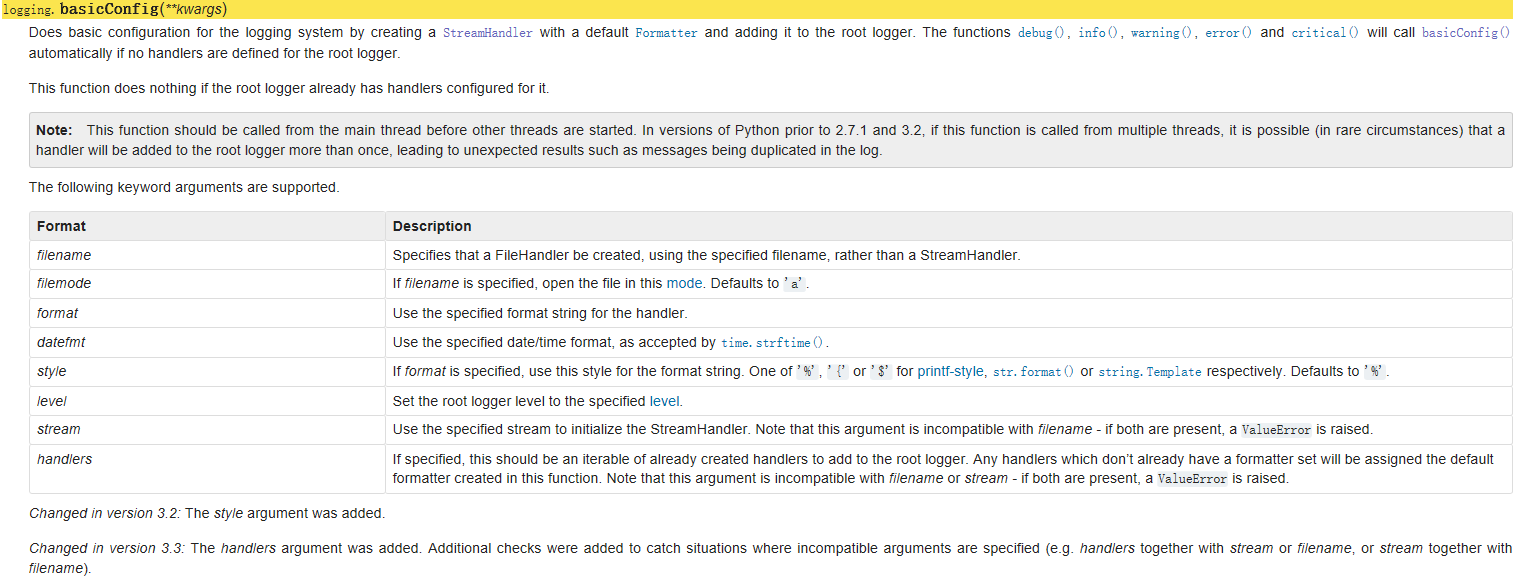
然后需要为log message设定destination,比如file,http get/post,email, sockets,queue等。destination是通过handler来确定的。默认是没有任何的destination的,可通过basicConfig()来进行简单的设置:
装配
有3种装配方法:
- 用logger,handler,filter,formatter对象的装配方法进行装配
import logging

# create logger

logger = logging.getLogger('simple_example')

logger.setLevel(logging.DEBUG)

# create console handler and set level to debug

ch = logging.StreamHandler()

ch.setLevel(logging.DEBUG)

# create formatter

formatter = logging.Formatter('%(asctime)s - %(name)s - %(levelname)s - %(message)s')

# add formatter to ch

ch.setFormatter(formatter)

# add ch to logger

logger.addHandler(ch)

# 'application' code

logger.debug('debug message')

logger.info('info message')

logger.warn('warn message')

logger.error('error message')

logger.critical('critical message')
- 用fileConfig()方法
logging.conf文件
[loggers] #声明logger

keys=root,rotateFileDemo #键值对

[handlers] #声明handler

keys=consoleHandler,rotateHandler #键值对

[formatters] #声明formatter

keys=simpleFormatter#键值对

[logger_root] #对于root的配置,必须是looger_xxx的形式

level=DEBUG

handlers=consoleHandler

[logger_rotateFileDemo]#对于rotateFileDemo的配置

level=DEBUG

handlers=rotateHandler

qualname=rotateDemo  #logger名称,应用程序通过 logging.getLogger获取。对于不能获取的名称,记录到root模块。

propagate=0  # 是否继承父类的log 信息,0:否 1:是.其父类这里是root

[handler_consoleHandler] #对于consoleHandler的配置,必须是handler_xxx的形式

class=StreamHandler  #类

level=DEBUG

formatter=simpleFormatter

args=(sys.stdout,)  #类参数

[handler_rotateHandler]

class=handlers.RotatingFileHandler  #这里注意是 handlers.RotatingfileHandler

level=DEBUG

formatter=simpleFormatter

args=('app.log','a',1024,5)  #该类的参数

[formatter_simpleFormatter] #simpleFormatter的定义及配置

format=%(asctime)s-%(name)s-%(levelname)s-%(message)s
loggingDemo.py
import logging

import logging.config

import time

logging.config.fileConfig('logging.conf')

logger=logging.getLogger('rotateDemo')

while True:

    logger.info('info message')

    time.sleep(0.1)
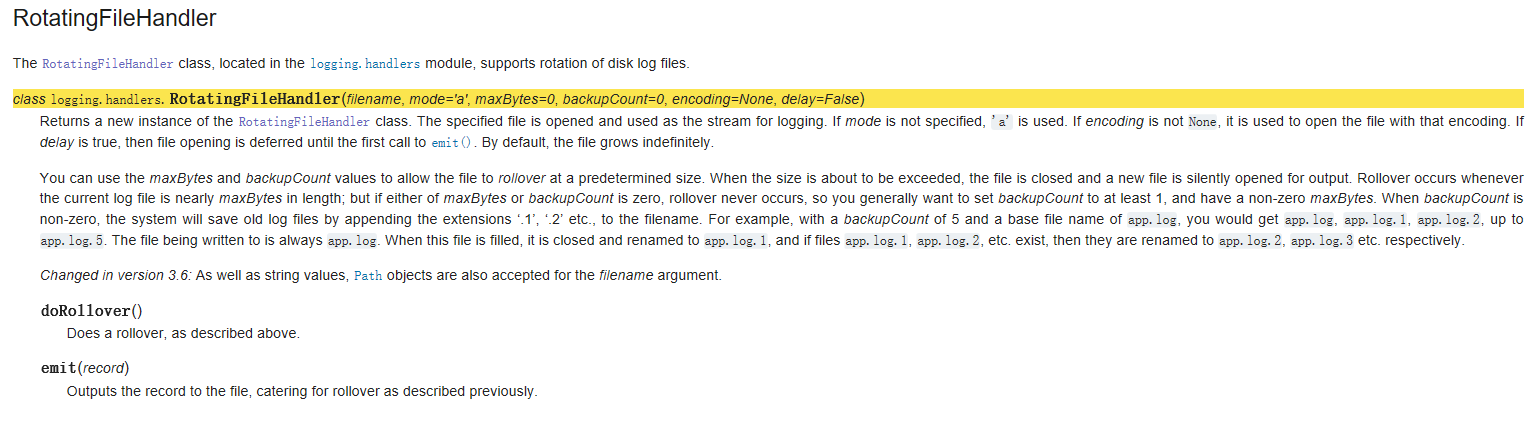
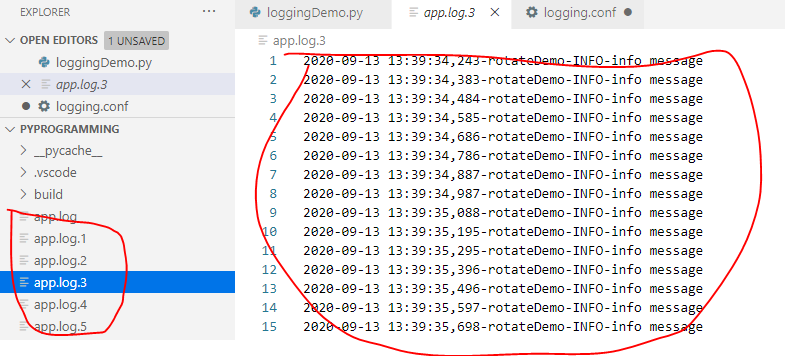
对于RotatingFileHandler,这里args=('app.log','a',1024,5) ,即记录到app.log中,当超过1024 bytes后,分别备份为app.log.01,app.log.02,app.log.03,app.log.04,app.log.05,然后再有的话不再增加。
- 运用dictConfig()进行配置
传入dictConfig()的dict,必须包含以下的键:
- version,当前唯一合法值是1,主要考虑到向后兼容性。
- formatters
- filters
- handlers
- class(强制必须有)
- level(可选)
- formatter(可选)
- filter(可选)
- loggers
- level(可选)
- propagare(可选)
- filters(可选)
- handlers(可选)
- root,设定root logger。
- incremental,配置是否解释为在已经存在的配置上增加,默认为False,意思就是设定的配置将代替原来的配置。
- disable_existing_loggers:是否使得已经存在loggers失效,默认为True,如果incremental 是True,则忽略该项。
例子:
import logging

import logging.config

LOGGING={

    'version':1,

    'formatters':{

        'simple':{

            'format':'[%(asctime)s]%(levelname)s%(message)s',

            'datefmt':'%Y-%m-%d %H:%M:%S'

        },

        'verbose':{

            'format':'[%(asctime)s]%(levelname)s[%(name)s.%(funcName)s%(lineno)d%(message)s',

            'datefmt':'%Y-%m-%d %H:%M:%S'

        }

    },

    'handlers':{

        'console':{

            'level':'DEBUG',

            'class':'logging.StreamHandler',

            'formatter':'simple'

        },

        'development_logfile':{

            'level':'DEBUG',

            'class':'logging.FileHandler',

            'filename':'test.log',

            'formatter':'verbose',

        },

            'production_logfile':{

            'level':'ERROR',

            'class':'logging.handlers.RotatingFileHandler',

            'filename':'test_production.log',

            'maxBytes':1024,

            'backupCount':3,

            'formatter':'simple'

        },

    'dba_logfile':{

        'level':'DEBUG',

        'class':'logging.handlers.WatchedFileHandler',

        'filename':'test_dba.log',

        'formatter':'simple'

    },

    },

    'root':{

        'level':'DEBUG',

        'handlers':['console'],

    },

    'loggers':{

        'coffee':{

            'handlers':['development_logfile'],

            # 'propagare':0,

            # 'qualname':'coffee'

        },

    'dba':{

        'handlers':['dba_logfile']

    }

    }

}

logging.config.dictConfig(LOGGING)

logger=logging.getLogger('coffee')

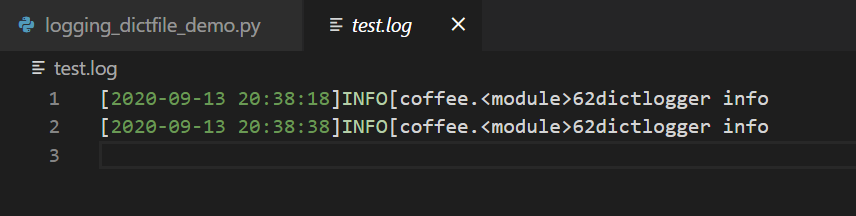
logger.info('dictlogger info')
Python标准库学习之logging的更多相关文章
- python标准库学习-SimpleHTTPServer
这是一个专题 记录学习python标准库的笔记及心得 简单http服务 SimpleHTTPServer 使用 python -m SimpleHTTPServer 默认启动8000端口 源码: &q ...
- Python标准库学习之zipfile模块
ZipFile模块里有两个非常重要的class, 分别是 ZipFile和ZipInfo. ZipFile是主要的类,用来创建和读取zip文件,而ZipInfo是存储的zip文件的每个文件的信息的. ...
- python标准库学习-ftplib
源码: """An FTP client class and some helper functions. Based on RFC 959: File Transfer ...
- 【python标准库学习】thread,threading(一)多线程的介绍和使用
在单个程序中我们经常用多线程来处理不同的工作,尤其是有的工作需要等,那么我们会新建一个线程去等然后执行某些操作,当做完事后线程退出被回收.当一个程序运行时,就会有一个进程被系统所创建,同时也会有一个线 ...
- python标准库00 学习准备
Python标准库----走马观花 python有一套很有用的标准库.标准库会随着python解释器一起安装在你的电脑上的.它是python的一个组成部分.这些标准库是python为你准备的利器,可以 ...
- Python标准库的学习准备
作者:Vamei 出处:http://www.cnblogs.com/vamei 欢迎转载,也请保留这段声明.谢谢! Python标准库是Python强大的动力所在,我们已经在前文中有所介绍.由于标准 ...
- Python 标准库一览(Python进阶学习)
转自:http://blog.csdn.net/jurbo/article/details/52334345 写这个的起因是,还是因为在做Python challenge的时候,有的时候想解决问题,连 ...
- python第六天 函数 python标准库实例大全
今天学习第一模块的最后一课课程--函数: python的第一个函数: 1 def func1(): 2 print('第一个函数') 3 return 0 4 func1() 1 同时返回多种类型时, ...
- Python标准库07 信号 (signal包,部分os包)
作者:Vamei 出处:http://www.cnblogs.com/vamei 欢迎转载,也请保留这段声明.谢谢! 在了解了Linux的信号基础之后,Python标准库中的signal包就很容易学习 ...
- Python标准库——走马观花
作者:Vamei 出处:http://www.cnblogs.com/vamei 欢迎转载,也请保留这段声明.谢谢! Python有一套很有用的标准库(standard library).标准库会随着 ...
随机推荐
- C# 网页截图全攻略:三种技术与 Chrome 路径查找指南
全局配置 string url = "https://blog.csdn.net/sunshineGGB/article/details/122316754"; 一.Puppete ...
- mysql 无数据插入,有数据更新
mysql的语法与sql server有很多不同,sql server执行插入更新时可以update后使用if判断返回的@@rowcount值,然后确定是否插入,mysql在语句中无法使用类似sql ...
- 分享4款.NET开源、免费、实用的商城系统
前言 今天大姚给大家分享4款.NET开源.免费.实用的商城系统,希望可以帮助到有商城系统开发需求的同学. nopCommerce nopCommerce是一个.NET开源功能丰富.免费.灵活且可定制的 ...
- 在ubuntu系统下,安装opencv各个版本
要在Linux系统上安装OpenCV库,你可以通过包管理器(如apt)来安装.以下是详细的步骤,包括如何在/usr/local/lib或/usr/lib/x86_64-linux-gnu目录下安装Op ...
- 解决 Mac(M1/M2)芯片,使用node 14版本
前言 nvm 在安装 Node.js v14.21.3 时,报错: nvm install 14 Downloading and installing node v14.21.3... Downloa ...
- k8s:The connection to the server localhost:8080 was refused - did you specify the right host or port?
前言 k8s 集群 node节点报错:The connection to the server localhost:8080 was refused - did you specify the rig ...
- golang中容易遇到的错误
前言 在循环中,有几种情况可能会导致混乱,需要弄清楚. 循环迭代器变量中使用引用 出于效率考虑,我们经常使用单个变量来循环迭代器.但在循环中,每次循环迭代中都会有不同的值,有时候会导致未知的行为. i ...
- 从 PostgreSQL 升级至 IvorySQL 4.0
本文作者:严少安,IvorySQL 贡献者. 本文为授权转载. 2024 年 8 月,我在<PG 12 即将退役,建议升级到 16.4>一文中提到,PostgreSQL 12 版本即将&q ...
- UNIQUE VISION Programming Contest 2025 Spring (AtCoder Beginner Contest 398) (A~F) 补题+题解
A - Doors in the Center 签到题,直接构造即可. 点击查看代码 #include<bits/stdc++.h> using namespace std; #defin ...
- AI 应用思考
之前看到过一个理论,创新技术的三个阶段:新技术创造-精英服务-平民化 技术扩散的三阶段理论模型 1. 创新垄断期(精英创造阶段)技术革命初期,创新活动高度依赖知识密集型投入.AI发展呈现"分 ...