
vue-element-admin 动态菜单改造
vue-element-admin 动态菜单改造
vue-element-admin 是一款优秀后台前端解决方案,它基于 vue 和 element-ui实现。开源后台管理系统解决方案项目 Boot-admin的前端模块就是基于vue-element-admin开发而来。
作为一款纯前端的后台界面解决方案,vue-element-admin是通过遍历路由进行渲染,从而得到菜单列表的,我们可以在 router.js 中看到相关代码,即是路由也是菜单。
改造思路:实现前后端分离要求,服务端控制菜单是否显示,前端控制路由信息定义。前端开发时不需要找服务端来新增路由信息,后端不需要关心前端路由的父/子关系、图标等定义信息。
第1步.定义路由
在 src/router/index.js 中将不需要后台控制的路由定义在 constantRoutes 中,如 /login /404 等;而需要后台控制是否显示的路由定义在 asyncRoutes 中。asyncRoutes 中每个节点都添加 srvName 属性,通过它来和服务端返回的菜单信息进行关联。
import Vue from 'vue'

import Router from 'vue-router'

Vue.use(Router)

/* Layout */

import Layout from '@/layout'

/* 外部路由文件 */

import sysManageRouter from './modules/sysmanage.js'

import codeGeneratorRouter from './modules/codegenerator.js'

import myWorkRouter from './modules/mywork.js'

/**

 * 同步路由

 * 不需要后台权限控制的路由,所有角色均可操作

 */

export const constantRoutes = [{

  path: '/redirect',

  component: Layout,

  hidden: true,

  children: [{

    path: '/redirect/:path(.*)',

    component: () => import('@/views/redirect/index')

  }]

},

{

  path: '/login',

  component: () => import('@/views/login/index'),

  hidden: true

},

{

  path: '/auth-redirect',

  component: () => import('@/views/login/auth-redirect'),

  hidden: true

},

{

  path: '/404',

  component: () => import('@/views/error-page/404'),

  hidden: true

},

{

  path: '/401',

  component: () => import('@/views/error-page/401'),

  hidden: true

},

{

  path: '/',

  component: Layout,

  redirect: '/dashboard',

  children: [{

    path: 'dashboard',

    component: () => import('@/views/dashboard/index'),

    name: 'Dashboard',

    meta: {

      title: '仪表板',

      icon: 'dashboard',

      affix: true

    }

  }]

},

]

/**

 * 异步路由

 * 基于后台动态控制的路由

 */

export const asyncRoutes = [

  /** 引入系统管理路由模块 **/

  sysManageRouter,

  /** 引入代码生成路由模块 **/

  codeGeneratorRouter,

  /** 引入工作流路由模块 **/

  myWorkRouter,

  // 404 page must be placed at the end !!!

  {

    path: '*',

    redirect: '/404',

    hidden: true

  }

]

const createRouter = () => new Router({

  scrollBehavior: () => ({

    y: 0

  }),

  routes: constantRoutes

})

const router = createRouter()

export function resetRouter() {

  const newRouter = createRouter()

  router.matcher = newRouter.matcher // reset router

}

export default router
在 src/router/modules 目录下,新建路由子模块文件
- 系统管理 sysmanage.js
- 代码生成 codegenerator.js
- 工作流 mywork.js
sysmanage.js内容如下:
import Layout from '@/layout'

const sysManageRouter = {

  path: '/manage',

  name: 'SysManage',

  component: Layout,

  redirect: '/manage/basemanage/dictionary',

  srvName: '/api/system/auth/manage',

  meta: {

    title: '系统管理',

    icon: 'example'

  },

  children: [{

    path: 'basemanage',

    name: 'BaseManage',

    srvName: '/api/system/auth/manage/basemanage',

    component: () => import('@/views/manage/basemanage/index'),

    redirect: '/manage/basemanage/dictionary',

    meta: {

      title: '基础管理',

      icon: 'tree'

    },

    children: [{

      path: 'dictionary',

      name: 'DicManage',

      srvName: '/api/system/auth/manage/basemanage/dictionary',

      component: () => import('@/views/manage/basemanage/dictionary/index'),

      meta: {

        title: '字典管理',

        icon: 'tree'

      }

    },

    {

      path: 'region',

      name: 'DivManage',

      srvName: '/api/system/auth/manage/basemanage/region',

      component: () => import('@/views/manage/basemanage/region/index'),

      meta: {

        title: '区域管理',

        icon: 'tree'

      }

    },

    {

      path: 'organization',

      name: 'OrgManage',

      srvName: '/api/system/auth/manage/basemanage/organization',

      component: () => import('@/views/manage/basemanage/organization/index'),

      meta: {

        title: '组织管理',

        icon: 'tree'

      }

    },

    {

      path: 'employee',

      name: 'EmpManage',

      srvName: '/api/system/auth/manage/basemanage/employee',

      component: () => import('@/views/manage/basemanage/employee/index'),

      meta: {

        title: '人员管理',

        icon: 'tree'

      }

    }

    ]

  },

  {

    path: 'authmanage',

    name: 'AuthManage',

    srvName: '/api/system/auth/manage/authmanage',

    component: () => import('@/views/manage/authmanage/index'),

    redirect: '/manage/authmanage/menu',

    meta: {

      title: '权限管理',

      icon: 'tree'

    },

    children: [{

      path: 'menu',

      name: 'MenuManage',

      srvName: '/api/system/auth/manage/authmanage/menu',

      component: () => import('@/views/manage/authmanage/menu'),

      meta: {

        title: '菜单管理',

        icon: 'table'

      }

    }, {

      path: 'resource',

      name: 'ResourceManage',

      srvName: '/api/system/auth/manage/authmanage/resource',

      component: () => import('@/views/manage/authmanage/resource'),

      meta: {

        title: '功能管理',

        icon: 'table'

      }

    }, {

      path: 'user',

      name: 'UserManage',

      srvName: '/api/system/auth/manage/authmanage/user',

      component: () => import('@/views/manage/authmanage/user'),

      meta: {

        title: '用户管理',

        icon: 'tree'

      }

    },

    {

      path: 'role',

      name: 'RoleManage',

      srvName: '/api/system/auth/manage/authmanage/role',

      component: () => import('@/views/manage/authmanage/role'),

      meta: {

        title: '角色管理',

        icon: 'tree'

      }

    }, {

      path: 'userofrole',

      name: 'UserOfRoleManage',

      srvName: '/api/system/auth/manage/authmanagele/userofrole',

      component: () => import('@/views/manage/authmanage/userofrole'),

      meta: {

        title: '角色-用户',

        icon: 'tree'

      }

    }, {

      path: 'resourceofrole',

      name: 'ResourceOfRoleManage',

      srvName: '/api/system/auth/manage/authmanage/resourceofrole',

      component: () => import('@/views/manage/authmanage/resourceofrole/index'),

      meta: {

        title: '角色-功能',

        icon: 'tree'

      }

    }

    ]

  },

  {

    path: 'operationmanage',

    name: 'OperationManage',

    srvName: '/api/system/auth/manage/operationmanage',

    component: () => import('@/views/manage/operationmanage/index'),

    meta: {

      title: '运行管理',

      icon: 'tree'

    },

    children: [{

      path: 'online',

      name: 'OnlineManage',

      srvName: '/api/system/auth/manage/operationmanage/online',

      component: () => import('@/views/manage/operationmanage/online/index'),

      meta: {

        title: '在线用户',

        icon: 'tree'

      }

    },

    {

      path: 'job',

      name: 'JobManage',

      srvName: '/api/system/auth/manage/operationmanage/job',

      component: () => import('@/views/manage/operationmanage/job/index'),

      meta: {

        title: '定时任务',

        icon: 'tree'

      }

    },

    {

      path: 'task',

      name: 'TaskManage',

      srvName: '/api/system/auth/manage/operationmanage/task',

      component: () => import('@/views/manage/operationmanage/task/index'),

      meta: {

        title: '流程任务',

        icon: 'tree'

      }

    },

    {

      path: 'histask',

      name: 'HisTaskManage',

      srvName: '/api/system/auth/manage/operationmanage/task/his',

      component: () => import('@/views/manage/operationmanage/histask/index'),

      meta: {

        title: '历史任务',

        icon: 'tree'

      }

    },

    {

      path: 'log',

      name: 'LogManage',

      srvName: '/api/system/auth/manage/operationmanage/log',

      component: () => import('@/views/manage/operationmanage/log/index'),

      meta: {

        title: '系统日志',

        icon: 'tree'

      }

    },

    {

      path: 'nacos',

      name: 'nacos',

      srvName: '/api/system/auth/manage/operationmanage/nacos',

      component: () => import('@/views/manage/operationmanage/nacos/index'),

      meta: {

        title: 'Nacos',

        icon: 'link'

      }

    },

    {

      path: 'admin',

      name: 'admin',

      srvName: '/api/system/auth/manage/operationmanage/admin',

      component: () => import('@/views/manage/operationmanage/admin/index'),

      meta: {

        title: 'Admin',

        icon: 'link'

      }

    }

    ]

  },

  {

    path: 'definitionmanage',

    name: 'DefManage',

    srvName: '/api/system/auth/manage/definitionmanage',

    component: () => import('@/views/manage/definitionmanage/index'),

    meta: {

      title: '定义管理',

      icon: 'tree'

    },

    children: [

      {

        path: 'model',

        name: 'ModelManage',

        srvName: '/api/system/auth/manage/definitionmanage/model',

        component: () => import('@/views/manage/definitionmanage/model/index'),

        meta: {

          title: '模型管理',

          icon: 'tree'

        }

      },

      {

        path: 'process',

        name: 'ProcessManage',

        srvName: '/api/system/auth/manage/definitionmanage/process',

        component: () => import('@/views/manage/definitionmanage/process/index'),

        meta: {

          title: '流程管理',

          icon: 'tree'

        }

      },

      {

        path: 'drools',

        name: 'DroolsManage',

        srvName: '/api/system/auth/manage/definitionmanage/drools',

        component: () => import('@/views/manage/definitionmanage/drools/index'),

        meta: {

          title: '规则管理',

          icon: 'tree'

        }

      }

    ]

  },

  {

    path: 'datamaintain',

    name: 'DataMaintain',

    srvName: '/api/system/auth/manage/datamaintain',

    component: () => import('@/views/manage/datamaintain/index'),

    meta: {

      title: '数据处理',

      icon: 'tree'

    },

    children: [{

      path: 'sqlinput',

      name: 'SqlInput',

      srvName: '/api/system/auth/manage/datamaintain/sqlinput',

      component: () => import('@/views/manage/datamaintain/sqlinput/index'),

      meta: {

        title: '提交',

        icon: 'tree'

      }

    }, {

      path: 'sqlexec',

      name: 'sqlexec',

      srvName: '/api/system/auth/manage/datamaintain/sqlexec',

      component: () => import('@/views/manage/datamaintain/sqlexec/index'),

      meta: {

        title: '执行',

        icon: 'tree'

      }

    }]

  }

  ]

}

export default sysManageRouter
第2步.服务端接口定义
服务端接口返回数据格式如下:
@Data

public class MenuDTO {

    private String id;

    private String srvName;

    private Boolean show;

    private String accessControlStyle;

}
节点中 srvName 和前端的路由进行匹配,通过 show 属性来确定显示或隐藏。
服务端无需关心菜单的子/父级关系,只需要将所有的菜单信息输出一个数组即可。
    @GetMapping("/auth/user/menu")

    public List<MenuDTO> getMenus() throws Exception{

        BaseUser baseUser = UserTool.getBaseUser();

        List<MenuDTO> menuDTOList = resourceDataGetter.getMyselfMenuList(baseUser);

        return menuDTOList;

    }
第3步.定义 api 请求接口
在 src/api/ 目录下创建 menus.js
import request from '@/utils/request'

export function getMenus(token) {

  return request({

    url: '/api/system/auth/user/menu',

    method: 'get',

    params: { token }

  })

}
第4步.配置 store 调用
新增文件 src/store/modules/menus.js
import {

  Message

} from 'element-ui'

import {

  getMenus

} from '@/api/menu'

import {

  getToken

} from '@/utils/auth'

import {

  asyncRoutes

} from '@/router/index'

const getDefaultState = () => {

  return {

    token: getToken(),

    menuList: []

  }

}

const state = getDefaultState()

const mutations = {

  SET_MENUS: (state, menus) => {

    state.menuList = menus

  }

}

// 动态菜单定义在前端,后台只会返回有权限的菜单列表,通过遍历服务端的菜单数据,没有的将对于菜单进行隐藏,前端新增页面无需先通过服务端进行菜单添加,遵循了前后端分离原则

export function generaMenu(routes, srvMenus) {

  for (let i = 0; i < routes.length; i++) {

    const routeItem = routes[i]

    var showItem = false

    for (let j = 0; j < srvMenus.length; j++) {

      const srvItem = srvMenus[j]

      // 前后端数据通过 srvName 属性来匹配

      if (routeItem.srvName !== undefined && routeItem.srvName === srvItem.srvName && srvItem.show === true) {

        showItem = true

        routes[i]['hidden'] = false

        break

      }

    }

    if (showItem === false) {

      routes[i]['hidden'] = true

    }

    if (routeItem['children'] !== undefined && routeItem['children'].length > 0) {

      generaMenu(routes[i]['children'], srvMenus)

    }

  }

}

const actions = {

  getMenus({

    commit

  }) {

    return new Promise((resolve, reject) => {

      getMenus(state.token).then(response => {

        if (response.code !== 100) {

          Message({

            message: response.message,

            type: 'error',

            duration: 5 * 1000

          })

          reject(response.message)

        }

        const {

          data

        } = response

        if (!data) {

          reject('Verification failed, please Login again.')

        }

        const srvMenus = data

        var pushRouter = asyncRoutes

        generaMenu(pushRouter, srvMenus)

        commit('SET_MENUS', pushRouter)

        resolve()

      }).catch(error => {

        reject(error)

      })

    })

  }

}

export default {

  namespaced: true,

  state,

  mutations,

  actions

}
第5步.修改路由钩子,渲染动态菜单
修改src/permission.js文件
import router from './router'

import store from './store'

import { Message } from 'element-ui'

import NProgress from 'nprogress' // progress bar

import 'nprogress/nprogress.css' // progress bar style

import { getToken } from '@/utils/auth' // get token from cookie

import getPageTitle from '@/utils/get-page-title'

NProgress.configure({ showSpinner: false }) // NProgress Configuration

const whiteList = ['/login', '/auth-redirect'] // no redirect whitelist

router.beforeEach(async(to, from, next) => {

  // start progress bar

  NProgress.start()

  // set page title

  document.title = getPageTitle(to.meta.title)

  // determine whether the user has logged in

  const hasToken = getToken()

  if (hasToken) {

    if (to.path === '/login') {

      // if is logged in, redirect to the home page

      next({ path: '/' })

      NProgress.done() // hack: https://github.com/PanJiaChen/vue-element-admin/pull/2939

    } else {

      // determine whether the user has obtained his permission roles through getInfo

      const hasRoles = store.getters.roles && store.getters.roles.length > 0

      if (hasRoles) {

        next()

      } else {

        try {

          const { roles } = await store.dispatch('user/getInfo')

          // 获取菜单

          await store.dispatch('menu/getMenus')

          // 生成动态路由

          const accessRoutes = await store.dispatch('permission/generateRoutes', roles)

          // 添加动态路由

          router.addRoutes(accessRoutes)

          next({ ...to, replace: true })

        } catch (error) {

          await store.dispatch('user/resetToken')

          Message.error(error || 'Has Error')

          next(`/login?redirect=${to.path}`)

          NProgress.done()

        }

      }

    }

  } else {

    if (whiteList.indexOf(to.path) !== -1) {

      next()

    } else {

      next(`/login?redirect=${to.path}`)

      NProgress.done()

    }

  }

})

router.afterEach(() => {

  NProgress.done()

})
关键代码:
// 在完成登录获取到用户信息后,开始从获取菜单

await store.dispatch('menu/getMenus')

// 生成动态路由

const accessRoutes = await store.dispatch('permission/generateRoutes', roles)

// 添加动态路由

router.addRoutes(accessRoutes)
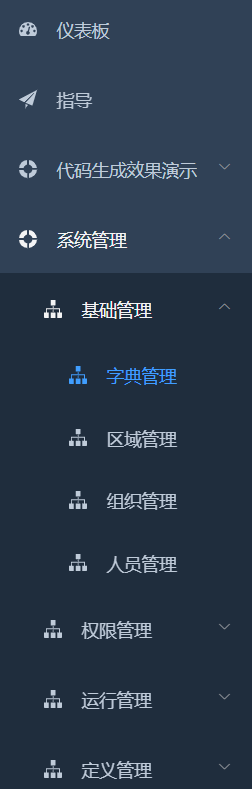
改造完成,效果如下:
vue-element-admin 动态菜单改造的更多相关文章
- Vue+Element的动态表单,动态表格(后端发送配置,前端动态生成)
Vue+Element的动态表单,动态表格(后端发送配置,前端动态生成) 动态表单生成 ElementUI官网引导 Element表单生成 Element动态增减表单,在线代码 关键配置 templa ...
- vue、iview动态菜单(可折叠)
vue项目与iview3实现可折叠动态菜单. 菜单实现一下效果: 动态获取项目路由生成动态三级菜单导航 可折叠展开 根据路由name默认打开子目录,选中当前项 自动过滤需要隐藏的路由(例:登陆) 在手 ...
- element ui 动态菜单解决方案集锦
1.<分享一个VUE Element-UI 的多级菜单动态渲染的组件> 2.<饿了么组件库,element-ui开发精美的后台管理系统系列之(一)开发伸缩菜单> 3.<V ...
- vue+element创建动态的form表单.以及动态生成表格的行和列
动态创建form表单,网上有插件 (form-create) 不过我不知道它怎么用,没有使用成功,如果你使用成功了,欢迎下方留言. 最后我使用了笨方法,针对各个表单写好通用的组件,然后根据type用v ...
- vue element Admin - 修改浏览器标签名 + 添加tagView标签 +固定导航头部 + 添加侧边栏Logo
1 .修改浏览器标签名称: 修改浏览器标签名称在文件:\src\settings.js image.png 2 .修改固定头部Header和侧边栏 Logo: image.png 1)侧边栏文 ...
- vue element admin 关闭eslint校验
vue.config.js里面进行设置 lintOnSave: false, // lintOnSave: process.env.NODE_ENV === 'development',
- 循序渐进VUE+Element 前端应用开发(27)--- 数据表的动态表单设计和数据存储
在我们一些系统里面,有时候会需要一些让用户自定义的数据信息,一般这些可以使用扩展JSON进行存储,不过每个业务表的显示项目可能不一样,因此需要根据不同的表单进行设计,然后进行对应的数据存储.本篇随笔结 ...
- 循序渐进VUE+Element 前端应用开发(3)--- 动态菜单和路由的关联处理
在我开发的很多系统里面,包括Winform混合框架.Bootstrap开发框架等系列产品中,我都倾向于动态配置菜单,并管理对应角色的菜单权限和页面权限,实现系统对用户权限的控制,菜单一般包括有名称.图 ...
- Vue + Element UI 实现权限管理系统 前端篇(十):动态加载菜单
动态加载菜单 之前我们的导航树都是写死在页面里的,而实际应用中是需要从后台服务器获取菜单数据之后动态生成的. 我们在这里就用上一篇准备好的数据格式Mock出模拟数据,然后动态生成我们的导航菜单. 接口 ...
- Vue + Element UI 实现权限管理系统(动态加载菜单)
动态加载菜单 之前我们的导航树都是写死在页面里的,而实际应用中是需要从后台服务器获取菜单数据之后动态生成的. 我们在这里就用上一篇准备好的数据格式Mock出模拟数据,然后动态生成我们的导航菜单. 接口 ...
随机推荐
- spring管理配置文件实现注入
创建配置文件 写入以下内容: 创建配置文件的bean: <bean id="configProperties" class="org.springframework ...
- Openssl自签证书|Nginx配置全站HTTPS,包括WSS(websocket)
一.生成自签证书 如果有购买证书的,可忽略此步骤. 生成方法一: openssl genrsa -des3 -out ca.key 1024 openssl rsa -in ca.key -out c ...
- Apache + PHP + Mysql Windows下配置
1.安装Apache 下载网址 http://httpd.apache.org/download.cgi#apache24 二.下载php 下载地址:https://www.php.net/downl ...
- 泛型 ? extends E ? super E的区别
package cn.itcast.generic; import java.util.ArrayList;import java.util.Collection; public class Supp ...
- (Linux服务器)git添加SSH公钥后本地验证失败
环境:腾讯云Ubuntu x86_64 问题说明: 在配置了公钥后,一直提示我git@github.com: Permission denied (publickey). 解决办法: 先查看root/ ...
- Echarts的安装和使用
安装步骤 下载相关文件 可以在该网站下载Echarts.js文件,网址在此:https://www.echartsjs.com/zh/builder.html 然后选择号自己需要用到的图形模块,点击下 ...
- Available parameters are [arg0, collection, list]错误的解决
关于这个错误 每次只要是俩list集合一嵌套起来,就会报出这个错误,检查过,并不是关键字的误用: 这个才是根本原因: 当mybatis传入参数为list集合的时候:mybatis会自动把其封装为一个m ...
- linux中查看用户和组信息小结
查看当前登录用户的组内成员groups 查看当前登录用户名whoami 查看tom用户所在的组,以及组内成员groups tom 查看所有的用户信息cat /etc/passwd 用户名.密码.用户i ...
- 在Vue中发起axios请求成功,却被catch捕捉返回Network Error
前端发起请求成功,后台接收处理返回,却被axios的catch捕获,没有走then函数. 最后添加了headers配置成功解决,如上,附上axios接口配置中文文档:axios中文文档|axios中文 ...
- 万字血书Vue—Vuex
Vuex概述 组件之间共享数据的方式(小范围) 全局事件总线 Vuex是什么? 专门在Vue中实现集中式状态(数据)管理的一个Vue插件,可以方便的实现组件之间的数据共享. 使用Vuex统一管理状态的 ...