
Springboot一些常用注解
Springboot启动注解
@SpringbootApplication
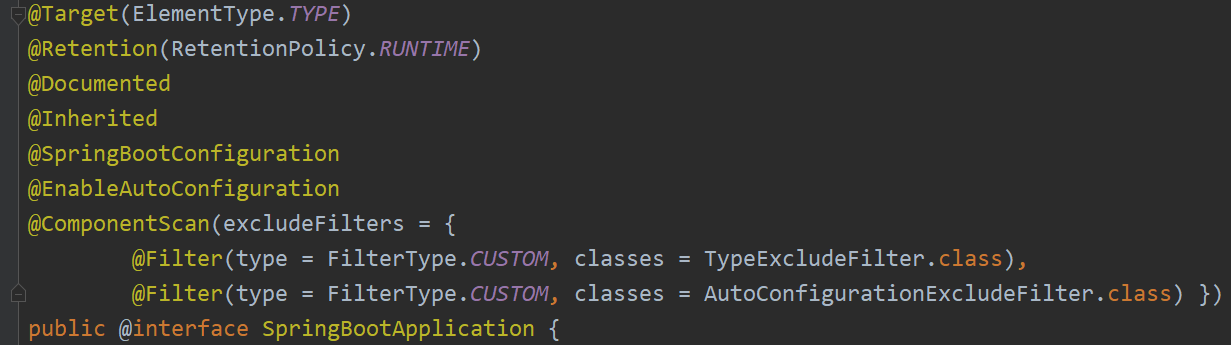
这个注解是Springboot最核心的注解,用在Springboot的主类上,标识这是一个Springboot应用,用来开启Springboot的各项能力。实际上这个注解 @SpringbootApplication = @SpringBootConfiguration + @EnableAutoConfiguration + @ComponentScan。
@EnableAutoConfiguration
允许Springboot自动配置,帮助Springboot将所有符合条件的@Configuration配置都加载到Spring容器中。
@Configuration
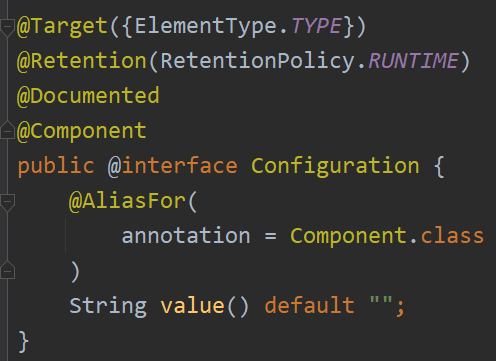
@Configuration注解用于定义配置类,替换xml配置文件,被注解的类内部包含一个或多个被@Bean注解的方法。这些方法会被
AnnotationConfigApplicationContext或AnnotationConfigWebApplicationContext类进行扫描,并用于构建bean定义,初始化Spring容器。
@SpringBootConfiguration
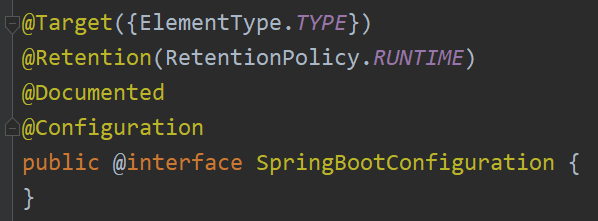
@SpringBootConfiguration继承自@Configuration,二者功能一致,标注当前类是配置类,并将类内声明的一个或多个@Bean注解标记的方法对应的实例加载到Spring容器中。
@ComponentScan
@ComponentScan注解默认会装配标识了@Controller,@Service,@Repository,@Component注解的类到Spring容器中。扫描路径可以通过value属性或basePackages属性配置。如果不指定扫描路径则默认从声明@ComponetScan所在类的包进行扫描。
Spring Bean相关注解
@Component, @Controller, @Service, @Repository
@Component: 通用的注解,可标注任意类为Spring组件
@Controller: 对应SpringMVC控制层,主要用于接受用户请求,并调用Service层返回数据给前端
@Service: 对应Service层,主要是一些逻辑功能的实现,并调用DAO层接口
@Repository: 对应DAO层,主要用于操作数据库
@RestController
@RestController = @Controller + @ResponseBody,表示这是一个控制器Bean,并返回JSON或XML格式数据(对应前后端分离的情况)。
@Bean
@Bean明确地指示了方法产生一个bean实例,并交给Spring容器管理。
@Bean

@Scope("singleton")

public PasswordEncoder passwordEncoder() {

  return new BCryptPasswordEncoder();

}
@Scope
@Scope用于声明Spring Bean的作用域。
- singletion: 单例(默认情况)
- prototype: 每次请求创建一个新的实例
- request: 每一次HTTP请求产生一个新的实例,该实例仅在当前HTTP request内有效
- session: 每一个HTTP Session会产生一个新的实例,该实例仅在当前HTTP Session内有效
@Autowired
@Autowired自动注入对象到类中。
注入方式:
- 构造器注入(推荐)
优点:保证依赖不为空,强依赖处理(编译阶段即可发现);避免了循环依赖;提升代码可复用性
缺点:注入参数较多时,代码臃肿不友好 - Field注入
优点:代码少,简洁明了
缺点:容易出现空指针异常,Field注入允许构建对象实例的时候依赖的实例对象为空,直到调用该实例才能发现 - Setter注入
优点:相比构造注入,Setter注入类似于选择注入;允许在类构造完成后重新注入
# Field注入

public class UmsAdminController {

    @Autowired

    private UmsAdminService umsAdminService;

}

# 构造器注入

public class UmsAdminController {

    private UmsAdminService umsAdminService;

    @Autowired

    public UmsAdminController(UmsAdminService umsAdminService) {

        this.umsAdminService = umsAdminService;

    }

}

# Setter注入

public class UmsAdminController {

    private UmsAdminService umsAdminService;

    @Autowired

    public void setAdminController(UmsAdminService umsAdminService) {

        this.umsAdminService = umsAdminService;

    }

}
HTTP请求相关注解
HTTP的请求类型:
- GET: 从服务器获取资源
- POST: 在服务器创建一个新的资源
- PUT: 更新服务器上的资源(全量更新,由客户端提供更新后的整个资源)
- DELETE: 从服务器删除资源
- PATCH: 更新服务器上的资源(增量更新,客户端提供更改的属性,使用较少)
@GetMapping
@GetMapping = @RequestMappig(method=RequestMethod.GET)
@PostMapping
@PostMapping= @RequestMappig(method=RequestMethod.POST)
@PutMapping
@PutMapping= @RequestMappig(method=RequestMethod.PUT)
@DeleteMapping
@DeleteMapping= @RequestMappig(method=RequestMethod.DELETE)
@PathVariable
获取路径参数。
@RequestMapping(value = "/permission/{adminId}", method = RequestMethod.GET)

@ResponseBody

public CommonResult<List<UmsPermission>> getPermissionList(@PathVariable Long adminId) {

  List<UmsPermission> permissionList = umsAdminService.getAllPermission(adminId);

  return CommonResult.success(permissionList);

}
可以从请求的url中获取adminId。
@RequestParam
获取请求参数。
@RequestMapping(value = "/delete/batch", method = RequestMethod.DELETE)

@ResponseBody

public CommonResult<Object> delete(@RequestParam("ids") List<Long> ids) {

  esProductService.delete(ids);

  return CommonResult.success(null);

}

RequestParam会跟在url的 ? 之后。
@RequestBody
读取Request请求的body部分,并且Content-Type为application/json格式,接收到数据之后会自动将数据绑定到Java对象。
@RequestMapping(value = "/login", method = RequestMethod.POST)

@ResponseBody

public CommonResult login(@RequestBody UmsAdminLoginParam umsAdminLoginParam, BindingResult result) {

  String token = umsAdminService.login(umsAdminLoginParam.getUsername(), umsAdminLoginParam.getPassword());

  if (token == null) {

    return CommonResult.validateFailed("用户名或密码错误");

  }

  Map<String, String> tokenMap = new HashMap<>();

  tokenMap.put("tokenHead", tokenHead);

  tokenMap.put("token", token);

  return CommonResult.success(tokenMap);

}

public class UmsAdminLoginParam {

    private String username;

    private String password;

    public String getUsername() {

        return username;

    }

    public void setUsername(String username) {

        this.username = username;

    }

    public String getPassword() {

        return password;

    }

    public void setPassword(String password) {

        this.password = password;

    }

}

在RequestBody中发送JSON数据,后端可以把JSON数据映射到UmsAdminLoginParam类实例上。
总结:一个请求方法只能有一个@RequestBody,可以有多个@RequestParam和@PathVariable。
读取配置信息相关注解
@Value
读取简单配置信息。
# application.yml

jwt:

  field: Authorization

  secret: mySecret

  expiration: 604800

  tokenHead: Bearer
@Component

public class JwtTokenUtil {

    @Value("${jwt.secret}")

    private String secret;

    @Value("${jwt.expiration}")

    private Long expiration;

}
@ConfigurationProperties
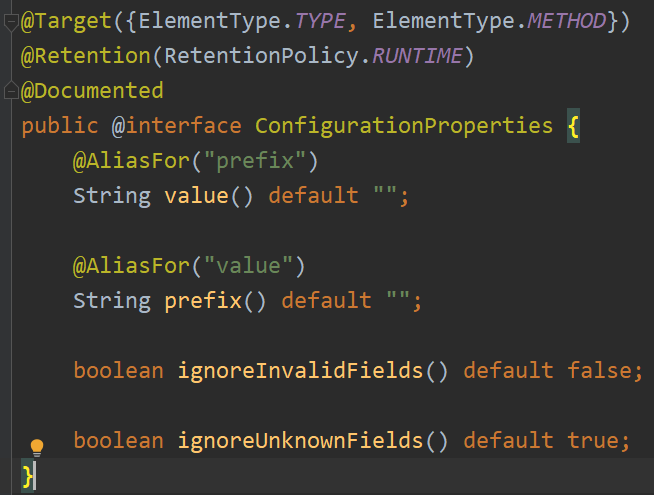
@ConfigurationProperties有一个
prefix属性,通过指定前缀来绑定配置文件中的配置信息。
使用方式:
- 作用于类上
- 作用于方法上:该方法需要有@Bean注解且所属类有@Configuration注解
spring:

  datasource:

    url: jdbc:mysql://localhost:3306/mall-learning?useUnicode=true&characterEncoding=utf-8&useSSL=false&serverTimezone=Asia/Shanghai

    username: root

    password: "0926"
// 作用于类上

@ConfigurationProperties(prefix = "spring.datasource")

@Component

@Getter

@Setter

public class Datasource {

  private String url;

  private String username;

  private String password;

}

// 作用于方法上

@Configuration

public class DatasourceConfig {

  @ConfigurationProperties(prefix = "spring.datasource")

  @Bean

  public Datasource datasource() {

    return new Datasource();

  }

}

public class ConfigurationPropertiesController {

  @Autowired

  private Datasource datasource;

}
这种绑定对象的方式是隐式绑定的,即配置文件中的字段除 prefix 后的名称需要与类中对应相同。
@PropertySource
@PropertySource读取指定 properties 文件。
# jwt.properties

jwt.field: Authorization

jwt.secret: mySecret

jwt.expiration: 604800

jwt.tokenHead: Bearer
@Component

@PeopertySource(name = "classpath:jwt.properties")

public class JwtTokenUtil {

  @Value("${jwt.secret}")

  private String secret;

  @Value("${jwt.expiration}")

  private Long expiration;

}
Springboot一些常用注解的更多相关文章
- SpringBoot 中常用注解
本篇博文将介绍几种SpringBoot 中常用注解 其中,各注解的作用为: @PathVaribale 获取url中的数据 @RequestParam 获取请求参数的值 @GetMapping 组合注 ...
- SpringBoot 中常用注解@PathVaribale/@RequestParam/@GetMapping介绍
SpringBoot 中常用注解@PathVaribale/@RequestParam/@GetMapping介绍 本篇博文将介绍几种如何处理url中的参数的注解@PathVaribale/@Requ ...
- SpringBoot 中常用注解@Controller/@RestController/@RequestMapping的区别
SpringBoot中常用注解@Controller/@RestController/@RequestMapping的区别 @Controller 处理http请求 @Controller //@Re ...
- SpringBoot 中常用注解@Controller/@RestController/@RequestMapping介绍
原文 SpringBoot 中常用注解 @Controller/@RestController/@RequestMapping介绍 @Controller 处理http请求 @Controller / ...
- SpringBoot+Spring常用注解总结
为什么要写这篇文章? 最近看到网上有一篇关于 SpringBoot 常用注解的文章被转载的比较多,我看了文章内容之后属实觉得质量有点低,并且有点会误导没有太多实际使用经验的人(这些人又占据了大多数). ...
- SpringBoot中常用注解@Controller/@RestController/@RequestMapping的区别
@Controller 处理http请求 @Controller //@ResponseBody public class HelloController { @RequestMapping(valu ...
- springboot部分常用注解
目录:[持续更新.....] spring 部分常用注解 spring boot 学习之路1(简单入门) spring boot 学习之路2(注解介绍) spring boot 学习之路3( 集成my ...
- springboot系列总结(二)---springboot的常用注解
上一篇文章我们简单讲了一下@SpringBootApplication这个注解,申明让spring boot自动给程序进行必要的配置,他是一个组合注解,包含了@ComponentScan.@Confi ...
- SpringBoot之常用注解
在spring boot中,摒弃了spring以往项目中大量繁琐的配置,遵循约定大于配置的原则,通过自身默认配置,极大的降低了项目搭建的复杂度.同样在spring boot中,大量注解的使用,使得代码 ...
- 【SpringBoot】常用注解
@EnableAutoConfiguration 启动自动装载:使用了这个注解之后,所有引入的jar的starters都会被自动注入.这个类的设计就是为starter工作的. @RestControl ...
随机推荐
- WPF Toolbox 添加image
//public Toolbox() //{ // ItemsControl items = this as ItemsControl; // ...
- TCP 异常断开连接的过程
Tcp连接正常断开的情况,大家都了解,也就是一端发送Fin报文开启四次挥手,然后 sock 结构销毁,但是我之前很少去追踪 Tcp 在对端宕机,进程 Crash 之后的行为逻辑.前段时间正巧遇到了这样 ...
- JAVA 在开发中如何选择集合实现类
先判断存储地类型(一组对象[单列]或者键值对[多列]) 一组对象:Collection接口 允许重复:list 增删多:LinkedList[底层维护了一个双向链表] 改查多;ArratList[底层 ...
- Java中int型数据类型对应MySQL数据库中哪种类型?
java类 mysql数据库 java.lang.Byte byte TINYINT java.lang.Short short SMALLINT java.lang.Integer intege ...
- Android adb命令 安装
adb的全称为Android Debug Bridge.是android司机经常用到的工具. 查看本地adb版本 打开cmd 命令:adb version 显示adb版本.如果显示不是内部或者外部命令 ...
- C++的万能引用解析
C++11除了带来了右值引用以外,还引入了一种称为"万能引用"的语法:通过"万能引用",对某型别的引用T&&,既可以表达右值引用,也可以表达左值 ...
- java学习笔记(五)运算符
++ -- 自增自减 a++ 执行完这行代码后,先给b赋值,再自增 ++a 执行完这行代码前,先自增,再给b赋值 Math类
- C++ || const_cast 将const变量转为非const
点击查看代码 #include <iostream> using namespace std; int main() { int a =5; const int* p=&a;//需 ...
- sql生成code
- 字符串练习1 于是他错误的点名开始了(Trie)
题目链接在这里:P2580 于是他错误的点名开始了 - 洛谷 | 计算机科学教育新生态 (luogu.com.cn) 是一道trie树的板子题,注意理解trie树的每一个节点代表的是一个状态,这个状态 ...