
在Spring Boot中整合Katharsis,来快速开发JSON API的Web应用
1 简介
我们进行Web API开发的时候,经常会使用Json格式的消息体,而Json格式非常灵活,不同的人会有不同的设计风格和实现,而JSON API提供了一套标准。但它并不提供直接实现。
Katharsis是JSON API的Java实现,使用它可以快速开发出Json based的Web接口,还能快速的整合到Spring中。今天我们就来试试如何在Spring Boot中使用Katharsis。

2 整合过程
2.1 添加依赖
我们在Spring Boot中添加依赖如下,包括常规的starter、jpa和h2,而整合Katharsis只需要katharsis-spring即可。
<dependencies>

  <dependency>

    <groupId>org.springframework.boot</groupId>

    <artifactId>spring-boot-starter-web</artifactId>

  </dependency>

  <dependency>

    <groupId>org.springframework.boot</groupId>

    <artifactId>spring-boot-starter-data-jpa</artifactId>

  </dependency>

  <dependency>

    <groupId>com.h2database</groupId>

    <artifactId>h2</artifactId>

  </dependency>

  <dependency>

    <groupId>io.katharsis</groupId>

    <artifactId>katharsis-spring</artifactId>

    <version>3.0.2</version>

  </dependency>

</dependencies>
2.2 Entity类
我们定义两个Entity,一个是学生,一个是教室,而教室对象会包含多个学生。
学生:
@JsonApiResource(type = "students")

@Entity

@Data

@Builder

@NoArgsConstructor

@AllArgsConstructor

public class Student {

    @JsonApiId

    @Id

    @GeneratedValue(strategy = GenerationType.AUTO)

    private Long id;

    private String name;

}
教室:
@JsonApiResource(type = "classrooms")

@Entity

@Data

@Builder

@NoArgsConstructor

@AllArgsConstructor

public class Classroom {

    @JsonApiId

    @Id

    @GeneratedValue(strategy = GenerationType.AUTO)

    private Long id;

    private String name;

    @ManyToMany(fetch = FetchType.EAGER)

    @JoinTable(name = "classrooms_students", joinColumns = @JoinColumn(name = "classroom_id", referencedColumnName = "id"), inverseJoinColumns = @JoinColumn(name = "student_id", referencedColumnName = "id"))

    @JsonApiRelation(serialize= SerializeType.EAGER)

    private Set<Student> students;

}
注解JsonApiResource这个会指定资源名称,这个会影响api的URL,注解JsonApiId则指定资源的id。
2.3 资源操作类
Katharsis使用ResourceRepository来对资源进行增删改查操作,这个跟数据库的增删改查类似,但属于更高一层。抽象到资源RESTful的资源层面,然后再调用数据库的Repository来操作,这里统一实现ResourceRepositoryV2接口。
@Component

public class StudentResourceRepository implements ResourceRepositoryV2<Student, Long> {

    private final StudentRepository studentRepository;

    public StudentResourceRepository(StudentRepository studentRepository) {

        this.studentRepository = studentRepository;

    }

    @Override

    public Student findOne(Long id, QuerySpec querySpec) {

        Optional<Student> student = studentRepository.findById(id);

        return student.orElse(null);

    }

    @Override

    public ResourceList<Student> findAll(QuerySpec querySpec) {

        return querySpec.apply(studentRepository.findAll());

    }

    @Override

    public ResourceList<Student> findAll(Iterable<Long> ids, QuerySpec querySpec) {

        return querySpec.apply(studentRepository.findAllById(ids));

    }

    @Override

    public <S extends Student> S save(S entity) {

        return studentRepository.save(entity);

    }

    @Override

    public void delete(Long id) {

        studentRepository.deleteById(id);

    }

    @Override

    public Class<Student> getResourceClass() {

        return Student.class;

    }

    @Override

    public <S extends Student> S create(S entity) {

        return save(entity);

    }

}
而数据库方面我们使用JPA实现即可:
public interface StudentRepository extends JpaRepository<Student, Long> {

}
上面的代码是针对Student资源类型的,对Classroom类似,就不把代码列出来了。
2.4 配置
为了使用Katharsis,我们需要在配置中引入KatharsisConfigV3,我们直接在Spring Boot启动类中引入即可:
@SpringBootApplication

@Import(KatharsisConfigV3.class)

public class KatharsisExample {

    public static void main(String[] args) {

        SpringApplication.run(KatharsisExample.class, args);

    }

}
Spring Boot的配置文件如下:
server.port=8080

server.servlet.context-path=/

katharsis.domainName=https://www.pkslow.com

katharsis.pathPrefix=/api/katharsis

spring.datasource.url = jdbc:h2:mem:springKatharsis;DB_CLOSE_DELAY=-1

spring.datasource.username = sa

spring.datasource.password =

spring.jpa.show-sql = true

spring.jpa.hibernate.ddl-auto = create-drop

spring.jpa.properties.hibernate.dialect = org.hibernate.dialect.H2Dialect

spring.jpa.properties.hibernate.globally_quoted_identifiers=true
katharsis.pathPrefix是URL前缀,而katharsis.domainName会影响Self Link等返回。
2.5 初始化数据
为了方便测试,初始化一些数据进行查询:
@Component

public class InitData {

    private final ClassroomRepository classroomRepository;

    private final StudentRepository studentRepository;

    public InitData(ClassroomRepository classroomRepository, StudentRepository studentRepository) {

        this.classroomRepository = classroomRepository;

        this.studentRepository = studentRepository;

    }

    @PostConstruct

    private void setupData() {

        Set<Student> students = new HashSet<>();

        Student student = Student.builder().name("Larry Deng").build();

        students.add(student);

        studentRepository.save(student);

        student = Student.builder().name("Eason").build();

        students.add(student);

        studentRepository.save(student);

        student = Student.builder().name("JJ Lin").build();

        students.add(student);

        studentRepository.save(student);

        Classroom classroom = Classroom.builder().name("Classroom No.1").students(students)

                .build();

        classroomRepository.save(classroom);

    }

}
至此则整合完毕了。
3 测试
整合完后启动,就可以用curl或Postman开始测试了:
查询一个student:
$ curl http://localhost:8080/api/katharsis/students/1 | jq .

  % Total    % Received % Xferd  Average Speed   Time    Time     Time  Current

                                 Dload  Upload   Total   Spent    Left  Speed

100   139    0   139    0     0   9828      0 --:--:-- --:--:-- --:--:-- 23166

{

  "data": {

    "id": "1",

    "type": "students",

    "attributes": {

      "name": "Larry Deng"

    },

    "links": {

      "self": "https://www.pkslow.com/api/katharsis/students/1"

    }

  }

}
查询多个student:
$ curl http://localhost:8080/api/katharsis/students | jq .

  % Total    % Received % Xferd  Average Speed   Time    Time     Time  Current

                                 Dload  Upload   Total   Spent    Left  Speed

100   429    0   429    0     0   3633      0 --:--:-- --:--:-- --:--:--  3830

{

  "data": [

    {

      "id": "1",

      "type": "students",

      "attributes": {

        "name": "Larry Deng"

      },

      "links": {

        "self": "https://www.pkslow.com/api/katharsis/students/1"

      }

    },

    {

      "id": "2",

      "type": "students",

      "attributes": {

        "name": "Eason"

      },

      "links": {

        "self": "https://www.pkslow.com/api/katharsis/students/2"

      }

    },

    {

      "id": "3",

      "type": "students",

      "attributes": {

        "name": "JJ Lin"

      },

      "links": {

        "self": "https://www.pkslow.com/api/katharsis/students/3"

      }

    }

  ],

  "meta": {

    "totalResourceCount": null

  }

}
查询一个教室:
$ curl http://localhost:8080/api/katharsis/classrooms/4 | jq .

  % Total    % Received % Xferd  Average Speed   Time    Time     Time  Current

                                 Dload  Upload   Total   Spent    Left  Speed

100   834    0   834    0     0  62462      0 --:--:-- --:--:-- --:--:--  116k

{

  "data": {

    "id": "4",

    "type": "classrooms",

    "attributes": {

      "name": "Classroom No.1"

    },

    "relationships": {

      "students": {

        "data": [

          {

            "id": "3",

            "type": "students"

          },

          {

            "id": "2",

            "type": "students"

          },

          {

            "id": "1",

            "type": "students"

          }

        ],

        "links": {

          "self": "https://www.pkslow.com/api/katharsis/classrooms/4/relationships/students",

          "related": "https://www.pkslow.com/api/katharsis/classrooms/4/students"

        }

      }

    },

    "links": {

      "self": "https://www.pkslow.com/api/katharsis/classrooms/4"

    }

  },

  "included": [

    {

      "id": "1",

      "type": "students",

      "attributes": {

        "name": "Larry Deng"

      },

      "links": {

        "self": "https://www.pkslow.com/api/katharsis/students/1"

      }

    },

    {

      "id": "2",

      "type": "students",

      "attributes": {

        "name": "Eason"

      },

      "links": {

        "self": "https://www.pkslow.com/api/katharsis/students/2"

      }

    },

    {

      "id": "3",

      "type": "students",

      "attributes": {

        "name": "JJ Lin"

      },

      "links": {

        "self": "https://www.pkslow.com/api/katharsis/students/3"

      }

    }

  ]

}
新增一个学生:
$ curl --header "Content-Type: application/json"   --request POST   --data '{

    "data": {

        "type": "students",

        "attributes": {

            "name": "Justin"

        }

    }

}'   http://localhost:8080/api/katharsis/students | jq .

  % Total    % Received % Xferd  Average Speed   Time    Time     Time  Current

                                 Dload  Upload   Total   Spent    Left  Speed

100   249    0   135  100   114  11202   9459 --:--:-- --:--:-- --:--:-- 41500

{

  "data": {

    "id": "6",

    "type": "students",

    "attributes": {

      "name": "Justin"

    },

    "links": {

      "self": "https://www.pkslow.com/api/katharsis/students/6"

    }

  }

}
修改:
$ curl --header "Content-Type: application/json"   --request PATCH   --data '{

    "data": {

        "id":"6",

        "type": "students",

        "attributes": {

            "name": "Justin Wu"

        }

    }

}'   http://localhost:8080/api/katharsis/students/6 | jq .

  % Total    % Received % Xferd  Average Speed   Time    Time     Time  Current

                                 Dload  Upload   Total   Spent    Left  Speed

100   273    0   138  100   135   4425   4329 --:--:-- --:--:-- --:--:-- 10920

{

  "data": {

    "id": "6",

    "type": "students",

    "attributes": {

      "name": "Justin Wu"

    },

    "links": {

      "self": "https://www.pkslow.com/api/katharsis/students/6"

    }

  }

}
删除:
$ curl --header "Content-Type: application/json"   --request DELETE   --data '{

    "data": {

        "id":"6",

        "type": "students",

        "attributes": {

            "name": "Justin Wu"

        }

    }

}'   http://localhost:8080/api/katharsis/students/6 | jq .
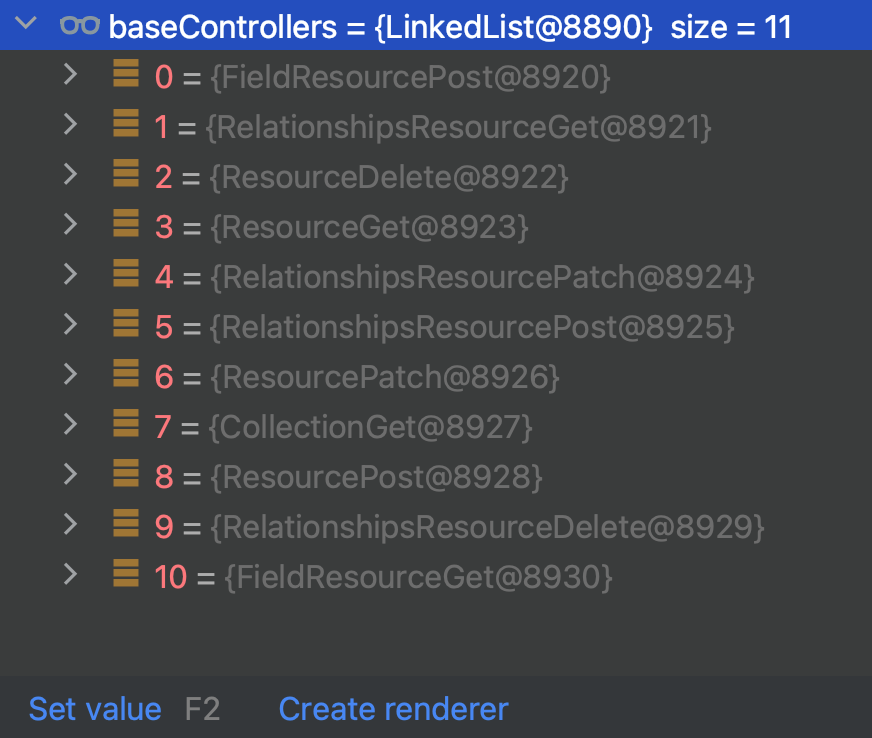
至此,我们已经覆盖了增删改查操作了。而我们在代码中并没有去写我们之前常写的Controller,却可以访问对应接口。因为Katharsis默认已经帮我们实现了,可以查看类:io.katharsis.core.internal.dispatcher.ControllerRegistry
4 代码
代码请看GitHub: https://github.com/LarryDpk/pkslow-samples
在Spring Boot中整合Katharsis,来快速开发JSON API的Web应用的更多相关文章
- Spring Boot中整合Sharding-JDBC单库分表示例
本文是Sharding-JDBC采用Spring Boot Starter方式配置第二篇,第一篇是读写分离讲解,请参考:<Spring Boot中整合Sharding-JDBC读写分离示例> ...
- 从零开始的Spring Boot(2、在Spring Boot中整合Servlet、Filter、Listener的方式)
在Spring Boot中整合Servlet.Filter.Listener的方式 写在前面 从零开始的Spring Boot(1.搭建一个Spring Boot项目Hello World):http ...
- Spring Boot中使用Swagger2构建强大的RESTful API文档
由于Spring Boot能够快速开发.便捷部署等特性,相信有很大一部分Spring Boot的用户会用来构建RESTful API.而我们构建RESTful API的目的通常都是由于多终端的原因,这 ...
- Spring Boot 中使用 Swagger2 构建强大的 RESTful API 文档
项目现状:由于前后端分离,没有很好的前后端合作工具. 由于接口众多,并且细节复杂(需要考虑不同的HTTP请求类型.HTTP头部信息.HTTP请求内容等),高质量地创建这份文档本身就是件非常吃力的事,下 ...
- Spring Boot中整合Sharding-JDBC读写分离示例
在我<Spring Cloud微服务-全栈技术与案例解析>书中,第18章节分库分表解决方案里有对Sharding-JDBC的使用进行详细的讲解. 之前是通过XML方式来配置数据源,读写分离 ...
- Spring Boot中使用MyBatis注解配置详解(1)
之前在Spring Boot中整合MyBatis时,采用了注解的配置方式,相信很多人还是比较喜欢这种优雅的方式的,也收到不少读者朋友的反馈和问题,主要集中于针对各种场景下注解如何使用,下面就对几种常见 ...
- Spring Boot 中实现定时任务的两种方式
在 Spring + SpringMVC 环境中,一般来说,要实现定时任务,我们有两中方案,一种是使用 Spring 自带的定时任务处理器 @Scheduled 注解,另一种就是使用第三方框架 Qua ...
- Spring Boot中使用Spring-data-jpa让数据访问更简单、更优雅
在上一篇Spring中使用JdbcTemplate访问数据库中介绍了一种基本的数据访问方式,结合构建RESTful API和使用Thymeleaf模板引擎渲染Web视图的内容就已经可以完成App服务端 ...
- Spring Boot中使用Spring-data-jpa
在实际开发过程中,对数据库的操作无非就“增删改查”.就最为普遍的单表操作而言,除了表和字段不同外,语句都是类似的,开发人员需要写大量类似而枯燥的语句来完成业务逻辑. 为了解决这些大量枯燥的数据操作语句 ...
- Spring Boot中使用RabbitMQ
很久没有写Spring Boot的内容了,正好最近在写Spring Cloud Bus的内容,因为内容会有一些相关性,所以先补一篇关于AMQP的整合. Message Broker与AMQP简介 Me ...
随机推荐
- rocky8删除/etc/fstab 和/boot/所有文件,通过光盘救援模式恢复
rocky8删除/etc/fstab 和/boot/所有文件,通过光盘救援模式恢复 mkdir /rootdir 先通过df和lsblk确定那个分区是根,如果确定不了,就先挂载一个分区,查看里边的文件 ...
- 云原生之旅 - 9)云原生时代网关的后起之秀Envoy Proxy 和基于Envoy 的 Emissary Ingress
前言 前一篇文章讲述了基于Nginx代理的Kuberenetes Ingress Nginx[云原生时代的网关 Ingress Nginx]这次给大家介绍下基于Envoy的 Emissary Ingr ...
- spring源码解析(一) 环境搭建(各种坑的解决办法)
上次搭建spring源码的环境还是两年前,依稀记得那时候也是一顿折腾,奈何当时没有记录,导致两年后的今天把坑重踩了一遍,还遇到了新的坑,真是欲哭无泪;为了以后类似的事情不再发生,这次写下这篇博文来必坑 ...
- perl哈希嵌套和引用的使用
数组,哈希嵌套 数组,哈希的引用 1.哈希的嵌套和引用 %hash = ( 'group1', {'fruit', 'banana', 'drink', 'orange juice', 'vegeta ...
- mysql 基础明细
1.mysql 没有 TOP,用limit实现 2.mysql having 聚合之后,对组操作,和GROUP By搭配 mysql where 聚合之前,对表和视图操作 3.where 子句的作用 ...
- aiohttp、asyncio使用协程增加爬虫效率
import aiohttp import asyncio import time async def get_requests(url): async with aiohttp.ClientSess ...
- 链接脚本中 AT> 的作用
缘由 这两天在梳理芯片的启动流程, 研究到了链接脚本(样本为stm32cube ide 中的 stm32f407 的 flash 链接脚本). 产生了一个疑问AT>是什么? 答案 AT>就 ...
- vue 原生js-实现下拉框
<template> <div class="por"> <div class="selectBox" style="w ...
- 真正“搞”懂HTTP协议07之body的玩法(实践篇)
我真没想到这篇文章竟然写了将近一个月,一方面我在写这篇文章的时候阳了,所以将近有两周没干活,另外一方面,我发现在写基于Node的HTTP的demo的时候,我不会Node,所以我又要一边学学Node,一 ...
- 升级csproj文件为vs2017工程格式(SDK样式)
csproj文件在VS2017后格式变更为SDK样式.framework项目如果需要源链接等等功能,需要进行手动升级. 升级过程 升级需要Project2015To2017Nuget包. > d ...