
Centos 7防火墙策略配置指南
Centos 7防火墙策略配置指南
—— 清听凌雪慕忆
@
1. 开启防火墙
1.1 user切换到root用户
[user@localhost ~] su root

密码:

[root@localhost home]# cd ~

[root@localhost ~]#
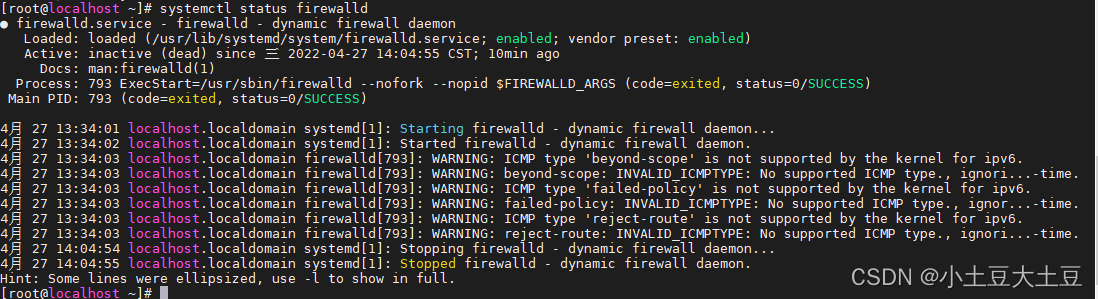
1.2 查看防火墙服务状态
systemctl status firewalld
1.3 查看firewall的状态
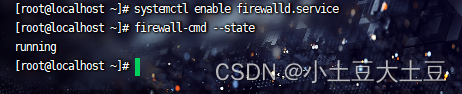
systemctl firewall state 或 firewall-cmd --state
1.4 启动/关闭防火墙
# 启动防火墙

 systemctl start firewalld

# 重启防火墙

 systemctl restart firewalld  或  systemctl reload firewalld

# 关闭

 systemctl stop firewalld

# 设置开机自启动防火墙

 systemctl enable firewalld.service

# 查看防火墙设置开机自启是否成功

 systemctl is-enabled firewalld.service
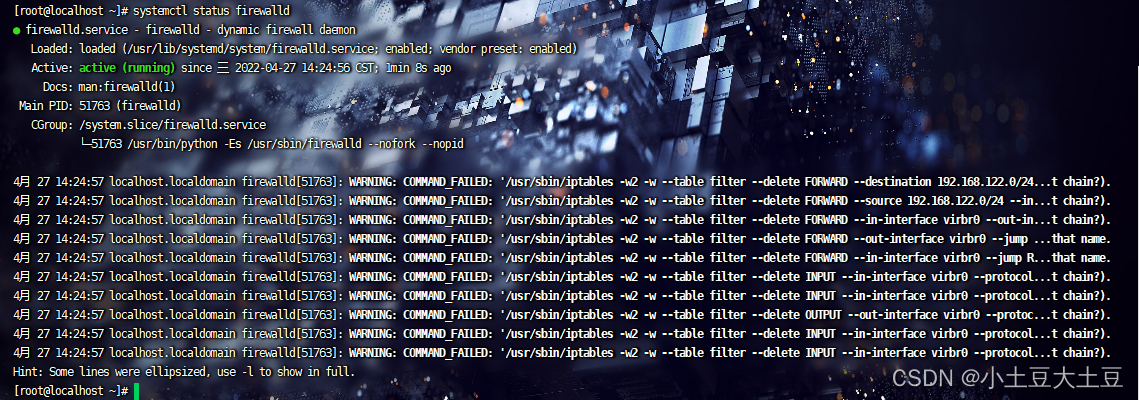
如下图所示,即为防火墙设置开机自启是否成功。

2. 防火墙端口配置
在开启防火墙之后,我们有些服务就会访问不到,是因为服务的相关端口没有打开。
2.1 查看已开启端口
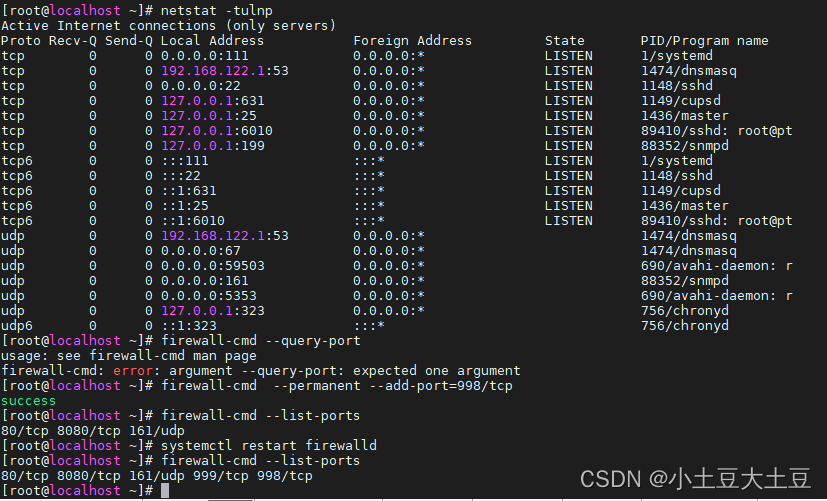
firewall-cmd --list-ports 或 netstat -ntlp
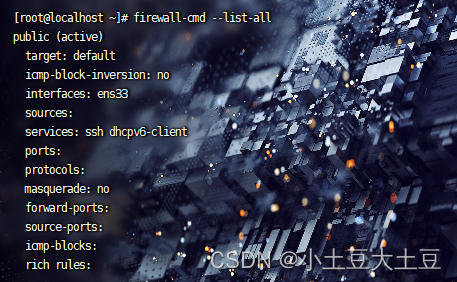
2.2 查看防火墙规则
firewall-cmd --list-all
2.3 查看允许协议
firewall-cmd --list-protocals
2.4 开启、关闭、查询端口
本次以开启80端口为例。
# 查询端口是否开放

 firewall-cmd --query-port=80/tcp

命令规则:
--permanent:表示永久生效,若没有重启失效;
-- zone :表示作用域
--add-port=80/tcp 表示添加端口,格式为端口/通讯协议
开启端口的关键字:add
移除的关键字:remove
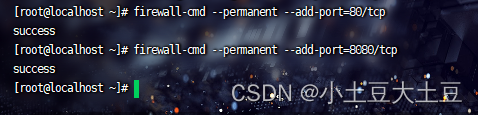
# 永久增加/开启80端口

 firewall-cmd --permanent --add-port=80/tcp

 firewall-cmd --permanent --add-port=998/tcp

 firewall-cmd --add-port=999/tcp

# 重启防火墙服务

 systemctl restart firewalld

# 删除端口

firewall-cmd --remove-port=999/tcp
3. 防火墙ip指向限制配置
3.1 允许指定ip访问所有流量
允许ip访问的关键字:accept
阻止ip访问的关键字:drop
# 开启192.168.43.88访问

 firewall-cmd --permanent --add-rich-rule="rule family="ipv4" source address="192.168.43.100" accept"

# 重启防火墙服务

firewall-cmd --reload

# 禁止192.168.43.88访问

 firewall-cmd --permanent --add-rich-rule="rule family="ipv4" source address="192.168.43.100" drop"
3.2 允许指定ip访问指定端口
# 允许IPV4 Ip是8.8.8.8 连接端口80 accept表示允许使用

 firewall-cmd --permanent --add-rich-rule="rule family="ipv4" source address="8.8.8.8" port protocol="tcp" port="80" accept"

# 允许IPV4 Ip是10.168.186.25 连接端口22 accept表示允许使用

 firewall-cmd --permanent --add-rich-rule="rule family="ipv4" source address="10.168.186.25" port protocol="tcp" port="22" accept"

 firewall-cmd --permanent --add-rich-rule="rule family="ipv4" source address="10.168.186.25,10.168.186.211" port protocol="tcp" port="3306" accept"

 firewall-cmd --permanent --add-rich-rule="rule family="ipv4" source address="10.168.186.0/24" port protocol="tcp" port="22" accept"

# 以上运行完后提示success则表示配置成功
3.3 允许指定ip访问指定协议
# 阻止ICMP包

 firewall-cmd  --permanent --add-rich-rule="rule protocol value="icmp" drop"

# 允许特定地址通过icmp

 firewall-cmd --permanent --add-rich-rule="rule family="ipv4" source address="120.12.23.136" protocol value="icmp" accept"
3.4 允许指定ip访问指定服务
# 允许特定地址可以访问SSH服务

 firewall-cmd --permanent --add-rich-rule="rule family="ipv4" source address="10.168.186.25" service name="ssh" accept"
3.5 防火墙移除某个服务
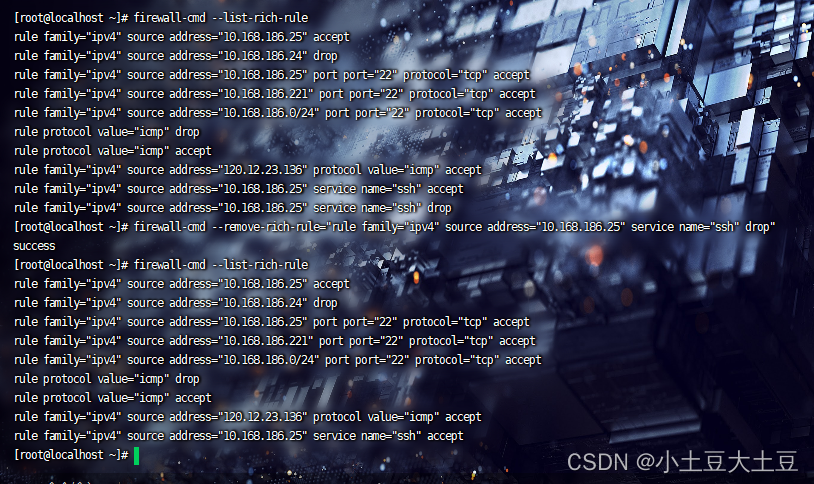
 firewall-cmd --remove-rich-rule="rule family="ipv4" source address="10.168.186.25" service name="ssh" drop"

#从允许通过防火墙的列表里移除SSH服务

 sudo firewall-cmd --remove-service=ssh --permanent

 firewall-cmd --remove-rich-rule="rule protocol value="icmp" drop" --permanent
3.6 其他
# 重启防火墙(修改配置后要重启防火墙)

 firewall-cmd --reload

# 加入白名单

 firewall-cmd --permanent --add-rich-rule="rule family="ipv4" source address="8.8.8.8" port protocol="tcp" port="80" accept"

# 查看规则

 firewall-cmd --list-rich-rules

# 显示是

 rule family="ipv4" source address="8.8.8.8" port port="80" protocol="tcp" accept

# 删除规则

 firewall-cmd --permanent --remove-rich-rule="rule family="ipv4" source address="8.8.8.8" port port="80" protocol="tcp" accept"

# 注意端口添加,删除后要更新防火墙

 firewall-cmd --reload
4. 获取所有支持的服务
firewall-cmd --get-services

4.1 增加、删除和服务
# 增加服务 (临时增加)

firewall-cmd --add-service=http

# 删除服务 (临时删除)

firewall-cmd --remove-service=http

# 查询服务

firewall-cmd --query-service=http
>“不是看到了希望才去坚持,而是坚持了才能看到希望”

Centos 7防火墙策略配置指南的更多相关文章
- 【转】CentOS 6 服务器安全配置指南
原文连接: CentOS 6 服务器安全配置指南(通用) Linux 是一个开放式系统,可以在网络上找到许多现成的程序和工具,这既方便了用户,也方便了黑客,因为他们也能很容易地找到程序和工具来潜入 L ...
- [转帖]CentOS 6 服务器安全配置指南(通用)
CentOS 6 服务器安全配置指南(通用) http://seanlook.com/2014/09/07/linux-security-general-settings/ 发表于 2014-09- ...
- CentOS 7防火墙服务FirewallD指南
CentOS 7防火墙服务FirewallD指南 作者:chszs,未经博主同意不得转载.经许可的转载需注明作者和博客主页:http://blog.csdn.net/chszs 防火墙是一种位于内部网 ...
- CentOS 7 防火墙端口配置
CentOS 7 防火墙端口配置查看防火墙是否开启systemctl status firewalld 若没有开启则开启systemctl start firewalld 查看所有开启的端口firew ...
- Linux Centos 开启防火墙 FirewallD is not running
转载自:http://www.z4zr.com/page/1006.html CentOS7用firewall命令“替代”了iptables.在这里我们需要区分“iptables服务”和“iptabl ...
- 双机冗余备份和负载均衡策略(Mysql Cluster入门安装配置指南)
MySQL Cluster 是MySQL适合于分布式计算环境的高实用.高冗余版本.它采用了NDB Cluster 存储引擎,允许在1个 Cluster 中运行多个MySQL服务器.MySQL Clus ...
- abbix通过JMX监控Tomcat(被监控端安装Tomat的服务器防火墙策略iptables配置)
原文地址:http://jaychang.iteye.com/blog/2214830 一.目前的环境 被监控端192.168.153.191 /usr/local/tomcat 下载了catalin ...
- CentOS 7 个性化配置指南
博客原文地址:CentOS 7 个性化配置指南 - Wind Spirit 0x00 前言 该教程主要安装了如下软件包 iptables MySQL PHP PHP 相关模块 Nginx 主要配置实现 ...
- CentOS 7 防火墙和端口配置
centos 7 防火墙和端口配置--解决 RHEL 7/ CentOS 7/Fedora 出现Unit iptables.service failed to load # 第一步,关闭firewal ...
随机推荐
- Java LRU实现方式
动画理解LRU算法:https://www.pianshen.com/article/8150146075/ Java实现LRU算法:https://www.pianshen.com/article/ ...
- gradle构建scala
1. 在目录下创建build.gradle文件,内容为: apply plugin: 'idea' apply plugin: 'scala' repositories { mavenLocal() ...
- kafka-linux-install
linux按照kafka 必须先按照java jdk包!!!!!!!!!!!! 先安装zookeeper 下载:http://mirrors.hust.edu.cn/apache/zookeeper/ ...
- python面向对象--快速入门
1面向对象基本用法 1.1基本格式 class 类名: def __init__(self,x): self.x = x def 方法名字 (self): #函数在类里称为方法,self就是固定参数, ...
- 定常系统(时不变系统)和时变系统&& 动态系统和静态系统
根据系统是否含有参数随时间变化的元件,自动控制系统可分为时变系统与定常系统两大类. 定常系统又称为时不变系统,其特点是:系统的自身性质(所研究物体的本质属性例如:质量.转动惯量等)不随时间而变化.具体 ...
- s函数中第一个程序修改(介绍function sys = mlupdate(t, x, u)用法)
示例: dx1/dt=-0.5572x1-0.7814x2+u1-u2; dx2/dt=0.7814x1+2u2; y=1.9691x1+6.4493x2; simulink模型的建立 s函数程序 A ...
- stylus css tooltips 工具提示
tooltips 纯css工具提示 bubbles-tooltips 查看效果 演示 安装 npm install tooltips --save 使用 在 gulp 中使用 gulp var gul ...
- HTML 初学整理
一.HTML简介 HTML的概念 HTML是HyperText Markup Language(超文本标记语言)的简写,超文本标记语言,标准通用标记语言下的一个应用."超文本"就是 ...
- 微信小程序拖动列表功能
WXML部分 1 <view class="index"> 2 3 <!-- 数据展示区 --> 4 <scroll-view 5 class=&qu ...
- python---用顺序表实现双端队列
class Dqueue(object): """双端队列""" def __init__(self): self.__list = [] ...