
利用QEMU+GDB搭建Linux内核调试环境
前言
对用户态进程,利用gdb调试代码是很方便的手段。而对于内核态的问题,可以利用crash等工具基于coredump文件进行调试。
其实我们也可以利用一些手段对Linux内核代码进行gdb调试,qemu就是一种。
qemu是一款完全软件模拟(Binary translation)的虚拟化软件,在虚拟化的实现中性能相对较差。但利用它在测试环境中gdb调试Linux内核代码,是熟悉Linux内核代码的一个好方法。
本文实验环境:
- ubuntu 20.04
- busybox-1.32.1
- Linux kernel 4.9.3
- QEMU
- GDB 10.1
编译内核源码
git clone git://git.kernel.org/pub/scm/linux/kernel/git/stable/linux.git

tar -xvzf linux-4.9.301.tar.gz

cd linux-4.9.301

make menuconfig
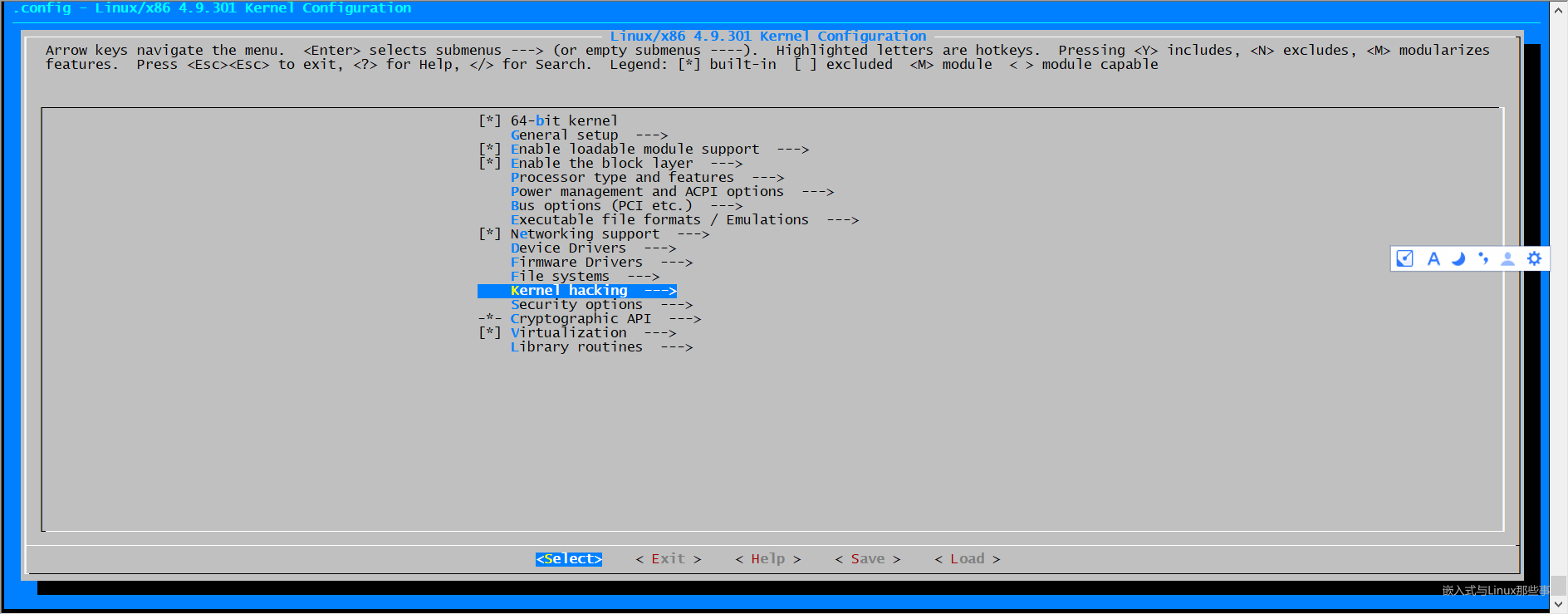
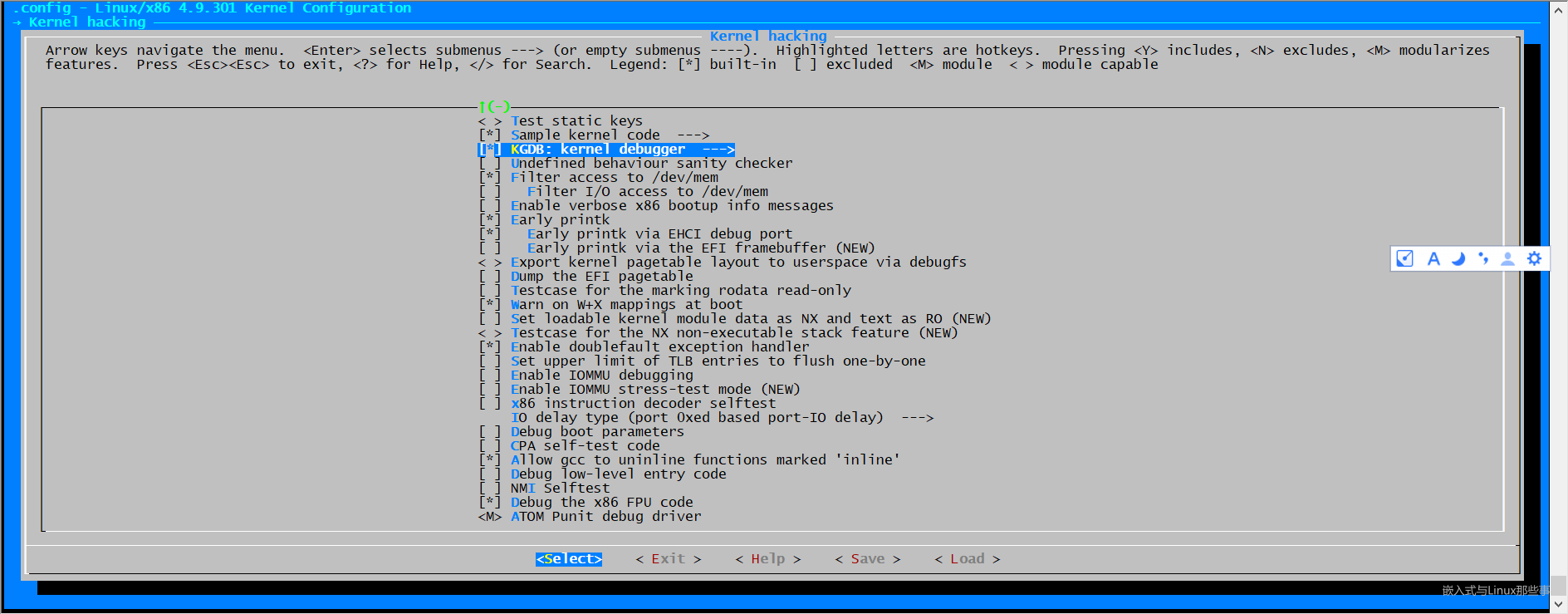
在内核编译选项中,开启如下"Compile the kernel with debug info"
Kernel hacking --->

  Compile-time checks and compiler options --->

    [ ] Compile the kernel with debug info
示意图如下,利用键盘选中debug选项,然后敲"Y"勾选:
以上配置完成后会在当前目录生成 .config 文件,我们可以使用 grep 进行验证:
grep CONFIG_DEBUG_INFO .config

CONFIG_DEBUG_INFO=y
编译内核
make bzImage -j4
编译完成后,会在当前目录下生成vmlinux,这个在 gdb 的时候需要加载,用于读取 symbol 符号信息,包含了所有调试信息,所以比较大。
压缩后的镜像文件为bzImage, 在arch/x86/boot/目录下。
➜  linux-4.9.301 ls -hl vmlinux

-rwxrwxr-x 1 ubuntu ubuntu 578M Apr 15 08:14 vmlinux

➜  linux-4.9.301 ls -hl ./arch/x86_64/boot/bzImage

lrwxrwxrwx 1 ubuntu ubuntu 22 Apr 15 08:15 ./arch/x86_64/boot/bzImage -> ../../x86/boot/bzImage

➜  linux-4.9.301 ls -hl ./arch/x86/boot/bzImage

-rw-rw-r-- 1 ubuntu ubuntu 9.3M Apr 15 08:15 ./arch/x86/boot/bzImage
几种linux内核文件的区别:
vmlinux 编译出来的最原始的内核文件,未压缩。
zImage 是vmlinux经过gzip压缩后的文件。
bzImage bz表示“big zImage”,不是用bzip2压缩的。两者的不同之处在于,zImage解压缩内核到低端内存(第一个640K)。
bzImage解压缩内核到高端内 存(1M以上)。如果内核比较小,那么采用zImage或bzImage都行,如果比较大应该用bzImage。
uImage U-boot专用的映像文件,它是在zImage之前加上一个长度为0x40的tag。
vmlinuz 是bzImage/zImage文件的拷贝或指向bzImage/zImage的链接。
initrd 是“initial ramdisk”的简写。一般被用来临时的引导硬件到实际内核vmlinuz能够接管并继续引导的状态。
编译busybox
Linux系统启动阶段,boot loader加载完内核文件vmlinuz后,内核紧接着需要挂载磁盘根文件系统,但如果此时内核没有相应驱动,无法识别磁盘,就需要先加载驱动。
而驱动又位于/lib/modules,得挂载根文件系统才能读取,这就陷入了一个两难境地,系统无法顺利启动。
于是有了initramfs根文件系统,其中包含必要的设备驱动和工具,bootloader加载initramfs到内存中,内核会将其挂载到根目录/,然后运行/init脚本,挂载真正的磁盘根文件系统。
这里借助BusyBox构建极简initramfs,提供基本的用户态可执行程序。
可以从busybox官网地址下载最新版本,或者直接使用wget下载我使用的版本。
wget https://busybox.net/downloads/busybox-1.32.1.tar.bz2

$ tar -xvf busybox-1.32.1.tar.bz2

$ cd busybox-1.32.1/

$ make menuconfig
在编译busybox之前,我们需要对其进行设置,执行make menuconfig,如下
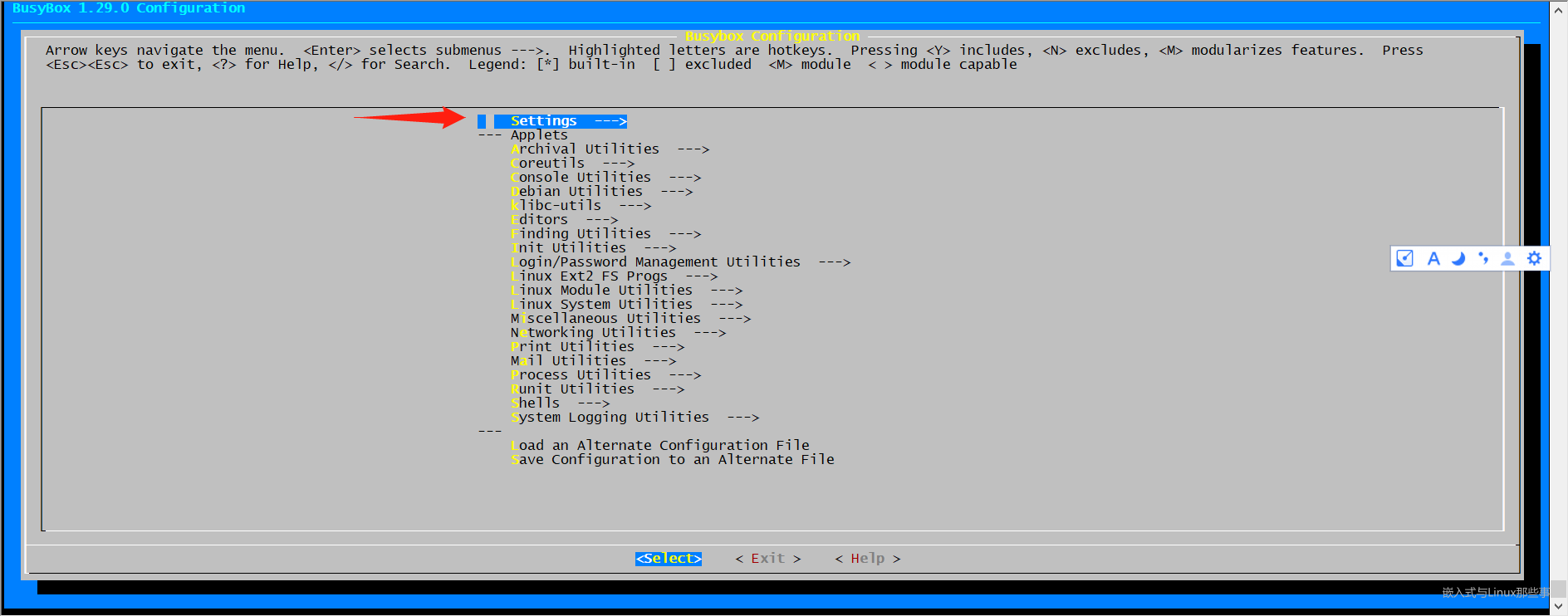
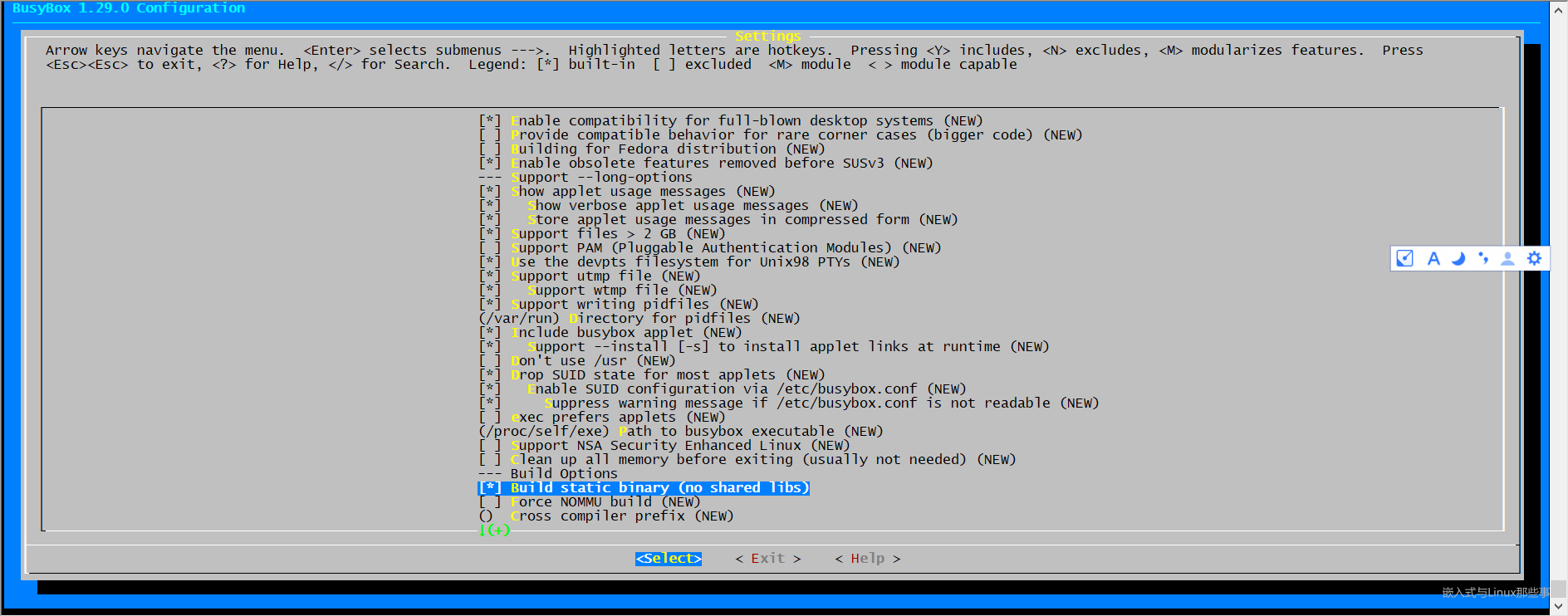
这里一定要选择静态编译,编译好的可执行文件busybox不依赖动态链接库,可以独立运行,方便构建initramfs。
之后选择Exit退出,到这里我们就可以编译busybox了,执行下面的命令
make -j 8

# 安装完成后生成的相关文件会在 _install 目录下

make && make install
构建initramfs根文件系统
[root@localhost temp]# ls

busybox-1.29.0  busybox-1.29.0.tar.bz2

[root@localhost temp]# mkdir initramfs

[root@localhost temp]# cd initramfs

[root@localhost initramfs]# cp ../busybox-1.32.1/_install/* -rf ./

[root@localhost initramfs]# mkdir dev proc sys

[root@localhost initramfs]# sudo cp -a /dev/{null,console,tty,tty1,tty2,tty3,tty4} dev/

[root@localhost initramfs]# rm -f linuxrc

[root@localhost initramfs]# vim init

[root@localhost initramfs]# chmod a+x init

[root@localhost initramfs]# ls

bin  dev  init  proc  sbin  sys  usr
其中init的内容如下
#!/bin/busybox sh

echo "{==DBG==} INIT SCRIPT"

mount -t proc none /proc

mount -t sysfs none /sys

echo -e "{==DBG==} Boot took $(cut -d' ' -f1 /proc/uptime) seconds"

exec /sbin/init
打包initramfs
find . -print0 | cpio --null -ov --format=newc | gzip -9 > ../initramfs.cpio.gz

[root@localhost initramfs]# ls ../

busybox-1.29.0  busybox-1.29.0.tar.bz2  initramfs  initramfs.cpio.gz
安装QEMU
apt install qemu qemu-utils qemu-kvm virt-manager libvirt-daemon-system libvirt-clients bridge-utils
安装GDB
wget https://ftp.gnu.org/gnu/gdb/gdb-10.1.tar.gz

tar -xzvf gdb-10.1.tar.gz

cd  gdb-10.1

./configure

# 必需要安装这两个库

sudo apt-get install texinfo

sudo apt-get install build-essential

make -j 8

sudo make install
QEMU启动调试内核
➜ linux-4.9.301 qemu-system-x86_64 -kernel ./arch/x86/boot/bzImage -initrd ../initramfs.cpio.gz -append "nokaslr console=ttyS0" -s -S -nographic
-kernel ./arch/x86/boot/bzImage:指定启用的内核镜像;-initrd ../initramfs.cpio.gz:指定启动的内存文件系统;-append "nokaslr console=ttyS0":附加参数,其中nokaslr参数必须添加进来,防止内核起始地址随机化,这样会导致 gdb 断点不能命中;-s:监听在 gdb 1234 端口;-S:表示启动后就挂起,等待 gdb 连接;-nographic:不启动图形界面,调试信息输出到终端与参数console=ttyS0组合使用;
在另一个窗口中,输入gdb,即可开启调试。
(gdb) target remote localhost:1234

Remote debugging using localhost:1234

warning: Can not parse XML target description; XML support was disabled at compile time

Remote 'g' packet reply is too long (expected 560 bytes, got 608 bytes): 0000000000000000000000000000000000000000000000006306000000000000000000000000000000000000000000000000000000000000000000000000000000000000000000000000000000000000000000000000000000000000000000000000000000000000000000000000000000000000000000000000000000000000f0ff0000000000000200000000f00000000000000000000000000000000000000000000000000000000000000000000000000000000000000000000010000060000000000000000000000000000000000000000000000000000000000000000000000000000000000000000000000000000000000000000000000000000000000000000000000000000000000000000000000000000000000000000000000000000000000000000000000000000000000000000000000000000000007f0300000000000000000000000000000000000000000000000000000000000000000000000000000000000000000000000000000000000000000000000000000000000000000000000000000000000000000000000000000000000000000000000000000000000000000000000000000000000000000000000000000000000000000000000000000000000000000000000000000000000000000000000000000000000000000000000000000000000000000000000000000000000000000000000000000000000000000000000000000000000000000000000000000000000000000000000000000000000000000000000000000000000000000000000000000000000000000000000000000000000000000000000000000000000000000000801f0000

(gdb) Remote debugging using localhost:1234

Undefined command: "Remote".  Try "help".

(gdb) warning: Can not parse XML target description; XML support was disabled at compile timeQuit
但是,在启动GDP调试时报错了,在查阅了诸多资料后,很多博客都给出了修复方法:源码重新安装gdb,并修改gdb/remote.c文件的一段代码。但是我尝试了,发现行不通。
出现该问题的原因是:编译 的是64 位模式的内核代码,但是运行是在 32 位保护模式下。64 位代码将无法在该环境中正常运行。
终于在stackflow上找到了修复方法:具体可以参考下面两篇文章。
https://wiki.osdev.org/QEMU_and_GDB_in_long_mode
文章中给出了三种修复方法,我这里只列出了一种,即修改GDB源码,重新编译安装。
--- gdb/remote.c  	2016-04-14 11:13:49.962628700 +0300

+++ gdb/remote.c	2016-04-14 11:15:38.257783400 +0300

@@ -7181,8 +7181,28 @@

   buf_len = strlen (rs->buf);

   /* Further sanity checks, with knowledge of the architecture.  */

+// HACKFIX for changing architectures for qemu. It's ugly. Don't use, unless you have to.

+  // Just a tiny modification of the patch of Matias Vara (http://forum.osdev.org/viewtopic.php?f=13&p=177644)

   if (buf_len > 2 * rsa->sizeof_g_packet)

-    error (_("Remote 'g' packet reply is too long: %s"), rs->buf);

+    {

+      warning (_("Assuming long-mode change. [Remote 'g' packet reply is too long: %s]"), rs->buf);

+      rsa->sizeof_g_packet = buf_len ;

+

+      for (i = 0; i < gdbarch_num_regs (gdbarch); i++)

+        {

+          if (rsa->regs[i].pnum == -1)

+            continue;

+

+          if (rsa->regs[i].offset >= rsa->sizeof_g_packet)

+            rsa->regs[i].in_g_packet = 0;

+          else

+            rsa->regs[i].in_g_packet = 1;

+        }

+

+      // HACKFIX: Make sure at least the lower half of EIP is set correctly, so the proper

+      // breakpoint is recognized (and triggered).

+      rsa->regs[8].offset = 16*8;

+    }

   /* Save the size of the packet sent to us by the target.  It is used

      as a heuristic when determining the max size of packets that the
cd gdb-10.1

./configure

make -j 8

sudo make install
接着就可以敲gdb 启动调试。
➜  linux-4.9.301 gdb

GNU gdb (GDB) 10.1

Copyright (C) 2020 Free Software Foundation, Inc.

License GPLv3+: GNU GPL version 3 or later <http://gnu.org/licenses/gpl.html>

This is free software: you are free to change and redistribute it.

There is NO WARRANTY, to the extent permitted by law.

Type "show copying" and "show warranty" for details.

This GDB was configured as "x86_64-pc-linux-gnu".

Type "show configuration" for configuration details.

For bug reporting instructions, please see:

<https://www.gnu.org/software/gdb/bugs/>.

Find the GDB manual and other documentation resources online at:

    <http://www.gnu.org/software/gdb/documentation/>.

For help, type "help".

Type "apropos word" to search for commands related to "word".

(gdb) file vmlinux

Reading symbols from vmlinux...

(gdb) target remote localhost:1234

Remote debugging using localhost:1234

warning: Can not parse XML target description; XML support was disabled at compile time

warning: Assuming long-mode change. [Remote 'g' packet reply is too long: PU]

0x000000000000fff0 in exception_stacks ()

(gdb) break start_kernel

Breakpoint 1 at 0xffffffff81fc6a95: file init/main.c, line 486.

(gdb) break  rest_init

Breakpoint 2 at 0xffffffff818aa1e1: file init/main.c, line 385.

(gdb) c

Continuing.

Breakpoint 1, start_kernel () at init/main.c:486

486             set_task_stack_end_magic(&init_task);

(gdb) c

Continuing.

Breakpoint 2, rest_init () at init/main.c:385

385     {

(gdb)
在start_kernel 和 rest_init 打了两个断点, 两个断点都成功命中了。
本文参考
https://www.shuzhiduo.com/A/kjdw2a2q5N/
https://cloud.tencent.com/developer/article/1793157
https://blog.csdn.net/alexanderwang7/article/details/113180447
https://blog.csdn.net/sjc2870/article/details/122017247
利用QEMU+GDB搭建Linux内核调试环境的更多相关文章
- 用Qemu模拟vexpress-a9 (一) --- 搭建Linux kernel调试环境【转】
转自:http://www.cnblogs.com/pengdonglin137/p/5023342.html#_label2 阅读目录(Content) 环境介绍: 下载Linux内核 安装arm的 ...
- 用Qemu模拟vexpress-a9 (一) --- 搭建Linux kernel调试环境
参考: http://blog.csdn.net/linyt/article/details/42504975 环境介绍: Win7 64 + Vmware 11 + ubuntu14.04 32 u ...
- linux内核调试指南
linux内核调试指南 一些前言 作者前言 知识从哪里来 为什么撰写本文档 为什么需要汇编级调试 ***第一部分:基础知识*** 总纲:内核世界的陷阱 源码阅读的陷阱 代码调试的陷阱 原理理解的陷阱 ...
- Linux Kernel - Debug Guide (Linux内核调试指南 )
http://blog.csdn.net/blizmax6/article/details/6747601 linux内核调试指南 一些前言 作者前言 知识从哪里来 为什么撰写本文档 为什么需要汇编级 ...
- Linux内核调试方法总结【转】
转自:http://my.oschina.net/fgq611/blog/113249 内核开发比用户空间开发更难的一个因素就是内核调试艰难.内核错误往往会导致系统宕机,很难保留出错时的现场.调试内核 ...
- 【转】Linux内核调试方法总结
目录[-] 一 调试前的准备 二 内核中的bug 三 内核调试配置选项 1 内核配置 2 调试原子操作 四 引发bug并打印信息 1 BUG()和BUG_ON() 2 dump_sta ...
- Linux内核调试方法总结
Linux内核调试方法总结 一 调试前的准备 二 内核中的bug 三 内核调试配置选项 1 内核配置 2 调试原子操作 四 引发bug并打印信息 1 BUG()和BUG_ON() 2 ...
- 用qemu+gdb tcp server+CDT调试linux内核启动-起步
用qemu+gdb tcp server+CDT调试linux内核启动-起步 说明: 环境信息与 用virtualbox+模拟串口+CDT调试linux内核 TCP IP协议栈-起步 提到的一样,并且 ...
- 《天书夜读:从汇编语言到windows内核编程》四 windows内核调试环境搭建
1) 基础篇是讲理论的,先跳过去,看不到代码运行的效果要去记代码是一个痛苦的事情.这里先跳入探索篇.其实今天的确也很痛苦,这作者对驱动开发的编译与调试环境介绍得太模糊了,我是各种尝试,对这个环境的搭建 ...
随机推荐
- 程序语言与编程实践7-> Java实操4 | 第三周作业及思路讲解 | 异常处理考察
第三周作业,可能是异常那一章当时没怎么听,此前也不怎么接触,感觉还挺陌生的. 00 第1题 00-1 题目 /* * To change this license header, choose Lic ...
- Ajax的乱码解决问题?
Javascript是使用UTF-8国际编码,即每个汉字用4个字节来存储,这就造成了用AJAX来send数据的时候出现会乱码. Ajax乱码产生主要有2个原因 1. XMLHttpRequest返回的 ...
- jvm-learning-类加载器分类
public class ClassLoaderTest { public static void main(String[] args) { //获取系统类加载器 ClassLoader syste ...
- awk 详解?
awk '{pattern + action}' {filenames} #cat /etc/passwd |awk -F ':' '{print 1"\t"7}' //-F 的意 ...
- 面试问题之C++语言:多态
什么是多态? 概念:同一操作作用于不同的对象,可以有不同的解释,产生不同的执行结果,这就是多态性.简单的说,就是用基类的引用指向子类的对象. 为什么要用多态呢? 原因:封装可以隐藏实现细节,使得代码模 ...
- Dubbo 如何停机?
Dubbo 是通过 JDK 的 ShutdownHook 来完成优雅停机的,所以如果使用 kill -9 PID 等强制关闭指令,是不会执行优雅停机的,只有通过 kill PID 时,才 会执行.
- 客户端注册 Watcher 实现?
1.调用 getData()/getChildren()/exist()三个 API,传入 Watcher 对象 2.标记请求 request,封装 Watcher 到 WatchRegistrati ...
- 介绍一下 WebApplicationContext?
WebApplicationContext 是 ApplicationContext 的扩展.它具有 Web 应用 程序所需的一些额外功能.它与普通的 ApplicationContext 在解析主题 ...
- spring重点知识分享
前言: spring是一个轻量级的开源的控制反转(Inversion of Control,IOC)和面向切面(AOP)的容器框架,它的主要目的是简化企业开发.这两个模块使得java开发更加简单.IO ...
- IE中的编码位置
进入设置 找到Editor 找到File Encodings