
Spring Security的使用
spring security使用目的:验证,授权,攻击防护。
原理:创建大量的filter和interceptor来进行请求的验证和拦截,以此来达到安全的效果。
Spring Security主要包括两大功能:验证和鉴权。验证就是确认用户的身份,一般采用用户名和密码的形式;鉴权就是确认用户拥有的身份(角色、权限)能否访问受保护的资源。
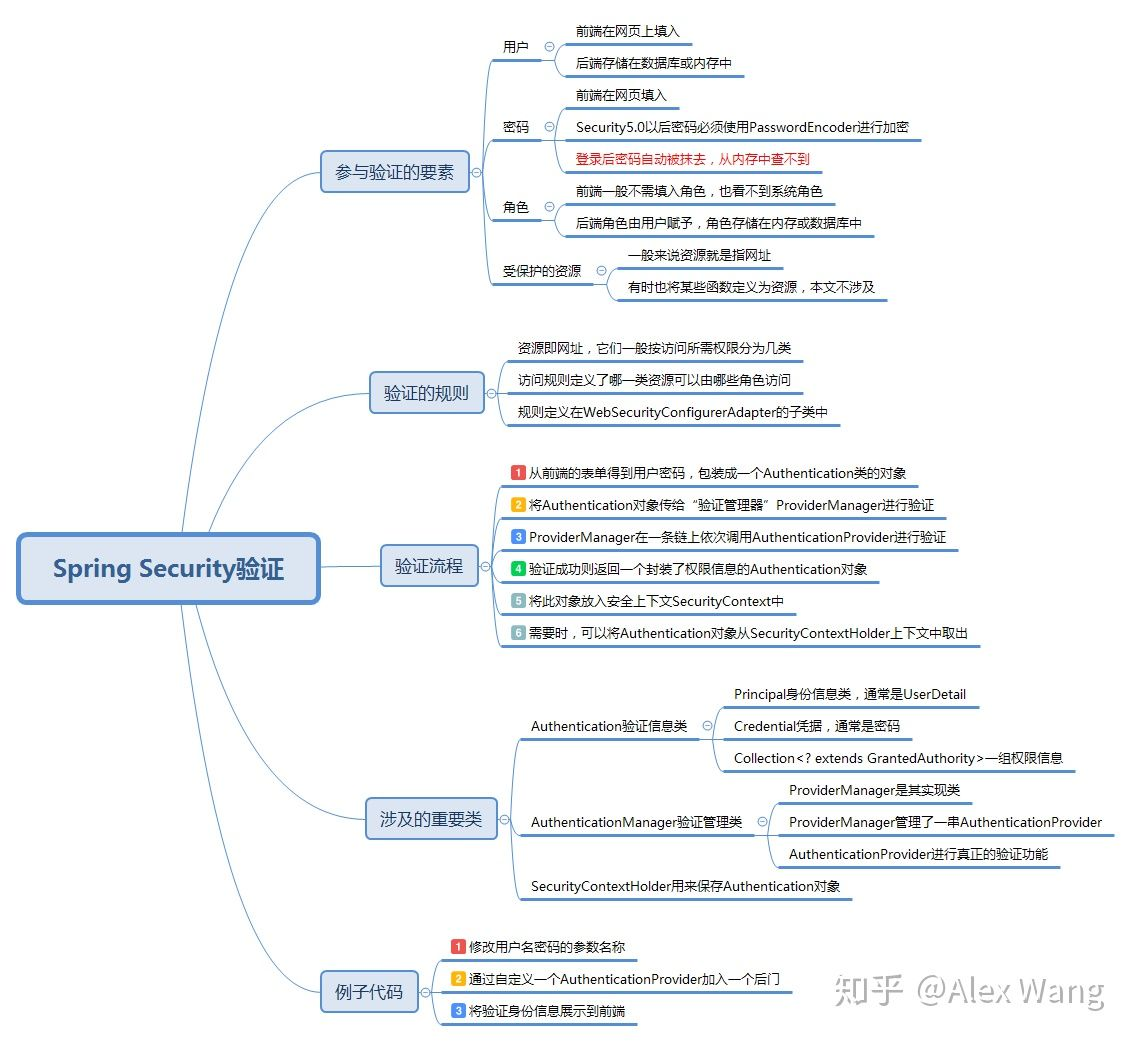
鉴权则是一系列判断用户是否有权限访问资源的过程。
1.当用户未登录时,访问任何需要权限的资源都会转向登录页面,尝试进行登录;
2.当用户登录成功时,他会获得一系列角色。
3.用户访问某资源/xxx时,FilterInvocationSecurityMetadataSource这个类的实现类(本文是MySecurityMetadataSource)会调用getAttributes方法来进行资源匹配。它会读取数据库resource表中的所有记录,对/xxx进行匹配。若匹配成功,则将/xxx对应所需的角色组成一个 Collection<ConfigAttribute>返回;匹配不成功则说明/xxx不需要什么额外的访问权限;
4.流程来到鉴权的决策类AccessDecisionManager的实现类(MyAccessDecisionManager)中,它的decide方法可以决定当前用户是否能够访问资源。decide方法的参数中可以获得当前用户的验证信息、第3步中获得的资源所需角色信息,对这些角色信息进行匹配即可决定鉴权是否通过。当然,你也可以加入自己独特的判断方法,例如只要用户具有ROLE_ADMIN角色就一律放行;
5.若鉴权成功则用户顺利访问页面,否则在decide方法中抛出AccessDeniedException异常,这个异常会被AccessDeniedHandler的实现类(MyAccessDeniedHandler)处理。它仅仅是生成了一个json对象,转换为字符串返回给客户端了。
新建一个springboot项目
创建一个springboot项目,添加一个
/helloController
这样,这个/hello是可以默认访问,返回一个hello字符串。
添加spring security
向pom.xml中添加security依赖
<dependency> <groupId>org.springframework.boot</groupId> <artifactId>spring-boot-starter-security</artifactId> </dependency>
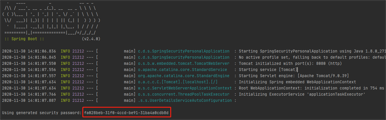
这样在启动的时候会在控制台显示随机生成的密码。
这时访问http://localhost:8080/hello会重定向到http://localhost:8080/login,这个页面是spring默认的。
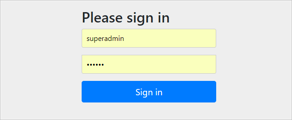
登录
使用默认用户和随机生成的密码登录
spring security 默认的用户名是user,spring security启动的时候会生成默认密码(在启动日志中可以看到)。
我们填入user 和 上图显示的fa028beb-31f0-4ccd-be91-31ba4a0cdb8d,那么就会正常的访问/hello。

使用yaml文件定义的用户名、密码登录
在application.yml中定义用户名密码:
spring:

    security:

        user:

            name: root

            password: root
使用root/root登录,可以正常访问/hello。
使用代码中指定的用户名、密码登录
- 使用configure(AuthenticationManagerBuilder) 添加认证。
- 使用configure(httpSecurity) 添加权限
@Configuration

public class MySecurityConfiguration extends WebSecurityConfigurerAdapter {

    @Override

    protected void configure(AuthenticationManagerBuilder auth) throws Exception {

        auth

                .inMemoryAuthentication()

                .withUser("admin") // 添加用户admin

                .password("{noop}admin")  // 不设置密码加密

                .roles("ADMIN", "USER")// 添加角色为admin,user

                .and()

                .withUser("user") // 添加用户user

                .password("{noop}user")

                .roles("USER")

                .and()

                .withUser("tmp") // 添加用户tmp

                .password("{noop}tmp")

                .roles(); // 没有角色

    }

    @Override

    protected void configure(HttpSecurity http) throws Exception {

        http

                .authorizeRequests()

                .antMatchers("/product/**").hasRole("USER") //添加/product/** 下的所有请求只能由user角色才能访问

                .antMatchers("/admin/**").hasRole("ADMIN") //添加/admin/** 下的所有请求只能由admin角色才能访问

                .anyRequest().authenticated() // 没有定义的请求,所有的角色都可以访问(tmp也可以)。

                .and()

                .formLogin().and()

                .httpBasic();

    }

}
添加AdminController、ProductController
@RestController

@RequestMapping("/admin")

public class AdminController {

    @RequestMapping("/hello")

    public String hello(){

        return "admin hello";

    }

}
@RestController

@RequestMapping("/product")

public class ProductController {

    @RequestMapping("/hello")

    public String hello(){

        return "product hello";

    }

}
通过上面的设置,访问http://localhost:8080/admin/hello只能由admin访问,http://localhost:8080/product/hello admin和user都可以访问,http://localhost:8080/hello 所有用户(包括tmp)都可以访问。
使用数据库的用户名、密码登录
添加依赖
<dependency>

    <groupId>org.springframework.boot</groupId>

    <artifactId>spring-boot-starter-data-jpa</artifactId>

</dependency>

<dependency>

    <groupId>mysql</groupId>

    <artifactId>mysql-connector-java</artifactId>

</dependency>
添加数据库配置
spring:

  datasource:

    url: jdbc:mysql://localhost:3306/demo?useUnicode=true&characterEncoding=utf8&serverTimezone=Asia/Shanghai

    username: root

    password: root

    driver-class-name: com.mysql.cj.jdbc.Driver
配置spring-security认证和授权
@Configuration

public class MySecurityConfiguration extends WebSecurityConfigurerAdapter {

    @Autowired

    private UserDetailsService userDetailsService;

    @Override

    protected void configure(AuthenticationManagerBuilder auth) throws Exception {

        auth.userDetailsService(userDetailsService)// 设置自定义的userDetailsService

                .passwordEncoder(passwordEncoder());

    }

    @Override

    protected void configure(HttpSecurity http) throws Exception {

        http

                .authorizeRequests()

                .antMatchers("/product/**").hasRole("USER")

                .antMatchers("/admin/**").hasRole("ADMIN")

                .anyRequest().authenticated() //

                .and()

                .formLogin()

                .and()

                .httpBasic()

                .and().logout().logoutUrl("/logout");

    }

    @Bean

    public PasswordEncoder passwordEncoder() {

        return NoOpPasswordEncoder.getInstance();// 使用不使用加密算法保持密码

//        return new BCryptPasswordEncoder();

    }

}
如果需要使用BCryptPasswordEncoder,可以先在测试环境中加密后放到数据库中:
@Test

void encode() {

    BCryptPasswordEncoder bCryptPasswordEncoder = new BCryptPasswordEncoder();

    String password = bCryptPasswordEncoder.encode("user");

    String password2 = bCryptPasswordEncoder.encode("admin");

    System.out.println(password);

    System.out.println(password2);

}
配置自定义UserDetailsService来进行验证
@Component("userDetailsService")

public class CustomUserDetailsService implements UserDetailsService {

   @Autowired

   UserRepository userRepository;

   @Override

   public UserDetails loadUserByUsername(String login) throws UsernameNotFoundException {

         // 1. 查询用户

      User userFromDatabase = userRepository.findOneByLogin(login);

      if (userFromDatabase == null) {

         //log.warn("User: {} not found", login);

       throw new UsernameNotFoundException("User " + login + " was not found in db");

            //这里找不到必须抛异常

      }

       // 2. 设置角色

      Collection<GrantedAuthority> grantedAuthorities = new ArrayList<>();

      GrantedAuthority grantedAuthority = new SimpleGrantedAuthority(userFromDatabase.getRole());

      grantedAuthorities.add(grantedAuthority);

      return new org.springframework.security.core.userdetails.User(login,

            userFromDatabase.getPassword(), grantedAuthorities);

   }

}
配置JPA中的UserRepository
@Repository

public interface UserRepository extends JpaRepository<User, Long> {

    User findOneByLogin(String login);

}
添加数据库数据

CREATE TABLE `user` (

  `id` int(28) NOT NULL,

  `login` varchar(255) COLLATE utf8mb4_general_ci DEFAULT NULL,

  `password` varchar(255) COLLATE utf8mb4_general_ci DEFAULT NULL,

  `role` varchar(255) COLLATE utf8mb4_general_ci DEFAULT NULL,

  PRIMARY KEY (`id`)

) ENGINE=InnoDB DEFAULT CHARSET=utf8mb4 COLLATE=utf8mb4_general_ci;

INSERT INTO `demo`.`user`(`id`, `login`, `password`, `role`) VALUES (1, 'user', 'user', 'ROLE_USER');

INSERT INTO `demo`.`user`(`id`, `login`, `password`, `role`) VALUES (2, 'admin', 'admin', 'ROLE_ADMIN');
默认角色前缀必须是
ROLE_,因为spring-security会在授权的时候自动使用match中的角色加上ROLE_后进行比较。
获取登录信息
@RequestMapping("/info")

public String info(){

    String userDetails = null;

    Object principal = SecurityContextHolder.getContext().getAuthentication().getPrincipal();

    if(principal instanceof UserDetails) {

        userDetails = ((UserDetails)principal).getUsername();

    }else {

        userDetails = principal.toString();

    }

    return userDetails;

}
使用SecurityContextHolder.getContext().getAuthentication().getPrincipal();获取当前的登录信息。
Spring Security 核心组件
SecurityContext
SecurityContext是安全的上下文,所有的数据都是保存到SecurityContext中。
可以通过SecurityContext获取的对象有:
- Authentication
SecurityContextHolder
SecurityContextHolder用来获取SecurityContext中保存的数据的工具。通过使用静态方法获取SecurityContext的相对应的数据。
Authentication
Authentication表示当前的认证情况,可以获取的对象有:
UserDetails:获取用户信息,是否锁定等额外信息。
Credentials:获取密码。
isAuthenticated:获取是否已经认证过。
Principal:获取用户,如果没有认证,那么就是用户名,如果认证了,返回UserDetails。
UserDetails
public interface UserDetails extends Serializable {

    Collection<? extends GrantedAuthority> getAuthorities();

    String getPassword();

    String getUsername();

    boolean isAccountNonExpired();

    boolean isAccountNonLocked();

    boolean isCredentialsNonExpired();

    boolean isEnabled();

}
UserDetailsService
UserDetailsService可以通过loadUserByUsername获取UserDetails对象。该接口供spring security进行用户验证。
通常使用自定义一个CustomUserDetailsService来实现UserDetailsService接口,通过自定义查询UserDetails。
AuthenticationManager
AuthenticationManager用来进行验证,如果验证失败会抛出相对应的异常。
PasswordEncoder
密码加密器。通常是自定义指定。
BCryptPasswordEncoder:哈希算法加密
NoOpPasswordEncoder:不使用加密
spring security session 无状态支持权限控制(前后分离)
spring security会在默认的情况下将认证信息放到HttpSession中。
但是对于我们的前后端分离的情况,如app,小程序,web前后分离等,httpSession就没有用武之地了。这时我们可以通过
configure(httpSecurity)设置spring security是否使用httpSession。
@Configuration

public class MySecurityConfiguration extends WebSecurityConfigurerAdapter {

    // code...

    @Override

    protected void configure(HttpSecurity http) throws Exception {

        http

                .sessionManagement()

                //设置无状态,所有的值如下所示。

                .sessionCreationPolicy(SessionCreationPolicy.STATELESS)

                // code...

    }

    // code...

}
共有四种值,其中默认的是ifRequired。
- always – a session will always be created if one doesn’t already exist,没有session就创建。
- ifRequired – a session will be created only if required (default),如果需要就创建(默认)。
- never – the framework will never create a session itself but it will use one if it already exists
- stateless – no session will be created or used by Spring Security 不创建不使用session
由于前后端不通过保存session和cookie来进行判断,所以为了保证spring security能够记录登录状态,所以需要传递一个值,让这个值能够自我验证来源,同时能够得到数据信息。选型我们选择JWT。对于java客户端我们选择使用jjwt。
添加依赖
<dependency>

    <groupId>io.jsonwebtoken</groupId>

    <artifactId>jjwt-api</artifactId>

    <version>0.11.2</version>

</dependency>

<dependency>

    <groupId>io.jsonwebtoken</groupId>

    <artifactId>jjwt-impl</artifactId>

    <version>0.11.2</version>

    <scope>runtime</scope>

</dependency>

<dependency>

    <groupId>io.jsonwebtoken</groupId>

    <artifactId>jjwt-jackson</artifactId> <!-- or jjwt-gson if Gson is preferred -->

    <version>0.11.2</version>

    <scope>runtime</scope>

</dependency>
创建工具类JWTProvider
JWTProvider需要至少提供两个方法,一个用来创建我们的token,另一个根据token获取Authentication。
provider需要保证Key密钥是唯一的,使用init()构建,否则会抛出异常。
@Component

@Slf4j

public class JWTProvider {

    private Key key;    // 私钥

    private long tokenValidityInMilliseconds; // 有效时间

    private long tokenValidityInMillisecondsForRememberMe; // 记住我有效时间

    @Autowired

    private JJWTProperties jjwtProperties; // jwt配置参数

    @Autowired

    private UserRepository userRepository;

    @PostConstruct

    public void init() {

        byte[] keyBytes;

        String secret = jjwtProperties.getSecret();

        if (StringUtils.hasText(secret)) {

            log.warn("Warning: the JWT key used is not Base64-encoded. " +

                    "We recommend using the `jhipster.security.authentication.jwt.base64-secret` key for optimum security.");

            keyBytes = secret.getBytes(StandardCharsets.UTF_8);

        } else {

            log.debug("Using a Base64-encoded JWT secret key");

            keyBytes = Decoders.BASE64.decode(jjwtProperties.getBase64Secret());

        }

        this.key = Keys.hmacShaKeyFor(keyBytes); // 使用mac-sha算法的密钥

        this.tokenValidityInMilliseconds =

                1000 * jjwtProperties.getTokenValidityInSeconds();

        this.tokenValidityInMillisecondsForRememberMe =

                1000 * jjwtProperties.getTokenValidityInSecondsForRememberMe();

    }

    public String createToken(Authentication authentication, boolean rememberMe) {

        long now = (new Date()).getTime();

        Date validity;

        if (rememberMe) {

            validity = new Date(now + this.tokenValidityInMillisecondsForRememberMe);

        } else {

            validity = new Date(now + this.tokenValidityInMilliseconds);

        }

        User user = userRepository.findOneByLogin(authentication.getName());

        Map<String ,Object> map = new HashMap<>();

        map.put("sub",authentication.getName());

        map.put("user",user);

        return Jwts.builder()

                .setClaims(map) // 添加body

                .signWith(key, SignatureAlgorithm.HS512) // 指定摘要算法

                .setExpiration(validity) // 设置有效时间

                .compact();

    }

    public Authentication getAuthentication(String token) {

        Claims claims = Jwts.parserBuilder()

                .setSigningKey(key)

                .build()

                .parseClaimsJws(token).getBody(); // 根据token获取body

        User principal;

        Collection<? extends GrantedAuthority> authorities;

        principal = userRepository.findOneByLogin(claims.getSubject());

        authorities = principal.getAuthorities();

        return new UsernamePasswordAuthenticationToken(principal, token, authorities);

    }

}
注意这里我们创建的User需要实现UserDetails对象,这样我们可以根据
principal.getAuthorities()获取到权限,如果不实现UserDetails,那么需要自定义authorities并添加到UsernamePasswordAuthenticationToken中。
@Data

@Entity

@Table(name="user")

public class User implements UserDetails {

    @Id

    @Column

    private Long id;

    @Column

    private String login;

    @Column

    private String password;

    @Column

    private String role;

    @Override

    // 获取权限,这里就用简单的方法

    // 在spring security中,Authorities既可以是ROLE也可以是Authorities

    public Collection<? extends GrantedAuthority> getAuthorities() {

        return Collections.singleton(new SimpleGrantedAuthority(role));

    }

    @Override

    public String getUsername() {

        return login;

    }

    @Override

    public boolean isAccountNonExpired() {

        return true;

    }

    @Override

    public boolean isAccountNonLocked() {

        return false;

    }

    @Override

    public boolean isCredentialsNonExpired() {

        return true;

    }

    @Override

    public boolean isEnabled() {

        return true;

    }

}
创建登录成功,登出成功处理器
登录成功后向前台发送jwt。
认证成功,返回jwt:
public class MyAuthenticationSuccessHandler implements AuthenticationSuccessHandler{

    void onAuthenticationSuccess(HttpServletRequest request, HttpServletResponse response, Authentication authentication) throws IOException, ServletException{

        PrintWriter writer = response.getWriter();

        writer.println(jwtProvider.createToken(authentication, true));

    }

}
登出成功:
public class MyLogoutSuccessHandler implements LogoutSuccessHandler {

    void onLogoutSuccess(HttpServletRequest var1, HttpServletResponse var2, Authentication var3) throws IOException, ServletException{

        PrintWriter writer = response.getWriter();

        writer.println("logout success");

        writer.flush();

    }

}
设置登录、登出、取消csrf防护
登出无法对token进行失效操作,可以使用数据库保存token,然后在登出时删除该token。
@Configuration

public class MySecurityConfiguration extends WebSecurityConfigurerAdapter {

    // code...

    @Override

    protected void configure(HttpSecurity http) throws Exception {

       http

           // code...

           // 添加登录处理器

           .formLogin().loginProcessingUrl("/login").successHandler((request, response, authentication) -> {

           PrintWriter writer = response.getWriter();

           writer.println(jwtProvider.createToken(authentication, true));

       })

           // 取消csrf防护

           .and().csrf().disable()

           // code...

           // 添加登出处理器

           .and().logout().logoutUrl("/logout").logoutSuccessHandler((HttpServletRequest request, HttpServletResponse response, Authentication authentication) -> {

           PrintWriter writer = response.getWriter();

           writer.println("logout success");

           writer.flush();

       })

            // code...

    }

    // code...

}
使用JWT集成spring-security
添加Filter供spring-security解析token,并向securityContext中添加我们的用户信息。
在UsernamePasswordAuthenticationFilter.class之前我们需要执行根据token添加authentication。关键方法是从jwt中获取authentication,然后添加到securityContext中。
在SecurityConfiguration中需要设置Filter添加的位置。
创建自定义Filter,用于jwt获取authentication:
@Slf4j

public class JWTFilter extends GenericFilterBean {

    private final static String HEADER_AUTH_NAME = "auth";

    private JWTProvider jwtProvider;

    public JWTFilter(JWTProvider jwtProvider) {

        this.jwtProvider = jwtProvider;

    }

    @Override

    public void doFilter(ServletRequest servletRequest, ServletResponse servletResponse, FilterChain filterChain) throws IOException, ServletException {

        try {

            HttpServletRequest httpServletRequest = (HttpServletRequest) servletRequest;

            String authToken = httpServletRequest.getHeader(HEADER_AUTH_NAME);

            if (StringUtils.hasText(authToken)) {

                // 从自定义tokenProvider中解析用户

                Authentication authentication = this.jwtProvider.getAuthentication(authToken);

                SecurityContextHolder.getContext().setAuthentication(authentication);

            }

            // 调用后续的Filter,如果上面的代码逻辑未能复原“session”,SecurityContext中没有想过信息,后面的流程会检测出"需要登录"

            filterChain.doFilter(servletRequest, servletResponse);

        } catch (Exception ex) {

            throw new RuntimeException(ex);

        }

    }

}
向HttpSecurity添加Filter和设置Filter位置:
public class MySecurityConfiguration extends WebSecurityConfigurerAdapter {

    // code...

    @Override

    protected void configure(HttpSecurity http) throws Exception {

        http

                .sessionManagement()

                //设置添加Filter和位置

                .and().addFilterBefore(new JWTFilter(jwtProvider), UsernamePasswordAuthenticationFilter.class);

                // code...

    }

    // code...

}
MySecurityConfiguration代码
@Configuration

@EnableGlobalMethodSecurity(prePostEnabled = true)

public class MySecurityConfiguration extends WebSecurityConfigurerAdapter {

    @Autowired

    private UserDetailsService userDetailsService;

    @Autowired

    private JWTProvider jwtProvider;

    @Override

    protected void configure(AuthenticationManagerBuilder auth) throws Exception {

        auth.userDetailsService(userDetailsService)// 设置自定义的userDetailsService

                .passwordEncoder(passwordEncoder());

    }

    @Override

    protected void configure(HttpSecurity http) throws Exception {

        http

                .sessionManagement()

                .sessionCreationPolicy(SessionCreationPolicy.STATELESS)//设置无状态

                .and()

                .authorizeRequests() // 配置请求权限

                .antMatchers("/product/**").hasRole("USER") // 需要角色

                .antMatchers("/admin/**").hasRole("ADMIN")

                .anyRequest().authenticated() // 所有的请求都需要登录

                .and()

                // 配置登录url,和登录成功处理器

                .formLogin().loginProcessingUrl("/login").successHandler((request, response, authentication) -> {

                    PrintWriter writer = response.getWriter();

                    writer.println(jwtProvider.createToken(authentication, true));

                })

                // 取消csrf防护

                .and().csrf().disable()

                .httpBasic()

                // 配置登出url,和登出成功处理器

                .and().logout().logoutUrl("/logout")

                .logoutSuccessHandler((HttpServletRequest request, HttpServletResponse response, Authentication authentication) -> {

                    PrintWriter writer = response.getWriter();

                    writer.println("logout success");

                    writer.flush();

                })

                // 在UsernamePasswordAuthenticationFilter之前执行我们添加的JWTFilter

                .and().addFilterBefore(new JWTFilter(jwtProvider), UsernamePasswordAuthenticationFilter.class);

    }

    @Bean

    public PasswordEncoder passwordEncoder() {

        return NoOpPasswordEncoder.getInstance();

    }

    @Override

    public void configure(WebSecurity web) {

        // 添加不做权限的URL

        web.ignoring()

                .antMatchers("/swagger-resources/**")

                .antMatchers("/swagger-ui.html")

                .antMatchers("/webjars/**")

                .antMatchers("/v2/**")

                .antMatchers("/h2-console/**");

    }

}
使用注解对方法进行权限管理
需要在
MySecurityConfiguration上添加@EnableGlobalMethodSecurity(prePostEnabled = true)注解,prePostEnabled默认为false,需要设置为true后才能全局的注解权限控制。
prePostEnabled设置为true后,可以使用四个注解:
添加实体类School:
@Data

public class School implements Serializable {

    private Long id;

    private String name;

    private String address;

}
@PreAuthorize
在访问之前就进行权限判断
@RestController

public class AnnoController {

    @Autowired

    private JWTProvider jwtProvider;

    @RequestMapping("/annotation")

//    @PreAuthorize("hasRole('ADMIN')")

    @PreAuthorize("hasAuthority('ROLE_ADMIN')")

    public String info(){

        return "拥有admin权限";

    }

}
hasRole和hasAuthority都会对UserDetails中的getAuthorities进行判断区别是hasRole会对字段加上
ROLE_后再进行判断,上例中使用了hasRole('ADMIN'),那么就会使用ROLE_ADMIN进行判断,如果是hasAuthority('ADMIN'),那么就使用ADMIN进行判断。@PostAuthorize
在请求之后进行判断,如果返回值不满足条件,会抛出异常,但是方法本身是已经执行过了的。
@RequestMapping("/postAuthorize")

@PreAuthorize("hasRole('ADMIN')")

@PostAuthorize("returnObject.id%2==0")

public School postAuthorize(Long id) {

    School school = new School();

    school.setId(id);

    return school;

}
returnObject是内置对象,引用的是方法的返回值。
如果
returnObject.id%2==0为 true,那么返回方法值。如果为false,会返回403 Forbidden。@PreFilter
在方法执行之前,用于过滤集合中的值。
@RequestMapping("/preFilter")

@PreAuthorize("hasRole('ADMIN')")

@PreFilter("filterObject%2==0")

public List<Long> preFilter(@RequestParam("ids") List<Long> ids) {

    return ids;

}filterObject是内置对象,引用的是集合中的泛型类,如果有多个集合,需要指定filterTarget。@PreFilter(filterTarget="ids", value="filterObject%2==0") public List<Long> preFilter(@RequestParam("ids") List<Long> ids,@RequestParam("ids") List<User> users,) { return ids; }filterObject%2==0会对集合中的值会进行过滤,为true的值会保留。第一个例子返回的值在执行前过滤返回2,4。

@PostFilter
会对返回的集合进行过滤。
@PreFilter(filterTarget="ids", value="filterObject%2==0")

public List<Long> preFilter(@RequestParam("ids") List<Long> ids,@RequestParam("ids") List<User> users,) {

    return ids;

}
上面的方法返回结果为:id为0,2,4,6,8的School对象。
转自:https://www.cnblogs.com/dl610455894/p/14072960.html
Spring Security的使用的更多相关文章
- Spring Security OAuth2 开发指南
官方原文:http://projects.spring.io/spring-security-oauth/docs/oauth2.html 翻译及修改补充:Alex Liao. 转载请注明来源:htt ...
- spring mvc 和spring security配置 web.xml设置
<?xml version="1.0" encoding="UTF-8"?> <web-app xmlns="http://xmln ...
- SPRING SECURITY JAVA配置:Web Security
在前一篇,我已经介绍了Spring Security Java配置,也概括的介绍了一下这个项目方方面面.在这篇文章中,我们来看一看一个简单的基于web security配置的例子.之后我们再来作更多的 ...
- 【OAuth2.0】Spring Security OAuth2.0篇之初识
不吐不快 因为项目需求开始接触OAuth2.0授权协议.断断续续接触了有两周左右的时间.不得不吐槽的,依然是自己的学习习惯问题,总是着急想了解一切,习惯性地钻牛角尖去理解小的细节,而不是从宏观上去掌握 ...
- spring security oauth2.0 实现
oauth应该属于security的一部分.关于oauth的的相关知识可以查看阮一峰的文章:http://www.ruanyifeng.com/blog/2014/05/oauth_2_0.html ...
- Spring Security(08)——intercept-url配置
http://elim.iteye.com/blog/2161056 Spring Security(08)--intercept-url配置 博客分类: spring Security Spring ...
- Spring Security控制权限
Spring Security控制权限 1,配置过滤器 为了在项目中使用Spring Security控制权限,首先要在web.xml中配置过滤器,这样我们就可以控制对这个项目的每个请求了. < ...
- Spring Security笔记:Hello World
本文演示了Spring Security的最最基本用法,二个页面(或理解成二个url),一个需要登录认证后才能访问(比如:../admin/),一个可匿名访问(比如:../welcome) 注:以下内 ...
- Spring Security笔记:自定义Login/Logout Filter、AuthenticationProvider、AuthenticationToken
在前面的学习中,配置文件中的<http>...</http>都是采用的auto-config="true"这种自动配置模式,根据Spring Securit ...
- spring session 和 spring security整合
背景: 我要做的系统前面放置zuul. 使用自己公司提供的单点登录服务.后面的业务应用也是spring boot支撑的rest服务. 目标: 使用spring security管理权限包括权限.用户请 ...
随机推荐
- 【Azure API 管理】使用APIM进行XML内容读取时遇见的诡异错误 Expression evaluation failed. Object reference not set to an instance of an object.
问题描述 使用APIM,在 Inbound 中对请求的Body内容进行解析.客户端请求所传递的Request Body为XML格式,需要从Request Body中解析出多个(Element)节点值, ...
- Vue 源码解读(11)—— render helper
前言 上一篇文章 Vue 源码解读(10)-- 编译器 之 生成渲染函数 最后讲到组件更新时,需要先执行编译器生成的渲染函数得到组件的 vnode. 渲染函数之所以能生成 vnode 是通过其中的 _ ...
- css3渐变色字体
\3cspan id="mce_marker" data-mce-type="bookmark">\3c/span>\3cspan id=" ...
- 在SpringBoot项目中添加SpringMVC拦截器
1.认识拦截器 SpringMVC的拦截器(Interceptor)不是Filer,同样可以实现请求的预处理.后处理.使用拦截器仅需要两个步骤 实现拦截器 注册拦截器 1.1实现拦截器 实现拦截器可以 ...
- 【数据库】优化SQL语言
第1章数据模型设计 第1条:确保所有表都有主键 [1]当表缺少主键时,会出现各种问题,所有表都必须有一列(或多列)设置为主键. [2]主键应当具备的特征 唯一性,值非空,不可变,尽可能简单 [3]不要 ...
- 实践2:github管理代码仓库,包含用webpack打包项目
此篇介绍用github仓库管理代码,github是大型的项目代码管理,存储平台:简单说帮助一个团队共享,修改同一个项目,配合着gitHub Desktop非常方便: 可以做到多人删除.修改.增加同一项 ...
- m3u8文件合并处理
m3u8文件合并处理 简介 M3U8 是 Unicode 版本的 M3U,用 UTF-8 编码."M3U" 和 "M3U8" 文件都是苹果公司使用的 HTTP ...
- Spring MVC 实验3 springMVC框架基础
实验三:spring mvc框架基础 实验目的: (1)理解spring mvc框架的运行流程 . (2)掌握springmvc框架的配置 实验要求: 请根据课程内容, 修改项目中的任意一用例,将控 ...
- 关于alertmanager报No private IP address found, and explicit IP not provided
./alertmanager --config.file=alertmanager.yml level=info ts=2021-11-22T05:53:11.195Z caller=main.go: ...
- 说一下linux启动过程boot流程
linux启动过程 https://www.ibm.com/developerworks/cn/linux/l-linuxboot/index.html http://www.ruanyifeng.c ...