
Spring IO Platform简介及示例
什么是Spring IO Platform
Spring IO Platform,简单的可以认为是一个依赖维护平台,该平台将相关依赖汇聚到一起,针对每个依赖,都提供了一个版本号;
这些版本对应的依赖都是经过测试的,可以保证一起正常使用。
为什么要使用Spring IO Platform
主要是解决依赖版本冲突问题,例如在使用Spring的时候,经常会使用到第三方库,一般大家都是根据经验挑选一个版本号或挑选最新的,随意性较大,其实这是有问题的,除非做过完整的测试,保证集成该版本的依赖不会出现问题,且后续集成其它第三方库的时候也不会出现问题,否则风险较大,且后续扩展会越来越困难,因为随着业务复杂度的增加,集成的第三方组件会越来会多,依赖之间的关联也会也来越复杂。
好消息是,Spring IO Platform能很好地解决这些问题,我们在添加第三方依赖的时候,不需要写版本号,它能够自动帮我们挑选一个最优的版本,保证最大限度的扩展,而且该版本的依赖是经过测试的,可以完美的与其它组件结合使用。
Spring IO Platform中维护了哪些依赖
详细的就不列了,太多了,我这里截张图示意下,如果你使用到以下依赖的话,那么可以不用声明版本号:
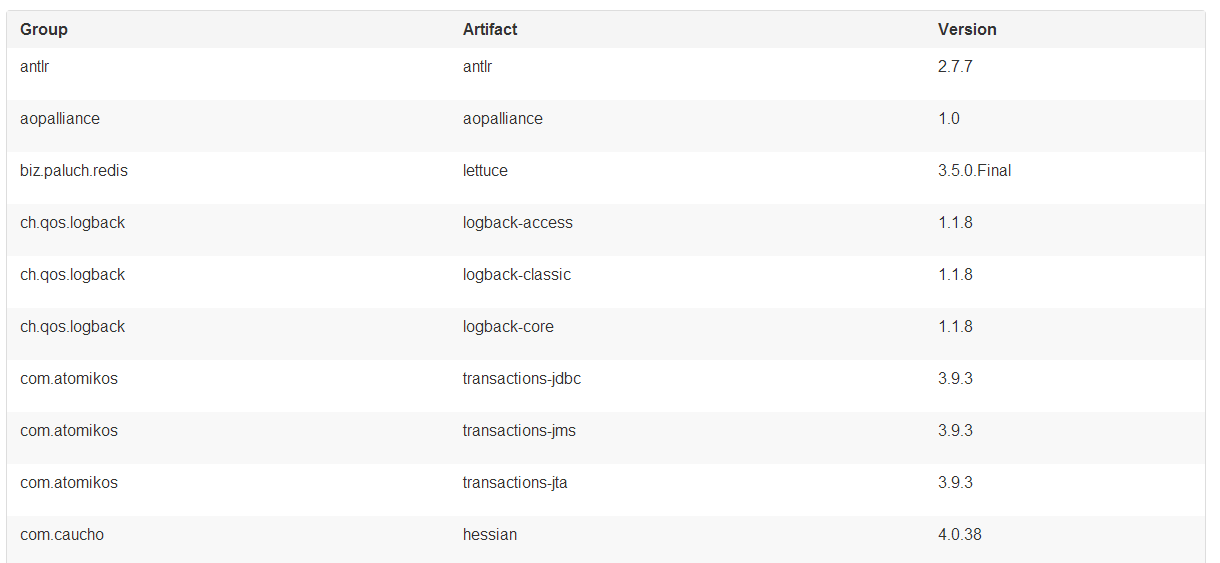
完整的依赖列表请参考如下链接:
http://docs.spring.io/platform/docs/current/reference/html/appendix-dependency-versions.html
如何使用Spring IO Platform
Spring IO Platform主要是与依赖管理系统结合一起使用的,例如,可以完美的支持Maven和Gradle;
下面,我们就分别来了解下在Maven和Gradle中如何使用Spring IO Platform;
在Maven中使用Spring IO Platform
有两种方式,一种是使用import导入,另一种是继承parent:
import方式:
<?xml version="1.0" encoding="UTF-8"?>

<project xmlns="http://maven.apache.org/POM/4.0.0"

         xmlns:xsi="http://www.w3.org/2001/XMLSchema-instance"

         xsi:schemaLocation="http://maven.apache.org/POM/4.0.0 http://maven.apache.org/xsd/maven-4.0.0.xsd">

    <modelVersion>4.0.0</modelVersion>

    <groupId>com.example</groupId>

    <artifactId>your-application</artifactId>

    <version>1.0.0-SNAPSHOT</version>

    <dependencyManagement>

        <dependencies>

            <dependency>

                <groupId>io.spring.platform</groupId>

                <artifactId>platform-bom</artifactId>

                <version>Athens-SR2</version>

                <type>pom</type>

                <scope>import</scope>

            </dependency>

        </dependencies>

    </dependencyManagement>

    …

    <!-- Add Spring repositories -->

    <!-- (you don't need this if you are using a .RELEASE version) -->

    <repositories>

    </repositories>

    <pluginRepositories>

    </pluginRepositories>

</project>
继承parent:
<?xml version="1.0" encoding="UTF-8"?>

<project xmlns="http://maven.apache.org/POM/4.0.0"

         xmlns:xsi="http://www.w3.org/2001/XMLSchema-instance"

         xsi:schemaLocation="http://maven.apache.org/POM/4.0.0 http://maven.apache.org/xsd/maven-4.0.0.xsd">

    <modelVersion>4.0.0</modelVersion>

    <groupId>com.example</groupId>

    <artifactId>your-application</artifactId>

    <version>1.0.0-SNAPSHOT</version>

    <parent>

        <groupId>io.spring.platform</groupId>

        <artifactId>platform-bom</artifactId>

        <version>Athens-SR2</version>

        <relativePath/>

    </parent>

    …

    <!-- Add Spring repositories -->

    <!-- (you don't need this if you are using a .RELEASE version) -->

    <repositories>

    </repositories>

    <pluginRepositories>

    </pluginRepositories>

</project>
使用继承的话,除了从父pom中引入Spring IO Platform之外,我们的应用还会引入一些插件管理的配置,如Spring Boot的Maven插件,我们可以利用这一点,然后只需要在<plugins>代码块中添加如下代码即可使用插件:
<build>

    <plugins>

        <plugin>

            <groupId>org.springframework.boot</groupId>

            <artifactId>spring-boot-maven-plugin</artifactId>

        </plugin>

    </plugins>

</build>
另外,使用继承的话,还可以直接覆盖父类提供的依赖版本号,如下所示:
<properties>

    <foo.version>1.1.0.RELEASE</foo.version>

</properties>
如果你想结合Spring IO Platform和Spring Boot一起使用的话,并不是一定要继承Spring IO Platform POM,可以选择使用导入的方式,然后自己将剩下的配置添加到POM里即可。有兴趣可以参考Spring Boot参考指南的这一章节 using-boot-maven,会讲述如何不用继承方式来使用Spring Boot.
最后,要说的是,无论你使用哪种方式,都不会有任何依赖添加进来;
当你想在自己的pom里添加了一个属于Spring IO Platform中的依赖的时候,可以直接省略版本号,如下所示:
<dependencies>

    <dependency>

        <groupId>org.springframework</groupId>

        <artifactId>spring-core</artifactId>

    </dependency>

</dependencies>
在Gradle中使用Spring IO Platform
如下所示,我们会应用io.spring.dependency-management这个插件,然后在dependencyManagement中导入bom。
buildscript {

    repositories {

        jcenter()

    }

    dependencies {

        classpath 'io.spring.gradle:dependency-management-plugin:0.6.0.RELEASE'

    }

}

apply plugin: 'io.spring.dependency-management'

repositories {

    mavenCentral()

}

dependencyManagement {

    imports {

        mavenBom 'io.spring.platform:platform-bom:Athens-SR2'

    }

}
当需要添加一个属于Spring IO Platform中的依赖的时候,写法与Maven类似,可以省略版本号,如下所示:
dependencies {

    compile 'org.springframework:spring-core'

}
一个完整的示例,基于Maven, 结合Spring Boot
示例的Pom文件如下:
<?xml version="1.0" encoding="UTF-8"?>

<project xmlns="http://maven.apache.org/POM/4.0.0" xmlns:xsi="http://www.w3.org/2001/XMLSchema-instance"

    xsi:schemaLocation="http://maven.apache.org/POM/4.0.0 http://maven.apache.org/xsd/maven-4.0.0.xsd">

    <modelVersion>4.0.0</modelVersion>

    <groupId>com.example</groupId>

    <artifactId>helloworld</artifactId>

    <version>0.0.1-SNAPSHOT</version>

   <dependencyManagement>

        <dependencies>

            <dependency>

                <groupId>io.spring.platform</groupId>

                <artifactId>platform-bom</artifactId>

                <version>Athens-SR2</version>

                <type>pom</type>

                <scope>import</scope>

            </dependency>

            <dependency>

                <!-- Import dependency management from Spring Boot -->

                <groupId>org.springframework.boot</groupId>

                <artifactId>spring-boot-dependencies</artifactId>

                <version>1.4.3.RELEASE</version>

                <type>pom</type>

                <scope>import</scope>

            </dependency>

        </dependencies>

    </dependencyManagement>

    <!-- Additional lines to be added here... -->

    <dependencies>

        <dependency>

            <groupId>org.springframework.boot</groupId>

            <artifactId>spring-boot-starter-web</artifactId>

        </dependency>

        <dependency>

            <groupId>com.google.code.gson</groupId>

            <artifactId>gson</artifactId>

        </dependency>

    </dependencies>

    <build>

        <plugins>

            <plugin>

                <groupId>org.springframework.boot</groupId>

                <artifactId>spring-boot-maven-plugin</artifactId>

                <version>1.4.3.RELEASE</version>

                <executions>

                    <execution>

                        <goals>

                            <goal>repackage</goal>

                        </goals>

                    </execution>

                </executions>

            </plugin>

        </plugins>

    </build>

</project>
有几点注意,这里我们没有继承Spring Boot的父Pom,也没继承Spring IO Platform的父POM,都是选择导入的方式,所以使用spring-boot-maven-plugin插件的时候,就不能像上一篇那样自动继承父POM的配置了,需要自己添加配置,绑定repackage Goal;
另外,想你想要修改依赖版本号的时候,由于不是继承,所以不能使用直接覆盖properties属性的方法,其实也很简单,如果不想继承Spring IO Platform中的依赖版本号的话,自己直接写上版本号即可,Spring Boot的话,可采用如下方式,来对Spring Data release train进行升级(注意要放在spring-boot-dependencies的前面):
<dependencyManagement>

    <dependencies>

        <!-- Override Spring Data release train provided by Spring Boot -->

        <dependency>

            <groupId>org.springframework.data</groupId>

            <artifactId>spring-data-releasetrain</artifactId>

            <version>Fowler-SR2</version>

            <scope>import</scope>

            <type>pom</type>

        </dependency>

        <dependency>

            <groupId>org.springframework.boot</groupId>

            <artifactId>spring-boot-dependencies</artifactId>

            <version>1.4.3.RELEASE</version>

            <type>pom</type>

            <scope>import</scope>

        </dependency>

    </dependencies>

</dependencyManagement>
最后,我们使用Gson库做个测试,现在maven repository中维护的gson的最新版本是2.8,Spring IO Platform中维护的版本是2.7(有兴趣可查阅appendix确认)。
然后当我们开始构建项目的时候,发现下载的gson版本确实是2.7。

示例源码
https://github.com/peterchenhdu/helloworld
参考资料
http://docs.spring.io/platform/docs/2.0.8.RELEASE/reference/htmlsingle/
Spring IO Platform简介及示例的更多相关文章
- Spring IO platform 简介
前提:熟悉Spring基础知识. 简介:Spring IO Platform将 the core Spring APIs 集成到一个Platform中.它提供了Spring portfolio中的大量 ...
- Spring IO Platform 解决Spring项目组合中版本依赖
简介: Spring IO Platform是Spring官网中排第一位的项目.它将Spring的核心API集成到一个适用于现代应用程序的平台中.提供了Spring项目组合中的版本依赖.这些依赖关系是 ...
- 解决jar包依赖:Spring IO platform推出bom
名词解释: BOM(bill of materials):材料清单,用于解决jar包依赖的好方法. Spring IO Platform 缘起:Spring起初只专注ioc和aop,现在已发展成一个庞 ...
- Spring IO Platform介绍
为什么要用Spring IO Platform 今天无意间看到了一个关键词:"Spring IO Platform",第一直觉是不是有关于IO方面的框架或者包呢,查了一下,居然是为 ...
- spring security之httpSecurity使用示例
如果在HttpSecurity中配置需要authenticate(),则如果没有登陆,或没有相关权限,则会无法访问 2017-01-02 23:39:32.027 DEBUG 10396 --- [n ...
- Spring Boot 2.x 综合示例-整合thymeleaf、mybatis、shiro、logging、cache开发一个文章发布管理系统
一.概述 经过HelloWorld示例(Spring Boot 2.x 快速入门(上)HelloWorld示例)( Spring Boot 2.x 快速入门(下)HelloWorld示例详解)两篇的学 ...
- Spring Web Flow 简介
Spring Web Flow 简介 博客分类: 转载 SSH 最近在TSS上看到了一片介绍Spring Web Flow的文章,顺便就翻译了下来,SWF的正式版估计要到6月份才能看到了,目前的例子都 ...
- Perl IO:简介和常用IO模块
三篇Perl IO基础类文章: Perl的IO操作(1):文件句柄 Perl的IO操作(2):更多文件句柄的模式 Perl文件句柄相关的常见变量 IO对象和IO::Module家族模块 无论是哪种高级 ...
- IdentityServer4 中文文档 -6- (简介)示例服务器和测试
IdentityServer4 中文文档 -6- (简介)示例服务器和测试 原文:http://docs.identityserver.io/en/release/intro/test.html 目 ...
随机推荐
- Email:2017
Hi, 2017,我对自己有一个小小的期望:写写文字,安安心. Enjoy a simple life. 如我所愿吧! 明年再来问候你.
- bi api 软件
https://www.interactivebrokers.com.hk/cn/index.php?f=5234&ns=T
- PHP 删除非法UTF-8字符
//reject overly long 2 byte sequences, as well as characters above U+10000 and replace with ? $some_ ...
- 使用eclipse和maven一步一步配置web项目
http://www.blogjava.net/kevonz/archive/2012/07/08/382542.html
- ZOJ 3946 Highway Project
1.迪杰斯特拉最小堆 #include<cstdio> #include<cstring> #include<cmath> #include<map> ...
- /etc/profile文件
导读:Linux /etc/profile文件的改变会涉及到系统的环境,也就是有关Linux环境变量的东西,学习Linux要了解Linux profile文件的相关原理,这里对则以文件进行具体分析.这 ...
- Android 5.0之前屏幕截图的方法
截图的几种方法 Android获取屏幕截图主要有以下三种方法 1.通过view.getDrawingCache()获取指定View的绘制缓存来实现截屏. 这种方式Android 5.0之前也可以,且不 ...
- 25、手把手教你Extjs5(二十五)Extjs5常用组件--form的基本用法
Extjs Form是一个比较常用的控件,主要用来显示和编辑数据的,今天这篇文章将介绍Extjs Form控件的详细用法,包括创建Form.添加子项.加载和更新数据.验证等. Form和Form Ba ...
- (中等) HDU 3265 Posters , 扫描线。
Problem Description Ted has a new house with a huge window. In this big summer, Ted decides to decor ...
- bitmap 加载的时候出现OOM,nullpointer
1.OOM :对图片进行压缩,效果还不错:http://182.92.150.15:9876/static/server/topic_user/8068/201506/e5b37fec-0919-11 ...