
MVC生成CheckBoxList并对其验证
通过扩展方法,可以让CheckBox水平排列,生成CheckBoxList,正如"MVC扩展生成CheckBoxList并水平排列"一文。但,如何对生成的CheckBoxList验证呢?比如要求至少勾选一项: 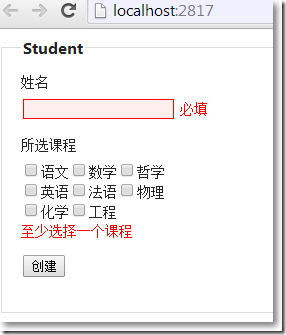
□ 思路
在强类型视图页中,@Html.EditorFor(model => model.属性, "模版名称", new{ ...路由数据...}),模版名称对应Views/Shared/EditorTemplates/CheckBoxList.cshtml部分视图,路由数据用来传递生成CheckBoxList所需要的一切,并在CheckBoxList.cshtml中显示错误信息,最后CheckBoxList的生成交给扩展方法。
□ Model
public class Course
{
public int Id { get; set; }
public string Name { get; set; }
}
using System.ComponentModel.DataAnnotations;
namespace MvcApplication1.Models
{
public class Student
{
[Display(Name = "姓名")]
[Required(ErrorMessage = "必填")]
[StringLength(100, ErrorMessage = "最大长度100")]
public string Name { get; set; }
[Display(Name = "所选课程")]
[Required(ErrorMessage = "至少选择一个课程")]
public string Courses{ get; set; }
}
}
□ 在_Layout.cshtml中启用客户端异步验证
@Scripts.Render("~/bundles/jquery")
@Scripts.Render("/bundles/jqueryval") //启用客户端异步验证
@RenderSection("scripts", required: false)
□ Home/Index.cshtml
@using MvcApplication1.Infrastructure.Enums
@model MvcApplication1.Models.Student
@{
ViewBag.Title = "Index";
Layout = "~/Views/Shared/_Layout.cshtml";
}
@using (Html.BeginForm())
{
@Html.AntiForgeryToken()
@Html.ValidationSummary(true)
<fieldset>
<legend>Student</legend>
<div class="editor-label">
@Html.LabelFor(model => model.Name)
</div>
<div class="editor-field">
@Html.EditorFor(model => model.Name)
@Html.ValidationMessageFor(model => model.Name)
</div>
<div class="editor-label">
@Html.LabelFor(model => model.Courses)
</div>
<div class="editor-field">
@Html.EditorFor(model => model.Courses, "CheckBoxList", new
{
TagName = "Courses",
CheckBoxItems = ViewBag.Course,
Position = Position.Horizontal,
Numbers = 3
})
</div>
<p>
<input type="submit" value="创建"/>
</p>
</fieldset>
}
.csharpcode, .csharpcode pre
{
font-size: small;
color: black;
font-family: consolas, "Courier New", courier, monospace;
background-color: #ffffff;
/*white-space: pre;*/
}
.csharpcode pre { margin: 0em; }
.csharpcode .rem { color: #008000; }
.csharpcode .kwrd { color: #0000ff; }
.csharpcode .str { color: #006080; }
.csharpcode .op { color: #0000c0; }
.csharpcode .preproc { color: #cc6633; }
.csharpcode .asp { background-color: #ffff00; }
.csharpcode .html { color: #800000; }
.csharpcode .attr { color: #ff0000; }
.csharpcode .alt
{
background-color: #f4f4f4;
width: 100%;
margin: 0em;
}
.csharpcode .lnum { color: #606060; }
其中,用到了有关CheckBoxList水平或垂直排列的一个枚举:
namespace MvcApplication1.Infrastructure.Enums
{
public enum Position
{
Horizontal,
Vertical
}
}
生成CheckBoxList的路由数据,以及模版名称:
@Html.EditorFor(model => model.Courses, "CheckBoxList", new
{
TagName = "Courses",
CheckBoxItems = ViewBag.Course,
Position = Position.Horizontal,
Numbers = 3
})
□ Views/Shared/EditorTemplates/CheckBoxList.cshtml
@using MvcApplication1.Infrastructure.Enums
@{
var required = false;
object validationMessage = string.Empty;
//获取客户端验证属性
var validationAttributes = Html.GetUnobtrusiveValidationAttributes("");
if (validationAttributes.ContainsKey("data-val") && validationAttributes.ContainsKey("data-val-required"))
{
required = true;
if (!validationAttributes.TryGetValue("data-val-required", out validationMessage))
{
validationMessage = "This field is required.";
}
validationAttributes.Add("required","required");
}
var tagName = ViewData["TagName"] == null ? "CheckBoxList" : (string)ViewData["TagName"];
var checkboxItems = ViewData["CheckBoxItems"] == null ? new List<SelectListItem>() : (IEnumerable<SelectListItem>)ViewData["CheckBoxItems"];
var position = ViewData["Position"] == null ? Position.Horizontal : (Position)ViewData["Position"];
var numbers = 0;
if (ViewData["Numbers"] == null)
{
numbers = 1;
}
else if (!int.TryParse(ViewData["Numbers"].ToString(), out numbers))
{
numbers = 1;
}
else
{
numbers = (int)ViewData["Numbers"];
}
}
@Html.CheckBoxList(
tagName,
checkboxItems,
new RouteValueDictionary(validationAttributes),
position,
numbers)
@if (required)
{
<span class="field-validation-valid" data-valmsg-for="@(tagName)" data-valmsg-replace="false">
@validationMessage
</span>
}
.csharpcode, .csharpcode pre
{
font-size: small;
color: black;
font-family: consolas, "Courier New", courier, monospace;
background-color: #ffffff;
/*white-space: pre;*/
}
.csharpcode pre { margin: 0em; }
.csharpcode .rem { color: #008000; }
.csharpcode .kwrd { color: #0000ff; }
.csharpcode .str { color: #006080; }
.csharpcode .op { color: #0000c0; }
.csharpcode .preproc { color: #cc6633; }
.csharpcode .asp { background-color: #ffff00; }
.csharpcode .html { color: #800000; }
.csharpcode .attr { color: #ff0000; }
.csharpcode .alt
{
background-color: #f4f4f4;
width: 100%;
margin: 0em;
}
.csharpcode .lnum { color: #606060; }
□ 生成CheckBoxList的扩展方法
using System.Collections.Generic;
using System.Linq;
using System.Text;
using MvcApplication1.Infrastructure.Enums;
namespace System.Web.Mvc
{
public static class CheckBoxListExtensions
{
#region 水平方向
/// <summary>
/// CheckBoxList
/// </summary>
/// <param name="htmlHelper">HTML helper</param>
/// <param name="name"></param>
/// <param name="listInfo"></param>
/// <param name="htmlAttributes"></param>
/// <param name="number">每行显式的个数</param>
/// <returns></returns>
public static MvcHtmlString CheckBoxList(this HtmlHelper htmlHelper,
string name,
IEnumerable<SelectListItem> listInfo,
IDictionary<string, object> htmlAttributes,
int number)
{
if (string.IsNullOrEmpty(name))
{
throw new ArgumentException("必须给CheckBoxList一个name值", "name");
}
if (listInfo == null)
{
throw new ArgumentNullException("listInfo", "List<SelectListItem> listInfo不能为null");
}
var selectListItems = listInfo as SelectListItem[] ?? listInfo.ToArray();
if (!selectListItems.Any())
{
throw new ArgumentException("List<SelectListItem> listInfo 至少有一组资料", "listInfo");
}
var sb = new StringBuilder();
var lineNumber = 0;
foreach (var info in selectListItems)
{
lineNumber++;
var builder = new TagBuilder("input");
if (info.Selected)
{
builder.MergeAttribute("checked", "checked");
}
builder.MergeAttributes(htmlAttributes);
builder.MergeAttribute("type", "checkbox");
builder.MergeAttribute("value", info.Value);
builder.MergeAttribute("name", name);
builder.MergeAttribute("id", string.Format("{0}_{1}", name, info.Value));
sb.Append(builder.ToString(TagRenderMode.Normal));
var labelBuilder = new TagBuilder("label");
labelBuilder.MergeAttribute("for", string.Format("{0}_{1}", name, info.Value));
labelBuilder.InnerHtml = info.Text;
sb.Append(labelBuilder.ToString(TagRenderMode.Normal));
if (number == 0 || (lineNumber % number == 0))
{
sb.Append("<br />");
}
}
return MvcHtmlString.Create(sb.ToString());
}
public static MvcHtmlString CheckBoxList(this HtmlHelper htmlHelper,
string name,
IEnumerable<SelectListItem> listInfo)
{
return htmlHelper.CheckBoxList(name, listInfo, (IDictionary<string, object>) null, 0);
}
#endregion
#region 垂直方向
public static MvcHtmlString CheckBoxListVertical(this HtmlHelper htmlHelper,
string name,
IEnumerable<SelectListItem> listInfo,
IDictionary<string, object> htmlAttributes,
int columnNumber = 1)
{
if (string.IsNullOrEmpty(name))
{
throw new ArgumentException("必须给CheckBoxList的name属性赋值", "name");
}
if (listInfo == null)
{
throw new ArgumentNullException("listInfo", "List<SelectListInfo> listInfo不能为null");
}
var selectListItmes = listInfo as SelectListItem[] ?? listInfo.ToArray();
if (!selectListItmes.Any())
{
throw new ArgumentException("List<SelectListItem> listInfo不能为null","listInfo");
}
var dataCount = selectListItmes.Count();
var rows = Convert.ToInt32(Math.Ceiling(Convert.ToDecimal(dataCount)/Convert.ToDecimal(columnNumber)));
if (dataCount <= columnNumber || dataCount - columnNumber == 1)
{
rows = dataCount;
}
var wrapBuilder = new TagBuilder("div");
wrapBuilder.MergeAttribute("style","float:left; line-height:25px; padding-right:5px;");
var wrapStart = wrapBuilder.ToString(TagRenderMode.StartTag);
var wrapClose = string.Concat(wrapBuilder.ToString(TagRenderMode.EndTag),
" <div style=\"clear:both;\"></div>");
var wrapBreak = string.Concat("</div>", wrapBuilder.ToString(TagRenderMode.StartTag));
var sb = new StringBuilder();
sb.Append(wrapStart);
var lineNumber = 0;
foreach (var info in selectListItmes)
{
var builder = new TagBuilder("input");
if (info.Selected)
{
builder.MergeAttribute("checked","checked");
}
builder.MergeAttributes(htmlAttributes);
builder.MergeAttribute("type","checkbox");
builder.MergeAttribute("value", info.Value);
builder.MergeAttribute("name", name);
builder.MergeAttribute("id", string.Format("{0}_{1}",name, info.Value));
sb.Append(builder.ToString(TagRenderMode.Normal));
var labelBuilder = new TagBuilder("label");
labelBuilder.MergeAttribute("for", string.Format("{0}_{1}", name, info.Value));
labelBuilder.InnerHtml = info.Text;
sb.Append(labelBuilder.ToString(TagRenderMode.Normal));
lineNumber++;
if (lineNumber.Equals(rows))
{
sb.Append(wrapBreak);
lineNumber = 0;
}
else
{
sb.Append("<br />");
}
}
sb.Append(wrapClose);
return MvcHtmlString.Create(sb.ToString());
}
#endregion
#region 水平或垂直方向
public static MvcHtmlString CheckBoxList(this HtmlHelper htmlHelper,
string name,
IEnumerable<SelectListItem> listInfo,
IDictionary<string, object> htmlAttributes,
Position position = Position.Horizontal,
int number = 0)
{
if (string.IsNullOrEmpty(name))
{
throw new ArgumentException("必须给CheckBoxList的name属性赋值","name");
}
if (listInfo == null)
{
throw new ArgumentNullException("listInfo", "List<SelectListItem> listInfo不能为null");
}
var selectListItems = listInfo as SelectListItem[] ?? listInfo.ToArray();
if (!selectListItems.Any())
{
throw new ArgumentException("List<SelectListItem> listInfo至少要一组资料","listInfo");
}
var sb = new StringBuilder();
var lineNumber = 0;
switch (position)
{
case Position.Horizontal:
foreach (var info in selectListItems)
{
lineNumber++;
sb.Append(CreateCheckBoxItem(info, name, htmlAttributes));
if (number == 0 || (lineNumber%number == 0))
{
sb.Append("<br />");
}
}
sb.Append("<br />");
break;
case Position.Vertical:
var dataCount = selectListItems.Count();
var rows = Convert.ToInt32(Math.Ceiling(Convert.ToDecimal(dataCount)/Convert.ToDecimal(number)));
if (dataCount <= number || dataCount - number == 1)
{
rows = dataCount;
}
var wrapBuilder = new TagBuilder("div");
wrapBuilder.MergeAttribute("style","float:left; line-height:25px; padding-right:5px;");
var wrapStart = wrapBuilder.ToString(TagRenderMode.StartTag);
var wrapClose = string.Concat(wrapBuilder.ToString(TagRenderMode.EndTag), " <div style=\"clear:both;\"></div>");
var wrapBreak = string.Concat("</div>", wrapBuilder.ToString(TagRenderMode.StartTag));
sb.Append(wrapStart);
foreach (var info in selectListItems)
{
lineNumber++;
sb.Append(CreateCheckBoxItem(info, name, htmlAttributes));
if (lineNumber.Equals(rows))
{
sb.Append(wrapBreak);
lineNumber = 0;
}
else
{
sb.Append(wrapClose);
}
}
sb.Append(wrapClose);
break;
}
return MvcHtmlString.Create(sb.ToString());
}
internal static string CreateCheckBoxItem(SelectListItem info, string name,
IDictionary<string, object> htmlAttributes)
{
var sb = new StringBuilder();
var builder = new TagBuilder("input");
if (info.Selected)
{
builder.MergeAttribute("checked","checked");
}
builder.MergeAttributes(htmlAttributes);
builder.MergeAttribute("type", "checkbox");
builder.MergeAttribute("value", info.Value);
builder.MergeAttribute("name", name);
builder.MergeAttribute("id", string.Format("{0}_{1}", name, info.Value));
sb.Append(builder.ToString(TagRenderMode.Normal));
var labelBuilder = new TagBuilder("label");
labelBuilder.MergeAttribute("for", string.Format("{0}_{1}", name, info.Value));
labelBuilder.InnerHtml = info.Text;
sb.Append(labelBuilder.ToString(TagRenderMode.Normal));
return sb.ToString();
}
#endregion
}
}
.csharpcode, .csharpcode pre
{
font-size: small;
color: black;
font-family: consolas, "Courier New", courier, monospace;
background-color: #ffffff;
/*white-space: pre;*/
}
.csharpcode pre { margin: 0em; }
.csharpcode .rem { color: #008000; }
.csharpcode .kwrd { color: #0000ff; }
.csharpcode .str { color: #006080; }
.csharpcode .op { color: #0000c0; }
.csharpcode .preproc { color: #cc6633; }
.csharpcode .asp { background-color: #ffff00; }
.csharpcode .html { color: #800000; }
.csharpcode .attr { color: #ff0000; }
.csharpcode .alt
{
background-color: #f4f4f4;
width: 100%;
margin: 0em;
}
.csharpcode .lnum { color: #606060; }
□ HomeController
using System;
using System.Collections.Generic;
using System.Linq;
using System.Web;
using System.Web.Mvc;
using MvcApplication1.Infrastructure.Services;
using MvcApplication1.Models;
namespace MvcApplication1.Controllers
{
public class HomeController : Controller
{
private readonly CourseService service = new CourseService();
private List<SelectListItem> coursesSelectListItems
{
get
{
var courses = this.service.GetCourses();
var items = new List<SelectListItem>();
foreach (var c in courses)
{
items.Add(new SelectListItem()
{
Value = c.Id.ToString(),
Text = c.Name
});
}
return items;
}
}
public ActionResult Index()
{
ViewBag.Course = this.coursesSelectListItems;
return View();
}
[HttpPost]
[ValidateAntiForgeryToken]
public ActionResult Index(Student stu)
{
ViewBag.Course = this.coursesSelectListItems;
if (ModelState.IsValid)
{
return View();
}
return View(stu);
}
}
}
.csharpcode, .csharpcode pre
{
font-size: small;
color: black;
font-family: consolas, "Courier New", courier, monospace;
background-color: #ffffff;
/*white-space: pre;*/
}
.csharpcode pre { margin: 0em; }
.csharpcode .rem { color: #008000; }
.csharpcode .kwrd { color: #0000ff; }
.csharpcode .str { color: #006080; }
.csharpcode .op { color: #0000c0; }
.csharpcode .preproc { color: #cc6633; }
.csharpcode .asp { background-color: #ffff00; }
.csharpcode .html { color: #800000; }
.csharpcode .attr { color: #ff0000; }
.csharpcode .alt
{
background-color: #f4f4f4;
width: 100%;
margin: 0em;
}
.csharpcode .lnum { color: #606060; }
□ CouseService.cs
using System.Collections.Generic;
using MvcApplication1.Models;
namespace MvcApplication1.Infrastructure.Services
{
public class CourseService
{
public IEnumerable<Course> GetCourses()
{
return new List<Course>()
{
new Course(){Id = 1, Name = "语文"},
new Course(){Id = 2, Name = "数学"},
new Course(){Id = 3, Name = "哲学"},
new Course(){Id = 4, Name = "英语"},
new Course(){Id = 5,Name = "法语"},
new Course(){Id = 6, Name = "物理"},
new Course(){Id = 7, Name = "化学"},
new Course(){Id = 8, Name = "工程"}
};
}
}
}
.csharpcode, .csharpcode pre
{
font-size: small;
color: black;
font-family: consolas, "Courier New", courier, monospace;
background-color: #ffffff;
/*white-space: pre;*/
}
.csharpcode pre { margin: 0em; }
.csharpcode .rem { color: #008000; }
.csharpcode .kwrd { color: #0000ff; }
.csharpcode .str { color: #006080; }
.csharpcode .op { color: #0000c0; }
.csharpcode .preproc { color: #cc6633; }
.csharpcode .asp { background-color: #ffff00; }
.csharpcode .html { color: #800000; }
.csharpcode .attr { color: #ff0000; }
.csharpcode .alt
{
background-color: #f4f4f4;
width: 100%;
margin: 0em;
}
.csharpcode .lnum { color: #606060; }
参考资料:
ASP.NET MVC - CheckBoxList与ValidationMessage
MVC生成CheckBoxList并对其验证的更多相关文章
- 再议ASP.NET MVC中CheckBoxList的验证
在ASP.NET MVC 4中谈到CheckBoxList,经常是与CheckBoxList的显示以及验证有关.我在"MVC扩展生成CheckBoxList并水平排列"中通过扩展H ...
- MVC中CheckBoxList的3种实现方式
比如,当为一个用户设置角色的时候,角色通常以CheckBoxList的形式呈现.用户和角色是多对多关系: using System.Collections.Generic; using System. ...
- MVC扩展生成CheckBoxList并水平排列
本篇体验生成CheckBoxList的几个思路,扩展MVC的HtmlHelper生成CheckBoxList,并使之水平排开. 通过遍历从控制器方法拿到的Model集合 □ 思路 比如为一个用 ...
- [ASP.NET MVC 小牛之路]16 - Model 验证
上一篇博文 [ASP.NET MVC 小牛之路]15 - Model Binding 中讲了MVC在Model Binding过程中如何根据用户提交HTTP请求数据创建Model对象.在实际的项目中, ...
- MVC中的数据注解和验证
数据注解和验证 用户输入验证在客户端浏览器中需要执行验证逻辑. 在客户端也需要执行. 注解是一种通用机制, 可以用来向框架注入元数据, 同时, 框架不只驱动元数据的验证, 还可以在生成显示和编辑模型的 ...
- ASP.NET MVC 5 学习教程:添加验证
原文 ASP.NET MVC 5 学习教程:添加验证 起飞网 ASP.NET MVC 5 学习教程目录: 添加控制器 添加视图 修改视图和布局页 控制器传递数据给视图 添加模型 创建连接字符串 通过控 ...
- 【译】ASP.NET MVC 5 教程 - 10:添加验证
原文:[译]ASP.NET MVC 5 教程 - 10:添加验证 在本节中,我们将为Movie模型添加验证逻辑,并确认验证规则在用户试图使用程序创建和编辑电影时有效. DRY 原则 ASP.NET M ...
- ASP.NET MVC基于标注特性的Model验证:将ValidationAttribute应用到参数上
原文:ASP.NET MVC基于标注特性的Model验证:将ValidationAttribute应用到参数上 ASP.NET MVC默认采用基于标准特性的Model验证机制,但是只有应用在Model ...
- ASP.NET没有魔法——ASP.NET MVC使用Oauth2.0实现身份验证
随着软件的不断发展,出现了更多的身份验证使用场景,除了典型的服务器与客户端之间的身份验证外还有,如服务与服务之间的(如微服务架构).服务器与多种客户端的(如PC.移动.Web等),甚至还有需要以服务的 ...
随机推荐
- android采用videoView播放视频(包装)
//android播放视频.用法:于androidManifest.xml添加activity, // <activity android:name=".PlayVideo" ...
- Android setDisplayOptions 具体的使用说明
Android有几个地方使用位计算.实例Intent Flags,它们的定义View onMeasure(int widthMeasureSpec, int heightMeasureSpec),并且 ...
- linux shell 不同进制数据转换(二进制,八进制,十六进制,base64) (转)
shell可以在不调用第3方命令,表示不同进制数据.这里总结以下表示方法.shell 脚本默认数值是由10 进制数处理,除非这个数字某种特殊的标记法或前缀开头. 才可以表示其它进制类型数值.如:以 0 ...
- hive的udf制剂
1.配置环境 1.介绍jar包裹:hive-exec-0.8.0.jar 和 hadoop-core-0.20.2.jar 2.书写udf性能 1.extends UDF 2.又一次定义UDF的eva ...
- POJ1458 Common Subsequence 【最长公共子序列】
Common Subsequence Time Limit: 1000MS Memory Limit: 10000K Total Submissions: 37614 Accepted: 15 ...
- Cocos2dx-3.1.1 冒险01----> 文件夹结构、新项目project创建并执行
windows开发环境:window7.vs2012.python2.7.6 Cocos2d-x 3.1.1的完整文件夹例如以下:比起曾经的2.x的版本号来说分类更规范了 watermark/2/te ...
- debian软件安装基础(同tomcat案件)
基本介绍 笔者是一个Linux盲.一旦只在虚拟机上载通过Ubantu-图形版本,我看着接口.打了几场比赛卸载的光盘上. 往下看,在过去的几天.试想想,在Linux关于建设nexus(mavenPW)玩 ...
- 吐槽一下Activiti用户手册和一本书
业余没事的时候,读点Java轮廓,无意中发现Activiti.我们打算跑了几个例子来看看它是如何. 我们一直从事低层次.我们在上面的照顾偶尔有精确地的程度不是什么. 这个过程是如此悲惨开始.第一Act ...
- cocos2d-html5基金会
1 环境结构 版本号Cocos2d-html5-v2.2,tomcat7.0 构造tomcat.然后直接解压Cocos2d-html5-v2.2.zip.解压后根文件访问的文件夹index.html你 ...
- [置顶] Hibernate从入门到精通(十一)多对多双向关联映射
上次我们在中Hibernate从入门到精通(十)多对多单向关联映射讲解了一下多对多单向关联映射,这次我们讲解一下七种映射中的最后一种多对多双向关联映射. 多对多双向关联映射 按照我们之前的惯例,先看一 ...