
使用SVNkit删除版本库的文件
源网址:http://wiki.svnkit.com/Committing_To_A_Repository
Editing Operation: commiting to a repository
The low-level layer provides for an ability to build and change tree-like hierarchies in a repository giving a developer an abstract editor. With such an editor you make edits to a repository manually (i.e. explicitly in your code): you add new nodes (directories) and items (files) under those nodes, change or delete existing ones identifying them (refering to them) by their paths in a repository. Now we are going to show this model in details.
Using the ISVNEditor Interface
ISVNEditor is the interface for editing operations, for committing changes to a repository in particular. ISVNEditor is also used to receive and apply changes from a repository during an update but this is the scope of the next example.
Imagine that we have got the following tree structure in our repository:
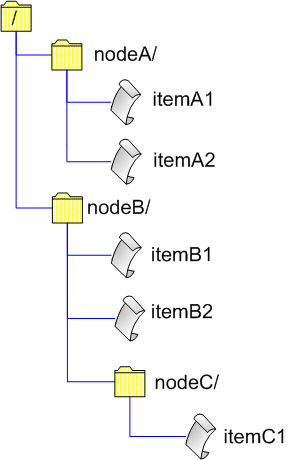
And we want to change it to something like this:
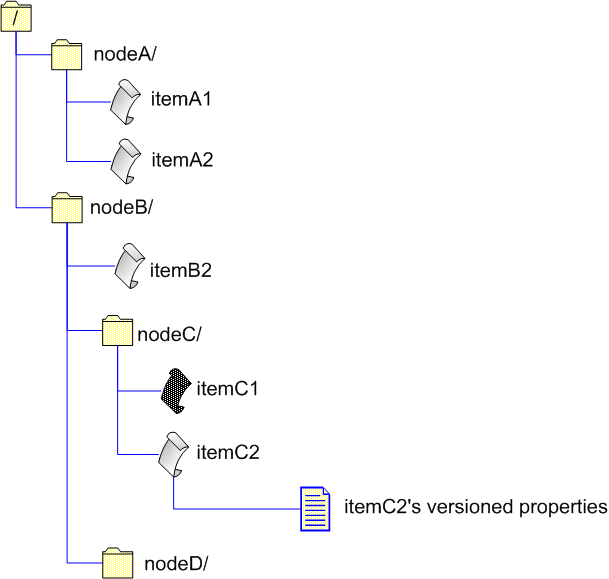
In other words we want to:
delete /nodeB/itemB1
change contents of /nodeB/nodeC/itemC1
add /nodeB/nodeC/itemC2 with some versioned properties attached to it
add /nodeB/nodeD
Now we'll discuss how to do these changes using a commit editor. We'll assume that we are working with a local repository. First of all we should obtain such an editor to carry out our plans. We create an SVNRepository driver bounded to the node /nodeB (since all our planned changes will be performed under this node):
Here we don't use an authentication manager - a session user name will be used as an author of a commit. Getting a commit editor:
Now when we have got an editor we can not call any reposiotory access methods of our SVNRepository driver till we call the editor's closeEdit() method. The following code snippet demonstrates how to prepare our planned changes in a single transaction. Main steps of the editing a repository tree process are numbered to the left of the code:
1     ...

2     //provide your local revision of nodeB

3 1   long r = ...;

4     editor.openRoot( r );

5

6     //provide your local revision of itemB1

7 2   r = ...;

8     editor.deleteEntry( "itemB1" , r );

9

10     //provide your local revision of nodeC

11 3   r = ...;

12     editor.openDir( "nodeC" , r );

13

14     //provide your local revision of itemC1

15 4   r = ...;

16     editor.openFile( "nodeC/itemC1" , r );
Now about applying text delta - text changes (only differences) made locally to itemC1. A base checksum is used to be sure that both client's base item and repository's one (of the same revision) have got the same contents what prevents from committing if a client's item is corrupted since calculated differences won't be applied correctly in this case:
Use a delta generator to calculate differences between base and working versions of the item. The generator produces differences or delta as a sequence of diff windows of fixed size. It means that applying one such a window against item contents gives you not larger than N bytes of the output text. A default size of a window is 100K bytes.
The delta generator passes each produced diff window to the editor calling its textDeltaChunk() method:
When the generator is finished it calls the editor's textDeltaEnd() method:
sendDelta() method returns the checksum for the working version of the item contents. This checksum may be used to verify that the delta is applied correctly on the repository side. If contents of the local working item and the one in the repository do not match, checksums are likely to be different, too:
1     editor.closeFile( "nodeC/itemC1" , checksum );

2

3 5   //the second and the third parameters are the path and revision respectively

4     //of the item's ancestor if the item is being added with history

5     editor.addFile( "nodeC/itemC2" , null , -1 );

6

7     baseChecksum = ...;

8     editor.applyTextDelta( "nodeC/itemC2" , baseChecksum );

9

10     baseData = ...;

11     workingData = ...;

12     checksum = deltaGenerator.sendDelta( "nodeC/itemC2" , baseData , 0 , workingData , editor , true );

13     editor.closeFile( "nodeC/itemC2" , checksum );

14

15 6   editor.changeFileProperty( "nodeC/itemC2" , "propName1" , "propValue1" );

16     editor.changeFileProperty( "nodeC/itemC2" , "propName2" , "propValue2" );

17     ...

18

19     //we are finished with changes under nodeC, so closing nodeC

20     editor.closeDir( );

21

22 7   //now we are under nodeB again

23     editor.addDir( "nodeD" , null , -1 );

24

25     //close nodeD

26     editor.closeDir( );

27

28     //close root - nodeB

29     editor.closeDir( );
In the step 5 we are adding a new item, not copying an existing one. But if we need to make a copy of an existing item we should provide the copy source absolute path and the revision of the copy source path as the second and third arguments of the editor.addFile() method respectively. If you would like only to copy an item (file) without changes, you don't need to apply any delta - Subversion will take care of making a copy on the server side.
In regard to addition of a directory - parameters are like in addFile(). We are not copying a directory, just adding a new one without history.
As you see every opened/added directory (including the root one) as well as every opened/added file must be closed with the editor. The final point - closing our editor what results in committing the transaction tree into the repository:
If transaction succeeds and this call makes our changes immutable in the repository, the editor returns an SVNCommitInfo object containing information about a new revision. However at any call to the editor it can throw an exception which means that something has went wrong. When we've got an exception from the editor we should abort it to purge the transaction like this:
After we have closed the editor we may go on using our SVNRepository driver. The following diagram illustrates our changes step by step. Numbers in the diagram correspond to numbers of our steps in the code:
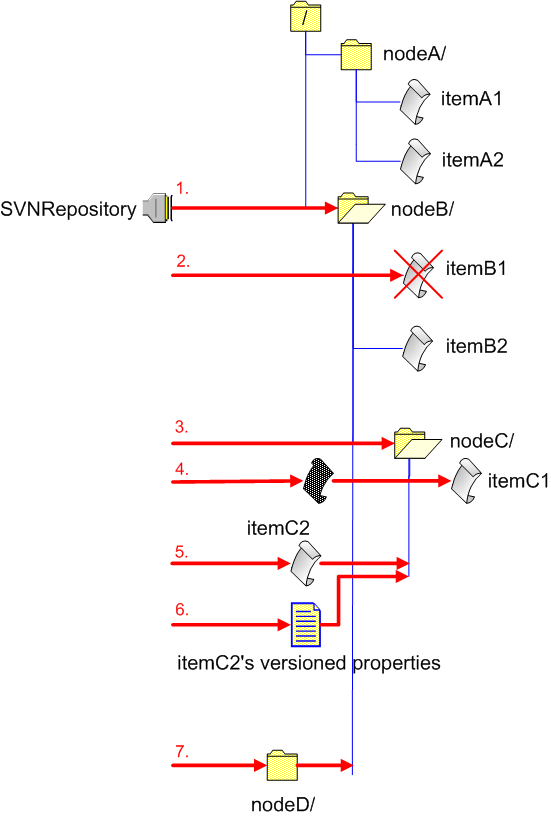
Notes:
with ISVNEditor you edit your repository in a hierarchical way traversing a necessary subtree; that is if your driver is bound to /a and you are going to change /a/b/c/d, you can not just open dwithout moving down in the tree to the node /a/b/c, you have to open the root (/a), then open /a/b, and then /a/b/c, after what you open /a/b/c/d.
- for all versioned data which is present on your local machine, you have to keep local revision numbers somehow, so that when you try to change an item, a repository server can check whether your local item is out of date or not.
- you don't have to apply text deltas immediately after you have opened a file; you may first open all necessary files in the way described above, then close all directories (including the root one) remaining opened in a way inverse to the one you opened them, then apply deltas to opened files and finally close files; you can not change directory properties after you've closed target directories.
- In repository edition operations you'll never need to use the following methods of a commit editor (they are irrelevant in commits, but relevant in updates):
Example On Using ISVNEditor In A Commit Operation
In the following example we'll continue discussing application of ISVNEditor in low-level commit operations. We will perform some simple commits in the following order:
- add a directory with a file to a repository,
- modify the added file,
- copy the whole added directory within a repository,
- delete both the original and copied directories.
For each of these four commit operations we'll write separate functions:
1. Addition:
1     private static SVNCommitInfo addDir( ISVNEditor editor , String dirPath , String filePath , byte[] data ) throws SVNException {

2         editor.openRoot( -1 );

3

4         editor.addDir( dirPath , null , -1 );

5

6         editor.addFile( filePath , null , -1 );

7

8         editor.applyTextDelta( filePath , null );

9

10         SVNDeltaGenerator deltaGenerator = new SVNDeltaGenerator( );

11         String checksum = deltaGenerator.sendDelta( filePath , new ByteArrayInputStream( data ) , editor , true );

12

13         editor.closeFile(filePath, checksum);

14

15         //Closes dirPath.

16         editor.closeDir();

17

18         //Closes the root directory.

19         editor.closeDir();

20

21         return editor.closeEdit();

22     }
2. File modification:
1     private static SVNCommitInfo modifyFile( ISVNEditor editor , String dirPath , String filePath , byte[] oldData , byte[] newData ) throws SVNException {

2         editor.openRoot( -1 );

3

4         editor.openDir( dirPath , -1 );

5

6         editor.openFile( filePath , -1 );

7

8         editor.applyTextDelta( filePath , null );

9

10         SVNDeltaGenerator deltaGenerator = new SVNDeltaGenerator( );

11         String checksum = deltaGenerator.sendDelta( filePath , new ByteArrayInputStream( oldData ) , 0 , new ByteArrayInputStream( newData ) , editor , true );

12

13         //Closes filePath.

14         editor.closeFile( filePath , checksum );

15

16         // Closes dirPath.

17         editor.closeDir( );

18

19         //Closes the root directory.

20         editor.closeDir( );

21

22         return editor.closeEdit( );

23     }
Here we use invalid revision numbers (-1) for simplifying the example since they will work for us, and that's all we need now. Of course, in real systems they'd better be real (valid) revision numbers. The same is regarding a base checksum.
3. Directory copying:
1     private static SVNCommitInfo copyDir( ISVNEditor editor , String srcDirPath , String dstDirPath , long revision ) throws SVNException {

2         editor.openRoot( -1 );

3

4         editor.addDir( dstDirPath , srcDirPath , revision );

5

6         //Closes dstDirPath.

7         editor.closeDir( );

8

9         //Closes the root directory.

10         editor.closeDir( );

11

12         return editor.closeEdit( );

13     }
4. Directory deletion:
Now when we've got these functions we are ready to start:
1 public class Commit {

2

3     public static void main( String[] args ) {

4

5         FSRepositoryFactory.setup( );

6         SVNURL url = SVNURL.parseURIDecoded( "file:///localhost/testRepos" );

7         String userName = "foo";

8         String userPassword = "bar";

9

10         byte[] contents = "This is a new file".getBytes( );

11         byte[] modifiedContents = "This is the same file but modified a little.".getBytes( );

12

13         SVNRepository repository = SVNRepositoryFactory.create( url );

14

15         ISVNAuthenticationManager authManager = SVNWCUtil.createDefaultAuthenticationManager( userName, userPassword );

16         repository.setAuthenticationManager( authManager );

17

18         SVNNodeKind nodeKind = repository.checkPath( "" , -1 );

19

20         if ( nodeKind == SVNNodeKind.NONE ) {

21             System.out.println( "No entry at URL " + url );

22             System.exit( 1 );

23         } else if ( nodeKind == SVNNodeKind.FILE ) {

24             System.out.println( "Entry at URL " + url + " is a file while directory was expected" );

25             System.exit( 1 );

26         }

27

28         //Get exact value of the latest (HEAD) revision.

29         long latestRevision = repository.getLatestRevision( );

30         System.out.println( "Repository latest revision (before committing): " + latestRevision );

31

32         ISVNEditor editor = repository.getCommitEditor( "directory and file added" , null );

33

34         try {

35             SVNCommitInfo commitInfo = addDir( editor , "test" , "test/file.txt" , contents );

36             System.out.println( "The directory was added: " + commitInfo );

37         } catch ( SVNException svne ) {

38             editor.abortEdit( );

39             throw svne;

40         }

41

42         editor = repository.getCommitEditor( "file contents changed" , null );

43         try {

44             commitInfo = modifyFile( editor , "test" , "test/file.txt" , contents , modifiedContents );

45             System.out.println( "The file was changed: " + commitInfo );

46         } catch ( SVNException svne ) {

47             editor.abortEdit( );

48             throw svne;

49         }

50

51         //converts a relative path to an absolute one

52         String absoluteSrcPath = repository.getRepositoryPath( "test" );

53         long srcRevision = repository.getLatestRevision( );

54

55         editor = repository.getCommitEditor( "directory copied" , null );

56         try {

57             commitInfo = copyDir( editor , absoluteSrcPath , "test2" , srcRevision );

58             System.out.println( "The directory was copied: " + commitInfo );

59         } catch ( SVNException svne ) {

60             editor.abortEdit( );

61             throw svne;

62         }

63

64

65         //Delete directory "test".

66         editor = repository.getCommitEditor( "directory deleted" , null );

67         try {

68             commitInfo = deleteDir( editor , "test" );

69             System.out.println( "The directory was deleted: " + commitInfo );

70         } catch ( SVNException svne ) {

71             editor.abortEdit( );

72             throw svne;

73         }

74

75         //Delete directory "test2".

76         editor = repository.getCommitEditor( "copied directory deleted" , null );

77         try {

78             commitInfo = deleteDir( editor , "test2" );

79             System.out.println( "The copied directory was deleted: " + commitInfo );

80         } catch ( SVNException svne ) {

81             editor.abortEdit( );

82             throw svne;

83         }

84

85         latestRevision = repository.getLatestRevision( );

86         System.out.println( "Repository latest revision (after committing): " + latestRevision );

87         ...

88     }

89     ...

90 }
That's what you'll see if you run the program:
Repository latest revision (before committing): 0

The directory was added: r1 by 'foo' at Tue Jun 27 15:46:59 NOVST 2006

The file was changed: r2 by 'foo' at Tue Jun 27 15:46:59 NOVST 2006

The directory was copied: r3 by 'foo' at Tue Jun 27 15:46:59 NOVST 2006

The directory was deleted: r4 by 'foo' at Tue Jun 27 15:46:59 NOVST 2006

The copied directory was deleted: r5 by 'foo' at Tue Jun 27 15:47:00 NOVST 2006

Repository latest revision (after committing): 5
Download the example program source code.
使用SVNkit删除版本库的文件的更多相关文章
- Linux svn直接删除版本库文件
业务目录:/home/web/oa.youxi.com/htdocs/materialsvn地址:svn://192.168.13.61:/oa.youxi.com/htdocs/material m ...
- svn创建版本库和删除版本库
作者:朱金灿 来源:http://blog.csdn.net/clever101 svn创建版本库的做法:使用cd命令进入版本仓库的根目录,我的是E:\Repository,然后运行命令: svnad ...
- gitblit删除版本库
Git客户端不提供删除远程仓库的方法,gitblit服务器网页也不支持删除版本仓库.若要强制删除,Windows下可以: 先在任务管理器中停止gitblit进程,然后将gitblit版本库文件夹中将版 ...
- git忽略已加入到版本库的文件
项目中,我们会用到 '.gitignore' 来忽略一些文件,不记录这些文件的版本控制. 然而,经常发现,已经添加到了 '.gitignore' 的文件/目录,每次的修改等扔会记录版本. 产生这种原因 ...
- IDEA中,已经被加到版本库的文件如何在提交的时候忽略它们
因为某些资源共享的原因,我在本地调试的时候需要修改Java启动程序类上的一些配置,禁用掉Kafka等等.然后我就想 把这些本地调试需要修改的但是线上服务不需要修改的给忽略掉,于是加入到了.gitign ...
- 利用SVNKit进行版本库的树的导出
public List searchByTree(String userName,String passwd,String SVNServerUrl,String dirUrl){ //这里有点像 s ...
- Git如何删除版本库中的一个提交?
如果不小心增加了一个最新的提交,可以通过以下的操作删除,记住:是删除最新的提交,如果回滚到其他的提交上面,就会导致之后的全部消失. 1.git reset --hard HEAD~1 2.gi ...
- git 忽略已经添加到版本库的文件
第一步: 指令:git rm -r --cached YOUR_PATH YOUR_PATH 即 你的文件,-r 指定了递归所有的子文件夹. 第二步: 修改项目根目录下的 .gitignore 文件, ...
- Git使用(二)版本库创建及文件修改
一.创建版本库 1.安装完成后,在开始菜单里找到“Git”->“Git Bash”,蹦出一个类似命令行窗口的东西,就说明Git安装成功! 安装完成后,还需要最后一步设置,在命令行输入: $ gi ...
随机推荐
- 美国企业人事喜欢考的3道.Net经典笔试题
1..求以下表达式的值,写出您想到的一种或几种实现方法: 1-2+3-4+……+m 答: int Num = this.TextBox1.Text.ToString() ; int Sum = 0 ; ...
- Effective C++_笔记_条款02_尽量以const、enum、inline替换#define
(整理自Effctive C++,转载请注明.整理者:华科小涛@http://www.cnblogs.com/hust-ghtao/) 这个条款或许改为“宁可以编译器替换预处理器”比较好,因为或许#d ...
- Redis C客户端API - God's blog - 博客频道 - CSDN.NET
Redis C客户端API - God's blog - 博客频道 - CSDN.NET Redis安装步骤: 1.redis server安装 wget http://redis.googlecod ...
- Delphi/C#之父首次访华:55岁了 每天都写代码
Delphi.C#之父Anders Hejlsberg 近日首次访华,并在10月24日和27日参加了两场见面会,分享了他目前领导开发的TypeScript项目,并与国内前端开发者近距离交流.本文就为读 ...
- windows时间函数
介绍 我们在衡量一个函数运行时间,或者判断一个算法的时间效率,或者在程序中我们需要一个定时器,定时执 行一个特定的操作,比如在多媒体中,比如在游戏中等,都会用到时间函数.还比如我们通过记 ...
- 如何利用Win32API取得另一支程式中的ListView內的所有值(RegisterHotKey,ReadProcessMemory,WindowFromPoint和VirtualAllocEx)
http://blog.csdn.net/shuaihj/article/details/6129506
- 获取option中间的值
<select name="wytype" id="wytype"> <option value="">—请选择—& ...
- Windows7WithSP1/TeamFoundationServer2012update4/SQLServer2012
[Info @09:03:33.737] ====================================================================[Info @ ...
- How to get the source code of the chromium of the specified revision
I'd like to get the source code of the chromium 34.0.1847.9. gclient config http://src.chromium.org/ ...
- 位运算之 C 与或非异或
与运算:& 两者都为1为1,否则为0 1&1=1, 1&0=0, 0&1=0, 0&0=0 或运算:| 两者都为0为0,否则为1 1|1 = 1, ...