
MeasureOverride和ArrangeOverride 练手项目
public class Diagnol:Panel

    {

        /// <summary>

        /// 测量

        /// </summary>

        /// <param name="availableSize">This的尺寸</param>

        /// <returns></returns>

        protected override Size MeasureOverride(Size availableSize)

        {

            Size size = new Size();

            foreach (UIElement item in this.InternalChildren)

            {

                item.Measure(availableSize);

                size.Width += item.DesiredSize.Width;

                size.Height += item.DesiredSize.Height;

            }

            //返回所有子控件需要的 总尺寸

            return base.MeasureOverride(size);

        }

        /// <summary>

        /// 排列每个子控件

        /// </summary>

        /// <param name="finalSize">This的尺寸</param>

        /// <returns></returns>

        protected override Size ArrangeOverride(Size finalSize)

        {

            Point point1 = new Point();

            //子控件个数

            int count = this.InternalChildren.Count;

            //总个数的中间值

            int index = (count + ) / -;

            for (int i = ; i < this.InternalChildren.Count; i++)

            {

                var child = this.InternalChildren[i];

                //如果就一个没法玩,直接排列

                if (count <= )

                {

                    //设置子控件的位置

                    child.Arrange(new Rect(point1, child.DesiredSize));

                    break;

                }

                //玩起来

                if (i < index)

                {

                    child.Arrange(new Rect(point1, child.DesiredSize));

                    point1.X += child.DesiredSize.Width;

                    point1.Y += child.DesiredSize.Height;

                }

                else

                {

                    child.Arrange(new Rect(point1, child.DesiredSize));

                    point1.X += child.DesiredSize.Width;

                    point1.Y -= child.DesiredSize.Height;

                }

            }

            return base.ArrangeOverride(finalSize);

        }

    }
 <local:Diagnol>

            <Button BorderBrush="Black" Background="Red" Content="0" Width="40"></Button>

            <Button BorderBrush="Black" Background="Red" Content="1" Width="40"></Button>

            <Button BorderBrush="Black" Background="Red" Content="2" Width="40"></Button>

            <Button BorderBrush="Black" Background="Red" Content="3" Width="40"></Button>

            <Button BorderBrush="Black" Background="Red" Content="4" Width="40"></Button>

            <Button BorderBrush="Black" Background="Red" Content="5" Width="40"></Button>

            <Button BorderBrush="Black" Background="Red" Content="6" Width="40"></Button>

            <Button BorderBrush="Black" Background="Red" Content="7" Width="40"></Button>

            <Button BorderBrush="Black" Background="Red" Content="8" Width="40"></Button>

        </local:Diagnol>
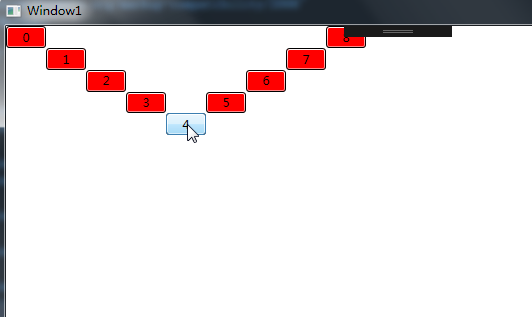
MeasureOverride和ArrangeOverride 练手项目的更多相关文章
- Python学习路径及练手项目合集
Python学习路径及练手项目合集 https://zhuanlan.zhihu.com/p/23561159
- web前端学习部落22群分享给需要前端练手项目
前端学习还是很有趣的,可以较快的上手然后自己开发一些好玩的项目来练手,网上也可以一抓一大把关于前端开发的小项目,可是还是有新手在学习的时候不知道可以做什么,以及怎么做,因此,就整理了一些前端项目教程, ...
- webpack练手项目之easySlide(三):commonChunks(转)
Hello,大家好. 在之前两篇文章中: webpack练手项目之easySlide(一):初探webpack webpack练手项目之easySlide(二):代码分割 与大家分享了webpack的 ...
- webpack练手项目之easySlide(二):代码分割(转)
在上一篇 webpack练手项目之easySlide(一):初探webpack 中我们一起为大家介绍了webpack的基本用法,使用webpack对前端代码进行模块化打包. 但是乍一看webpack ...
- Python之路【第二十四篇】:Python学习路径及练手项目合集
Python学习路径及练手项目合集 Wayne Shi· 2 个月前 参照:https://zhuanlan.zhihu.com/p/23561159 更多文章欢迎关注专栏:学习编程. 本系列Py ...
- 练手项目:利用pygame库编写射击游戏
本项目使用pygame模块编写了射击游戏,目的在于训练自己的Python基本功.了解中小型程序框架以及学习代码重构等.游戏具有一定的可玩性,感兴趣的可以试一下. 项目说明:出自<Python编程 ...
- Vue练手项目(包含typescript版本)
本项目的git仓库https://github.com/lznism/xiachufang-vue 对应的使用typescript实现的版本地址https://github.com/lznism/xi ...
- 适合Python的5大练手项目, 你练了么?
在练手项目的选择上,还存在疑问?不知道要从哪种项目先下手? 首先有两点建议: 最好不要写太应用的程序练手,要思考什么更像是知识,老只会写写爬虫是无用的,但是完全不写也不行. 对于练手的程序,要注意简化 ...
- 适合Python 新手的5大练手项目,你练了么?
接下来就给大家介绍几种适合新手的练手项目. 0.算法系列-排序与查找 Python写swap很方便,就一句话(a, b = b, a),于是写基于比较的排序能短小精悍.刚上手一门新语言练算法最合适不过 ...
随机推荐
- .net中反射技术的应用
using System; using System.Collections.Generic; using System.IO; using System.Linq; using System.Ref ...
- redis在游戏服务器中的使用初探(三) 信息存储
摘要: 搭建了服务器环境 有了客户端 我们来假想下以下应用场景:我们简单举个实例来描述下Hash的应用场景,比如我们要存储一个用户信息对象数据,包含以下信息:用户ID,为查找的key,存储的value ...
- C++11与Unicode及使用标准库进行UTF-8、UTF-16、UCS2、UCS4/UTF-32编码转换
zt https://blog.poxiao.me/p/unicode-character-encoding-conversion-in-cpp11/ Unicode Unicode是计算机领域的一项 ...
- pc-H5 适配方案
一.介绍 在前端项目页面开发中,尤其是H5页面开发,我们常常要适配各种分辨率的屏幕,才能让用户获得最好的体验效果.pc也是如此,很多页面是一屏,也是要适配各种尺寸的分辨率.这时候我们就需要对各种分辨率 ...
- Imageview 按比例适应屏幕大小
DisplayMetrics dm = new DisplayMetrics();//取得窗口属性getWindowManager().getDefaultDisplay().getMetrics(d ...
- linux 查看信息-服务器相关
查看系统内核 查看磁盘信息 查看CPU的信息 查看内存相关信息
- canvas 实现太阳系效果
一:创建画布 <canvas width="1000" height="1000" id="solar" style="ba ...
- 开发简单的JavaWeb项目
一.配置相关环境 下载配置JDK,eclipse,Tomcat服务器,Mysql数据库,Navicat for MySQL(数据库可视化工具) 如果你已经做好各个环境的配置,eclipse与Tomca ...
- swift-基础语法2
一.整形 :有符号和无符号类型 有符号类型:Int ,Int8 ,Int32,Int64 无符号类型: UInt ,UInt8 UInt32,UInt64 注意点:如果你的开发环境是32位,那么Int ...
- 4. Father's Impact on a Child's Language Development 父亲对孩子语言发展的影响
4. Father's Impact on a Child's Language Development 父亲对孩子语言发展的影响 (1)Im families with two working pa ...