
Python 之 Difflib
Python 之 Difflib
2017年7月8日
word文档地址:https://wenku.baidu.com/view/36692440854769eae009581b6bd97f192379bf57
参考书籍:《Python自动化运维 ——技术与最佳实践》 作者:李天斯
1.什么是difflib
Difflib作为python的标准库,无需安装,作用是对比文本之间的差异,而且支持输出可读性比较强的HTML文档,与Linux下的vimdiff命令类似,我们可以比对文本、配置文件之间的差异,在版本控制方面非常有用。
2.difflib的简单使用
2.1 Differ的简单使用
2.1.1 编写python代码
 root@kali:/mnt/disk/python/difflib# cat difflib_0.py

 #!/usr/bin/env python

 import difflib

 text1 = '''

 I love HaiYan

 I very love HaiYan

 She's the one I love the most.

 '''

 text2 = '''

 I love LiWang

 I very love LiWang

 I'm his favorite person.

 '''

 d = difflib.Differ()

 print (list(d.compare(text1,text2)))
2.1.2 执行脚本输出
# python difflib_0.py
[' \n', ' I', ' ', ' l', ' o', ' v', ' e', ' ', '+ L', '- H', '- a', ' i', '- Y', '+ W', ' a', ' n', '+ g', ' \n', ' I', ' ', ' v', ' e', ' r', ' y', ' ', ' l', ' o', ' v', ' e', ' ', '+ L', '- H', '- a', ' i', '- Y', '+ W', ' a', ' n', '+ g', ' \n', '- S', '+ I', "+ '", '+ m', '+ ', ' h', '+ i', '- e', "- '", ' s', ' ', '+ f', '+ a', '+ v', '+ o', '+ r', '+ i', ' t', '- h', ' e', ' ', '+ p', '+ e', '+ r', '+ s', ' o', ' n', '- e', '- ', '- I', '- ', '- l', '- o', '- v', '- e', '- ', '- t', '- h', '- e', '- ', '- m', '- o', '- s', '- t', ' .', ' \n']
输出了看不懂的列表,打印列表后再进行查看
增加代码:
 list1 = list(d.compare(text1,text2))

 for line in list1:

     if line == "\n":

         print ("\n")

     print ("%s" %(line),end='')
执行代码:
# python3 difflib_0.py

  I     l  o  v  e   + L- H- a  i- Y+ W  a  n+ g

  I     v  e  r  y     l  o  v  e   + L- H- a  i- Y+ W  a  n+ g

- S+ I+ '+ m+    h+ i- e- '  s   + f+ a+ v+ o+ r+ i  t- h  e   + p+ e+ r+ s  o  n- e-  - I-  - l- o- v- e-  - t- h- e-  - m- o- s- t  .
符号含义:
+:包含在第一个序列中,但不包含第二个序列
-:包含在第二个序列中,但是不包含第一个序列
2.2 HtmlDiff的简单使用
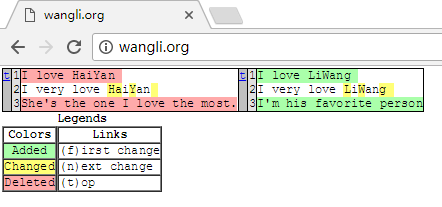
2.2.1 向文件写入内容
 # echo -e "I love HaiYan \nI very love HaiYan \nShe's the one I love the most." > test_1

 # echo -e "I love LiWang \nI very love LiWang \nI'm his favorite person" > test_2
2.2.2 编写python代码
 # cat  difflib_1.py

 #!/usr/bin/env python

 import difflib

 def open_files(filename):

    files = open(filename,'rb')

    text = files.read().splitlines()

    files.close()

    return text

 d = difflib.HtmlDiff()

 text_1 = open_files('test_1')

 text_2 = open_files('test_2')

 print (d.make_file(text_1,text_2))
2.2.3 执行脚本,用网页打开
# python difflib_1.py > /mnt/disk/html/index.html
3.difflib案例
3.1 需求
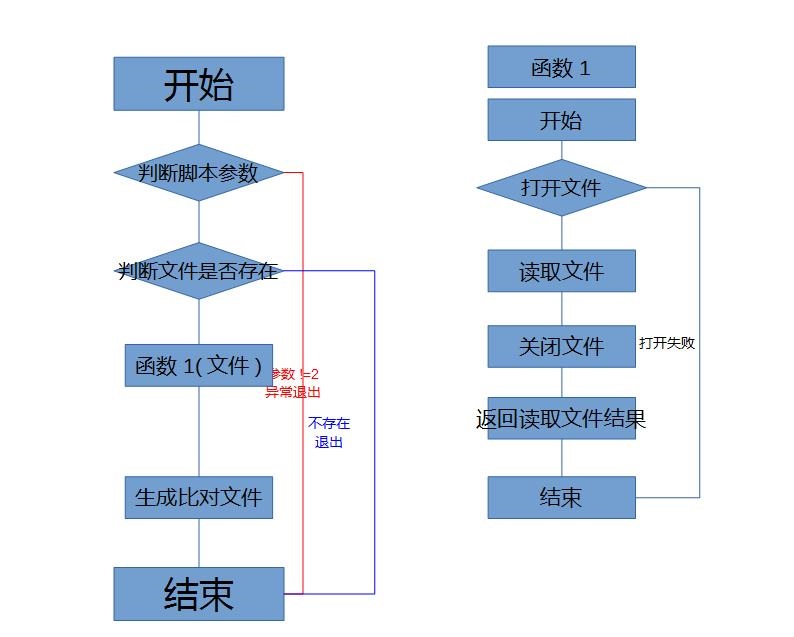
需求:利用python实现一个功能,只需要执行[python脚本名称 文件1 文件2],只需要打开浏览器输入网址就能够看见文件比对效果
3.2 流程图
流程图:
3.3 代码编写:
 #cat difflib_2.py

 #!/usr/bin/env python

 #exit argv

 import sys

 #path

 import os

 #HtmlDiff

 import difflib

 html_files = '/mnt/disk/html/index.html'

 #Determine whether the parameter exists

 try:

     script_name = sys.argv[0]

     file1 = sys.argv[1]

     file2 = sys.argv[2]

 except:

     print ("%s Using: %s filename1 filename 2" %(script_name,script_name))

     sys.exit()

 #Function 1

 def dealwith_files(filename):

     #open files

     try:

         files = open(filename,'rb')

         #read files

         text = files.read().splitlines()

         #close files

         files.close()

     except:

         print ("Open files fail ")

         sys.exit()

     #return files

     return text

 #Determine if the files exists

 if os.path.isfile(file1) and os.path.isfile(file2):

     d = difflib.HtmlDiff()

     try:

         print_files = open(html_files,'w')

         print_files.write(d.make_file(dealwith_files(file1),dealwith_files(file2)))

         print_files.close()

     except:

         print ("write %s fail" %(html_files))

 #    print (d.make_file(dealwith_files(file1),dealwith_files(file2)))

 else:

     print ("%s or %s is not such file" %(file1,file2))

 sys.exit()
3.4 执行脚本输出
 #  difflib_2.py

 # ./difflib_2.py debconf.conf debconf.conf.bak

 #
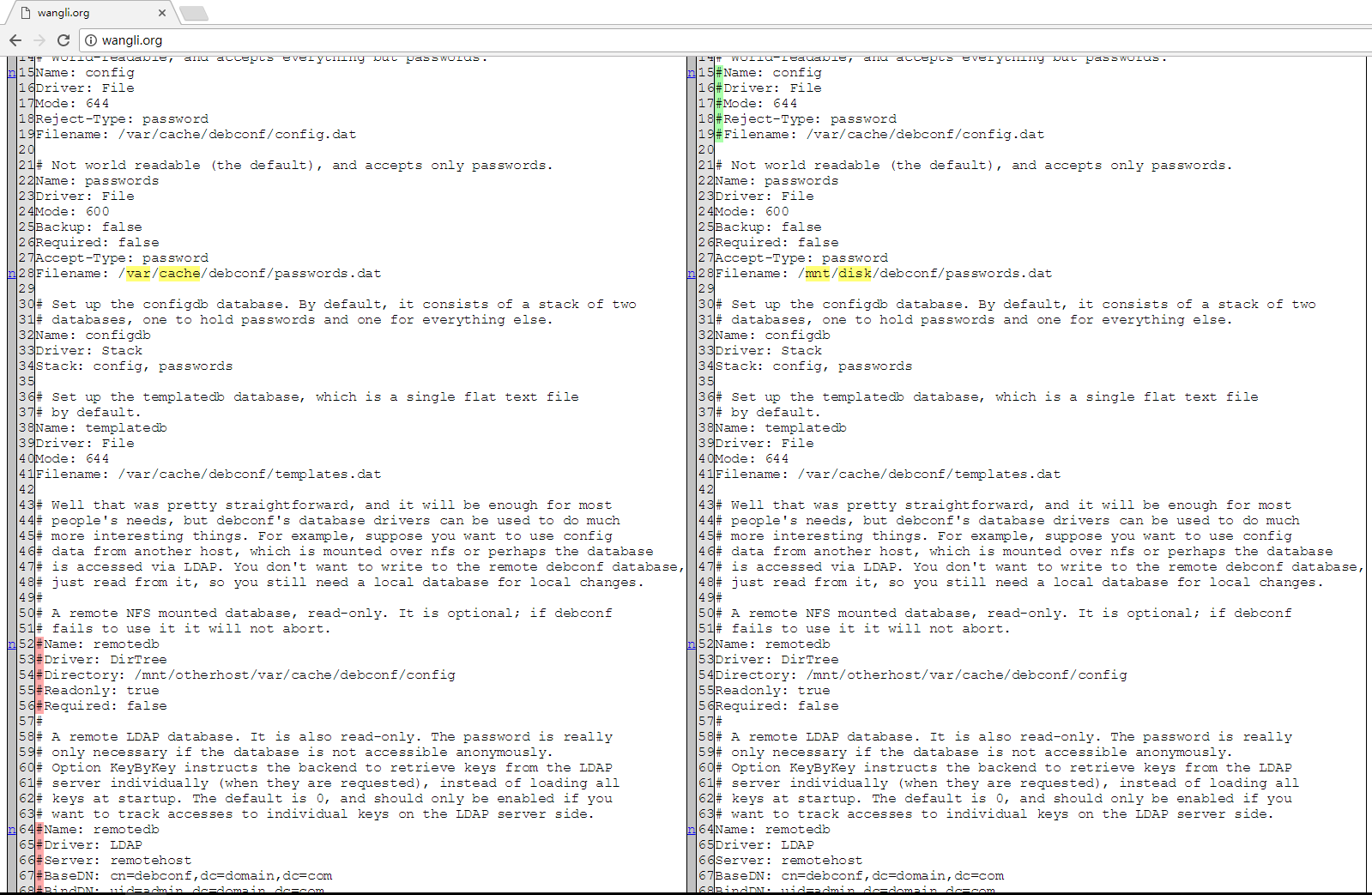
chmod 是赋予脚本执行权限,执行difflib_2py 参数为debconf.conf debconf.conf.bak,没有任何输出,则证明执行OK
3.5 效果
刷新网页
Python 之 Difflib的更多相关文章
- python利用difflib判断两个字符串的相似度
我们再工作中可能会遇到需要判断两个字符串有多少相似度的情况(比如抓取页面内容存入数据库,如果相似度大于70%则判定为同一片文章,则不录入数据库) 那这个时候,我们应该怎么判断呢? 不要着急,pytho ...
- 使用Python自带difflib模块进行文件内容差异对比
difflib_text.py #!/usr/bin/python import difflib import sys try: textfile1=sys.argv[1] textfile2=sys ...
- Python Thrift 简单示例
本文基于Thrift-0.10,使用Python实现服务器端,使用Java实现客户端,演示了Thrift RPC调用示例.Java客户端提供两个字符串参数,Python服务器端计算这两个字符串的相似度 ...
- 使用python比较两个文件的不同之处
比较两个文件的不同之处用处还是比较大的,特别是比较两个版本的不同之处 [root@localhost python]# cat diftest.py #!/usr/bin/python import ...
- python开发_difflib字符串比较
在python的difflib中 HtmlDiff:比较后以html方法展示 我们比较的是字符串: 'hello world!' 和 'hElLO Wor2d!' 具体代码: from difflib ...
- Python比较配置文件
工作中最常见的配置文件有四种:普通key=value的配置文件.Json格式的配置文件.HTML格式的配置文件以及YAML配置文件. 这其中以第一种居多,后三种在成熟的开源产品中较为常见,本文只针对第 ...
- 你可能不知道的 Python 技巧
英文 | Python Tips and Trick, You Haven't Already Seen 原作 | Martin Heinz (https://martinheinz.dev) 译者 ...
- difflib模块详解
1.两个字符串对比 import difflib text1=""" test1 #定义字符串 hellow my name is machanwei! difflib ...
- 对比Nginx配置文件差异
一.概要: Python2 官方文档:https://docs.python.org/2/library/difflib.html Python2 官方文档:https://docs.python.o ...
随机推荐
- 成为JAVA架构师必看书籍推荐
原创文章 “学习的最好途径就是看书“,这是我自己学习并且小有了一定的积累之后的第一体会.个人认为看书有两点好处: 1.能出版出来的书一定是经过反复的思考.雕琢和审核的,因此从专业性的角度来说,一本好书 ...
- Redhat(RHEL)配置静态IP
vim /etc/sysconfig/network NETWORKING=yes NETWORKING_IPV6=no HOSTNAME=itcc.dev GATEWAY=192.168.0.1 v ...
- Dom,pull,Sax解析XML
本篇随笔将详细讲解如何在Android当中解析服务器端传过来的XML数据,这里将会介绍解析xml数据格式的三种方式,分别是DOM.SAX以及PULL. 一.DOM解析XML 我们首先来看看DOM(Do ...
- javascript 字面量 和变量 之间的关系
https://www.w3cschool.cn/javascript/js-syntax.html
- 基于Confluent.Kafka实现的KafkaConsumer消费者类和KafkaProducer消息生产者类型
一.引言 研究Kafka有一段时间了,略有心得,基于此自己就写了一个Kafka的消费者的类和Kafka消息生产者的类,进行了单元测试和生产环境的测试,还是挺可靠的. 二.源码 话不多说,直接上代码,代 ...
- msysgit解决中文乱码问题
项目中在用git,安装msysgit客户端后处理中文是有问题的: ls中文目录/文件名乱码:提交中文的log,push到服务器上会乱码:git log查看服务器pull过来的log乱码. 1.ls命令 ...
- linux 管道符与通配符
###管道符 *命令格: 命令1 | 命令2 //命令1的正确输出作为命令2的操作对象 ll | more netstat -an | grep xxx 通配符 类似于正则表达式 ? 一个以上 [] ...
- svn冲突问题解决办法
经常有人会说,树冲突是很难解决的一类冲突,其实一旦了解了其原理,要解决也不难.先回顾下对于树冲突的定义. 树冲突:当一名开发人员移动.重命名.删除一个文件或文件夹,而另一名开发人员也对它们进行 ...
- spec文件写作规范
spec文件写作规范 2008-09-28 11:52:17 分类: LINUX 1.The RPM system assumes five RPM directories BUILD:rpmbuil ...
- mongo数据库的y2038问题
查阅mongo for c driver 驱动源码, 发现其 _id 是 12byte ,其中头4字节,调用time(NULL), 这个函数存在y2038问题. 建议是修改为16byte ,前面8b ...