
odoo 开发基础 -- 视图之xpath语法
odoo 视图函数 在整个项目文件中,结构并不是十分明显,虽然它也遵循MVC设计,类比django的MTV模式,各个模块区分的十分明显,在Odoo中,视图的概念不是特别明显,很多时候,我们会将调用模型的函数直接写在models里边(即:类中)。
而对于模版Tempelate部分,odoo里边反而称做“views”,如下是odoo典型模块,销售模块sale的代码结构:
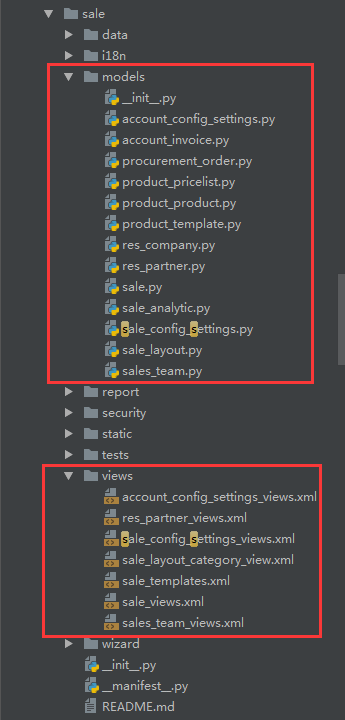
可以看到odoo的前端显示部分,对应的就是views,它是基于xml来实现的,而不是我们日常的html;
今天要说的xpath语法,就是针对于xml文件的一种语法格式。
通过xpath语法,可以对xml文件中要显示的内容,进行自定义的显示,比如:我们要插入一个新的标签在当前已经存在的标签的后边,前边,里边甚至替换。。。
这种语法看着还有点像JS的寻找父子节点。。。
1. xpath有一个用法,就是当你要修改的多个标签是在同一个目录节点下的时候,多个xpath标签可以写在同一个<record>标签中,而不用每次都去声明定义一遍,
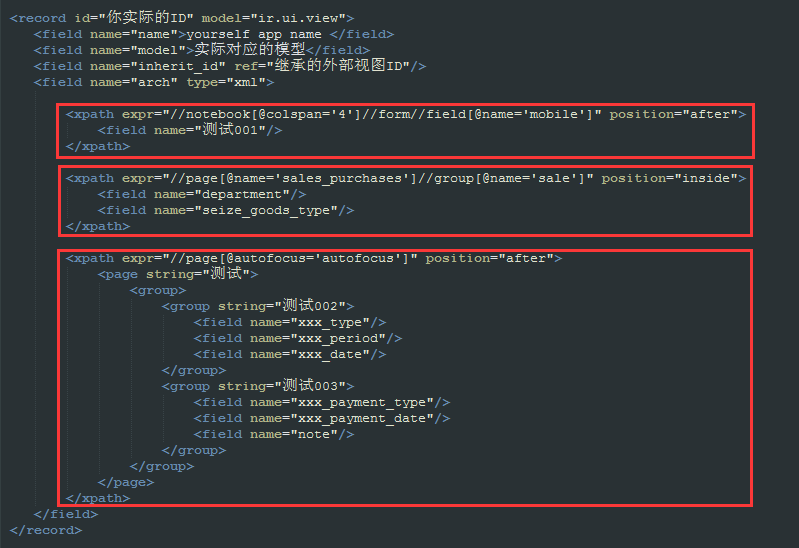
支持的视图类型:form、tree、search ...
支持的定位方法:
<notebook position="inside">

       <xpath expr="//page[@name='page_history']" position="inside">

                 <field name="mobile" position="after">

                 <filter name="consumable" position="after">

                 <group name="bank" position="after">

                 <xpath expr="//field[@name='standard_price']" position="replace">

                 <xpath expr="//button[@name='open_ui']" position="replace">

                 <xpath expr="//div[@class='oe_employee_details']/h4/a" position="after">

                 <xpath expr="/form/sheet/notebook/page/field[@name='line_ids']/tree/field[@name='analytic_account_id']" position="replace">

                 <xpath expr="/form/sheet/notebook/page/field[@name='line_ids']/form/group/field[@name='analytic_account_id']" position="replace">
支持的规则:before、after、replace、inside、attributes
插入:
position='before'
position="after"
      <field name="mobile" position="after">

       <field name="sale_order_count"/>

      </field>

          <filter name="consumable" position="after">

            <separator/>

             <filter name="filter_to_qty_available" string="在手数量>0" icon="terp-accessories-archiver+" domain="[('qty_available', '>', 0)]"/>

             <filter name="filter_to_virtual_available" string="预测数量>0" icon="terp-accessories-archiver+" domain="[('virtual_available', '>', 0)]"/>

          </filter>
替换:
position="replace"
               <xpath expr="//field[@name='standard_price']" position="replace">

                        <group name='cost_prices' colspan="2" col="4">

                            <field name="standard_price" nolabel="1" attrs="{'readonly':[('cost_method','=','average')]}"/>

                            <field name="cost_price_extra" groups="product.group_product_variant"/>

                        </group>

                 </xpath>

                 <xpath expr="//button[@name='open_ui']" position="replace">

                     <button name="open_ui" type="object" string="Start Selling" attrs="{'invisible' : [('pos_state', 'not in', ('opened',))]}" class="oe_highlight" invisible="True"/>

</xpath>内部创建:position="inside"
               <xpath expr="//page[@name='page_history']" position="inside">

                    <group name="grp_task" string="Tasks">

                        <field name="task_ids" colspan="4" nolabel="1">

                            <tree string="Tasks" editable="bottom">

                                <field name="name"/>

                                <field name="user_id"/>

                                <field name="date_deadline"/>

                                <field name="state" invisible="1"/>

                                <button name="do_open" states="pending,draft,done,cancelled" string="Start Task" type="object" icon="gtk-media-play" help="For changing to open state" invisible="context.get('set_visible',False)"/>

                                <button name="action_close" states="draft,pending,open" string="Done" type="object" icon="terp-dialog-close" help="For changing to done state"/>

                            </tree>

                        </field>

                      </group>

                </xpath>
修改属性:修改属性能够实现的功能,不要使用 replace
position="attributes"
                    <xpath expr="//field[@name='name']" position="attributes">

                        <attribute name="required">1</attribute>

                    </xpath>
示例代码:
        <record id="product_normal_variant_form_view" model="ir.ui.view">

            <field name="name">product.normal.variant.form</field>

            <field name="model">product.product</field>

            <field name="type">form</field>

            <field name="inherit_id" ref="product.product_normal_form_view" />

            <field name="arch" type="xml">

             <data>

                    <xpath expr="//field[@name='name']" position="attributes">

                        <attribute name="required">1</attribute>

                    </xpath>

                    <xpath expr="//field[@name='standard_price']" position="replace">

                        <group name='cost_prices' colspan="2" col="4">

                            <field name="standard_price" nolabel="1" attrs="{'readonly':[('cost_method','=','average')]}"/>

                            <field name="cost_price_extra" groups="product.group_product_variant"/>

                        </group>

                    </xpath>

                <sheet>

                    <group col="2" colspan="2" groups="base.group_extended" position="replace">

                         <group colspan="2" col="6" name="weight" groups="base.group_extended">

                            <field name="is_multi_variants" invisible="1"/>

                            <group colspan="2" col="2">

                                <separator string="Template Weights" colspan="2"/>

                                <field digits="(14, 3)" name="volume" attrs="{'readonly':[('type','=','service')]}"/>

                                <field digits="(14, 3)" name="weight" attrs="{'readonly':[('type','=','service')]}"/>

                                <field digits="(14, 3)" name="weight_net" attrs="{'readonly':[('type','=','service')]}"/>

                            </group>

                            <group colspan="2" col="2" attrs="{'invisible':[('is_multi_variants','=',False)]}">

                                <separator string="Variant Weights" colspan="2"/>

                                <field digits="(14, 3)" name="additional_volume" attrs="{'readonly':[('type','=','service')]}"/>

                                <field digits="(14, 3)" name="additional_weight" attrs="{'readonly':[('type','=','service')]}"/>

                                <field digits="(14, 3)" name="additional_weight_net" attrs="{'readonly':[('type','=','service')]}"/>

                            </group>

                            <group colspan="2" col="2" attrs="{'invisible':[('is_multi_variants','=',False)]}">

                                <separator string="Total Weights" colspan="2"/>

                                <field digits="(14, 3)" name="total_volume"/>

                                <field digits="(14, 3)" name="total_weight"/>

                                <field digits="(14, 3)" name="total_weight_net"/>

                            </group>

                        </group>

                    </group>

                </sheet>

                </data>

            </field>

        </record>

        <!-- 隐藏 open_ui 按钮 -->

        <record model="ir.ui.view" id="pos_session_opening_form_view_openui">

            <field name="name">pos.session.opening.form.view.openui</field>

            <field name="model">pos.session.opening</field>

            <field name="inherit_id" ref="point_of_sale.pos_session_opening_form_view"/>

            <field name="arch" type="xml">

                 <xpath expr="//button[@name='open_ui']" position="replace">

                     <button name="open_ui" type="object" string="Start Selling" attrs="{'invisible' : [('pos_state', 'not in', ('opened',))]}" class="oe_highlight" invisible="True"/>

                 </xpath>

            </field>

        </record>

        <record id="product_search_form_view_filter" model="ir.ui.view">

            <field name="name">product.search.form.filter</field>

            <field name="model">product.product</field>

            <field name="inherit_id" ref="product.product_search_form_view"/>

            <field name="arch" type="xml">

                <filter name="consumable" position="after">

                   <separator/>

                   <filter name="filter_to_qty_available" string="在手数量>0" icon="terp-accessories-archiver+" domain="[('qty_available', '>', 0)]"/>

                   <filter name="filter_to_virtual_available" string="预测数量>0" icon="terp-accessories-archiver+" domain="[('virtual_available', '>', 0)]"/>

                </filter>

            </field>

        </record>

        <!-- Partner kanban view inherte -->

        <record model="ir.ui.view" id="crm_lead_partner_kanban_view">

            <field name="name">res.partner.kanban.saleorder.inherit</field>

            <field name="model">res.partner</field>

            <field name="inherit_id" ref="base.res_partner_kanban_view"/>

            <field name="priority" eval="20"/>

            <field name="arch" type="xml">

                <field name="mobile" position="after">

                    <field name="sale_order_count"/>

                </field>

                <xpath expr="//div[@class='oe_kanban_partner_links']" position="inside">

                    <a name="%(sale.act_res_partner_2_sale_order)d" type="action" t-if="record.sale_order_count.value>0">

                        <t t-esc="record.sale_order_count.value"/> Sales

                    </a>

                </xpath>

            </field>

        </record>

         <!--  Partners inherited form -->

        <record id="view_task_partner_info_form" model="ir.ui.view">

            <field name="name">res.partner.task.info.inherit</field>

            <field name="model">res.partner</field>

            <field name="inherit_id" ref="base.view_partner_form"/>

            <field name="arch" type="xml">

                <xpath expr="//page[@name='page_history']" position="attributes">

                    <attribute name="invisible">False</attribute>

                </xpath>

                <xpath expr="//page[@name='page_history']" position="inside">

                    <group name="grp_task" string="Tasks">

                        <field name="task_ids" colspan="4" nolabel="1">

                            <tree string="Tasks" editable="bottom">

                                <field name="name"/>

                                <field name="user_id"/>

                                <field name="date_deadline"/>

                                <field name="state" invisible="1"/>

                                <button name="do_open" states="pending,draft,done,cancelled" string="Start Task" type="object" icon="gtk-media-play" help="For changing to open state" invisible="context.get('set_visible',False)"/>

                                <button name="action_close" states="draft,pending,open" string="Done" type="object" icon="terp-dialog-close" help="For changing to done state"/>

                            </tree>

                        </field>

                      </group>

                </xpath>

            </field>

       </record>
odoo 开发基础 -- 视图之xpath语法的更多相关文章
- odoo 开发基础 -- 视图之widget
Odoo 中的widget many2many_tags one2many_list selection progressbar selection statusbar handle monetary ...
- odoo开发基础--模型之基本字段类型
定义模型的时候,和python的其他框架类似,可以对比Django,同样是一个模型即:一个class对应生成数据库中的一张表, 只是odoo的继承机制比较复杂一点,在日常的开发中,定义模型的时候, 基 ...
- odoo 开发基础 -- postgresql重新启动、状态查看
场景描述: 当遇到数据库不能正常访问的时候,我们首先想到的是,查看相关的告警日志,一般先查看系统的日志,然后查看数据库的日志,Linux平台下,postgresql的日志文件存放目录在如下路径: te ...
- 【实习第十天】odoo开发基础整合
前言 发文时间是2019年7月19日.提一下学习odoo的感受,odoo目前在国内并不是很流行,且主流是在企业型软件,所以导致目前odoo在网上的文献很少,学习相对来说比其他框架吃力.以下为大家总结1 ...
- 【实习第一天】odoo开发基础(一)
管理权限 在项目中,有个security文件夹,其中的ir.model.access文件后面带4个参数.分别代表着读,写,创建,删除的操作 想要开启权限需要将其参数调成为1,反之为0.倘若不调整参数, ...
- 【实习第二天】odoo开发基础(二)
搜索视图 搜索试图包括过滤器(Filters),分组(Group By)以及收藏(Favorites) 其中还包括默认的搜索栏 搜索栏添加自定义方法 <!--views.xml--> &l ...
- odoo开发笔记 -- 视图继承扩展
参考: http://www.jeffzhang.cn/Odoo-Notes-2/ http://blog.csdn.net/zhangfeng1133/article/details/4693517 ...
- Python自动化 【第七篇】:Python基础-面向对象高级语法、异常处理、Scoket开发基础
本节内容: 1. 面向对象高级语法部分 1.1 静态方法.类方法.属性方法 1.2 类的特殊方法 1.3 反射 2. 异常处理 3. Socket开发基础 1. ...
- iOS开发——总结篇&IOS开发基础知识
IOS开发基础知识 1:Objective-C语法之动态类型(isKindOfClass, isMemberOfClass,id) 对象在运行时获取其类型的能力称为内省.内省可以有多种方法实现. 判断 ...
随机推荐
- TCP/IP协议(1):各层协议帧格式
一. 1.OSI与TCP/IP对应: TCP/IP各层功能: 链路层:包括操作系统的设备驱动程序和计算机的网卡,提供底层传输服务. 网络层:为数据选择路由,在众多计算机和网络设备组成的网络中选择一 ...
- IntelliJ IDEA 2017版 编译器使用学习笔记(十) (图文详尽版);IDE快捷键使用;IDE关联一切
关联一切 一.与spring关联 通过图标跳转相关联的类 设置关联:进入project structure ===>facets =>选加号,===>选spring,默认添 ...
- Event.target和Event.currentTarget的区别
<style> * { margin:0; padding:0; list-style:none; } #ul { width:400px; height:250px; margin:0 ...
- cyclone IV中DDR的一个疑惑
的生成的DDR2 IP中DDR的时钟竟然是双向的,而在arria10中生成的DDR4则是输出,而DDR2的datasheet上也指出ck和ck#是输入,不知为什么? inout mem_clk , i ...
- js parseInt函数
在代码中,用到数字的地方,如果是字符串,需要将字符串转化为数字型. 1.使用parseInt(string,radix),将整数类型的字符串变为整型,radix表示以什么样的基数来解析字符串,通常是1 ...
- MIT Molecular Biology 笔记7 调控RNA
视频 https://www.bilibili.com/video/av7973580/ 教材 Molecular biology of the gene 7th edition J.D. Wat ...
- 判断页面是app打开还是浏览器打开。cookie
有个需求需要对页面判断不同的打开方式来最里面的链接进行不同调整, 这样就要分四种情况,app,浏览器X安卓系统,苹果系统,起初是对页面url地址带有的参数(安卓)跟用户代理(苹果)返回值判断navig ...
- noip第34课作业
1. 信息加密 [问题描述] 在传递信息的过程中,为了加密,有时需要按一定规则将文本转换成密文发送出去.有一种加密规则是这样的:1. 对于字母字符,将其转换成其后的第3个字母.例如:A→D,a→ ...
- PAT甲级 1122. Hamiltonian Cycle (25)
1122. Hamiltonian Cycle (25) 时间限制 300 ms 内存限制 65536 kB 代码长度限制 16000 B 判题程序 Standard 作者 CHEN, Yue The ...
- shell 命令之 jps
中华石衫老师说过,java是一个生态,几乎所有框架都对java 有很好的支持. 正是这句话,让我坚定了持续学习java的信念. 说回jps,jps是java 提供的,功能等于 ps -ef | gre ...