
TiDB数据库 mydumper与loader导入数据
从mysql导出数据最好的方法是使用tidb官方的工具mydumper。
导入tidb最好的方法是使用loader工具,大概19.4G每小时的速度。
详细的步骤可以参考官网:https://pingcap.com/docs-cn/op-guide/migration-overview/
自己的总结:以前将mysq导出数据的时候,是一个大的sql文件,比如这次就是从mysql中导出一个41G大的文件,这是单个的。以为这样子就能使用loader命令导入到tidb中,最后发现错了。loader命令的导入是将一个目录下的sql文件导入到数据库中,那么问题就来了,像我们之前那样只有一个大的sql文件是不能使用loader命令导入数据库的。(这里的loader是tidb官方自己研发的)最后使用了source命令导入了这个大的sql文件。
所以说要使用loader命令导入数据,那么前提是就要用mydumper命令导出数据,这样的数据才能被loader导入进去。
mydumper命令是将一个表导出到一个目录下面,这个表比较大的时候,mydumper就会分成以64M为大小的一个个的小文件(比如这次的41G的文件分成了600多个小文件)。
当然使用导入导出命令也踩了一些坑
报错:
1、导入数据出现10084错误
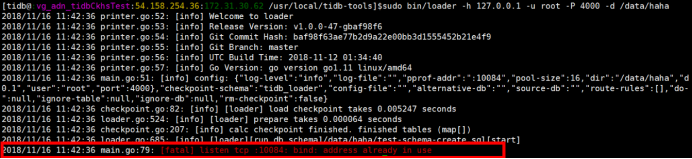
这是因为端口被占用,导致不能重新写入,使用netstat -lnp| grep 10084命令找到该端口10084的对应的进程,然后使用kill命令杀死进程即可。
2、tidb_loader数据库下check_point表的作用
解释:当我们导入tidb数据库数据之后,这个check_point表都会产生一行数据,用来记录导入数据的状态信息以及导入时间等。
如果你导入一次数据之后,check_point以及记录一次了,这个时候你把导入的那个表删除了,但是没有删除check_point的导入记录,那么现在你继续重新导入之前的那个表,会发现导入失败。
下面是讲解check_point表的作用:
mysql> select * from haha

    -> ;

+------+------+

| id   | name |

+------+------+

|     | chen |

|     | chao |

|     | feng |

+------+------+

 rows in set (0.00 sec)

mysql> drop table haha;

Query OK,  rows affected (0.25 sec)

mysql> show databases;

+--------------------+

| Database           |

+--------------------+

| INFORMATION_SCHEMA |

| PERFORMANCE_SCHEMA |

| mob                |

| mysql              |

| test               |

| tidb_loader        |

+--------------------+

 rows in set (0.00 sec)

mysql> use tidb_loader;

Database changed

mysql> show tables;

+-----------------------+

| Tables_in_tidb_loader |

+-----------------------+

| checkpoint            |

+-----------------------+

 row in set (0.00 sec)

mysql> select * from checkpoint;

+--------+---------------+-----------+----------+--------+---------+---------------------+---------------------+

| id     | filename      | cp_schema | cp_table | offset | end_pos | create_time         | update_time         |

+--------+---------------+-----------+----------+--------+---------+---------------------+---------------------+

| 32c716 | test.haha.sql | test      | haha     |      |       | -- :: | -- :: |

+--------+---------------+-----------+----------+--------+---------+---------------------+---------------------+

 row in set (0.00 sec)

mysql> exit

Bye

[tidb@:vg_adn_tidbCkhsTest:54.158.254.36:172.31.30.62 /usr/local/tidb-tools]$sudo bin/loader -h 127.0.0.1 -u root -P  -t  -d /data/haha

// :: printer.go:: [info] Welcome to loader

// :: printer.go:: [info] Release Version: v1.0.0--gbaf98f6

// :: printer.go:: [info] Git Commit Hash: baf98f63ae77b2d9a22e00bb3d1555452b21e4f9

// :: printer.go:: [info] Git Branch: master

// :: printer.go:: [info] UTC Build Time: -- ::

// :: printer.go:: [info] Go Version: go version go1. linux/amd64

// :: main.go:: [info] config: {"log-level":"info","log-file":"","pprof-addr":":10084","pool-size":,"dir":"/data/haha","db":{"host":"127.0.0.1","user":"root","port":},"checkpoint-schema":"tidb_loader","config-file":"","alternative-db":"","source-db":"","route-rules":[],"do-table":null,"do-db":null,"ignore-table":null,"ignore-db":null,"rm-checkpoint":false}

// :: checkpoint.go:: [info] [loader] load checkpoint takes 0.005710 seconds

// :: loader.go:: [info] [loader] prepare takes 0.000085 seconds

// :: checkpoint.go:: [info] calc checkpoint finished. finished tables (map[test.haha:{}])

// :: loader.go:: [info] [loader][run db schema]/data/haha/test-schema-create.sql[start]

// :: db.go:: [warning] [exec][sql][CREATE DATABASE `test` /* !40100 DEFAULT CHARACTER SET utf8 */;][error]Error : Can't create database 'test'; database exists

// :: loader.go:: [info] [loader][database already exists, skip]/data/haha/test-schema-create.sql

// :: loader.go:: [info] [loader][run db schema]/data/haha/test-schema-create.sql[finished]

// :: loader.go:: [info] table (test.haha) has finished, skip.

// :: loader.go:: [info] [loader] create tables takes 0.004609 seconds

// :: loader.go:: [info] [loader] all data files have been dispatched, waiting for them finished

// :: loader.go:: [info] [loader] all data files has been finished, takes 0.004650 seconds

// :: main.go:: [info] loader stopped and exits

[tidb@:vg_adn_tidbCkhsTest:54.158.254.36:172.31.30.62 /usr/local/tidb-tools]$mysql -u root -P  -h 127.0.0.1

Welcome to the MySQL monitor.  Commands end with ; or \g.

Your MySQL connection id is

Server version: 5.7.-TiDB-v2.0.8 MySQL Community Server (Apache License 2.0)

Copyright (c) , , Oracle and/or its affiliates. All rights reserved.

Oracle is a registered trademark of Oracle Corporation and/or its

affiliates. Other names may be trademarks of their respective

owners.

Type 'help;' or '\h' for help. Type '\c' to clear the current input statement.

mysql> use test

Database changed

mysql> show tables;

Empty set (0.00 sec)

mysql>
TiDB数据库 mydumper与loader导入数据的更多相关文章
- oracle数据库管理员简介、导入数据与导出数据
数据库管理员: sys和system的权限区别:sys:所有oracle的数据字典的基表和视图都存放在sys用户中,这些基表和视图对于oracle的运行时至关重要的,由数据库 自己维护,任何用户都不能 ...
- 使用neo4j图数据库的import工具导入数据 -方法和注意事项
背景 最近我在尝试存储知识图谱的过程中,接触到了Neo4j图数据库,这里我摘取了一段Neo4j的简介: Neo4j是一个高性能的,NOSQL图形数据库,它将结构化数据存储在网络上而不是表中.它是一个嵌 ...
- TiDB数据库 mydumper命令导出数据报错:(mydumper:1908): CRITICAL **: Couldn't acquire global lock, snapshots will not be consistent: Access denied for user 'super'@'%' (using password: YES)
今天想使用Tidb官方提供的mydumper来备份AWS上的RDS集群中mysql数据库的某个表,发现报错了 [tidb@:xxx /usr/local/tidb-tools]$ -t -F -B x ...
- 【搜索引擎】Solr最新安装以及通过关系型数据库(MySQL,Oracle,PostgreSQL)导入数据
版本号 最新的solr版本 : Solr 8.1.1下载地址:https://lucene.apache.org/solr/downloads.html solr-8.1.0.tgz for Linu ...
- SQL server 导入数据 (excel导入到SQL server数据库)
打开数据库SQL server ,右键数据库,任务,导入数据 点击下一步 选择数据源类型 选择路径,点击下一步 选择将要生成的类型 选择登陆方式 选中,点击下一步 点击编辑映射可以修改将要生成的表,点 ...
- SQL SERVER导入数据到ORACLE的方法总结
我们偶尔会有将数据从SQL SERVER导入到ORACLE当中的这种需求,那么这种跨数据库导数有那些方法呢?这些方法又有那些利弊呢? 下面比较肤浅的总结了一些可行的方法. 1:生成SQL脚本然后去OR ...
- 记录一次向TiDB数据库导入数据的例子
导出数据 今天从Mysql的某个库中导出一个表大概有20分钟吧,等了一会终于导出成功了.查看一下文件的大小: [tidb@:vg_adn_CkhsTest ~]$du -h ./creative_ou ...
- Tidb数据库导入数据出现oom问题
今天使用insert操作向tidb中插入数据,发现正在导入的过程中出现如下错误: mysql: [Warning] Using a password on the command line inter ...
- TiDB数据库 使用syncer工具同步实时数据
mysql> select campaign_id ,count(id) from creative_output group by campaign_id; rows min 44.23 se ...
随机推荐
- Async和await关键字的用法
async & await 的前世今生(Updated) 1. 方法打上Async关键字, 就可以使用await调用别的Async方法了 2. 记得在需要异步执行的方法里面调用await或者n ...
- 【手记】解决Resharper 2018.x起本机license server不能用的问题
ReSharper升级到2018版后,一直用的好好的本机license server(下称LS)不能用了,报The license server address is incorrect....在网上 ...
- Java基础——网络编程(二)
一.套接字 Socket 网络驱动程序提供给应用程序编程的接口和一种机制,可以比喻成一个港口码头 应用程序只要把货放在这,就算完成了货物的运送.它在应用程序中创建,通过一种绑定机制与驱动程序建立关系, ...
- Gold Rush(hnu13249)
Gold Rush Time Limit: 2000ms, Special Time Limit:5000ms, Memory Limit:65536KB Total submit users: 15 ...
- Android-事件分发(ViewGroup)
http://blog.csdn.net/guolin_blog/article/details/9153747 http://blog.csdn.net/lmj623565791/article/d ...
- spring-bean实例化三种方式
在spring中,bean的示例化有三种方式. 1.使用类的无参构造函数创建 2.使用静态工厂方式创建 3.使用实例化工厂方式创建. 具体代码如下 静态工厂方式: Bean2.java package ...
- 悟空模式-java-原型模式
[却说那妖精与大圣斗经半日,不分胜败.行者把棒丢起,叫一声“变!”就以一变十,以十变百,以百变千,半天里,好似蛇游蟒搅,乱打妖邪.妖邪慌了手脚,将身一闪,化道清风,即奔碧空之上逃走.行者念声咒语,将铁 ...
- HDU2643(SummerTrainingDay05-P 第二类斯特林数)
Rank Time Limit: 2000/1000 MS (Java/Others) Memory Limit: 32768/32768 K (Java/Others)Total Submis ...
- stylus常用写法
带参数 border-radius(val) -webkit-border-radius: val -moz-border-radius: val border-radius: val button ...
- 【读书笔记】iOS-网络-解析响应负载
Web Service可以通过多种格式返回结构化数据, 不过大多数时候使用的是XML与JSON.也可以让应用只接收HTML结构的数据.实现了这些Web Service或是接收HTML文档的应用必须能解 ...