
简单的SpringMVC经典案例
主题:构建一个基于SpringMVC的HelloWord Web 项目
目的:快速体验什么是SpringMVC
方案:
1、创建工程,命名:SpringMVC
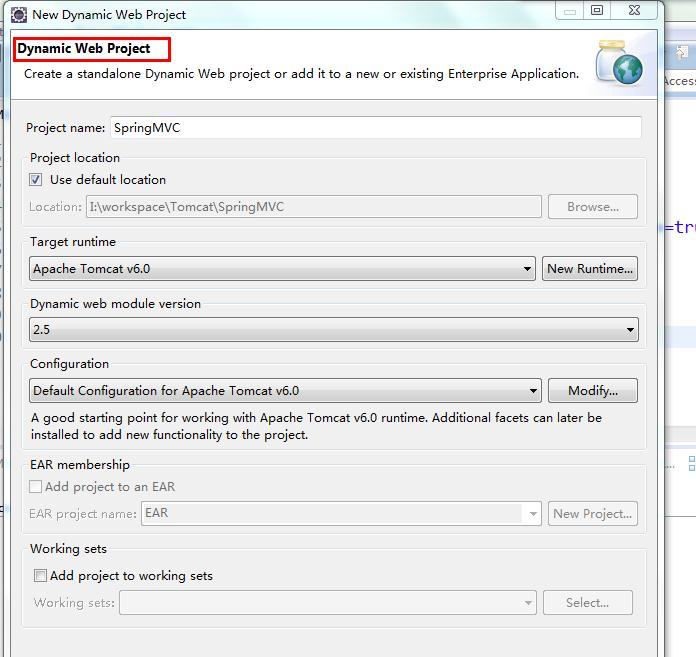
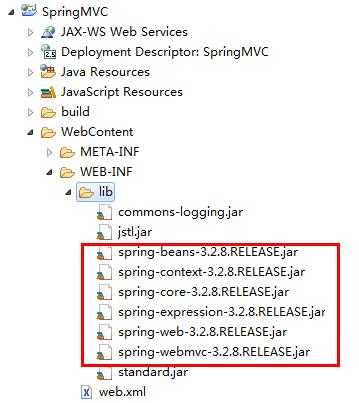
2、导包
3、在SRC下添加spring-mvc.xml配置文件
(注意:名字可以随便取,最好就是看上就知道是什么)

<?xml version="1.0" encoding="UTF-8"?>

<beans xmlns="http://www.springframework.org/schema/beans"

    xmlns:mvc="http://www.springframework.org/schema/mvc" xmlns:xsi="http://www.w3.org/2001/XMLSchema-instance"

    xmlns:context="http://www.springframework.org/schema/context" xmlns:tx="http://www.springframework.org/schema/tx"

    xmlns:aop="http://www.springframework.org/schema/aop"

    xsi:schemaLocation="http://www.springframework.org/schema/beans

               http://www.springframework.org/schema/beans/spring-beans-4.0.xsd

               http://www.springframework.org/schema/context

               http://www.springframework.org/schema/context/spring-context-4.0.xsd

               http://www.springframework.org/schema/tx

               http://www.springframework.org/schema/tx/spring-tx-4.0.xsd

               http://www.springframework.org/schema/aop

               http://www.springframework.org/schema/aop/spring-aop-4.0.xsd

               http://www.springframework.org/schema/mvc

                http://www.springframework.org/schema/mvc/spring-mvc.xsd">

</beans>
4、在web.xml配置封装在Spring里面的servlet--DispatcherServlet前端控制器,并指定spring-mvc.xml文件
<?xml version="1.0" encoding="UTF-8"?>

<web-app xmlns:xsi="http://www.w3.org/2001/XMLSchema-instance" xmlns="http://java.sun.com/xml/ns/javaee" xsi:schemaLocation="http://java.sun.com/xml/ns/javaee http://java.sun.com/xml/ns/javaee/web-app_2_5.xsd" id="WebApp_ID" version="2.5">

  <display-name>SpringMVC</display-name>

  <servlet>

      <servlet-name>SpringMVC</servlet-name>

      <!-- DispathcherServlet 前端控制器 -->

      <servlet-class>org.springframework.web.servlet.DispatcherServlet</servlet-class>

      <init-param>

          <!-- 变量名随便取 -->

          <param-name>contextConfigLocation</param-name>

          <!-- 指定SpringMVC配置文件名 -->

          <param-value>classpath:spring-mvc.xml</param-value>

      </init-param>

      <!-- load-on-startup等于1,则表示容器启动就实例化此Servlet -->

    <load-on-startup>1</load-on-startup>

  </servlet>

  <servlet-mapping>

      <!-- 要与上面Servlet的名字对应 -->

      <servlet-name>SpringMVC</servlet-name>

      <!-- 用来匹配客户端请求 -->

      <url-pattern>*.action</url-pattern>

  </servlet-mapping>

</web-app>
5、在spring-mvc.xml中配置 【HandlerMapping组件】------------------作用------>设置客户端请求与Controller
【InternalResourceViewResolver组件】--作用------>设置视图配置
【HelloController】------------------------作用------->测试请求处理
<?xml version="1.0" encoding="UTF-8"?>

<beans xmlns="http://www.springframework.org/schema/beans"

    xmlns:mvc="http://www.springframework.org/schema/mvc" xmlns:xsi="http://www.w3.org/2001/XMLSchema-instance"

    xmlns:context="http://www.springframework.org/schema/context" xmlns:tx="http://www.springframework.org/schema/tx"

    xmlns:aop="http://www.springframework.org/schema/aop"

    xsi:schemaLocation="http://www.springframework.org/schema/beans

               http://www.springframework.org/schema/beans/spring-beans-4.0.xsd

               http://www.springframework.org/schema/context

               http://www.springframework.org/schema/context/spring-context-4.0.xsd

               http://www.springframework.org/schema/tx

               http://www.springframework.org/schema/tx/spring-tx-4.0.xsd

               http://www.springframework.org/schema/aop

               http://www.springframework.org/schema/aop/spring-aop-4.0.xsd

               http://www.springframework.org/schema/mvc

                http://www.springframework.org/schema/mvc/spring-mvc.xsd">

    <!-- 定义客户端请求映射关系 -->

    <!-- HeanlerMapping是Spring核心组件之一 -->

    <bean id="headlerMapping"

          class="org.springframework.web.servlet.handler.SimpleUrlHandlerMapping">

         <property name="mappings">

             <map>

                 <entry key="/hello.action">

                     <value>helloController</value>

                 </entry>

             </map>

         </property>

    </bean>

    <!-- 增加HelloController的Bean -->

    <bean id="helloController" class="controller.HelloController" />

    <!-- 定义视图解释器(Spring核心组件之一) -->

    <bean id="viewResolver"

          class="org.springframework.web.servlet.view.InternalResourceViewResolver">

          <property name="prefix" value="WEB-INF/jsp/"/>

          <property name="suffix" value=".jsp"/>

    </bean>

</beans>
6、编写HelloController【注意:需要实现Controller接口】
package controller;

import javax.servlet.http.HttpServletRequest;

import javax.servlet.http.HttpServletResponse;

import org.springframework.web.servlet.ModelAndView;

import org.springframework.web.servlet.mvc.Controller;

public class HelloController implements Controller{

    @Override

    public ModelAndView handleRequest(HttpServletRequest arg0, HttpServletResponse arg1) throws Exception {

        ModelAndView mv = new ModelAndView("hello");

        System.out.println("处理hello.action请求");

        return mv;

    }

}
7、在WEB-INF文件夹下新增"jsp"文件夹,并添加hello.jsp
<%@ page language="java" contentType="text/html; charset=UTF-8"

    pageEncoding="UTF-8"%>

<!DOCTYPE html PUBLIC "-//W3C//DTD HTML 4.01 Transitional//EN" "http://www.w3.org/TR/html4/loose.dtd">

<html>

<head>

<meta http-equiv="Content-Type" content="text/html; charset=UTF-8">

<title>Insert title here</title>

</head>

<body>

    欢迎来到Spring的世界!

</body>

</html>
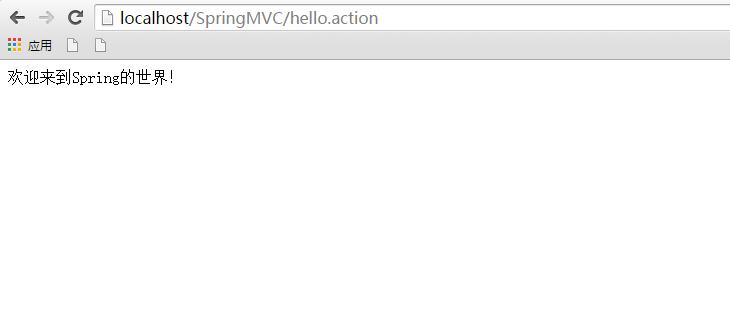
8、跑起来吧兄弟们~然后访问http://localhost/SpringMVC/hello.action,效果如下:

简单的SpringMVC经典案例的更多相关文章
- Linux运维之道(大量经典案例、问题分析,运维案头书,红帽推荐)
Linux运维之道(大量经典案例.问题分析,运维案头书,红帽推荐) 丁明一 编 ISBN 978-7-121-21877-4 2014年1月出版 定价:69.00元 448页 16开 编辑推荐 1 ...
- Altera OpenCL用于计算机领域的13个经典案例(转)
英文出自:Streamcomputing 转自:http://www.csdn.net/article/2013-10-29/2817319-the-application-areas-opencl- ...
- php中foreach()函数与Array数组经典案例讲解
//php中foreach()函数与Array数组经典案例讲解 function getVal($v) { return $v; //可以加任意检查代码,列入要求$v必须是数字,或过滤非法字符串等.} ...
- HTML5 CSS3 经典案例:无插件拖拽上传图片 (支持预览与批量) (二)
转载请标明出处:http://blog.csdn.net/lmj623565791/article/details/31513065 上一篇已经实现了这个项目的整体的HTML和CSS: HTML5 C ...
- 经典案例复盘——运维专家讲述如何实现K8S落地
经典案例复盘——运维专家讲述如何实现K8S落地 背景介绍 运满满自开始微服务改造以来,线上线下已有数千个微服务的 Java 实例在运行中.这些 Java 实例部署在数百台云服务器或虚机上,除少数访问量 ...
- springmvc 项目完整示例01 需求与数据库表设计 简单的springmvc应用实例 web项目
一个简单的用户登录系统 用户有账号密码,登录ip,登录时间 打开登录页面,输入用户名密码 登录日志,可以记录登陆的时间,登陆的ip 成功登陆了的话,就更新用户的最后登入时间和ip,同时记录一条登录记录 ...
- Python递归的经典案例
目录 : 一.递归的简介 二.递归的经典应用 2.1 递归求阶乘 2.2 递归推斐波那契数列 2.3 二分法找有序列表指定值 2.4 递归解汉诺塔 前言: 当我们碰到诸如需要求阶乘或斐 ...
- SpringMVC经典系列-15对SpringMVC的总结---【LinusZhu】
注意:此文章是个人原创,希望有转载须要的朋友们标明文章出处,假设各位朋友们认为写的还好,就给个赞哈.你的鼓舞是我创作的最大动力,LinusZhu在此表示十分感谢,当然文章中如有纰漏,请联系linusz ...
- Spark之权威指南经典案例
hadoop权威指南上有一个求历史最高温度的经典案例,源数据如下: -- sample.txt0067011990999991950051507004+68750+023550FM-12+038299 ...
随机推荐
- 3、JUC--ConcurrentHashMap 锁分段机制
ConcurrentHashMap Java 5.0 在 java.util.concurrent 包中提供了多种并发容器类来改进同步容器的性能. ConcurrentHashMap 同步容器 ...
- UICollectionView设置首个cell默认选中
设置UICollectionView中某个cell的默认选中,刚开始为追求性能,采用同一个cellId去标识UICollectionViewCell,却由于cell的重用会导致之前选中的cell在被重 ...
- CentOS 安装Weblogic并配置 domain
CentOS 安装Weblogic并配置 domain 1.创建用户组 [root@localhost weblogic]# groupadd weblogic 2.创建 tmn 用户 [root@l ...
- WebDriver高级应用实例(2)
2.1在日期选择器上进行日期选择 被测网页的网址: https://www.html5tricks.com/demo/Kalendae/index.html Java语言版本的API实例代码 impo ...
- C# SqlHelper类的数据库操作
#region 私有构造函数和方法 private SqlHelper() { } /// <summary> /// 将SqlParameter参数数组(参数值)分配给SqlComman ...
- odoo开发笔记 -- 权限机制
转两篇关于权限的2篇文章,加深这方面的认识.注:后面附有原作者地址,希望不构成侵权. https://www.cnblogs.com/crazyguo/p/6999408.html 第一篇:http: ...
- dbvisulizer 存储过程
--/ CREATE PROCEDURE test () BEGIN DECLARE v CHAR(10) DEFAULT 'Hello';SELECT CONCAT(v, ', ', current ...
- Scanner的概述与String类的构造和使用_DAY12
1:Scanner的概述(理解) 1)Scanner是JDK5以后出现的方便我们从键盘接受数据的类. 2)Scanner的构造格式: Scanner sc = new Scanner(System.i ...
- Openstack单元测试工具简单说明
一.Openstack 的单元测试工具介绍 1.unittest unittest: 是 Python 的标准库,提供了最基本的单元测试功能,包括 单元测试运行器(简称runner) 和 单元测试框架 ...
- Linux 部署 ASP.NET Core 的一些问题记录
异常错误: 关闭 IP6 #修改 vi /etc/sysctl.conf # 添加如下三条设置 net.ipv6.conf.all.disable_ipv6 = 1 net.ipv6.co ...