
redis cluster应用连接(password)
application.properties
集群配置
application.properties
#各Redis节点信息
spring.redis.cluster.nodes=47.96.*.*:6370,47.96.*.*:6371,47.96.*.*:6372,116.62.*.*:6373,116.62.*.*:6374,116.62.*.*:6375
spring.redis.cluster.password=******
#执行命令超时时间
spring.redis.cluster.command-timeout= 10000
#重试次数
spring.redis.cluster.max-attempts=2
#跨集群执行命令时要遵循的最大重定向数量
spring.redis.cluster.max-redirects=3
#连接池最大连接数(使用负值表示没有限制)
spring.redis.cluster.max-active=16
#连接池最大阻塞等待时间(使用负值表示没有限制)
spring.redis.cluster.max-wait=-1
#连接池中的最大空闲连接
spring.redis.cluster.max-idle=8
#连接池中的最小空闲连接
spring.redis.cluster.min-idle=0
#是否在从池中取出连接前进行检验,如果检验失败,则从池中去除连接并尝试取出另一个
spring.redis.cluster.test-on-borrow=true
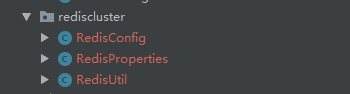
@Component

@ConfigurationProperties(prefix = "spring.redis.cluster")

@Data

public class RedisProperties {

    private String nodes;

    private String password;

    private Integer commandTimeout;

    private Integer maxAttempts;

    private Integer maxRedirects;

    private Integer maxActive;

    private Integer maxWait;

    private Integer maxIdle;

    private Integer minIdle;

    private boolean testOnBorrow;

    public String getNodes() {

        return nodes;

    }

    public void setNodes(String nodes) {

        this.nodes = nodes;

    }

    public String getPassword() {

        return password;

    }

    public void setPassword(String password) {

        this.password = password;

    }

    public Integer getCommandTimeout() {

        return commandTimeout;

    }

    public void setCommandTimeout(Integer commandTimeout) {

        this.commandTimeout = commandTimeout;

    }

    public Integer getMaxAttempts() {

        return maxAttempts;

    }

    public void setMaxAttempts(Integer maxAttempts) {

        this.maxAttempts = maxAttempts;

    }

    public Integer getMaxRedirects() {

        return maxRedirects;

    }

    public void setMaxRedirects(Integer maxRedirects) {

        this.maxRedirects = maxRedirects;

    }

    public Integer getMaxActive() {

        return maxActive;

    }

    public void setMaxActive(Integer maxActive) {

        this.maxActive = maxActive;

    }

    public Integer getMaxWait() {

        return maxWait;

    }

    public void setMaxWait(Integer maxWait) {

        this.maxWait = maxWait;

    }

    public Integer getMaxIdle() {

        return maxIdle;

    }

    public void setMaxIdle(Integer maxIdle) {

        this.maxIdle = maxIdle;

    }

    public Integer getMinIdle() {

        return minIdle;

    }

    public void setMinIdle(Integer minIdle) {

        this.minIdle = minIdle;

    }

    public boolean isTestOnBorrow() {

        return testOnBorrow;

    }

    public void setTestOnBorrow(boolean testOnBorrow) {

        this.testOnBorrow = testOnBorrow;

    }

    @Override

    public String toString() {

        return "RedisProperties{" +

                "nodes='" + nodes + '\'' +

                ", password='" + password + '\'' +

                ", commandTimeout=" + commandTimeout +

                ", maxAttempts=" + maxAttempts +

                ", maxRedirects=" + maxRedirects +

                ", maxActive=" + maxActive +

                ", maxWait=" + maxWait +

                ", maxIdle=" + maxIdle +

                ", minIdle=" + minIdle +

                ", testOnBorrow=" + testOnBorrow +

                '}';

    }

}
@Configuration

@ConditionalOnClass(JedisCluster.class)

public class RedisConfig {

    Logger logger = LoggerFactory.getLogger(RedisCacheConfiguration.class);

    @Resource

    private RedisProperties redisProperties;

    /**

     * 配置 Redis 连接池信息

     */

    @Bean

    public JedisPoolConfig getJedisPoolConfig() {

        JedisPoolConfig jedisPoolConfig =new JedisPoolConfig();

        jedisPoolConfig.setMaxIdle(redisProperties.getMaxIdle());

        jedisPoolConfig.setMaxWaitMillis(redisProperties.getMaxWait());

        jedisPoolConfig.setTestOnBorrow(redisProperties.isTestOnBorrow());

        return jedisPoolConfig;

    }

    /*

     *返回单例JedisCluster

     */

    @Bean

    public JedisCluster getJedisCluster(){

        String[] serverArray = redisProperties.getNodes().split(",");

        Set<HostAndPort> nodes = new HashSet<HostAndPort>();

        for(String ipPort: serverArray){

            String[] ipPortPair = ipPort.split(":");

            nodes.add(new HostAndPort(ipPortPair[0].trim(),Integer.valueOf(ipPortPair[1].trim())));

        }

        return new JedisCluster(nodes,redisProperties.getCommandTimeout(),1000,1,redisProperties.getPassword(),new GenericObjectPoolConfig());

    }

    /**

     * 设置数据存入redis 的序列化方式

     *  redisTemplate序列化默认使用的jdkSerializeable

     *  存储二进制字节码,导致key会出现乱码,所以自定义序列化类

     */

    @Bean

    public RedisTemplate<Object, Object> redisTemplate(RedisConnectionFactory redisConnectionFactory) {

        RedisTemplate<Object, Object> redisTemplate = new RedisTemplate<>();

        redisTemplate.setConnectionFactory(redisConnectionFactory);

        Jackson2JsonRedisSerializer jackson2JsonRedisSerializer = new Jackson2JsonRedisSerializer(Object.class);

        ObjectMapper objectMapper = new ObjectMapper();

        objectMapper.setVisibility(PropertyAccessor.ALL, JsonAutoDetect.Visibility.ANY);

        objectMapper.enableDefaultTyping(ObjectMapper.DefaultTyping.NON_FINAL);

        jackson2JsonRedisSerializer.setObjectMapper(objectMapper);

        redisTemplate.setValueSerializer(jackson2JsonRedisSerializer);

        redisTemplate.setKeySerializer(new StringRedisSerializer());

        redisTemplate.setHashKeySerializer(new StringRedisSerializer());

        redisTemplate.afterPropertiesSet();

        logger.info("redis cluster集群连接成功");

        return redisTemplate;

    }

}
@Component

public class RedisUtil {

    private static final Logger LOGGER    = LoggerFactory.getLogger(RedisUtil.class);

    @Autowired

    private JedisCluster jedisCluster;

    /**

     * 设置缓存

     * @param key    缓存key

     * @param value  缓存value

     */

    public void set(String key, String value) {

        jedisCluster.set(key, value);

        LOGGER.debug("RedisUtil:set cache key={},value={}", key, value);

    }

    /**

     * 设置缓存对象

     * @param key    缓存key

     * @param obj  缓存value

     */

    public <T> void setObject(String key, T obj , int expireTime) {

        jedisCluster.setex(key, expireTime, JSON.toJSONString(obj));

    }

    /**

     * 获取指定key的缓存

     * @param key---JSON.parseObject(value, User.class);

     */

    public String getObject(String key) {

        return jedisCluster.get(key);

    }

    /**

     * 判断当前key值 是否存在

     *

     * @param key

     */

    public boolean hasKey(String key) {

        return jedisCluster.exists(key);

    }

    /**

     * 设置缓存,并且自己指定过期时间

     * @param key

     * @param value

     * @param expireTime 过期时间

     */

    public void setWithExpireTime( String key, String value, int expireTime) {

        jedisCluster.setex(key, expireTime, value);

        LOGGER.debug("RedisUtil:setWithExpireTime cache key={},value={},expireTime={}", key, value, expireTime);

    }

    /**

     * 获取指定key的缓存

     * @param key

     */

    public String get(String key) {

        String value = jedisCluster.get(key);

        LOGGER.debug("RedisUtil:get cache key={},value={}",key, value);

        return value;

    }

    /**

     * 删除指定key的缓存

     * @param key

     */

    public void delete(String key) {

        jedisCluster.del(key);

        LOGGER.debug("RedisUtil:delete cache key={}", key);

    }

}
单机版
spring.redis.database=0
spring.redis.host=116.62.*.*
spring.redis.password=********
spring.redis.port=6379
spring.redis.jedis.pool.max-active=4
spring.redis.jedis.pool.max-wait=-1
spring.redis.jedis.pool.max-idle=2
spring.redis.jedis.pool.min-idle=0
#spring.redis.default.expire.time=60
spring.redis.timeout=10000
spring.redis.clientname=knowsecret
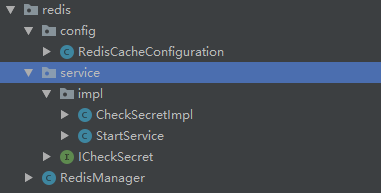
@Configuration

@Order(value = )

public class StartService implements ApplicationRunner {

    private static Logger logger = LoggerFactory.getLogger(StartService.class);

    @Autowired

    private ICheckSecret iCheckSecret;

    @Override

    public void run(ApplicationArguments args) throws Exception {

        logger.info("project start secret init");

        String uuid = UUID.randomUUID().toString();

        //0代表永久有效

        iCheckSecret.setSectetMes("secretvalue",uuid,);

    }

}
@Configuration

@EnableCaching

public class RedisCacheConfiguration extends CachingConfigurerSupport {

    Logger logger = LoggerFactory.getLogger(RedisCacheConfiguration.class);

    @Value("${spring.redis.host}")

    private String host;

    @Value("${spring.redis.port}")

    private int port;

    @Value("${spring.redis.timeout}")

    private int timeout;

    @Value("${spring.redis.jedis.pool.max-idle}")

    private int maxIdle;

    @Value("${spring.redis.jedis.pool.max-wait}")

    private long maxWaitMillis;

    @Value("${spring.redis.password}")

    private String password;

    @Value("${spring.redis.database}")

    private int database;

    @Value("${spring.redis.clientname}")

    private String clienttoken;

    @Bean

    public JedisPool redisPoolFactory() {

        logger.info("JedisPool注入成功!!");

        logger.info("redis地址:" + host + ":" + port);

        JedisPoolConfig jedisPoolConfig = new JedisPoolConfig();

        jedisPoolConfig.setMaxIdle(maxIdle);

        jedisPoolConfig.setMaxWaitMillis(maxWaitMillis);

        jedisPoolConfig.setTestOnBorrow(true);

        jedisPoolConfig.setTestOnReturn(true);

       // JedisPool jedisPool = new JedisPool(jedisPoolConfig, host, port, timeout, password);

        JedisPool jedisPool = new JedisPool(jedisPoolConfig, host, port, timeout, password,database,clienttoken);

        return jedisPool;

    }

}
redis cluster应用连接(password)的更多相关文章
- redis集群报Jedis does not support password protected Redis Cluster configurations异常解决办法
解决spring-data-redis操作redis集群报“Jedis does not support password protected Redis Cluster configurations ...
- Redis Cluster集群搭建后,客户端的连接研究(Spring/Jedis)(待实践)
说明:无论是否已经搭建好集群,还是使用什么样的客户端去连接,都是必须把全部IP列表集成进去,然后随机往其中一个IP写. 这样做的好处: 1.随机IP写入之后,Redis Cluster代理层会自动根据 ...
- python 连接 redis cluster 集群
一. redis集群模式有多种, cluster模式只是其中的一种实现方式, 其原理请自行谷歌或者百度, 这里只举例如何使用Python操作 redis cluster 集群 二. python 连接 ...
- jedis处理redis cluster集群的密码问题
环境介绍:jedis:2.8.0 redis版本:3.2 首先说一下redis集群的方式,一种是cluster的 一种是sentinel的,cluster的是redis 3.0之后出来新的集群方式 本 ...
- Redis Cluster部署、管理和测试
背景: Redis 3.0之后支持了Cluster,大大增强了Redis水平扩展的能力.Redis Cluster是Redis官方的集群实现方案,在此之前已经有第三方Redis集群解决方案,如Twen ...
- Redis Cluster的搭建与部署,实现redis的分布式方案
前言 上篇Redis Sentinel安装与部署,实现redis的高可用实现了redis的高可用,针对的主要是master宕机的情况,我们发现所有节点的数据都是一样的,那么一旦数据量过大,redi也会 ...
- 超详细的 Redis Cluster 官方集群搭建指南
今天从 0 开始搭建 Redis Cluster 官方集群,解决搭建过程中遇到的问题,超详细. 安装ruby环境 因为官方提供的创建集群的工具是用ruby写的,需要ruby2.2.2+版本支持,rub ...
- 【精】搭建redis cluster集群,JedisCluster带密码访问【解决当中各种坑】!
转: [精]搭建redis cluster集群,JedisCluster带密码访问[解决当中各种坑]! 2017年05月09日 00:13:18 冉椿林博客 阅读数:18208 版权声明:本文为博主 ...
- redis cluster 实现
Redis cluster是一个redis官方提供的集群功能,集群节点最小3个节点,配置比较多,记录下来,以供下次使用.我在这使用的redis 4.0.6. 因为最新的ruby redis扩展需要ru ...
随机推荐
- PeopleSoft面试题(服务器相关)
如何配置app服务器与web服务器的负载均衡?请详细说明. App Server: 在配置App Server负载均衡时候,通过webserv目录下的configuration.properties文 ...
- MaterialRefreshLayout+ListView 下拉刷新 上拉加载
效果图是这样的,有入侵式的,非入侵式的,带波浪效果的......就那几个属性,都给出来了,自己去试就行. 下拉刷新 上拉加载 关于下拉刷新-上拉加载的效果,有许许多多的实现方式,百度了一下竟然有几十种 ...
- 网站软件FTP下载
网站软件FTP下载 统一管理站 http://www.mmnt.net/ db2 http://www.mmnt.net/db/0/0/public.dhe.ibm.com/software/hk/ ...
- 【转】设置Qt应用程序图标及应用程序名
一直以来很纠结给qt应用程序添加图标问题,在网上收过一次,但是感觉不够完整,现将自己的实现过程记录下,以便以后查看: 通过网上的例子知道qt助手中有相关说明: Setting the Applicat ...
- As3截图转换为ByteArray传送给后台node的一种方法
最近将以前用As3+Php做的一个画板拿出来改成了As3+nodejs(expressjs4). Node: 1. 将图片存放的路径设置为静态公开的路径. app.use(express.static ...
- 解释JS变量作用域的范例
JS的变量作用域只有两种:全局作用域与函数作用域. 用var声明的变量不能简单的说是属于函数作用域,应该是说属于其最近的作用域. var a = 10; function test(){ var a; ...
- [经典bug]弹框关闭按钮点击后程序闪退
问题背景: 业务上遇到一个很诡异的问题:弹框界面上有一个关闭按钮,切换后台再返回后,点击关闭按钮,部分机型上会直接崩溃.点击手机返回键关闭界面则正常. 问题原因: 点击关闭按钮的操作属于UI线程,直接 ...
- JSON教程基础
一.基础简介 二.JSON 语法 三.JSON 使用 一.基础简介 1.JSON:JavaScript 对象表示法(JavaScript Object Notation). JSON 是存储和交换文本 ...
- [转载]Buffer cache的调整与优化
Buffer Cache是SGA的重要组成部分,主要用于缓存数据块,其大小也直接影响系统的性能.当Buffer Cache过小的时候,将会造成更多的free buffer waits事件.下面将具体描 ...
- 使用Fiddler模拟客户端http响应
在客户端开发中,常常需要对一些特殊情况做处理,比如404.503等,又比如服务返回错误数据等.而测试这些情况会比较麻烦,往往都是找开发人员配合修改代码,这样效率不高. 接触到Fiddler之后,这样的 ...