
一个struts2程序
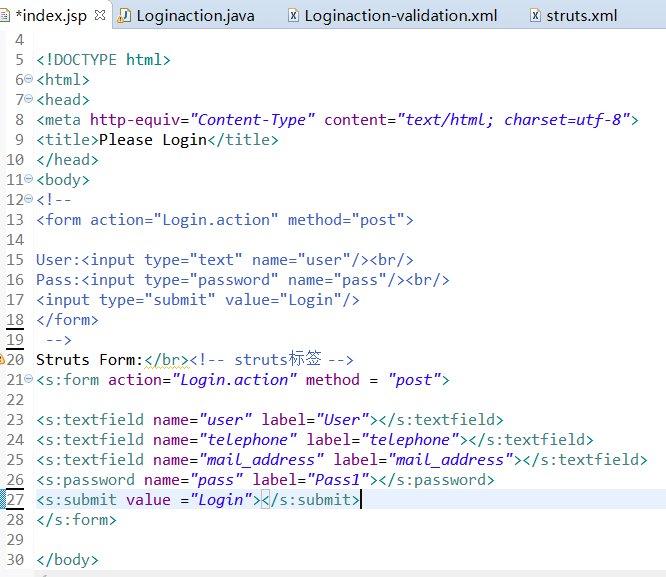
1.index.jsp

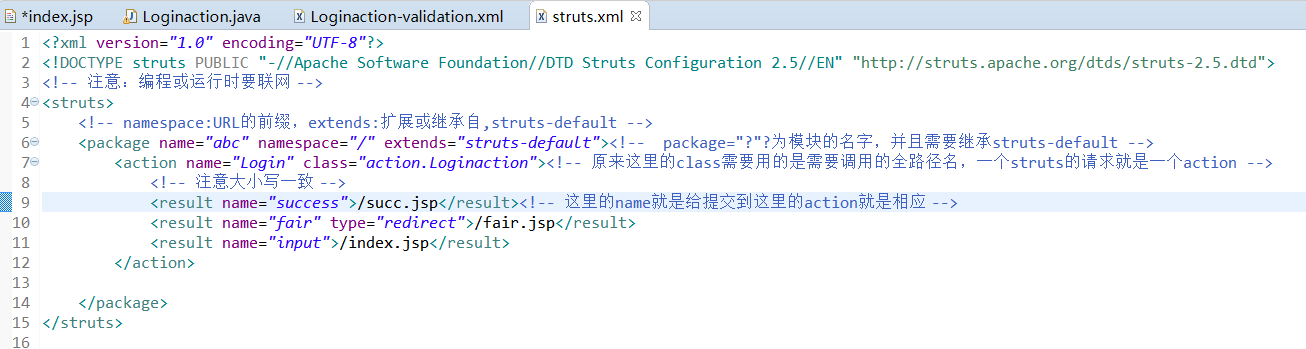
2.struts.xml
3.Loginaction.java
package action;

import java.io.File;

import java.io.FileNotFoundException;

import java.io.FileOutputStream;

import java.util.Map;

import java.io.PrintStream;

import com.opensymphony.xwork2.Action;

import com.opensymphony.xwork2.ActionContext;

import com.opensymphony.xwork2.ActionSupport;

//Action本质上是一个POJO:Plain Old Java Object(JavaBean)

public class Loginaction extends ActionSupport {

    private String user, pass; //private

    private String mail_address,telephone,birth_date;

    public String execute(){

        System.out.println("User:" + user + ",Pass:" + pass);

        if(user == null || user.length() == 0)

            return "fair";

        ActionContext context = ActionContext.getContext();//action 的上下文对象

        //Map session = context.getSession();//actiontext本身就是一个session

        Map<String,Object> session =context.getSession();

        session.put("user", user);

        session.put("pass", pass);

        session.put("mail_address", mail_address);

        session.put("telephone", telephone);

        //FileOutputStream out =null;

      try {

            File file = new File("D://file.txt");

                //FileOutputStream fs = new FileOutputStream(file);

                PrintStream ps =null;

                ps =new PrintStream(file);

                 ps.println(user);// 往文件里写入字符串

                 ps.append(pass);// 在已有的基础上添加字符串

        } catch (FileNotFoundException e) {

            e.printStackTrace();

        }

        return SUCCESS;

    }

    public String getMail_address() {

        return mail_address;

    }

    public void setMail_address(String mail_address) {

        this.mail_address = mail_address;

    }

    public String getTelephone() {

        return telephone;

    }

    public void setTelephone(String telephone) {

        this.telephone = telephone;

    }

    public String getUser() {

        return user;

    }

    public void setUser(String user) {

        this.user = user;

    }

    public String getPass() {

        return pass;

    }

    public void setPass(String pass) {

        this.pass = pass;

    }

}
4.web.xml
<?xml version="1.0" encoding="UTF-8"?>

<web-app xmlns:xsi="http://www.w3.org/2001/XMLSchema-instance" xmlns="http://java.sun.com/xml/ns/javaee" xsi:schemaLocation="http://java.sun.com/xml/ns/javaee http://java.sun.com/xml/ns/javaee/web-app_2_5.xsd" id="WebApp_ID" version="2.5">

  <display-name>teststruts2</display-name>

  <welcome-file-list>

    <welcome-file>index.html</welcome-file>

    <welcome-file>index.htm</welcome-file>

    <welcome-file>index.jsp</welcome-file>

    <welcome-file>default.html</welcome-file>

    <welcome-file>default.htm</welcome-file>

    <welcome-file>default.jsp</welcome-file>

  </welcome-file-list>

  <!-- 配置Struts2过滤器 -->

    <filter>

        <filter-name>struts2</filter-name>

        <filter-class>org.apache.struts2.dispatcher.filter.StrutsPrepareAndExecuteFilter</filter-class>

    </filter>

    <filter-mapping>

        <filter-name>struts2</filter-name>

        <url-pattern>*.action</url-pattern>

    </filter-mapping>

      <filter-mapping>

        <filter-name>struts2</filter-name>

        <url-pattern>*.jsp</url-pattern>

    </filter-mapping>

</web-app>
5.pom.xml
 <project xmlns="http://maven.apache.org/POM/4.0.0" xmlns:xsi="http://www.w3.org/2001/XMLSchema-instance" xsi:schemaLocation="http://maven.apache.org/POM/4.0.0 http://maven.apache.org/xsd/maven-4.0.0.xsd">

   <modelVersion>4.0.0</modelVersion>

   <groupId>teststruts2maven2</groupId>

   <artifactId>teststruts2maven2</artifactId>

   <version>0.0.1-SNAPSHOT</version>

   <dependencies>

       <dependency>

           <groupId>javax.servlet</groupId>

           <artifactId>servlet-api</artifactId>

           <version>2.5</version>

       </dependency>

       <dependency>

           <groupId>org.apache.struts</groupId>

           <artifactId>struts2-core</artifactId>

           <version>2.5.16</version>

       </dependency>

   </dependencies>

 </project>

一个struts2程序的更多相关文章
- struts2基础---->第一个Struts2程序
学习struts2的第一个程序,这里只会涉及到简单的代码编写.有一个夜晚我烧毁了所有的记忆,从此我的梦就透明了:有一个早晨我扔掉了所有的昨天,从此我的脚步就轻盈了. Struts的项目
- Struts2入门(1)-第一个Struts2程序
目录结构 C:\WorkSpace\java\StrutsTest\src\main C:\WorkSpace\java\StrutsTest\src\test C:\WorkSpace\java\S ...
- 2.第一个Struts2程序-HelloWorld程序
1.新建Web Project项目:Study_Struts2 2.新建HelloWordAction.java类 3.复制struts.xml文件到src目录下,配置struts.xml文件内容如下 ...
- 第一个Struts2程序之HelloWorld
1.Struts2 简介 Struts 2是Struts的下一代产品,是在 struts 1和WebWork的技术基础上进行了合并的全新的Struts 2框架.其全新的Struts 2的体系结构与St ...
- 第一个Struts2程序
Struts2.3.16, Tomcat6.0.37,Java8 /web.xml <?xml version="1.0" encoding="UTF-8" ...
- 1、第一个Struts2程序
为了让我们以后开发方便,我们需要配置struts.xml的dtd的头,这样在编写struts.xml文件中可以有提示! 操作如下: (1)打开myeclipse→window→Preferences→ ...
- 第一struts2程序
今天学习了第一个struts2程序 第一步建立一个java web程序 第二步 加入jar包 第三步 添加两个jsp文件 login.jsp和result.jsp文件 login.jsp 在body部 ...
- 如何创建一个简单的struts2程序
如何创建一个简单的Struts2程序 “计应134(实验班) 凌豪” 1.创建一个新的Web项目test(File->new->Web Project) 2.Struts2框架的核心配置文 ...
- struts2总结二:第一个简单的struts2程序
到struts2官网上面下载struts2的jar包,然后解压. struts2的入门程序,实现简单的用户登录,struts2里面的helllo world.利用eclipse的开发工作如下: 1.首 ...
随机推荐
- 【代码笔记】iOS-NSSearchPathForDirectoriesInDomainsDemo
一,代码. - (void)viewDidLoad { [super viewDidLoad]; // Do any additional setup after loading the view, ...
- SD从零开始57-58,第三方订单处理,跨公司销售
[原创] SD从零开始57 第三方订单处理流程 第三方订单处理的流程Processes for Third-Party Order Processing 客户的采购订单首先在你公司的一个销售组织作为一 ...
- npm 安装指定模块版本
npm list 查看具体模块 如: npm list @antv/g6 如需要安装指定的模块和版本 保存时 - --save-dev 是你开发时候依赖的东西,--save 是你发布之后还 ...
- profile,bashrc,.bash_profile,.bash_login,.profile,.bashrc,.bash_logout浅析 Part 2
profile,bashrc,.bash_profile,.bash_login,.profile,.bashrc,.bash_logout浅析 Part 2 by:授客 QQ:103355312 ...
- 网络基础 HTTP协议之缓存简介
HTTP协议之缓存简介 by:授客 QQ:1033553122 用浏览器查看缓存 IE为例,Tools->Internet options -> View files,如图 点击图示的Vi ...
- 【three.js练习程序】拖动选中的物体
<!DOCTYPE html> <html> <head> <meta charset="utf-8"> <title> ...
- gulp学习。
安装gulp 安装gulp之前必须先安装node.js,然后在命令行里输入 $ npm install gulp-cli -g (-g 表示全局安装)然后在输入$ gulp -v ,验证,安装完成后再 ...
- Oracle EBS OPM complete batch
--complete_batch --created by jenrry SET serveroutput on DECLARE x_return_status VARCHAR2 (1); l_exc ...
- 内网DHCP攻击
局域网内DHCP攻击 实验环境:两个win2008 r2虚拟机(一台用作正常的DHCP服务器,另一台用作伪造DHCP服务器),两个win7虚拟机(用作客户机),一个kali虚拟机(用作攻击,耗尽DHC ...
- Spring Boot 验证表单
在实际工作中,得到数据后的第一步就是验证数据的正确性,如果存在录入上的问题,一般会通过注解校验,发现错误后返回给用户,但是对于逻辑上的错误,很难使用注解方式进行验证了,这个使用可以使用Spring所提 ...