
基于LBS平台的iOS开发
LBS,即Location Based Services,基于位置服务,用于定位、导航等功能,比如地图应用、订外卖等的app就需要这个功能。
在这里我使用的是高德LBS开放平台,地址:http://lbs.amap.com/
进入网站,首先注册并认证为开发者,然后为你的每个APP申请一个key,其中安全码(Bundle Identifier)通过Xcode切换到General标签,查看Bundle Identifier。
使用第三方服务,我们可以使用自动配置,这里就要使用到Cocoapods。CocoaPods是一个用来帮助我们管理第三方依赖库的工具。它可以解决库与库之间的依赖关系,下载库的源代码,同时通过创建一个Xcode的workspace来将这些第三方库和我们的工程连接起来,供我们开发使用。使用CocoaPods的目的是让我们能自动化的、集中的、直观的管理第三方开源库。
如果需要升级ruby,使用homebrew安装:brew install ruby
另外一种方法升级ruby: sudo gem update --system
安装Cocoapods教程:
gem sources -l

gem sources --remove https://rubygems.org/

gem sources -a https://ruby.taobao.org/

gem sources -l

sudo gem install -n /usr/local/bin cocoapods
pod setup
创建Podfile:
cd /project

touch Podfile
或者直接cd到工程目录,然后pod init ,在Podfile里直接添加也行。
编辑Podfile文件:
source 'https://github.com/CocoaPods/Specs.git'

platform:ios,'7.0' #手机系统

#pod 'AMap3DMap' #3D地图SDK

pod 'AMap2DMap' #2D地图SDK(2D和3D不能同时使用)

pod 'AMapSearch' #搜索服务SDK

以下是额外补充

#platform :ios

#pod 'Reachability',  '~> 3.0.0'

#pod 'SBJson', '~> 4.0.0'

#platform :ios, '7.0'

#pod 'AFNetworking', '~> 2.0'
标准格式:
source 'https://github.com/CocoaPods/Specs.git'

platform :ios, '9.0'

use_frameworks!

target 'AlamofireDemo' do

pod 'Alamofire'

pod 'SwiftyJSON'

end
然后到工程目录,输入命令pod install,如果出现-bash: pod: command not found,输入sudo gem install -n /usr/local/bin cocoapods即可解决。
如果如果pod update / pod install 卡在:Updating local specs repositories,
等待即可,或者可以使用 “pod install --verbose --no-repo-update” 进行下载。
更新:如果你又添加新的三方库,可以在Podfile文件中继续添加,然后再终端输入pod update,然后CocoaPods就会重新帮你导入.
然后通过打开xcworkspace文件打开安装有cocoapods的工程
以下是我Controller.m的核心代码,仅供参考:
#import "ViewController.h"

#import <MAMapKit/MAMapKit.h>

#import <AMapSearchKit/AMapSearchAPI.h>

#define APIKey @"你申请的key"

@interface ViewController ()<MAMapViewDelegate,AMapSearchDelegate>

{

    MAMapView *_mapView;

    AMapSearchAPI *_search;

    CLLocation *_currentLocation;

    UIButton *_locationButton;

}

@end

@implementation ViewController

- (void)initControls

{

    _locationButton = [UIButton buttonWithType:UIButtonTypeCustom];

    _locationButton.frame = CGRectMake(, CGRectGetHeight(_mapView.bounds)-,,);

    _locationButton.autoresizingMask = UIViewAutoresizingFlexibleRightMargin | UIViewAutoresizingFlexibleTopMargin;

    _locationButton.backgroundColor = [UIColor whiteColor];

    _locationButton.layer.cornerRadius = ;

    [_locationButton addTarget:self action:@selector(locateAction) forControlEvents:UIControlEventTouchUpInside];

    [_locationButton setImage:[UIImage imageNamed:@"location_no"] forState:UIControlStateNormal];

    [_mapView addSubview:_locationButton];

}

//搜索服务

- (void)initSearch

{

    _search = [[AMapSearchAPI alloc]initWithSearchKey:APIKey Delegate:self];

}

//修改用户定位模式

- (void)locateAction

{

    if (_mapView.userTrackingMode != MAUserTrackingModeFollow) {

        [_mapView setUserTrackingMode:MAUserTrackingModeFollow animated:YES];

    }

}

//地理编码搜索请求

- (void)reGeoAction

{

    if(_currentLocation)

    {

        AMapReGeocodeSearchRequest *request = [[AMapReGeocodeSearchRequest alloc]init];

        request.location = [AMapGeoPoint locationWithLatitude:_currentLocation.coordinate.latitude longitude:_currentLocation.coordinate.longitude];

        [_search AMapGeocodeSearch:request];

    }

}

- (void)searchRequest:(id)request didFailWithError:(NSError *)error

{

    NSLog(@"request :%@, error :%@",request,error);

}

- (void)onReGeocodeSearchDone:(AMapGeocodeSearchRequest *)request response:(AMapReGeocodeSearchResponse *)response

{

    NSLog(@"response :%@",response);

    NSString *title = response.regeocode.addressComponent.city;

    if (title.length == ) {

        title = response.regeocode.addressComponent.province;

    }

    _mapView.userLocation.title = title;

    _mapView.userLocation.subtitle = response.regeocode.formattedAddress;

}

//用户代理方法

- (void)mapView:(MAMapView *)mapView didChangeUserTrackingMode:(MAUserTrackingMode)mode animated:(BOOL)animated

{

    //修改定位按钮状态

    if(mode == MAUserTrackingModeNone)

    {

        [_locationButton setImage:[UIImage imageNamed:@"location_no"] forState:UIControlStateNormal];

    }

    else{

        [_locationButton setImage:[UIImage imageNamed:@"location_yes"] forState:UIControlStateNormal];

    }

}

//记录当前所在位置

- (void)mapView:(MAMapView *)mapView didUpdateUserLocation:(MAUserLocation *)userLocation updatingLocation:(BOOL)updatingLocation

{

    NSLog(@"userLocation: %@",userLocation.location);

    _currentLocation = [userLocation.location copy];

}

- (void)mapView:(MAMapView *)mapView didSelectAnnotationView:(MAAnnotationView *)view

{

    //选中定位annotation的时候进行逆地理编码查询

    if ([view.annotation isKindOfClass:[MAUserLocation class]])

    {

        [self reGeoAction];

    }

}

//初始化地图

- (void)initMapView

{

    [MAMapServices sharedServices].apiKey = APIKey;

    _mapView = [[MAMapView alloc]initWithFrame:CGRectMake(, , CGRectGetWidth(self.view.bounds), CGRectGetHeight(self.view.bounds))];

    //设置地图的代理和两个附件的位置

    _mapView.delegate = self;

    _mapView.compassOrigin = CGPointMake(_mapView.compassOrigin.x, );

    _mapView.scaleOrigin = CGPointMake(_mapView.scaleOrigin.x, );

    [self.view addSubview:_mapView];

    //打开用户定位

    _mapView.showsUserLocation = YES;

}

- (void)viewDidLoad {

    [super viewDidLoad];

    // Do any additional setup after loading the view, typically from a nib.

    [self initMapView];

    [self initSearch];

    [self initControls];

}

- (void)didReceiveMemoryWarning {

    [super didReceiveMemoryWarning];

    // Dispose of any resources that can be recreated.

}

@end
运行结果:
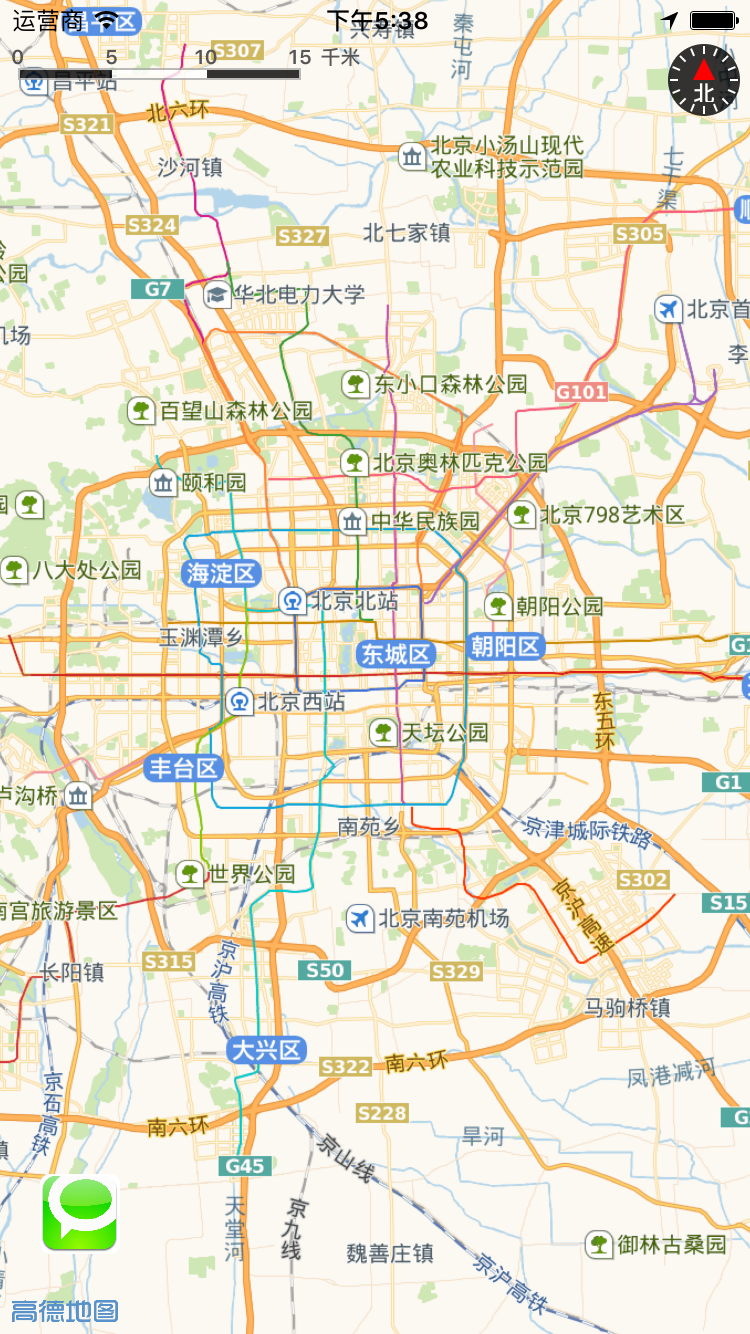
如果你有更多的API接口想要实现,你可以去高德LBS开放平台去看看开发文档,可以作进一步深入和开发。
github地址:https://github.com/AbelSu131/HelloAmap
基于LBS平台的iOS开发的更多相关文章
- 基于 Koa平台Node.js开发的KoaHub.js的控制器,模型,帮助方法自动加载
koahub-loader koahub-loader是基于 Koa平台Node.js开发的KoaHub.js的koahub-loader控制器,模型,帮助方法自动加载 koahub loader I ...
- 基于 Koa平台Node.js开发的KoaHub.js连接打印机的代码
最近好多小伙伴都在做微信商城的项目,那就给大家分享一个基于 Koa.js 平台的 Node.js web 开发的框架连接微信易联云打印机接口的代码,供大家学习.koahub-yilianyun 微信易 ...
- 基于 Koa平台Node.js开发的KoaHub.js获取/设置会话功能代码
koa-session2 Middleware for Koa2 to get/set session use with custom stores such as Redis or mongodb ...
- 基于 Koa平台Node.js开发的KoaHub.js的静态服务器重写和索引代码
koa-static-server Static file serving middleware for koa with directory, rewrite and index support k ...
- 基于 Koa平台Node.js开发的KoaHub.js的模板引擎代码
koahub-handlebars koahub-handlebars koahub handlebars templates Installation $ npm install koahub-ha ...
- 基于 Koa平台Node.js开发的KoaHub.js的输出json到页面代码
koahub-body-res koahub body res Format koa's respond json. Installation $ npm install koahub-body-re ...
- 基于 Koa平台Node.js开发的KoaHub.js的跳过组件代码
koahub-skip koahub skip middleware koahub skip Conditionally skip a middleware when a condition is m ...
- iOS开发---集成百度地图完善版
一.成为百度的开发者.创建应用 http://developer.baidu.com/map/index.php?title=首页 (鼠标移向 然后选择你的项目需要的功能 你可以在里面了解到你想要使用 ...
- 《iOS开发指南》正式出版-源码-样章-目录,欢迎大家提出宝贵意见
智捷iOS课堂-关东升老师最新作品:<iOS开发指南-从0基础到AppStore上线>正式出版了 iOS架构设计.iOS性能优化.iOS测试驱动.iOS调试.iOS团队协作版本控制.... ...
随机推荐
- Django使用多个数据库
一.定义数据库 使用Django的多个数据库的第一步是告诉Django将使用的数据库服务器. 这是使用DATABASES设置完成的. 此设置将数据库别名映射到该特定连接的设置字典,该数据库别名是一种在 ...
- 【jdk源码2】Objects源码学习
在学习上一个类TreeMap的时候,提到了这个类,这个类是jdk1.7新增的,里面有很多实用的方法.就是一个工具类,熟悉以后,如果里面有已经实现的方法,那么就不要再去实现了,省时省力省测试. 一.简单 ...
- Sql server 索引详解
参考资料:老K写的,http://www.cnblogs.com/AK2012/archive/2013/01/04/2844283.html SQL索引在数据库优化中占有一个非常大的比例, 一个好的 ...
- 团队项目个人进展——Day06
一.昨天工作总结 冲刺第六天,深入学习了小程序官方文档,并看了几节小程序教程的视频 二.遇到的问题 对文档中的内容只是熟悉,理解并运用起来还存在问题 三.今日工作规划 学习微信小程序中WebSocke ...
- 10款jQuery文本高亮插件
[编者按]本文作者为 Julian Motz,主要介绍十款 jQuery 文本高亮插件的现状.文章系国内 ITOM 管理平台 OneAPM 编译呈现. 很多应用或网站都为用户提供搜索关键词的方法.为了 ...
- APP性能测试指标和测试方法
流量 常用方法 方法一:Android系统自带统计功能(总体流量数值) Proc/uid_stat/{UID}/tcp_snd和tcp_rcv UID是每个app安装时候分配的唯一编号用于识别该app ...
- LeetCode题解之Pascal's Triangle II
1.题目描述 2.题目分析 题目要求返回杨辉三角的某一行,需要将杨辉三角的某行的全部计算出来. 3.代码实现 vector<int> getRow(int rowIndex) { ) ,) ...
- .NET笔试题集(四)
转载于:http://www.cnblogs.com/ForEvErNoME/archive/2012/09/10/2678727.html 1.请你简单的说明数据库建立索引的优缺点 使用索引可以加快 ...
- length() 用法
length:(字符串 | 列):求出字符串的长度: 求出bqh4表中zym列的长度. select * from bqh4select a.*,length(zym) from bqh4 a
- Hadoop 命令 && Web UI
0. 说明 Hadoop 命令合集 && Web UI 1. HDFS 命令 [1.0 启动所有 && 关闭所有进程] 相当于启动 HDFS 和 YARN # 启动所有 ...