
asp.net core web 添加角色管理
新建asp.net core web应用
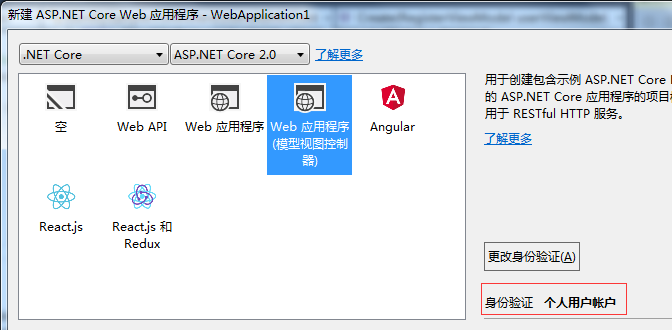
添加RolesAdminController
[Authorize(Roles = "Admin")]
    public class RolesAdminController : Controller
    {
        private UserManager<ApplicationUser> _userManager;
        private RoleManager<IdentityRole> _roleManager;
        private readonly ILogger _logger;
        public RolesAdminController(UserManager<ApplicationUser> userManager, RoleManager<IdentityRole> roleManager, ILogger<AccountController> logger)
        {
            _userManager = userManager;
            _roleManager = roleManager;
            _logger = logger;
        }

        //
        // GET: /Roles/
        public ActionResult Index()
        {
            return View(_roleManager.Roles);
        }

        //
        // GET: /Roles/Details/5
        public async Task<ActionResult> Details(string id)
        {
            if (id == null)
            {
                throw new ApplicationException();
            }
            var role = await _roleManager.FindByIdAsync(id);
            // Get the list of Users in this Role
            var users = new List<ApplicationUser>();

            // Get the list of Users in this Role
            foreach (var user in _userManager.Users.ToList())
            {
                if (await _userManager.IsInRoleAsync(user, role.Name))
                {
                    users.Add(user);
                }
            }

            ViewBag.Users = users;
            ViewBag.UserCount = users.Count();
            return View(role);
        }

        //
        // GET: /Roles/Create
        public ActionResult Create()
        {
            return View();
        }

        //
        // POST: /Roles/Create
        [HttpPost]
        public async Task<ActionResult> Create(IdentityRole roleViewModel)
        {
            if (ModelState.IsValid)
            {
                var role = new IdentityRole(roleViewModel.Name);

                var roleresult = await _roleManager.CreateAsync(role);
                if (!roleresult.Succeeded)
                {
                    AddErrors(roleresult);
                    return View();
                }
                return RedirectToAction("Index");
            }
            return View();
        }

        //
        // GET: /Roles/Edit/Admin
        public async Task<ActionResult> Edit(string id)
        {
            if (id == null)
            {
                throw new ApplicationException();
            }
            var role = await _roleManager.FindByIdAsync(id);
            if (role == null)
            {
                throw new ApplicationException();
            }
            IdentityRole roleModel = new IdentityRole { Id = role.Id, Name = role.Name };

            return View(roleModel);
        }

        [HttpPost]
        [ValidateAntiForgeryToken]
        public async Task<ActionResult> Edit(IdentityRole roleModel)
        {
            if (ModelState.IsValid)
            {
                var role = await _roleManager.FindByIdAsync(roleModel.Id);
                role.Name = roleModel.Name;

                await _roleManager.UpdateAsync(role);
                return RedirectToAction("Index");
            }
            return View();
        }

        //
        // GET: /Roles/Delete/5
        public async Task<ActionResult> Delete(string id)
        {
            if (id == null)
            {
                throw new ApplicationException();
            }
            var role = await _roleManager.FindByIdAsync(id);
            if (role == null)
            {
                throw new ApplicationException();
            }
            return View(role);
        }

        //
        // POST: /Roles/Delete/5
        [HttpPost, ActionName("Delete")]
        [ValidateAntiForgeryToken]
        public async Task<ActionResult> DeleteConfirmed(string id, string deleteUser)
        {
            if (ModelState.IsValid)
            {
                if (id == null)
                {
                    throw new ApplicationException();
                }
                var role = await _roleManager.FindByIdAsync(id);
                if (role == null)
                {
                    throw new ApplicationException();
                }
                IdentityResult result;
                if (deleteUser != null)
                {
                    result = await _roleManager.DeleteAsync(role);
                }
                else
                {
                    result = await _roleManager.DeleteAsync(role);
                }
                if (!result.Succeeded)
                {
                    AddErrors(result);
                    return View();
                }
                return RedirectToAction("Index");
            }
            return View();
        }

        #region Helpers

        private void AddErrors(IdentityResult result)
        {
            foreach (var error in result.Errors)
            {
                ModelState.AddModelError(string.Empty, error.Description);
            }
        }

        private IActionResult RedirectToLocal(string returnUrl)
        {
            if (Url.IsLocalUrl(returnUrl))
            {
                return Redirect(returnUrl);
            }
            else
            {
                return RedirectToAction(nameof(HomeController.Index), "Home");
            }
        }

        #endregion
    }
添加对应的View
index
@model IEnumerable<IdentityRole>

@{
    ViewBag.Title = "Index";
}

<h2>Index</h2>

<p>
    @Html.ActionLink("Create New", "Create")
</p>
<table class="table">
    <tr>
        <th>
            @Html.DisplayNameFor(model => model.Name)
        </th>

        <th>

        </th>
    </tr>

    @foreach (var item in Model)
    {
        <tr>
            <td>
                @Html.DisplayFor(modelItem => item.Name)
            </td>

            <td>
                @Html.ActionLink("Edit", "Edit", new { id = item.Id }) |
                @Html.ActionLink("Details", "Details", new { id = item.Id }) |
                @Html.ActionLink("Delete", "Delete", new { id = item.Id })
            </td>
        </tr>
    }

</table>
create
@model IdentityRole
@{
    ViewBag.Title = "Create";
}
<h2>Create.</h2>
@using (Html.BeginForm())
{
    @Html.AntiForgeryToken()

    <div class="form-horizontal">
        <h4>Role.</h4>
        <hr />
        @Html.ValidationSummary(true)
        <div class="form-group">
            @Html.LabelFor(model => model.Name, new { @class = "control-label col-md-2" })
            <div class="col-md-10">
                @Html.TextBoxFor(model => model.Name, new { @class = "form-control" })
                @Html.ValidationMessageFor(model => model.Name)
            </div>
        </div>

        <div class="form-group">
            <div class="col-md-offset-2 col-md-10">
                <input type="submit" value="Create" class="btn btn-default" />
            </div>
        </div>
    </div>
}
<div>
    @Html.ActionLink("Back to List", "Index")
</div>
@section Scripts {
    @await Html.PartialAsync("_ValidationScriptsPartial")
}
edit
@model IdentityRole
@{
    ViewBag.Title = "Edit";
}
<h2>Edit.</h2>
@using (Html.BeginForm())
{
    @Html.AntiForgeryToken()

    <div class="form-horizontal">
        <h4>Roles.</h4>
        <hr />
        @Html.ValidationSummary(true)
        @Html.HiddenFor(model => model.Id)
        <div class="form-group">
            @Html.LabelFor(model => model.Name, new { @class = "control-label col-md-2" })
            <div class="col-md-10">
                @Html.TextBoxFor(model => model.Name, new { @class = "form-control" })
                @Html.ValidationMessageFor(model => model.Name)
            </div>
        </div>

        <div class="form-group">
            <div class="col-md-offset-2 col-md-10">
                <input type="submit" value="Save" class="btn btn-default" />
            </div>
        </div>
    </div>
}
<div>
    @Html.ActionLink("Back to List", "Index")
</div>
@section Scripts {
    @await Html.PartialAsync("_ValidationScriptsPartial")
}
details
@model IdentityRole

@{
    ViewBag.Title = "Details";
}

<h2>Role Details.</h2>

<div>
    <h4>Roles.</h4>
    <hr />
    <dl class="dl-horizontal">
        <dt>
            @Html.DisplayNameFor(model => model.Name)
        </dt>
        <dd>
            @Html.DisplayFor(model => model.Name)
        </dd>
    </dl>

</div>
<h4>List of users in this role</h4>
@if (ViewBag.UserCount == )
{
    <hr />
    <p>No users found in this role.</p>
}

<table class="table">

    @foreach (var item in ViewBag.Users)
    {
        <tr>
            <td>
                @item.UserName
            </td>
        </tr>
    }
</table>
<p>
    @Html.ActionLink("Edit", "Edit", new { id = Model.Id }) |
    @Html.ActionLink("Back to List", "Index")
</p>
delete
@model IdentityRole

@{
    ViewBag.Title = "Delete";
}

<h2>Delete.</h2>

<h3>Are you sure you want to delete this Role? </h3>
<p>Deleting this Role will remove all users from this role. It will not delete the users.</p>
<div>
    <h4>Delete Role.</h4>
    <hr />
    <dl class="dl-horizontal">
        <dt>
            @Html.DisplayNameFor(model => model.Name)
        </dt>

        <dd>
            @Html.DisplayFor(model => model.Name)
        </dd>

    </dl>
    @using (Html.BeginForm())
    {
        @Html.AntiForgeryToken()

        <div class="form-actions no-color">
            <input type="submit" value="Delete" class="btn btn-default" /> |
            @Html.ActionLink("Back to List", "Index")
        </div>
    }
</div>
添加UsersAdminController
[Authorize(Roles = "Admin")]
    public class UsersAdminController : Controller
    {

        public UsersAdminController(UserManager<ApplicationUser> userManager, RoleManager<IdentityRole> roleManager, ILogger<AccountController> logger)
        {
            _userManager = userManager;
            _roleManager = roleManager;
            _logger = logger;
        }

        private UserManager<ApplicationUser> _userManager;
        private RoleManager<IdentityRole> _roleManager;
        private readonly ILogger _logger;

        //
        // GET: /Users/
        public async Task<ActionResult> Index()
        {
            return View(await _userManager.Users.ToListAsync());
        }

        //
        // GET: /Users/Details/5
        public async Task<ActionResult> Details(string id)
        {
            if (id == null)
            {
                throw new ApplicationException();
            }
            var user = await _userManager.FindByIdAsync(id);

            ViewBag.RoleNames = await _userManager.GetRolesAsync(user);

            return View(user);
        }

        //
        // GET: /Users/Create
        public async Task<ActionResult> Create()
        {
            //Get the list of Roles
            ViewBag.RoleId = new SelectList(await _roleManager.Roles.ToListAsync(), "Name", "Name");
            return View();
        }

        //
        // POST: /Users/Create
        [HttpPost]
        public async Task<ActionResult> Create(RegisterViewModel userViewModel, params string[] selectedRoles)
        {
            if (ModelState.IsValid)
            {
                var user = new ApplicationUser
                {
                    UserName = userViewModel.Email,
                    Email =
                    userViewModel.Email,
                };

                // Then create:
                var adminresult = await _userManager.CreateAsync(user, userViewModel.Password);

                //Add User to the selected Roles
                if (adminresult.Succeeded)
                {
                    if (selectedRoles != null)
                    {
                        var result = await _userManager.AddToRolesAsync(user, selectedRoles);
                        if (!result.Succeeded)
                        {
                            AddErrors(result);
                            ViewBag.RoleId = new SelectList(await _roleManager.Roles.ToListAsync(), "Name", "Name");
                            return View();
                        }
                    }
                }
                else
                {
                    AddErrors(adminresult);
                    ViewBag.RoleId = new SelectList(_roleManager.Roles, "Name", "Name");
                    return View();

                }
                return RedirectToAction("Index");
            }
            ViewBag.RoleId = new SelectList(_roleManager.Roles, "Name", "Name");
            return View();
        }

        //
        // GET: /Users/Edit/1
        public async Task<ActionResult> Edit(string id)
        {
            if (id == null)
            {
                throw new ApplicationException();
            }
            var user = await _userManager.FindByIdAsync(id);
            if (user == null)
            {
                throw new ApplicationException();
            }

            var userRoles = await _userManager.GetRolesAsync(user);

            return View(new EditUserViewModel()
            {
                Id = user.Id,
                Email = user.Email,

                RolesList = _roleManager.Roles.ToList().Select(x => new SelectListItem()
                {
                    Selected = userRoles.Contains(x.Name),
                    Text = x.Name,
                    Value = x.Name
                })
            });
        }

        //
        // POST: /Users/Edit/5
        [HttpPost]
        [ValidateAntiForgeryToken]
        public async Task<ActionResult> Edit(EditUserViewModel editUser, params string[] selectedRole)
        {
            if (ModelState.IsValid)
            {
                var user = await _userManager.FindByIdAsync(editUser.Id);
                if (user == null)
                {
                    throw new ApplicationException();
                }

                user.UserName = editUser.Email;
                user.Email = editUser.Email;

                var userRoles = await _userManager.GetRolesAsync(user);

                selectedRole = selectedRole ?? new string[] { };

                var result = await _userManager.AddToRolesAsync(user, selectedRole.Except(userRoles).ToArray<string>());

                if (!result.Succeeded)
                {
                    AddErrors(result);
                    return View();
                }
                result = await _userManager.RemoveFromRolesAsync(user, userRoles.Except(selectedRole).ToArray<string>());

                if (!result.Succeeded)
                {
                    AddErrors(result);
                    return View();
                }
                return RedirectToAction("Index");
            }
            ModelState.AddModelError("", "Something failed.");
            return View();
        }

        //
        // GET: /Users/Delete/5
        public async Task<ActionResult> Delete(string id)
        {
            if (id == null)
            {
                throw new ApplicationException();
            }
            var user = await _userManager.FindByIdAsync(id);
            if (user == null)
            {
                throw new ApplicationException();
            }
            return View(user);
        }

        //
        // POST: /Users/Delete/5
        [HttpPost, ActionName("Delete")]
        [ValidateAntiForgeryToken]
        public async Task<ActionResult> DeleteConfirmed(string id)
        {
            if (ModelState.IsValid)
            {
                if (id == null)
                {
                    throw new ApplicationException();
                }

                var user = await _userManager.FindByIdAsync(id);
                if (user == null)
                {
                    throw new ApplicationException();
                }
                var result = await _userManager.DeleteAsync(user);
                if (!result.Succeeded)
                {
                    AddErrors(result);
                    return View();
                }
                return RedirectToAction("Index");
            }
            return View();
        }

        #region Helpers

        private void AddErrors(IdentityResult result)
        {
            foreach (var error in result.Errors)
            {
                ModelState.AddModelError(string.Empty, error.Description);
            }
        }

        private IActionResult RedirectToLocal(string returnUrl)
        {
            if (Url.IsLocalUrl(returnUrl))
            {
                return Redirect(returnUrl);
            }
            else
            {
                return RedirectToAction(nameof(HomeController.Index), "Home");
            }
        }

        #endregion
    }
添加对应的EditUserViewModel
public class EditUserViewModel
    {
        public string Id { get; set; }

        [Required(AllowEmptyStrings = false)]
        [Display(Name = "Email")]
        [EmailAddress]
        public string Email { get; set; }

        public IEnumerable<SelectListItem> RolesList { get; set; }
    }
添加对应的view
index
@model IEnumerable<WebApplication2.Models.ApplicationUser>

@{
    ViewBag.Title = "Index";
}

<h2>Index</h2>

<p>
    @Html.ActionLink("Create New", "Create")
</p>
<table class="table">
    <tr>
        <th>
            @Html.DisplayNameFor(model => model.UserName)
        </th>

        <th>

        </th>
    </tr>

    @foreach (var item in Model)
    {
        <tr>
            <td>
                @Html.DisplayFor(modelItem => item.UserName)
            </td>

            <td>
                @Html.ActionLink("Edit", "Edit", new { id = item.Id }) |
                @Html.ActionLink("Details", "Details", new { id = item.Id }) |
                @Html.ActionLink("Delete", "Delete", new { id = item.Id })
            </td>
        </tr>
    }

</table>
create
@model WebApplication2.Models.AccountViewModels.RegisterViewModel
@{
    ViewBag.Title = "Create";
}
<h2>@ViewBag.Title.</h2>
@using (Html.BeginForm("Create", "UsersAdmin", FormMethod.Post, new { @class = "form-horizontal", role = "form" }))
{
    @Html.AntiForgeryToken()
    <h4>Create a new account.</h4>
    <hr />
    @Html.ValidationSummary("", new { @class = "text-error" })
    <div class="form-group">
        @Html.LabelFor(m => m.Email, new { @class = "col-md-2 control-label" })
        <div class="col-md-10">
            @Html.TextBoxFor(m => m.Email, new { @class = "form-control" })
        </div>
    </div>

    <div class="form-group">
        @Html.LabelFor(m => m.Password, new { @class = "col-md-2 control-label" })
        <div class="col-md-10">
            @Html.PasswordFor(m => m.Password, new { @class = "form-control" })
        </div>
    </div>
    <div class="form-group">
        @Html.LabelFor(m => m.ConfirmPassword, new { @class = "col-md-2 control-label" })
        <div class="col-md-10">
            @Html.PasswordFor(m => m.ConfirmPassword, new { @class = "form-control" })
        </div>
    </div>
    <div class="form-group">
        <label class="col-md-2 control-label">
            Select User Role
        </label>
        <div class="col-md-10">
            @foreach (var item in (SelectList)ViewBag.RoleId)
            {
                <input type="checkbox" name="SelectedRoles" value="@item.Value" class="checkbox-inline" />
                @Html.Label("Role", item.Value, new { @class = "control-label" })
            }
        </div>
    </div>
    <div class="form-group">
        <div class="col-md-offset-2 col-md-10">
            <input type="submit" class="btn btn-default" value="Create" />
        </div>
    </div>
}
@section Scripts {
    @await Html.PartialAsync("_ValidationScriptsPartial")
}
edit
@model WebApplication2.Models.AdminViewModels.EditUserViewModel
@{
    ViewBag.Title = "Edit";
}
<h2>Edit.</h2>

@using (Html.BeginForm())
{
    @Html.AntiForgeryToken()

    <div class="form-horizontal">
        <h4>Edit User Form.</h4>
        <hr />
        @Html.ValidationSummary(true)
        @Html.HiddenFor(model => model.Id)
        <div class="form-group">
            @Html.LabelFor(model => model.Email, new { @class = "control-label col-md-2" })
            <div class="col-md-10">
                @Html.TextBoxFor(m => m.Email, new { @class = "form-control" })
                @Html.ValidationMessageFor(model => model.Email)
            </div>
        </div>

        <div class="form-group">
            @Html.Label("Roles","", new { @class = "control-label col-md-2" })
            <span class=" col-md-10">
                @foreach (var item in Model.RolesList)
                {
                    <input type="checkbox" name="SelectedRole" value="@item.Value" checked="@item.Selected" class="checkbox-inline" />
                    @Html.Label("Role",item.Value, new { @class = "control-label" })
                }
            </span>
        </div>
        <div class="form-group">
            <div class="col-md-offset-2 col-md-10">
                <input type="submit" value="Save" class="btn btn-default" />
            </div>
        </div>
    </div>
}
<div>
    @Html.ActionLink("Back to List", "Index")
</div>
@section Scripts {
    @await Html.PartialAsync("_ValidationScriptsPartial")
}
details
@model WebApplication2.Models.ApplicationUser

@{
    ViewBag.Title = "Details";
}

<h2>Details.</h2>

<div>
    <h4>User</h4>
    <hr />
    <dl class="dl-horizontal">
        <dt>
            @Html.DisplayNameFor(model => model.UserName)
        </dt>
        <dd>
            @Html.DisplayFor(model => model.UserName)
        </dd>
    </dl>
</div>
<h4>List of roles for this user</h4>
@if (ViewBag.RoleNames.Count == )
{
    <hr />
    <p>No roles found for this user.</p>
}

<table class="table">

    @foreach (var item in ViewBag.RoleNames)
    {
        <tr>
            <td>
                @item
            </td>
        </tr>
    }
</table>
<p>
    @Html.ActionLink("Edit", "Edit", new { id = Model.Id }) |
    @Html.ActionLink("Back to List", "Index")
</p>
delete
@model WebApplication2.Models.ApplicationUser

@{
    ViewBag.Title = "Delete";
}

<h2>Delete.</h2>

<h3>Are you sure you want to delete this User?</h3>
<div>
    <h4>User.</h4>
    <hr />
    <dl class="dl-horizontal">
        <dt>
            @Html.DisplayNameFor(model => model.UserName)
        </dt>

        <dd>
            @Html.DisplayFor(model => model.UserName)
        </dd>
    </dl>

    @using (Html.BeginForm()) {
        @Html.AntiForgeryToken()

        <div class="form-actions no-color">
            <input type="submit" value="Delete" class="btn btn-default" /> |
            @Html.ActionLink("Back to List", "Index")
        </div>
    }
</div>
修改共享模板页
Shared/_layout.cshtml
<div class="navbar-collapse collapse">
                <ul class="nav navbar-nav">
                    <li><a asp-area="" asp-controller="Home" asp-action="Index">Home</a></li>
                    <li><a asp-area="" asp-controller="Home" asp-action="About">About</a></li>
                    <li><a asp-area="" asp-controller="Home" asp-action="Contact">Contact</a></li>
                    @if (User!=null && User.IsInRole("Admin"))
                    {
                        <li>@Html.ActionLink("RolesAdmin", "Index", "RolesAdmin")</li>
                        <li>@Html.ActionLink("UsersAdmin", "Index", "UsersAdmin")</li>
                    }
                </ul>
                @await Html.PartialAsync("_LoginPartial")
            </div>
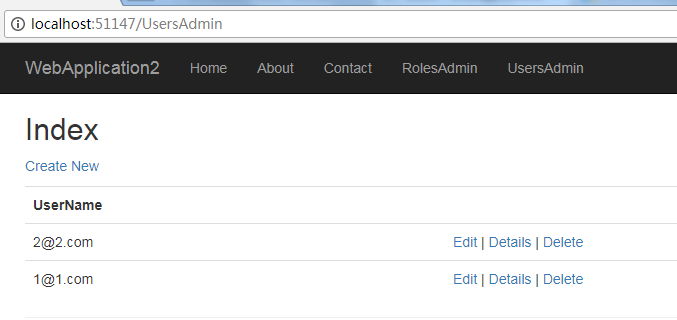
运行应用,注册两个账号
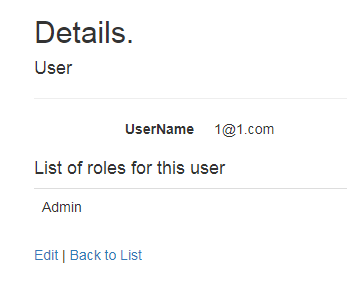
1@1.com具有Admin角色权限
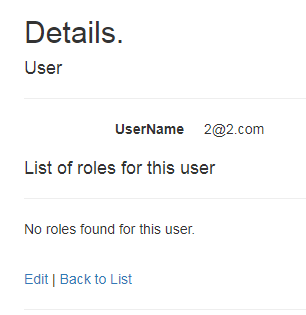
2@2.com没有 Admin权限
1@1.com可以进入管理页面

2@2.com没有管理页面权限

Role具体实现
UserManager<TUser>类中的IsInRoleAsync(user, role.Name)是个虚方法
public virtual Task<bool> IsInRoleAsync(TUser user, string role);
具体的实现是在Microsoft.AspNet.Identity.EntityFramework 中,使用dotPeek 打开Microsoft.AspNet.Identity.EntityFramework.dll

public virtual async Task<bool> IsInRoleAsync(TUser user, string roleName)
    {
      this.ThrowIfDisposed();
      if ((object) user == null)
        throw new ArgumentNullException(nameof (user));
      if (string.IsNullOrWhiteSpace(roleName))
        throw new ArgumentException(IdentityResources.ValueCannotBeNullOrEmpty, nameof (roleName));
      TRole role = (TRole) await (TaskExtensions.CultureAwaiter<TRole>) TaskExtensions.WithCurrentCulture<TRole>(QueryableExtensions.SingleOrDefaultAsync<TRole>((IQueryable<M0>) this._roleStore.DbEntitySet, (Expression<Func<M0, bool>>) (r => r.Name.ToUpper() == roleName.ToUpper())));
      if ((object) role == null)
        return false;
      TKey userId = user.Id;
      TKey roleId = role.Id;
      ;
    }
可以看到判断的依旧是r => r.Name.ToUpper() == roleName.ToUpper()
自定义用户、角色属性
参考:ASP.NET Identity 2.0: Customizing Users and Roles
这里需要修改几处
创建ApplicationRole
public class ApplicationRole:IdentityRole
    {
        public ApplicationRole() : base() { }
        public ApplicationRole(string roleName) : base(roleName) { }
    }
修改RolesAdminController和UsersAdminController
将之前的IdentityRole替换成ApplicationRole
修改ApplicationDbContext,加上新建的ApplicationRole及TKey--string
public class ApplicationDbContext : IdentityDbContext<ApplicationUser, ApplicationRole,string>
修改Startup中的ConfigureServices
services.AddIdentity<ApplicationUser, ApplicationRole>()
                .AddEntityFrameworkStores<ApplicationDbContext>()
                .AddDefaultTokenProviders();
重新运行项目即可
接下来就可以在ApplicationUser和ApplicationRole中添加属性
public class ApplicationRole:IdentityRole
    {
        public ApplicationRole() : base() { }
        public ApplicationRole(string roleName) : base(roleName) { }
        public string Description { get; set; }
    }
之后更新对应的ViewModel和页面即可。
asp.net core web 添加角色管理的更多相关文章
- ASP.NET Core Web API下事件驱动型架构的实现(二):事件处理器中对象生命周期的管理
在上文中,我介绍了事件驱动型架构的一种简单的实现,并演示了一个完整的事件派发.订阅和处理的流程.这种实现太简单了,百十行代码就展示了一个基本工作原理.然而,要将这样的解决方案运用到实际生产环境,还有很 ...
- asp.net core web api + Element-UI的Vue管理后台
后端:asp.net core web api + EF Core 前端:VUE + Element-UI+ Node环境的后台管理系统. 线上地址:http://www.wangjk.wang/ 密 ...
- ASP.NET Core Web API下事件驱动型架构的实现(一):一个简单的实现
很长一段时间以来,我都在思考如何在ASP.NET Core的框架下,实现一套完整的事件驱动型架构.这个问题看上去有点大,其实主要目标是为了实现一个基于ASP.NET Core的微服务,它能够非常简单地 ...
- 使用JWT创建安全的ASP.NET Core Web API
在本文中,你将学习如何在ASP.NET Core Web API中使用JWT身份验证.我将在编写代码时逐步简化.我们将构建两个终结点,一个用于客户登录,另一个用于获取客户订单.这些api将连接到在本地 ...
- Azure 部署 Asp.NET Core Web App
在云计算大行其道的时代,当你在部署一个网站时,第一选择肯定是各式各样的云端服务.那么究竟使用什么样的云端服务才能够以最快捷的方式部署一个 ASP.NET Core 的网站呢?Azure 的 Web A ...
- 使用 Swagger 自动生成 ASP.NET Core Web API 的文档、在线帮助测试文档(ASP.NET Core Web API 自动生成文档)
对于开发人员来说,构建一个消费应用程序时去了解各种各样的 API 是一个巨大的挑战.在你的 Web API 项目中使用 Swagger 的 .NET Core 封装 Swashbuckle 可以帮助你 ...
- Gitlab CI 自动部署 asp.net core web api 到Docker容器
为什么要写这个? 在一个系统长大的过程中会经历不断重构升级来满足商业的需求,而一个严谨的商业系统需要高效.稳定.可扩展,有时候还不得不考虑成本的问题.我希望能找到比较完整的开源解决方案来解决持续集成. ...
- ASP.NET Core Web 支付功能接入 支付宝-电脑网页支付篇
这篇文章将介绍ASP.NET Core中使用 开源项目 Payment,实现接入支付宝-电脑网页支付接口及同步跳转及异步通知功能. 开发环境:Win 10 x64.VS2017 15.6.4..NET ...
- ASP.NET Core Web 支付功能接入 微信-扫码支付篇
这篇文章将介绍ASP.NET Core中使用 开源项目 Payment,实现接入微信-扫码支付及异步通知功能. 开发环境:Win 10 x64.VS2017 15.6.4..NET Core SDK ...
随机推荐
- PageInfo 前台分页js,带分页栏
在使用mybatis3,并且使用分页,PageHelper 接口,分页还是很好使用的.使用pageInfo的后台分页接口. /** * * @param switchPage方法,切换页码方法 * * ...
- Ubuntu下配置PHP和CakePHP记录
目前在完成一个PayPal的支付页面,需要有PHP的开发环境,同时,在开发时使用了CakePHP的框架,于是就有了下面的情景. 操作环境: OS:ubuntu-14.04.2-desktop-amd6 ...
- java基本语法、标识符、关键字
基本语法 编写Java程序时,应注意以下几点: 大小写敏感:Java是大小写敏感的,这就意味着标识符Hello与hello是不同的. 类名:对于所有的类来说,类名的首字母应该大写.如果类名由若干单词组 ...
- 【python】Python 中的 classmethod 和 staticmethod
Python 中的 classmethod 和 staticmethod 有什么具体用途? 推荐地址:http://www.cnblogs.com/wangyongsong/p/6750454.htm ...
- Python 7步机器学习
http://python.jobbole.com/84108/ 由于我们要使用机器学习和科学计算的 packages ,这里建议安装 Anaconda.Anaconda 是一个可在 Linux , ...
- uniGUI for C++ builder之杂七杂八小知识
uniGUI for C++ builder之杂七杂八小知识 2018年09月30日 22:16:05 中国银行之路在脚下 阅读数:41 标签: uniguibuilder 更多 个人分类: C++ ...
- Cannot retrieve metalink for repository: epel/x86_64. Please verify its path and try again 问题分析
Cannot retrieve metalink for repository: epel/x86_64. Please verify its path and try again Loaded pl ...
- python实现Telnet远程登陆到设备并执行命令
#encoding=utf-8 import telnetlib import time def do_telnet(Host, username, password, finish, command ...
- Asp .Net core 2 学习笔记(2) —— 中间件
这个系列的初衷是便于自己总结与回顾,把笔记本上面的东西转移到这里,态度不由得谨慎许多,下面是我参考的资源: ASP.NET Core 中文文档目录 官方文档 记在这里的东西我会不断的完善丰满,对于文章 ...
- 【转】PowerDesigner快捷键
一般快捷键 快捷键 说明 F4 打开检查模型窗口,检查模型 F5 如果图窗口内的图改变过大小,恢复为原有大小即正常大小 F6 放大图窗口内的图 F7 缩小图窗口内的图 F8 在图窗口内中查看全部图内容 ...