
asterisk搭建goip
利用asterisk来搭建goip使用,步骤如下:
第一步:先需要搭建centos服务器并优化
搭建centos服务器就省略;
优化centos服务器,进行如下步骤:
关闭防火墙:systemctl stop firewalld,systemctl disable firewalld
关闭selinux: sed -i 's#(^SELINUX=).#\SELINUX=disabled#' /etc/selinux/config; setenforce 0
搭建yum源和第三方源
curl -o /etc/yum.repos.d/CentOS-Base.repo http://mirrors.aliyun.com/repo/Centos-7.repo
curl -o /etc/yum.repos.d/epel.repo http://mirrors.aliyun.com/repo/epel-7.repo
安装系统所需的小软件:
yum -y install wget vim lrzsz bash-completion telnet nmap nc net-tools tree
这样centos系统优化就完成了
第二步:进行asterisk软件安装
1、增加asterisk用户: useradd astrisk -s /sbin/nologin
2、使用80端口通过防火墙:firewall-cmd --zone=public --add-port=80/tcp --permanent
3、安装astrisk所需要的补丁:
yum -y install lynx tftp-server unixODBC mysql-connector-odbc mariadb-server mariadb httpd ncurses-devel sendmail sendmail-cf sox newt-devel libxml2-devel libtiff-devel audiofile-devel gtk2-devel subversion kernel-devel git crontabs cronie cronie-anacron wget vim uuid-devel sqlite-devel net-tools gnutls-devel python-devel texinfo libuuid-devel
4、安装php服务:
yum install php56w php56w-pdo php56w-mysql php56w-mbstring php56w-pear php56w-process php56w-xml php56w-opcache php56w-ldap php56w-intl php56w-soap
5、安装nodejs :yum install -y nodejs
6、启动mariadb服务:systemctl start mariadb; systemctl enable mariadb
7、进入mariadb(mysql),并设置root无密码:mysql_secure_installation
8、下载jansson: wget -O jansson.tar.gz https://github.com/akheron/jansson/archive/v2.11.tar.gz
并安装jansson控件:cd /server/tools
tar xf jansson.tar.gz
cd jansson-2.11 && autoreconf -i
./configure --libdir=/usr/lib64
make && make install
9、下载asterisk软件: wget http://downloads.asterisk.org/pub/telephony/asterisk/asterisk-16-current.tar.gz
安装asterisk软件:tar xf asterisk-16-current.tar.gz && cd asterisk-16.5.0/
contrib/scripts/install_prereq install
./configure --libdir=/usr/lib64 --with-pjproject-bundled --with-jansson-bundled
make menuselect (并选择app_macro)
make && make install
make config && make samples
ldconfig && chkconfig asterisk off
chown asterisk /var/run/astrisk
chown -R asterisk. /etc/asterisk
chown -R asterisk. /var/{lib,log,spool}/asterisk
chown -R asterisk. /usr/lib/64/asterisk
chown -R asterisk. /var/www
sed -i 's/(^upload_max_filesize = )./\120M/' /etc/php.ini
sed -i 's/^(User|Group).*/\1 asterisk/' /etc/httpd/conf/httpd.conf
sed -i 's/AllowOverride None/AllowOverride All/' /etc/httpd/conf/httpd.conf
systemctl restart httpd.service
cd /server/tools
wget http://mirror.freepbx.org/modules/packages/freepbx/freepbx-14.0-latest.tgz
tar xfz freepbx-14.0-latest.tgz
rm -f freepbx-14.0-latest.tgz
cd freepbx
./start_asterisk start
./install -n
第三步:查看安装好的asterisk
#ifconfig eth0
eth0: flags=4163<UP,BROADCAST,RUNNING,MULTICAST> mtu 1500
inet 10.0.0.100 netmask 255.255.255.0 broadcast 10.0.0.255
inet6 fe80::5041:4e89:2600:f96e prefixlen 64 scopeid 0x20
ether 00:0c:29:0b:6a:a3 txqueuelen 1000 (Ethernet)
RX packets 487409 bytes 630322073 (601.1 MiB)
RX errors 0 dropped 0 overruns 0 frame 0
TX packets 173734 bytes 95408541 (90.9 MiB)
TX errors 0 dropped 0 overruns 0 carrier 0 collisions 0
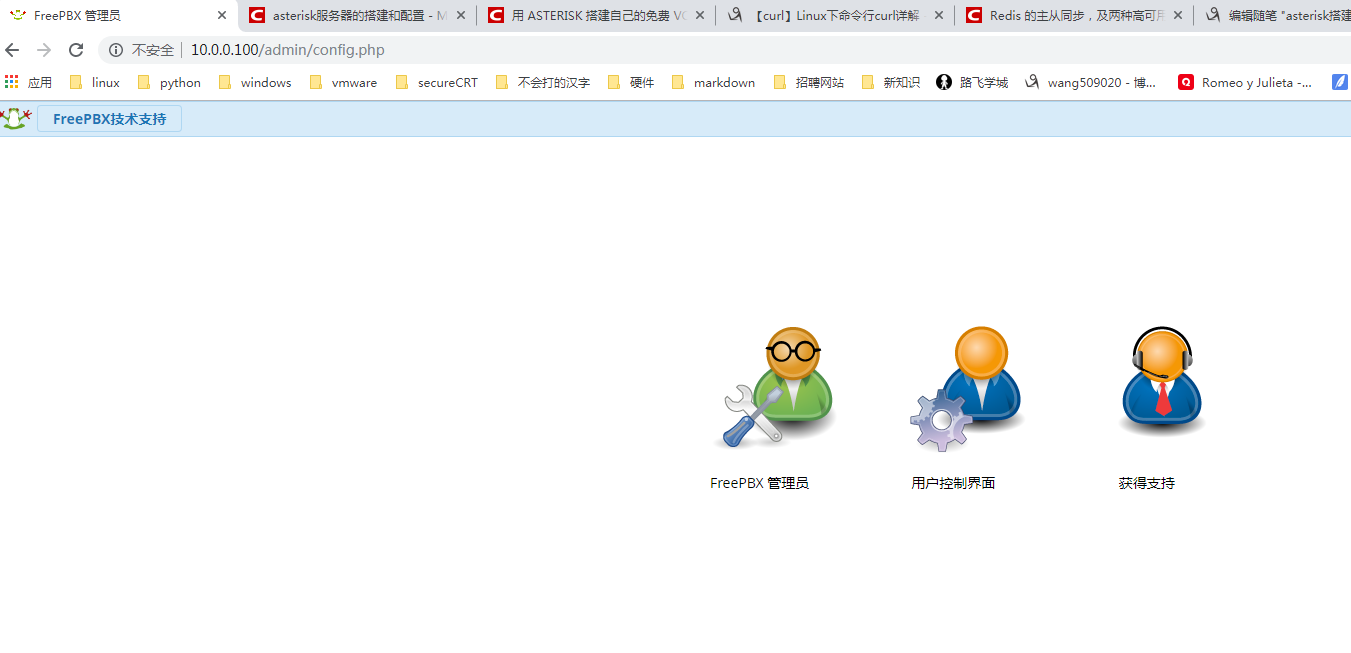
在浏览器中输入:10.0.0.100就可以直接访问
asterisk搭建goip的更多相关文章
- 用 Asterisk 搭建自己的免费 VoIP 服务器
原文 http://www.yaoblog.info/?p=5021 1. 这里以 Debian 为例子,安装 Asterisk apt-get update apt-get install aste ...
- 用ASTERISK搭建自己的免费VOIP服务器
服务器别闲着,博主又要给大家带来新的玩法咯 1. 这里以 Debian 为例子,安装 Asterisk apt-get update apt-get install asterisk 2. 预设置 A ...
- asterisk manager api 配置 (manager.conf)
http://blog.csdn.net/niino/article/details/5748805 要激活AMI,需要在/etc/asterisk/manager.conf中,[general]块下 ...
- 基于Asterisk的VoIP开发指南——(1)实现基本呼叫功能
原文:基于Asterisk的VoIP开发指南--(1)实现基本呼叫功能 说明: 1.本文档探讨基于Asterisk如何实现VoIP的一些基本功能,包括基本呼叫功能的方案选取.主叫号码透传.如何编写As ...
- 基于docker搭建开源扫描器——伏羲
基于docker搭建开源扫描器——伏羲 1.简介 项目地址 伏羲是一款开源的安全检测工具,适用于中小型企业对企业内部进行安全检测和资产统计. 功能一览: 基于插件的漏洞扫描功能(类似于巡风) 漏洞管理 ...
- Elastix GOIP 网关配合
方案一 Gateway disallow=allallow=alaw&ulawcanreinvite=nodtmfmode=rfc2833host=192.168.1.108insecure= ...
- asterisk配置SIP服务器
服务器asterisk我们安装完以后,需要在windows(就是自己的本机)上在安装一个客户端xlite,直接下载安装就行,安装完以后,我们就需要自己手动配置一下sip服务器了. 下面给大家讲一下怎么 ...
- 发挥到极致的Asterisk SS7 解决方案【转】
基于SS7的开源解决方案在国内已经安装了很多.很多用户都使用chan_ss7 开源协议栈作为呼叫中心,400电话,计费结算的系统.随着国内对开源Asterisk的认可程度越来越高. Asterisk让 ...
- SIP协议&开源SIP服务器搭建和客户端安装
1. SIP SIP 是一个应用层的控制协议,可以用来建立,修改,和终止多媒体会话,例如Internet电话 SIP在建立和维持终止多媒体会话协议上,支持五个方面: 1) 用户定位: 检查终端用户 ...
随机推荐
- Scrapy五大核心组件工作流程
一.Scrapy五大核心组件工作流程 1.核心组件 # 引擎(Scrapy) 对整个系统的数据流进行处理, 触发事务(框架核心). # 调度器(Scheduler) 用来接受引擎发过来的请求. 由过滤 ...
- java工具类学习,系统中用户密码加密总结
现在项目,用户注册登录部分很少有涉及到了,原因:现在热门开发框架都已经在底层帮我们做了一套用户注册,密码加密,登录认证,权限控制,缓存数据等基本功能. 这有利于项目的快速完成,只需要搬砖码畜们专注于业 ...
- Qt 开源串口工具serialplot
一.总结 serialplot,可视化很强大的串口收发工具.源代码:https://bitbucket.org/hyOzd/serialplot 1.serialplot用到了qwt插件,所以先安装好 ...
- Caché,Cache数据库下载
Caché数据库主要用于医疗领域,国内的开发人员比较少接触,使用环境相对封闭,前段时间刚才用到,下载也费了许多时间,特记录一下,帮助那些需要的人. 顺便说一下,TreeSoft数据库管理系统,目前支持 ...
- Bean映射工具之Apache BeanUtils VS Spring BeanUtils
背景 在我们实际项目开发过程中,我们经常需要将不同的两个对象实例进行属性复制,从而基于源对象的属性信息进行后续操作,而不改变源对象的属性信息,比如DTO数据传输对象和数据对象DO,我们需要将DO对象进 ...
- 第34课.数组操作符的重载("[]"重载)
1.问题:string类对象还具备c方式字符串的灵活性吗?还能直接访问单个字符吗? 答案:可以按照c字符串的方式使用string对象 string s = "a1b2c3d4e"; ...
- 46.前端html5标签学习
HTML:TR TD TH OL UL LI 这几个标签要区别 一.什么是HTML: 超文本标记语言(HyperText Markup Language),标准通用标记语言下的一个应用: 是 ...
- mysql中的反引号``
[1]反引号`,数字1左边的符号.tab键上面的符号. 它是为了区分MYSQL的保留字与普通字符而引入的符号. 不加反引号建的表不能包含MYSQL保留字,否则出错 如上图,很明显的,如果我们直接建立名 ...
- orcale数据库授权码
Product Code:4t46t6vydkvsxekkvf3fjnpzy5wbuhphqzserial Number:601769password:xs374ca
- Oracle的查询-多行查询
多行函数[聚合函数],作用于多行,返回一个值 ) from emp;--查询总数量 select count(empno) from emp;--查询总数量 select count(*) from ...