
linux mysql-5.7.26 安装全记录
 买了个阿里云,自己折腾一下。
时间:2019年7月17日13:40:18
1、下载
wget https://cdn.mysql.com//Downloads/MySQL-5.7/mysql-5.7.26-linux-glibc2.12-x86_64.tar.gz
2、解压
tar -zxvf mysql-5.7.-linux-glibc2.-x86_64.tar.gz
3、移动文件到 usr/local/mysql目录下
mv mysql-5.7.-linux-glibc2.-x86_64 /usr/local/mysql

发现写错了,移到上层目录

cd /usr/local/mysql/

cd mysql-5.7.-linux-glibc2.-x86_64/

cd ..

mv mysql-5.7.-linux-glibc2.-x86_64/* ./

rm -rf mysql-5.7.26-linux-glibc2.12-x86_64/

4、增加用户组
groupadd mysql

useradd -r -g mysql mysql
5、修改当前目录拥有者为mysql用户:执行命令
chown -R mysql:mysql ./
6、安装
cd /usr/local/mysql/bin/

./mysqld --initialize --user=mysql --basedir=/usr/local/mysql --datadir=/usr/local/mysql/data

./mysqld: error while loading shared libraries: libaio.so.1: cannot open shared object file: No such file or directory
报错了
rpm -qa|grep libaio
yum install  libaio-devel.x86_64
安装一个这玩意
./mysqld --initialize --user=mysql --basedir=/usr/local/mysql --datadir=/usr/local/mysql/data
再执行,有warn 没error了
2019-07-17T05:51:34.038056Z 0 [Warning] TIMESTAMP with implicit DEFAULT value is deprecated. Please use --explicit_defaults_for_timestamp server option (see documentation for more details).
2019-07-17T05:51:35.100511Z 0 [Warning] InnoDB: New log files created, LSN=45790
2019-07-17T05:51:35.223640Z 0 [Warning] InnoDB: Creating foreign key constraint system tables.
2019-07-17T05:51:35.287407Z 0 [Warning] No existing UUID has been found, so we assume that this is the first time that this server has been started. Generating a new UUID: efa727f9-a856-11e9-96d2-00163e063119.
2019-07-17T05:51:35.289478Z 0 [Warning] Gtid table is not ready to be used. Table 'mysql.gtid_executed' cannot be opened.
2019-07-17T05:51:35.289924Z 1 [Note] A temporary password is generated for root@localhost: gpPkXgqLT1=S 这个是随机密码
初始化完毕后在命令行最后会提供生成好的随机密码,先拷贝下来
7、修改权限
然后修改下权限,把除了data外的所有mysql文件的权限都设置为root
chown -R root:root ./
chown -R mysql:mysql data
8、启动mysql服务和添加开机启动mysql服务
添加开机启动:执行命令cp support-files/mysql.server /etc/init.d/mysql,把启动脚本放到开机初始化目录
启动mysql服务:执行命令 service mysql start
Starting MySQL.2019-07-17T05:59:19.660315Z mysqld_safe error: log-error set to '/var/log/mariadb/mariadb.log', however file don't exists. Create writable for user 'mysql'.
The server quit without updating PID file (/var/lib/mysql/i[FAILED]gohhgjiy8uy2gZ.pid).
pwd
/usr/local/mysql
报错,权限问题还是文件夹没有。。
建一个
mkdir /var/log/mariadb
touch /var/log/mariadb/mariadb.log
chown -R mysql:mysql /var/log/mariadb/
service mysql start
Starting MySQL.2019-07-17T06:02:23.769297Z mysqld_safe Directory '/var/lib/mysql' for UNIX socket file don't exists.
The server quit without updating PID file (/var/lib/mysql/i[FAILED]gohhgjiy8uy2gZ.pid).
又少了啥
mkdir /var/lib/mysql
chmod 777 /var/lib/mysql
service mysql start
Starting MySQL....The server quit without updating PID file[FAILED]ib/mysql/iZ2ze967kgohhgjiy8uy2gZ.pid).
日了。。
去/etc/下看看 my.cnf
vim /etc/my.cnf
发现datadir 不是咱指定的那个
改一下
datadir = /usr/local/mysql/data
保存,再启动。
service mysql start
Starting MySQL. [ OK ]
没错,绿色是我自己改的!!
搞定了
9、改密码
mysql -u root -p

登录,密码就是上面标红的位置

会提示

ERROR  (HY000): Your password has expired. To log in you must change it using a client that supports expired passwords.

意思就是密码要过期了。

./mysql -u root -p

再登录一遍

Welcome to the MySQL monitor.  Commands end with ; or \g.

Your MySQL connection id is

Server version: 5.7.

mysql> set password = password('');

Query OK,  rows affected,  warning (0.00 sec)

完事!
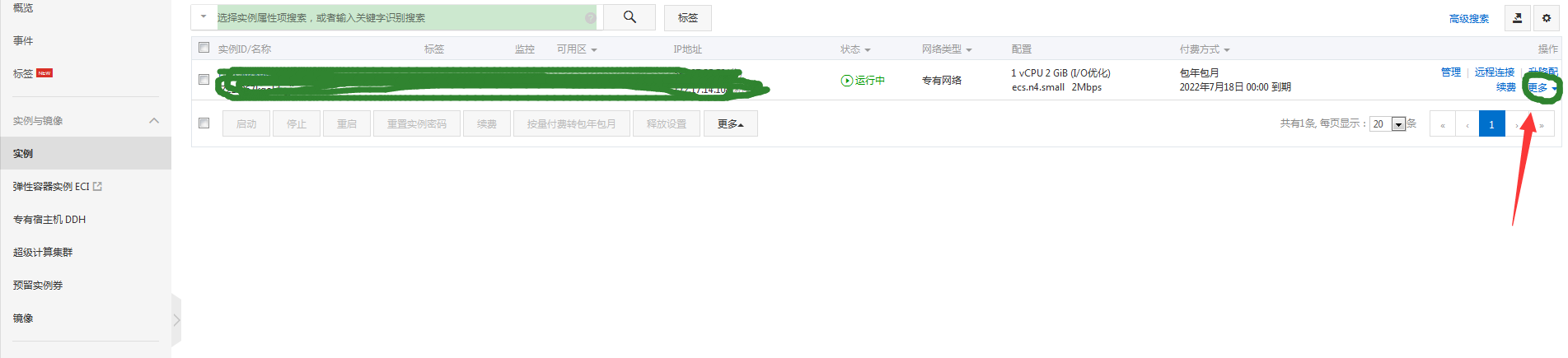
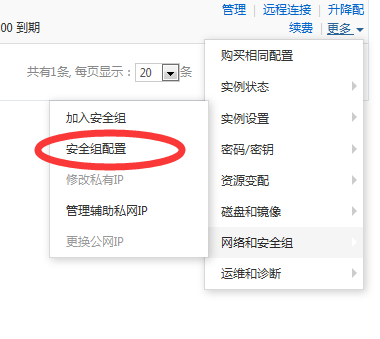
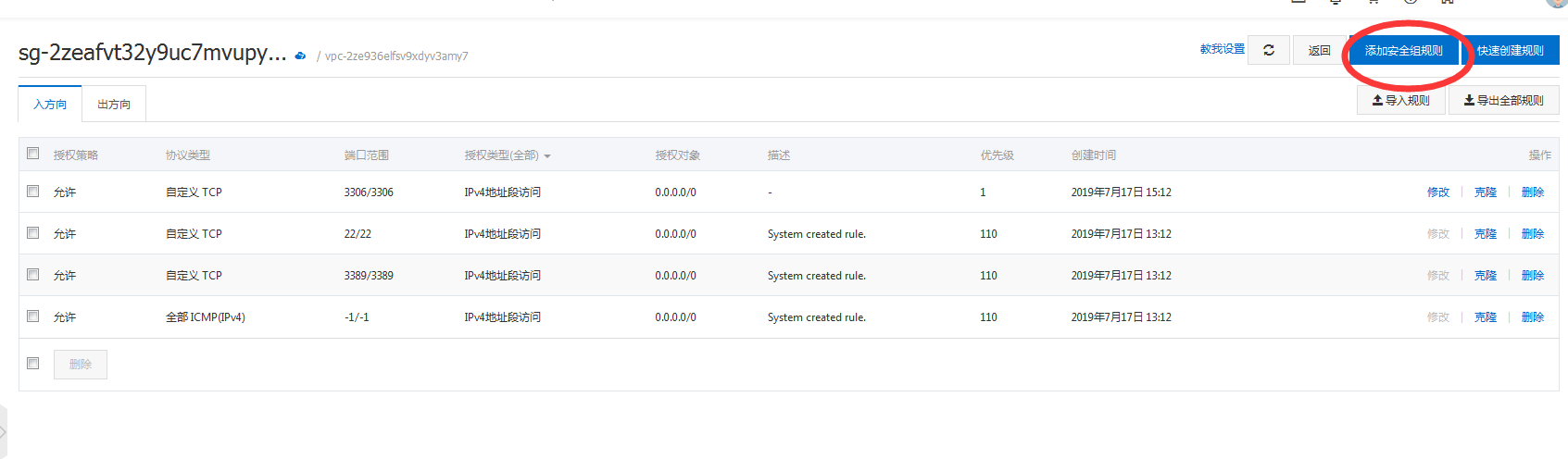
10、备注一下,3306端口默认开放,如果用Navicat去连的话,阿里云服务器连不上,上阿里云控制台

linux mysql-5.7.26 安装全记录的更多相关文章
- Linux下搭建tomcat集群全记录
(转) Linux下搭建tomcat集群全记录 2011-10-12 10:23 6133人阅读 评论(1) 收藏 举报 tomcatlinuxapacheinterceptorsession集群 1 ...
- centos下mysql 5源码安装全过程记录
参考:http://blog.csdn.net/mycwq/article/details/24488691 安装cmake,mysql 5.5以后的版本要通过cmake进行编译 在新装的CentOS ...
- LFS(Linux From Scratch)构建过程全记录(一):准备工作
写在前面 本人修学了一门课,名曰<操作系统课程设计>,其任务为基于LFS以编译源代码的方式制作一个基本的Linux操作系统,并且编写在linux下的GUI软件. 本操作系统构建的全过程将分 ...
- 干货CentOS6.5_Nginx1.40_Php5.57_MySQL5.5.35编译安装全记录
http://www.unixdo.com/Unix_Linux/CentOS65_Nginx140_Php557_MySQL5535.html 如果是编译升级php,之前做过nginx的虚拟主机配置 ...
- CentOS6.5_Nginx1.40_Php5.57_MySQL5.5.35编译安装全记录
环境说明:CentOS 6.5 32位 PHP Version 5.5.7 mysql version _5.6.16 一.准备工作 配置防火墙,允许防火墙通过22(sshd).80(WEB).3 ...
- Linux下搭建tomcat集群全记录(转)
本文将讲述如何在Linux下搭建tomcat集群,以及搭建过程中可能的遇到的问题和解决方法.为简单起见,本文演示搭建的集群只有两个tomact节点外加一个apache组成,三者将安装在同一机器上:ap ...
- Centos7下ZABBIX安装全记录
安装之前务必关闭SELINUX Install Repository with MySQL database : rpm -i https://repo.zabbix.com/zabbix/3.4/r ...
- MySQL 5.7.26安装及配置--windows10系统下
安装过程省略,下载包解压即可 一.配置my.ini在解压目录下,新建一个my.ini [mysql] default-character-set=utf8 [mysqld] port = 3306 b ...
- Linux MySQL 5.6.43 安装
[注意] 1.首先安装在默认目录 /usr/local/mysql,如需更改数据存储目录,进行2.3两步 2.如果需要修改数据目录,将my.nf 中的 datadir=/usr/local/mysql ...
随机推荐
- 解决Sublime Text3中文显示乱码问题
一.安装包管理器 使用Ctrl+~快捷键或者通过View->Show Console菜单打开命令行,粘贴如下代码 import urllib.request,os; pf = 'Package ...
- MySQL主从双向同步
最近部署测试环境,涉及到MySQL数据库主从双向同步的部署,记录一下部署过程,正常读写都发生在主库,从库作为备选数据库(热备份),当主库发生异常,数据库自动切换到从库,这里面是怎么监控数据库异常并触发 ...
- Node Newbie Error – NPM Refusing to Install Package as a Dependency of Itself
46 error argv "C:\\Program Files\\nodejs\\node.exe" "C:\\Program Files\\nodejs\\node_ ...
- xshell一些简单的使用---1
1.下载本地window中 2.在sftp模式下输入:put会打开xshell下载到window的位置目录
- Linux Shell 自动备份脚本
写一个使用shell脚本增量备份系统文件,顺便复习一下shell脚本相关的命令,这个脚本可以根据自己的需求来备份不同的文件或者文件夹,进行完整备份和增量备份. 参考的网址:http://blog.51 ...
- #dokcer部署code-server web版vscode+golang
codercom/code-server:latest不支持插件在线安装 codercom/code-server:v2目前为最新版1. #创建 docker rm -f vscode docker ...
- UIView和UIWindow的使用
1.创建窗口: func application(application: UIApplication, didFinishLaunchingWithOptions launchOptions: [N ...
- 1293 - Incorrect table definition; there can be only one TIMESTAMP column with CURRENT_TIMESTAMP in DEFAULT or ON UPDATE clause
在数据库执行脚本文件时,执行到一半会遇到 这种问题: 出错处:2018-05-14 18:53:38 行号:712454 错误代码: 1293 - Incorrect table definitio ...
- Spring Boot开发Web应用之Thymeleaf篇
前言 Web开发是我们平时开发中至关重要的,这里就来介绍一下Spring Boot对Web开发的支持. 正文 Spring Boot提供了spring-boot-starter-web为Web开发予以 ...
- STS中依赖项的设置
经过试验,把依赖项总结一下,可能会不断修改. 1. 父依赖项(固定) <parent> <groupId>org.springframework.boot</groupI ...